


I first used ActiveCampaign in 2012, when it was one of the first email marketing tools to offer visual marketing automation.
Since then, we’ve rolled it out across eight portfolio companies and sent over 124,000 emails. I also collected ~2,000 survey responses from ActiveCampaign users via MarketingAutomationInsider.com.
Here’s my latest test results:
How much does ActiveCampaign cost?
ActiveCampaign starts at $15/month for 1,000 contacts. But if you’re choosing ActiveCampaign, I’d budget for either the Pro (from $79/mo) or Plus plan (from $49/mo – this is what we use). Most of the features that make ActiveCampaign punch above its weight are on those tiers. There’s a handy side-by-side comparison here, and I’ve added a table below showing the price of all four tiers at a range of list sizes. First, here’s an overview of what each of the four tiers includes.
- Starter Plan - Core email marketing and basic automation for getting started. Includes 1 user seat (with the option to add more) and pricing that scales by contact tier, starting at $15/month.
- Plus Plan - Adds stronger automation, landing pages, and AI tools, with more channels and add-ons available (like SMS and CRM). Includes 1 user seat (with the option to add more), starting at $49/month.
- Pro Plan - Built for advanced, omnichannel automation with deeper analytics and optimisation features (like predictive sending and attribution). Includes 3 user seats (with the option to add more), starting at $79/month.
- Enterprise Plan - Best for larger teams needing advanced security, compliance, premium integrations, and dedicated support. Includes 5 user seats (with the option to add more) starting at $145/month.
| Starter | Plus | Pro | Enterprise | |
|---|---|---|---|---|
| 1,000 contacts | $15 | $49 | $79 | $145 |
| 2,500 contacts | $39 | $95 | $149 | $255 |
| 5,000 contacts | $79 | $145 | $205 | $375 |
| 10,000 contacts | $149 | $189 | $375 | $589 |
| 25,000 contacts | $319 | $389 | $629 | $879 |
| 50,000 contacts | NA | $609 | $969 | $1,169 |
| 75,000 contacts | NA | $879 | $1,375 | Custom |
ActiveCampaign’s pricing isn’t the cheapest for marketing automation, but given the range of features offered the pricing is fair and reasonable – especially when compared against similarly advanced tools.
Does ActiveCampaign have a free plan?
No — ActiveCampaign doesn’t offer a free plan. There’s a 14-day free trial (no credit card required) which gives you access to most features. After that, the cheapest entry point is the Starter plan at $15/month for 1,000 contacts on annual billing.
The billing change you should know about
In November 2025, ActiveCampaign quietly changed how new accounts are billed. If you created your account on or after 3 November 2025, you’re charged for every contact in your account — including unsubscribed, bounced and unconfirmed contacts. Accounts created before that date are grandfathered on the old active-only billing (ours included, which I’ll admit softens my irritation).
Why it matters: dead contacts accumulate. A healthy list picks up a meaningful layer of unsubscribes and bounces within a couple of years, and under the new policy you pay for all of them. At Plus-plan pricing, 9,000 active contacts plus 2,500 unsubscribed and bounced puts you at 11,500 total — bumping you from the 10,000-contact tier ($189/mo) into the 25,000-contact tier ($389/mo). That’s $2,400 a year for people you legally can’t email.
At small list sizes it’s more forgiving — a few hundred dead contacts on a 1,000-contact Starter plan may not tip you into the next tier. The bigger your list, the more expensive the rounding error.
Two practical things if you’re signing up now. First, clean your list before you import it: strip unsubscribes, bounces and anyone who hasn’t engaged in a year. Your import sets your billing baseline (do this before using the free migration service, not after). Second, archive ruthlessly — archived contacts don’t count toward your limit. The archive has caveats though: monthly archive limits apply, archived contacts are only stored for a year before deletion, and there’s a 30-day wait before you can restore them.
For balance, ActiveCampaign isn’t alone here — Mailchimp has billed for unsubscribed contacts for years, and it’s one of the more common reasons people go looking for Mailchimp alternatives. But it does erase an advantage ActiveCampaign used to hold, and it’s worth factoring into any price comparison you run.
What are ActiveCampaign’s pros and cons?
We’ve used ActiveCampaign ourselves and compared that with responses from ~2,000 ActiveCampaign users via our annual email marketing software research.
-
Automation builder is the main reason we stay. 135+ triggers, 1,000+ pre-built recipes, and the only platform we’ve used that lets you split-test entire automation paths (not just emails). New hires have shipped working sequences in their first week with no training.
-
Deliverability holds up at volume — well above the ~83% industry average for inbox placement, with strong list-hygiene tooling, predictive sending and pre-warmed dedicated IPs on Enterprise.
-
Strong real-world engagement shows up in account-wide open and click rates, which sit comfortably above industry benchmarks. That’s a fair test of the deliverability and segmentation tooling working together.
-
Active Intelligence is useful, with supervision. Active Intelligence builds segments, drafts campaigns and critiques existing sequences. It still needs supervision, especially when you ask it to build A/B test variants.
-
Split testing can pay for the platform. Few platforms let you split-test entire automation paths, and our best tests have produced multi-x uplifts on key sequences.
-
Flexible integrations are another strength, with 1,000+ integrations including deep native ties to Salesforce, Shopify, HubSpot and the major eCommerce platforms.
-
Free migration from any competing platform is part of ActiveCampaign’s customer success guarantees — included.
-
CRM is too basic for any serious sales team. Fine as a backbone for automation, but when we’ve genuinely needed a CRM we’ve reached for Pipedrive instead.
-
Reporting is functional but dated. The data you need is all there — goals, attribution, eCommerce revenue — but the visualisation and organisation feel a generation behind the rest of the platform.
-
2024 pricing restructure pushed existing users up 30-40% and damaged trust with long-term members of the community.
-
New accounts are billed for dead contacts. Since November 2025, accounts created after the 3rd are charged for unsubscribed, bounced and unconfirmed contacts — not just the ones you can actually email. Older accounts are grandfathered.
-
14-day free trial is shorter than several competitors — not long enough to fully migrate a list and run a campaign cycle before the clock runs out.
01Is ActiveCampaign’s marketing automation any good?
With 135+ triggers and actions to build your automation sequences from, ActiveCampaign’s automation builder is leaps and bounds beyond those offered by competitors.
It’s also the easiest automation builder we’ve used, largely thanks to the flowchart-style canvas that’s visually self-explanatory — non-technical team members pick it up without needing a walkthrough.
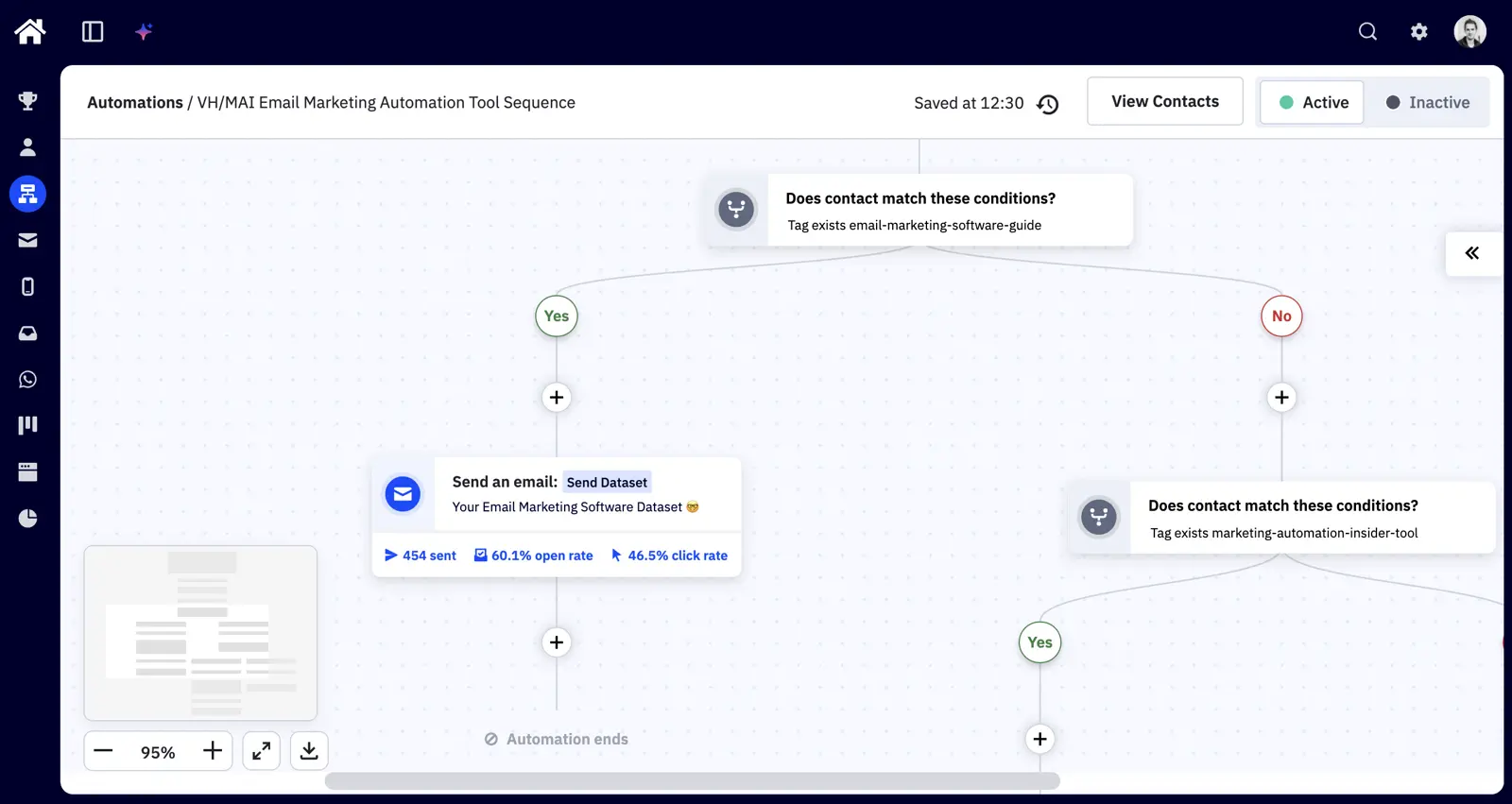
If you’re just getting started, ActiveCampaign has over 1,000 pre-built automation recipes. These are particularly good for eCommerce businesses, as you can integrate your eCommerce platform (e.g. Shopify or WooCommerce). From there, you can use automation sequences that run when someone buys a product, abandons a checkout, or uses a discount code.
Triggers and actions
You can trigger an automation to start when almost anything changes to a contact or deal. While not exhaustive, these include when:
- A contact submits a form, joins a list, visits a web page, opens/clicks an email, or achieves a goal.
- A contact has a tag added/removed, a field changed, or a lead score updated.
- A deal in the CRM changes status, deal stage, value, owner or has a task added.
- A conversion occurs, or a person abandons a cart.
- A date arrives (useful for birthdays, contract renewals, and holiday promotions).
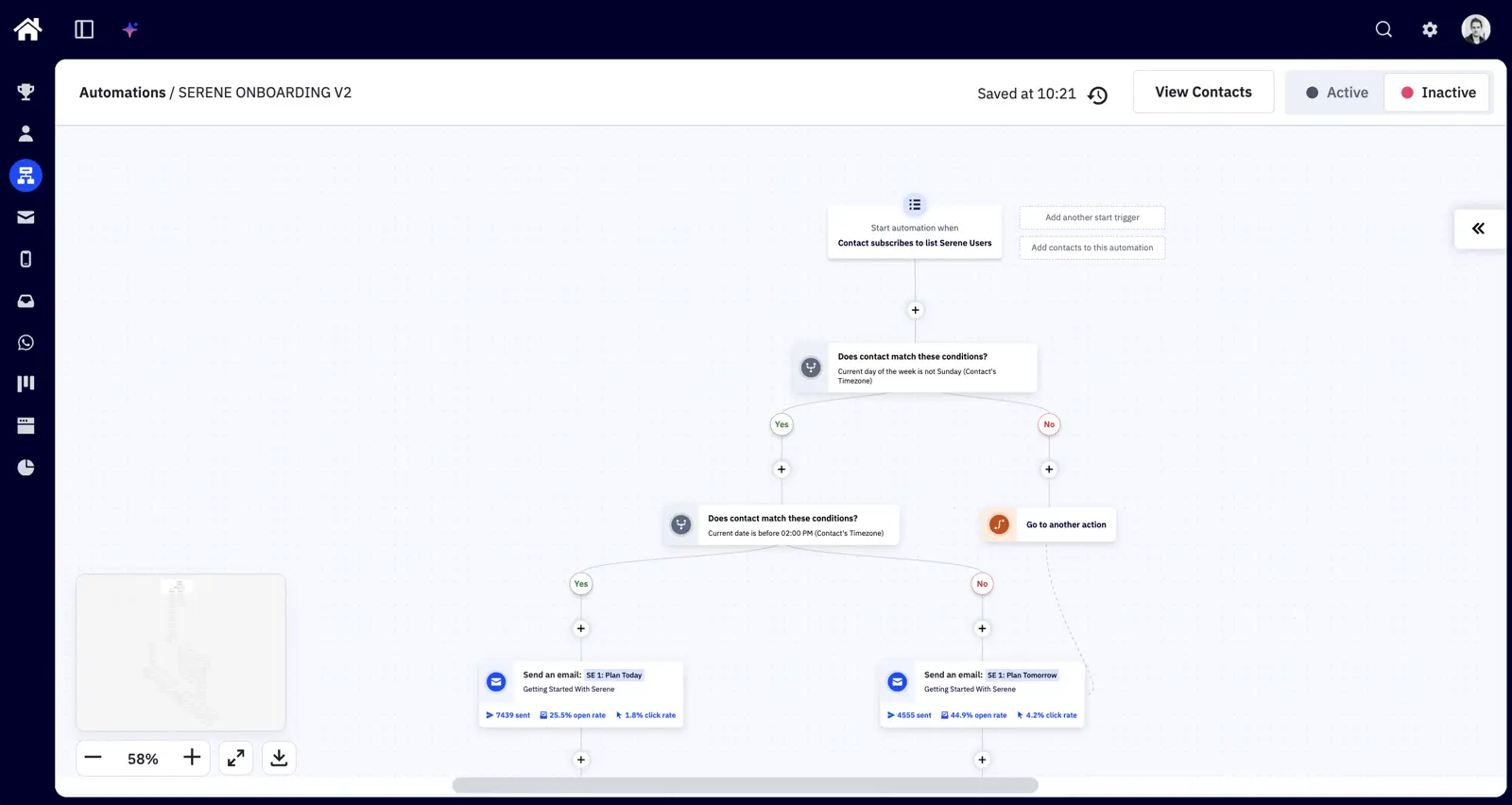
You can then build out your automation workflows with a combination of conditions and actions. Conditions are mostly “If/Else” rules, waits, and go-to’s. Actions broadly fall into three channels for communicating with your contacts — email, SMS, and site messages (notifications that appear on your website).
Here’s an example of a SaaS onboarding sequence we built showing each of these steps. This sequence is triggered when a contact subscribes to a list. We then wait until the time is 2pm on a weekday (when we have the highest open rates). Then we send a series of educational emails on how to use the software.
Split testing
While email split testing is nothing new, few marketing automation tools allow you to split test paths of an automation sequence. ActiveCampaign was among the first to do this, and in my opinion it’s one of the best features in its platform.
This is because you can test useful hypotheses: “Does sending 10 emails vs. 5 emails improve your conversion rate?” Or: “Does sending them over a week vs. a month, or combining SMS and email, work better?”
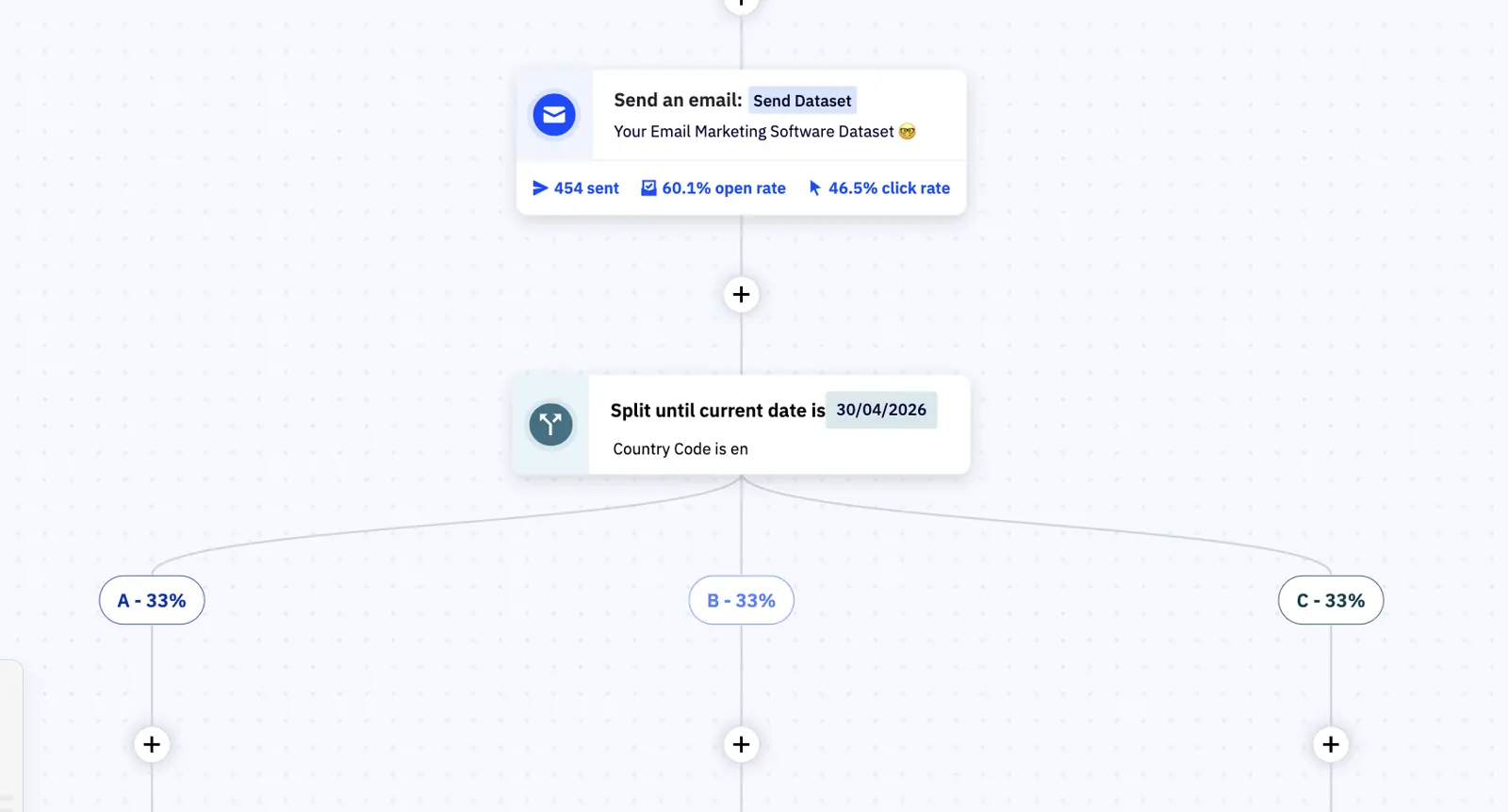
This also means that your automated email sequences can improve over time because you can set up unlimited split tests to refine your automation sequences while you focus elsewhere.
By running all of our emails as split tests, we’ve seen 4-5× uplifts in open rates on some of our most-tested automation sequences — and the downstream clicks that follow them.
02What’s ActiveCampaign’s email marketing like?
Across our accounts we sit at an account-wide open rate of 39.62% and click rate of 1.34% — well above industry benchmarks of ~21% open and ~2% click for marketing emails (our click rate reflects a broad lifecycle mix; nurture sequences typically run higher).
ActiveCampaign’s email builder is one of the few we’ve used that’s as good for beginners as it is for advanced marketers. It’s drag-and-drop, auto-saving, and it just works. Or, you can simply prompt AI (Active Intelligence) to describe the type of email you want (campaign details, audience, offers, etc.).
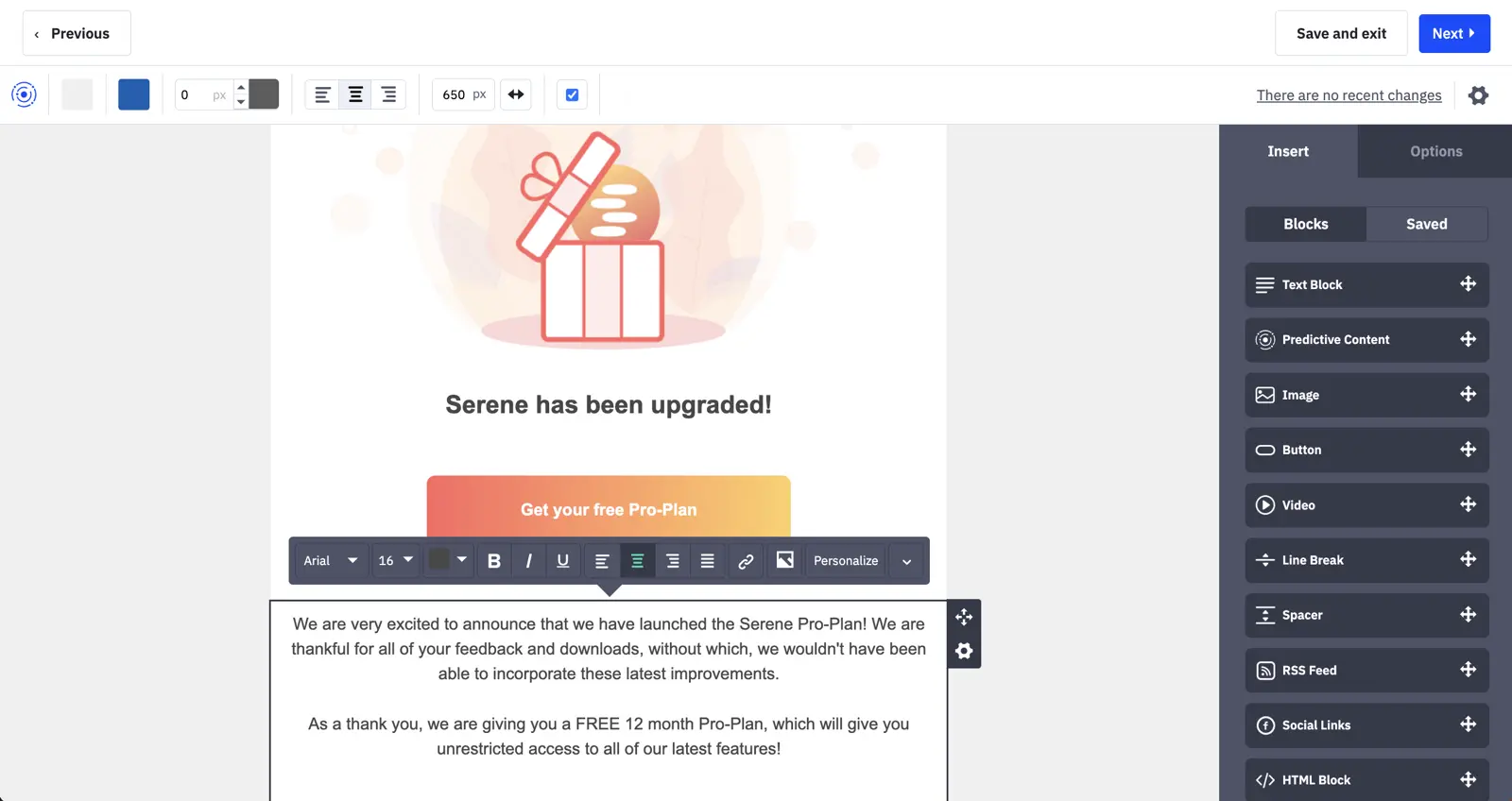
You can edit the HTML, insert content blocks that would usually require a developer (e.g. countdown timers, videos and eCommerce products), create and organise a brand kit, and split test almost anything you can think of.
One of my favourite things about ActiveCampaign is the ability to optimise your marketing with personalisation and split testing.
Conditional content lets you display different blocks to contacts based on any field, saving you from sending lots of variations of the same email. For critical emails, you can create variations and let ActiveCampaign’s predictive content algorithm show the most-likely to convert content to each contact.
Template options are broad. You can choose from the 200+ pre-designed templates, use a basic template (i.e. a layout with no design), a past campaign, or start from scratch. If you want emails that look personal, you can also choose between plain text and HTML.
Or, you can prompt Active Intelligence to generate whatever you need - just describe it.
To help you improve deliverability, ActiveCampaign has a handy range of checks for spam filters, email client compatibility and you can preview how your email appears on different devices.
You can segment who your email is sent to based on almost any condition – from whether they’ve visited a certain page on your website, to their geography, or based on company information.
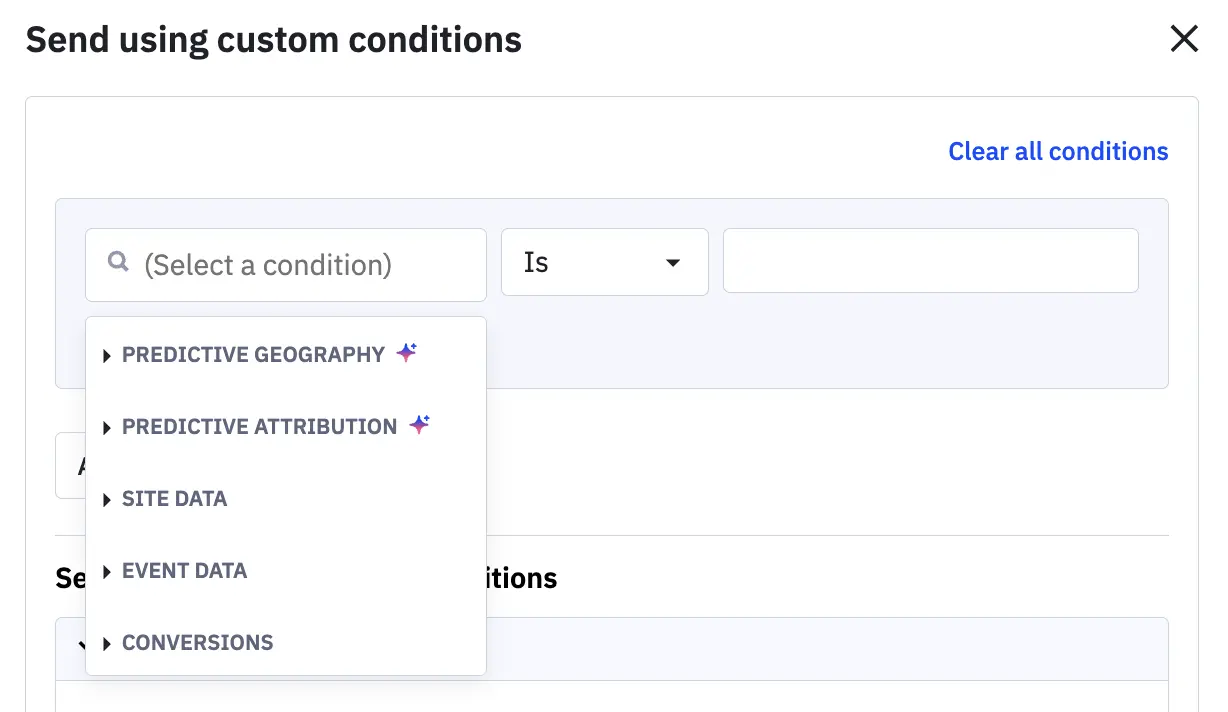
You can also build segments in ActiveCampaign using natural language by asking Active Intelligence for the segment you’d like.
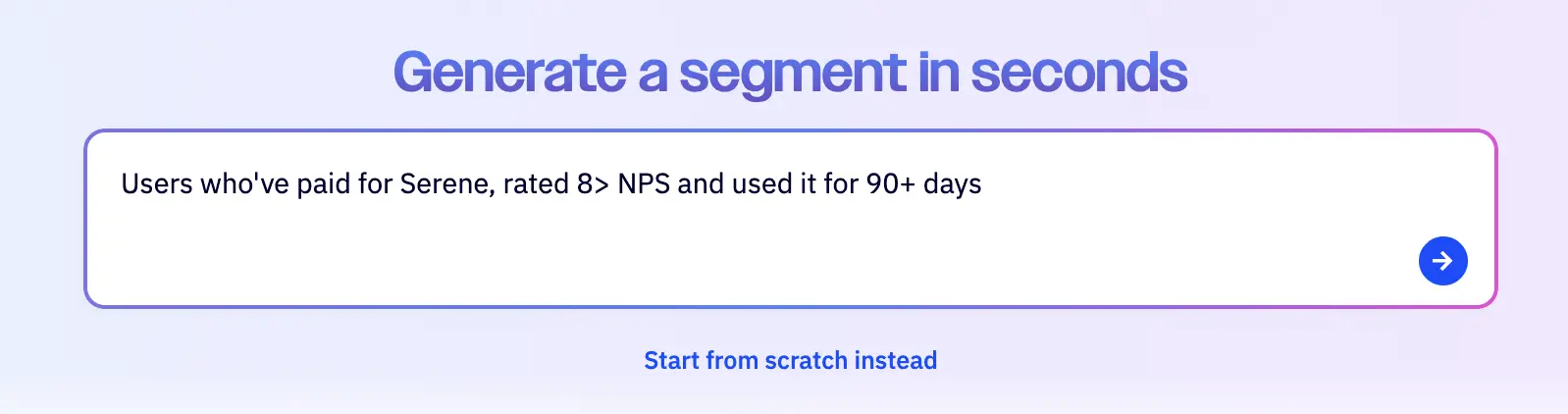
The segmentation options will of course depend on what information you collect about your contacts – which brings us onto the next part of ActiveCampaign’s platform.
03Is ActiveCampaign a good CRM?
Combining your email marketing software and CRM makes a lot of sense, as your CRM is generally the source of truth for contact information.
This gives you useful opportunities to trigger emails when your leads change statuses, buy products, or take actions on your website. This is all achievable with ActiveCampaign’s CRM, which is built around an intuitive deal pipeline.
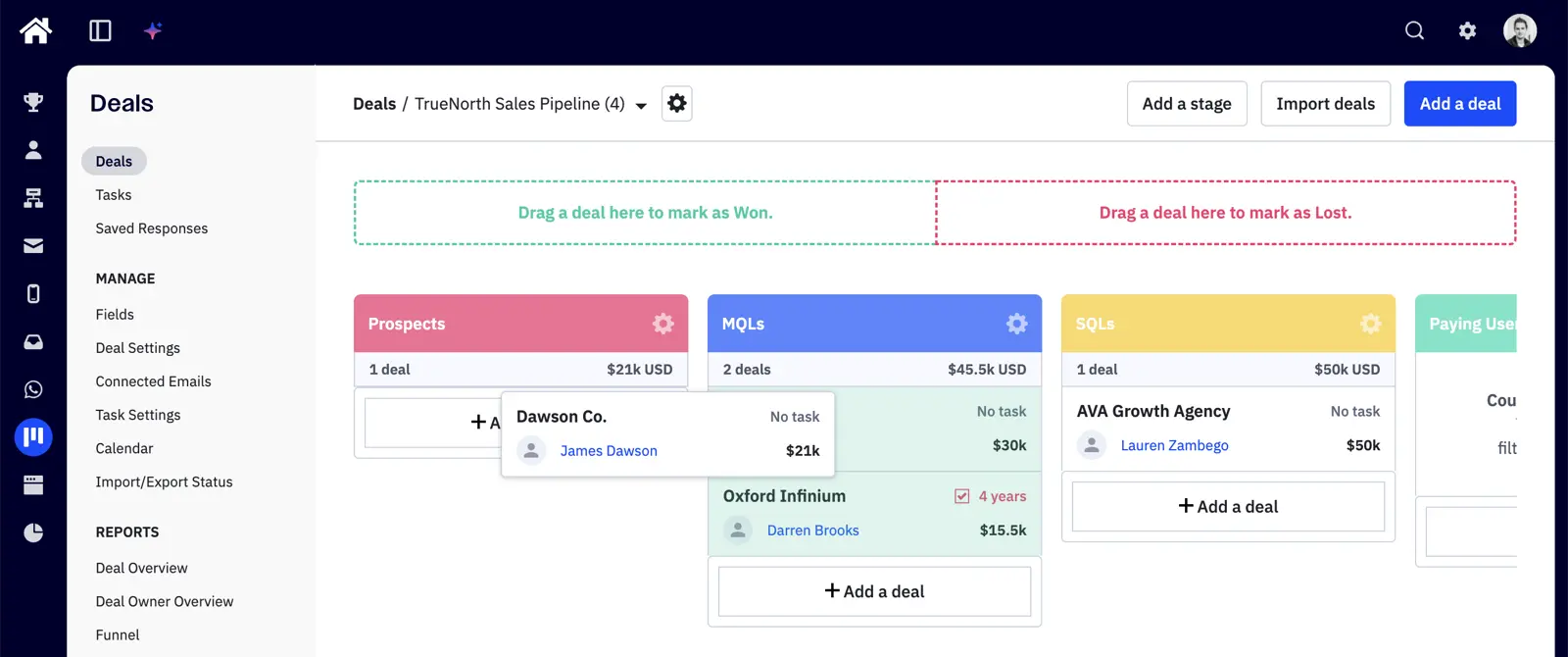
When you click into any deal on your pipeline you can see the information about that company and the associated contacts. If you’ve installed site tracking, you’ll see every action they’ve taken on your website, as well as a history of interactions made with your email campaigns and automation sequences.

Contacts (i.e. people) have a similar view, though with more emphasis on the specific information you’ve captured about that person. It’s here that you can also see which lists, automations, and tags are applied to that contact.
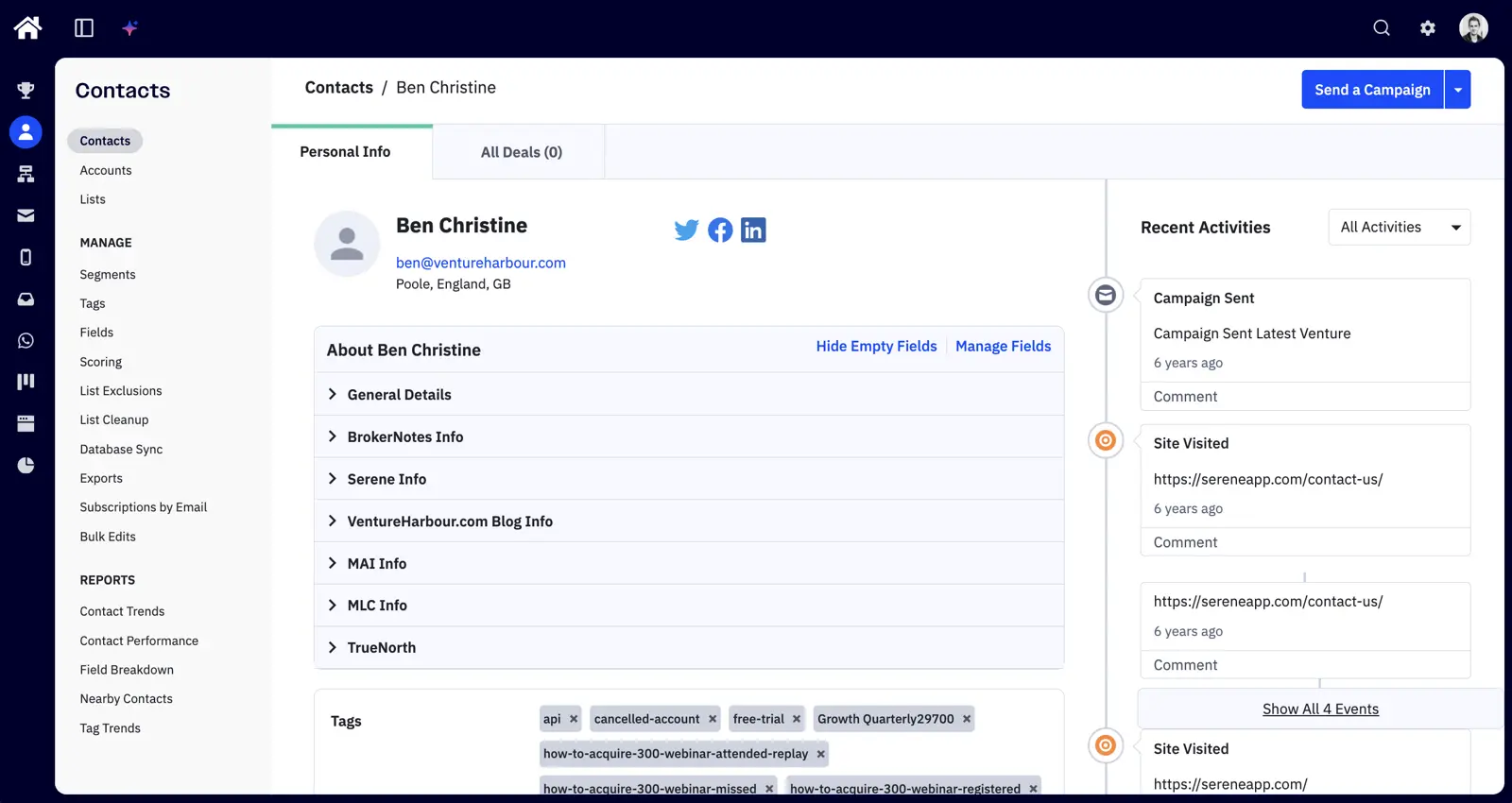
Around here is where you’ll find lead scoring. This is one of those features that can make or break your entire sales process. When it’s set up correctly, it creates clarity around which leads your people should focus on and how good a job your marketing team is doing at nurturing cold leads into warm leads.
For one of our ventures, we use lead scoring to determine whether a lead is cold, marketing qualified, or sales qualified. We also use it to measure the health of existing customers.
- Cold lead (has a lead score below 7 points)
- MQL (has a lead score between 7-14 points) – We apply points when people register for our webinars, visit key pages on our site, and engage with our emails. The purpose of this is to separate engaged leads from unengaged leads.
- SQL (has a lead score above 14 points) – We use the BANT (budget, authority, need, timeframe) methodology for this. Once we know all four of these criteria and they’re above our agreed thresholds, the lead is considered sales qualified.
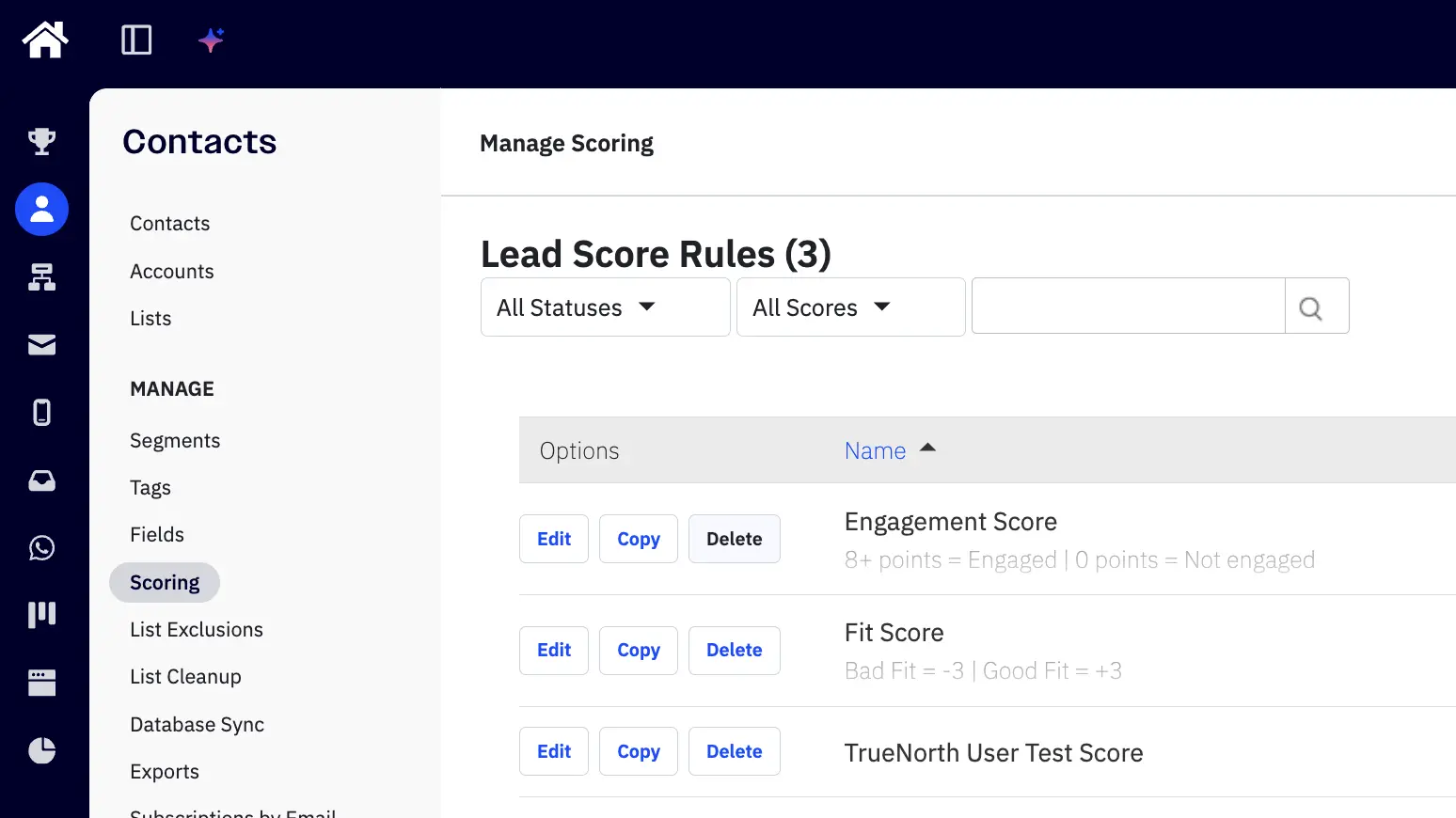
Setting up lead scoring in ActiveCampaign doesn’t take long and makes it much easier to set clear KPIs for marketing and sales. You can also identify whether the % of leads that you’re converting into marketing-qualified or sales-qualified leads is increasing or decreasing over time.
Honestly though — we’ve had the CRM enabled but rarely used it as a primary sales tool. It works fine as a backbone for automation triggers and lifecycle stages, but I would not run a sales team from it.
The platform tends to get cumbersome with a large number of deals and contacts. Larger sales teams typically end up running something like Salesforce/Pipedrive and integrating it with ActiveCampaign to manage the automations there. So my honest take: ActiveCampaign’s CRM is fine if you’re a smaller team running marketing-led growth where the “CRM” is a contacts and lifecycle layer feeding your automations. If you have a real sales team running actual deals, pair ActiveCampaign with a dedicated CRM.
04Does ActiveCampaign have AI features?
ActiveCampaign’s AI features — collectively branded Active Intelligence — have evolved beyond subject-line suggestions. The useful bit is that it can act on account context, rather than leaving you to copy a generic ChatGPT answer back into your email tool.
In the latest test I gave it five jobs, starting with a simple natural-language segment and ending with a Claude-connected activation sequence. The segment test was boring in the best way: I asked for people who had opened a campaign, it counted the contacts, I approved it, and the segment appeared in the account.
The one-shot email build was less tidy. I asked for a short, personal, one-column email with one image and a CTA at the bottom; it built the campaign, but ignored the one-image and one-column constraints. In a real account I would have pushed it back through another prompt, but the first attempt deserved a 3/5.
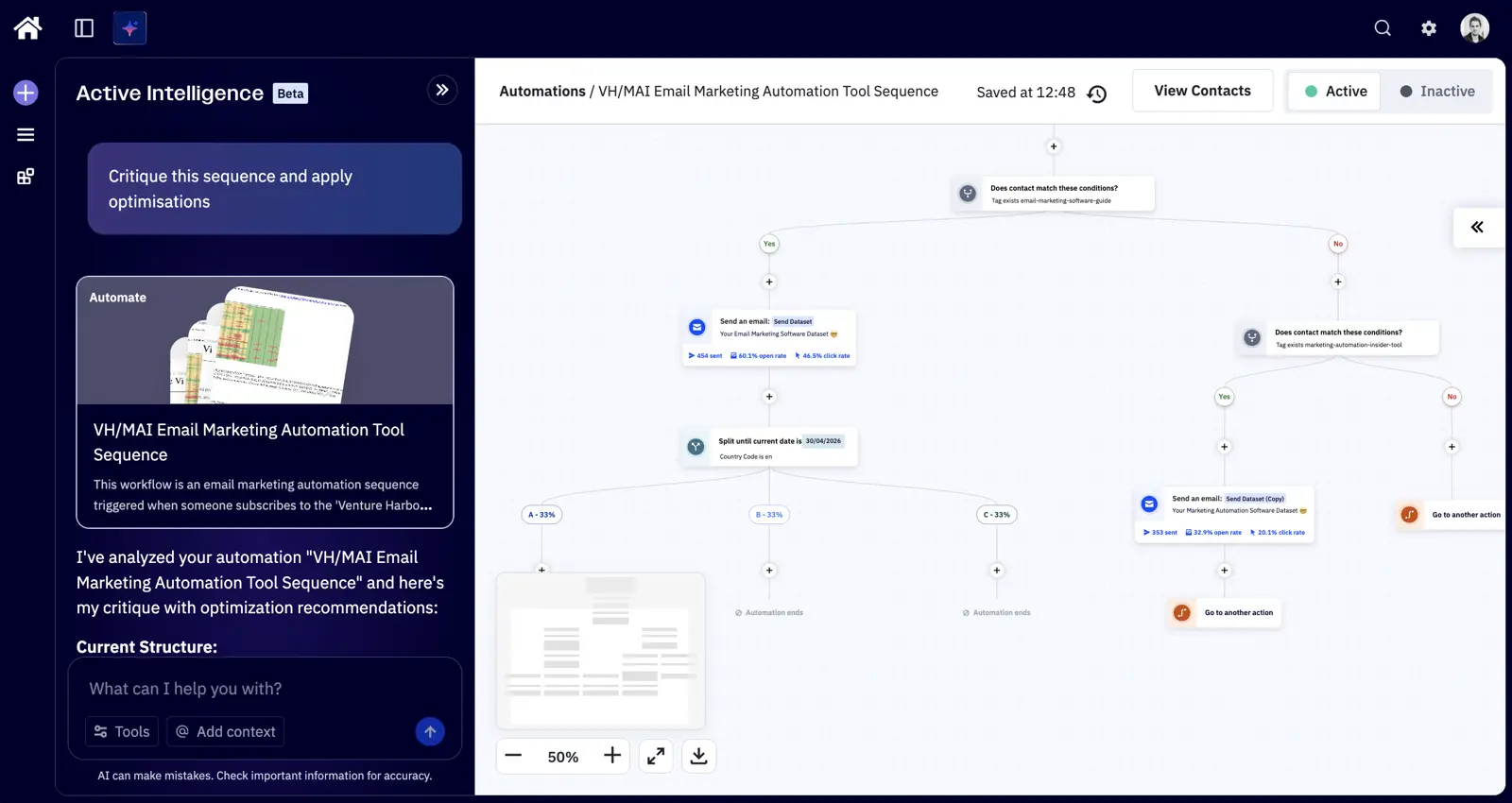
The sequence critique was the strongest part of the test. I pointed it at an onboarding automation and asked for improvements to open rates, click-through rates and activation. It pulled a useful baseline, spotted an unfinished A/B test, flagged the high unsubscribe rate, noticed a missing preheader and suggested a prioritised action plan.
Then I asked it to implement the fixes. It could add goal exits, a day-seven re-engagement branch and a 48-hour non-opener resend, which is where Active Intelligence starts to feel like a useful operator rather than a content assistant.
The ceiling showed up when I asked it to create an A/B test for every email in the automation. It could not add the split actions itself, and when I created one branch manually it rebuilt a whole new email variant rather than duplicating the control and changing one hypothesis-led element. Anyone who has run A/B tests will know why that matters.
The MCP and Claude connector were similar: excellent for strategy, limited for execution. Claude pulled account context, drafted a sensible 14-day activation sequence and wrote plain-text emails with A/B variants, but the connector could not build the automation itself.
That leaves Active Intelligence in a slightly odd place. It is one of the few AI marketing automation features I would pay attention to, especially for segmentation, sequence critique and first drafts. It still needs a human who understands testing, brand voice and the difference between a useful variant and a random rebuild.
The wider Active Intelligence feature set covers:
- Goal-to-campaign generation: Turn a simple objective (“promote a webinar”, “reduce churn”) into draft campaigns across email and SMS, with content and structure suggested automatically.
- Smarter segmentation suggestions: Engagement and behaviour signals are surfaced to identify who’s most likely to convert (or churn), with one-click actions to act on them.
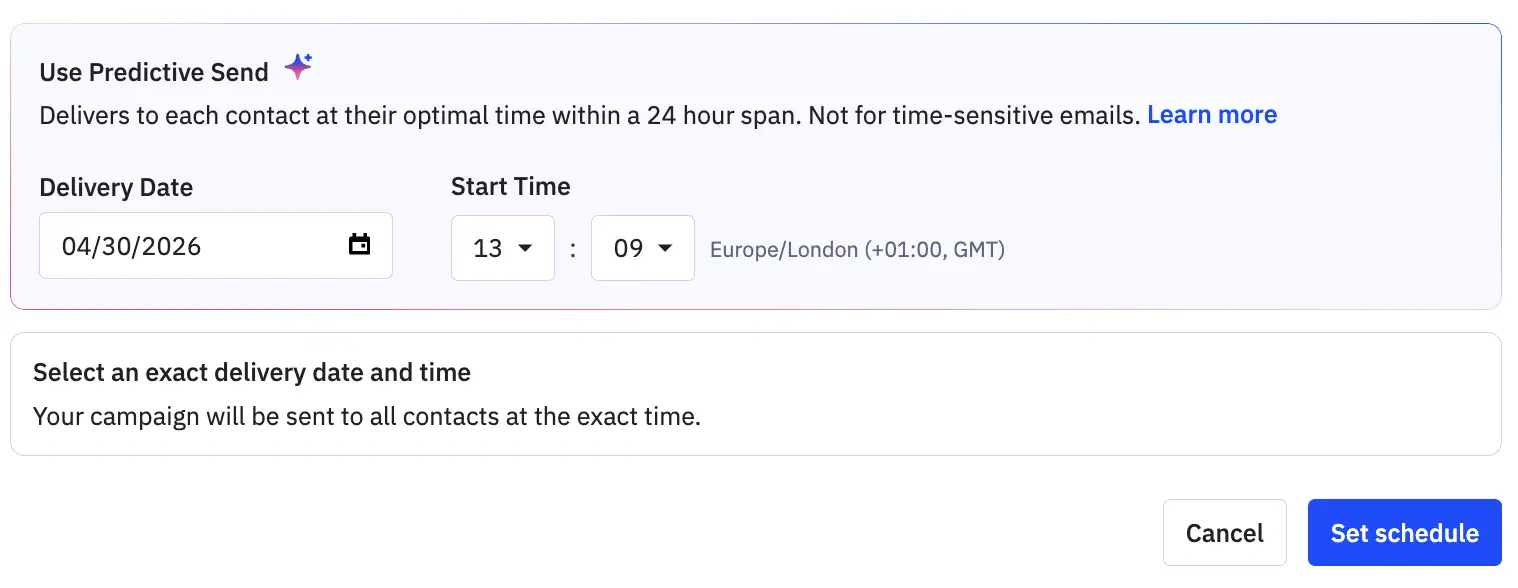
- Predictive sending. Send-time optimisation runs at the individual contact level rather than picking a global “best time” for the whole list — small thing, meaningful uplift on engagement.
- Brand-aware content generation: AI-assisted content creation that respects your brand styling and assets, though you still need to set the brand kit up properly.
- AI-assisted CRM insights: Pipeline-level analysis surfacing signals in CRM activity so marketing and sales stay aligned.
- AI Translations: ActiveCampaign detects each contact’s preferred language and translates entire campaigns automatically — no duplicate campaigns, no manual localisation work.
- MCP Server and Claude connector: In June 2025 ActiveCampaign released an MCP (Model Context Protocol) Server that lets AI tools like Claude, ChatGPT and Cursor connect directly to your ActiveCampaign account — managing contacts, triggering automations and pulling campaign data from within AI-powered tooling. A dedicated Claude connector followed in November 2025, making ActiveCampaign one of the first marketing platforms to integrate natively with external AI agents.
05Can ActiveCampaign send SMS and WhatsApp?
Instead of managing campaigns in silos, ActiveCampaign allows you to coordinate email, SMS, and WhatsApp from one place — so your messaging stays consistent and your team isn’t constantly rebuilding workflows.
It’s an area of ActiveCampaign we’ve only lightly used outside of some basic SMS reminders, but the ability to shift channels based on behaviour is useful. You can follow up with an SMS if an email goes unopened, or use WhatsApp for time-sensitive updates and more conversational nudges.
WhatsApp and SMS expansion
In April 2025, ActiveCampaign acquired Hilos, a WhatsApp automation platform. The acquisition added native WhatsApp messaging to ActiveCampaign’s offering — including a no-code workflow builder, a shared team inbox, broadcast messaging, and automated sequences. WhatsApp went live inside ActiveCampaign in July 2025, with a two-way SMS inbox following in September 2025.
SMS is available as an add-on on Plus, Pro, and Enterprise plans. Credits are consumed per message sent, with the cost varying by destination country (1 credit per SMS in the US, up to 11 in some European countries). Unused credits do not roll over.
| SMS Credits | Monthly Cost | Cost per Credit |
|---|---|---|
| 1,000 | $16.83 | $0.017 |
| 2,500 | $36.83 | $0.015 |
| 5,000 | $52.83 | $0.011 |
| 10,000 | $88.83 | $0.009 |
| 25,000 | $176.83 | $0.007 |
| 50,000 | $336.83 | $0.007 |
06How good is ActiveCampaign’s reporting?
ActiveCampaign’s reports have always been a little too reminiscent of a dull powerpoint presentation for my liking, and there’s a lot of room to improve the data organisation and visualisation.
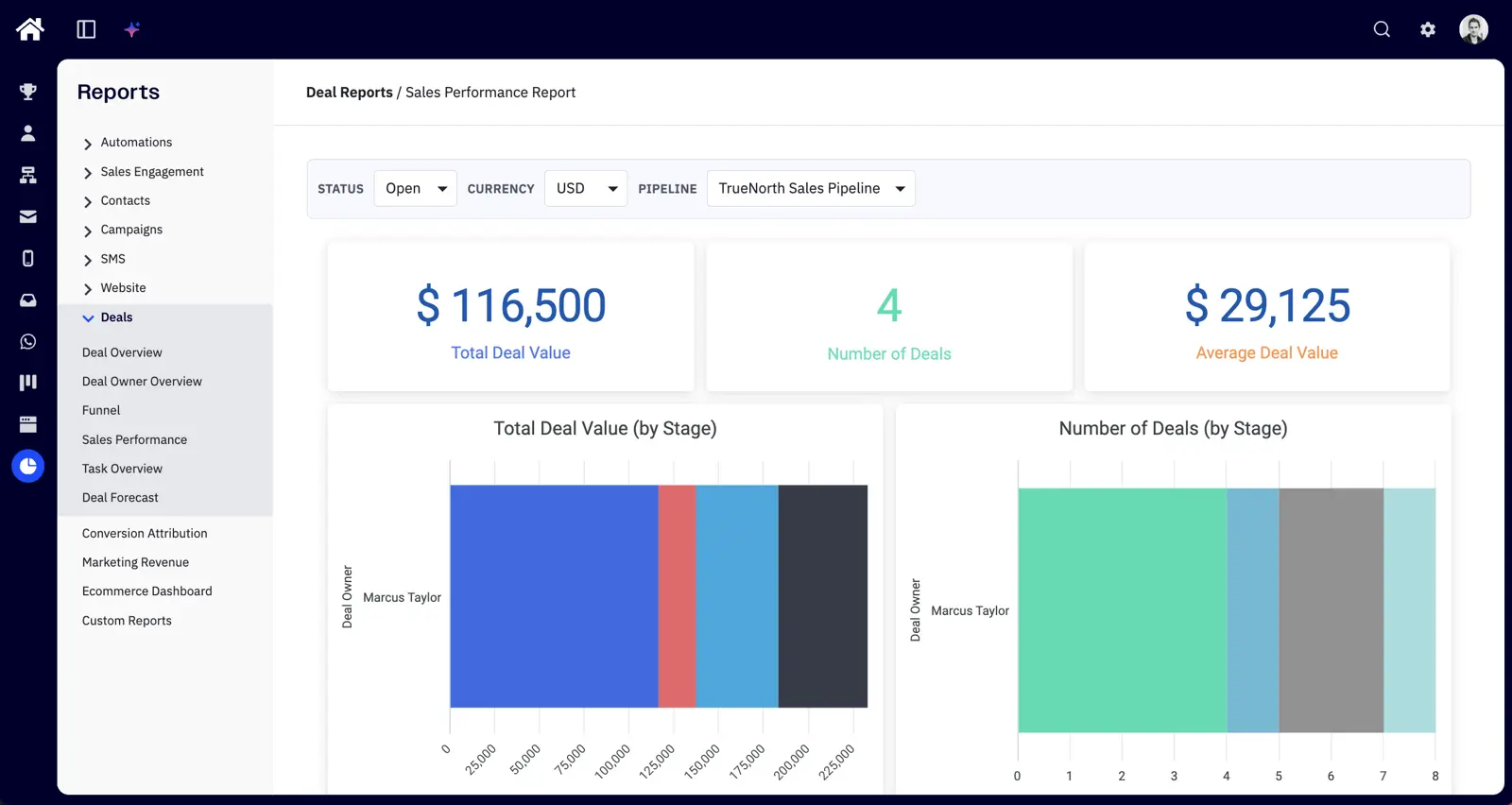
Still, reporting should be judged on whether it answers questions, and how useful the insights are. To be fair to ActiveCampaign, the data is useful – thanks to Goals, integrations, and attribution.
Goals
One action I didn’t cover in the section on marketing automation is goals.
You can trigger a goal being achieved in ActiveCampaign when a contact does something – whether that’s buying a product, completing an automation sequence, or opening an email.
This enables the goal and conversion attribution report, which shows who’s achieved the goal, the conversion rate, touchpoints and, my favourite – time-to-completion. This means you can track how long, on average, it takes to get a lead to convert, buy a product, or anything else. This is a great metric to then try and reduce.
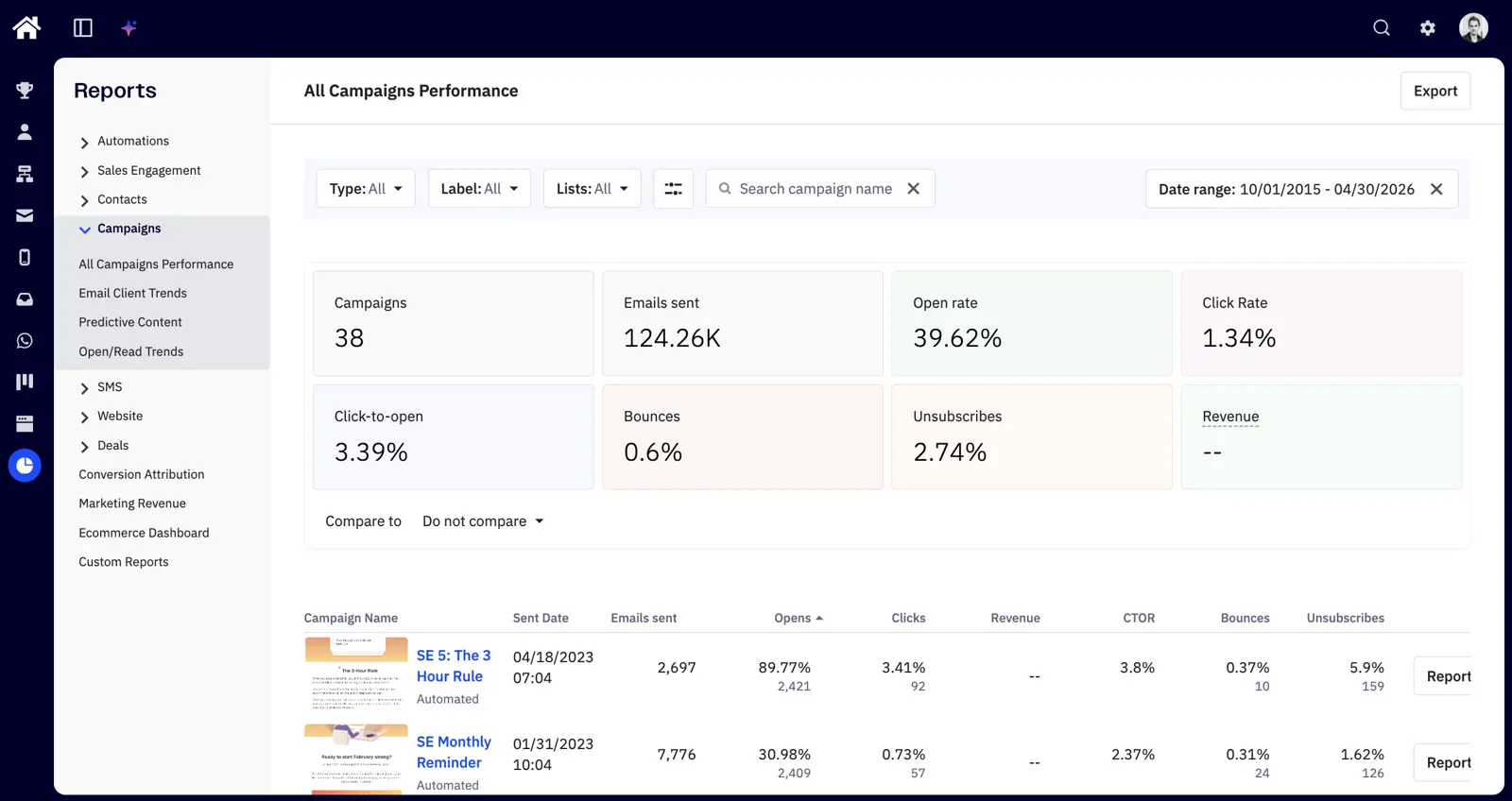
One habit I recommend is ensuring every automation sequence you build has a goal. This allows you to see how all of your automation sequences are performing at a glance.
eCommerce revenue reporting
For eCommerce users, ActiveCampaign can integrate with your store and work out how much revenue is generated from your campaigns and automation sequences. This gives you a clear ROI for every email campaign and automation.
ActiveCampaign currently offers deep data integrations with BigCommerce, Shopify, WooCommerce, and Square.
Campaign reporting
ActiveCampaign also offers the standard reports for tracking campaign performance, including list growth tracking and open/click through rate tracking. You also get reports to identify when your open rates are highest, and how they vary by different mail clients.
Our verdict on ActiveCampaign’s reporting
ActiveCampaign’s reporting can be summed up as function over form. You’ll find everything you need to optimise your email marketing, but just don’t expect them to look great.
07Can you build landing pages in ActiveCampaign?
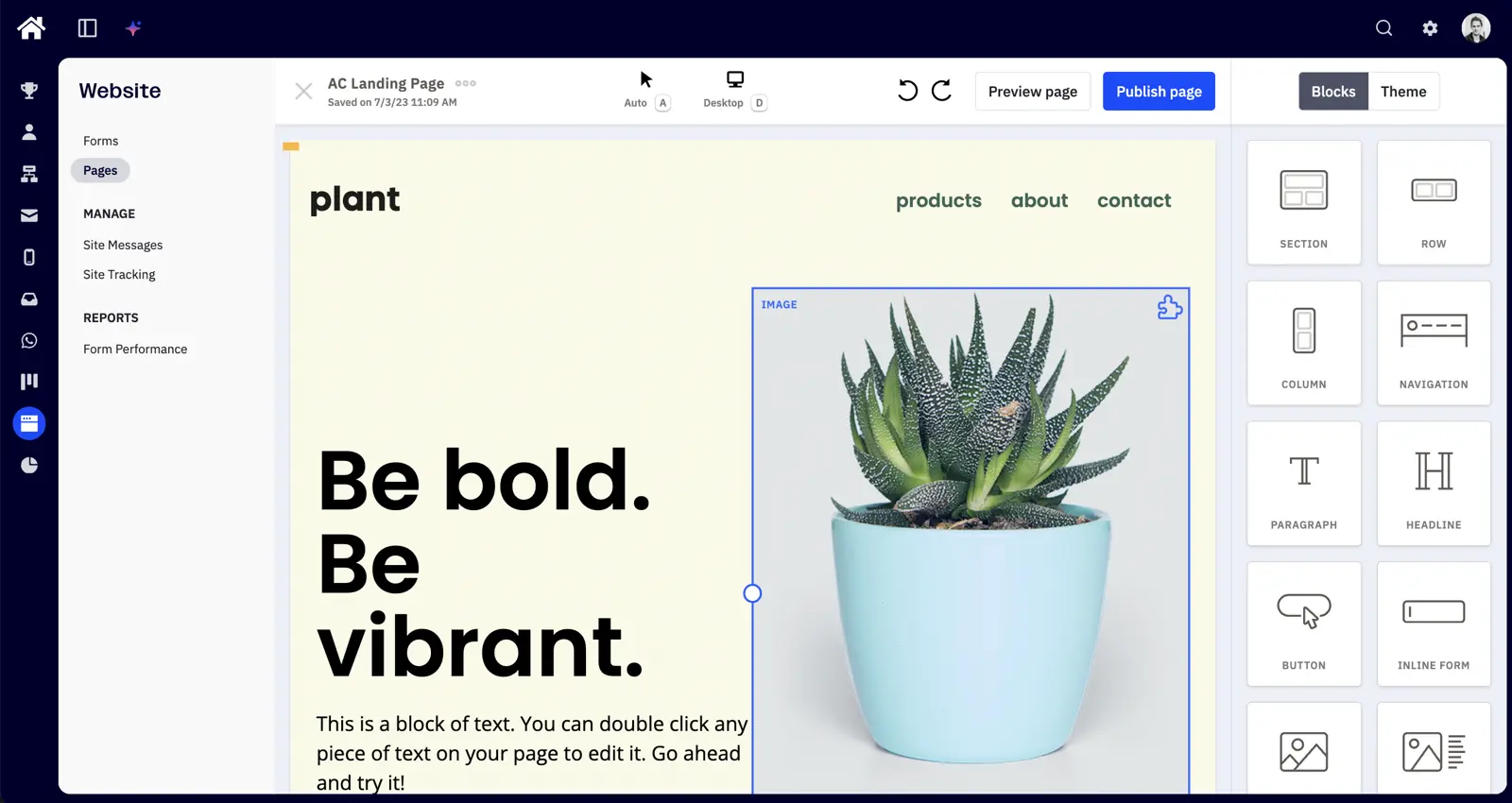
If you’re after a simple landing page builder for webinars, events or one-page microsites, ActiveCampaign’s landing page builder will do the trick. If your needs are more complex you’ll likely be better off using dedicated landing page software.
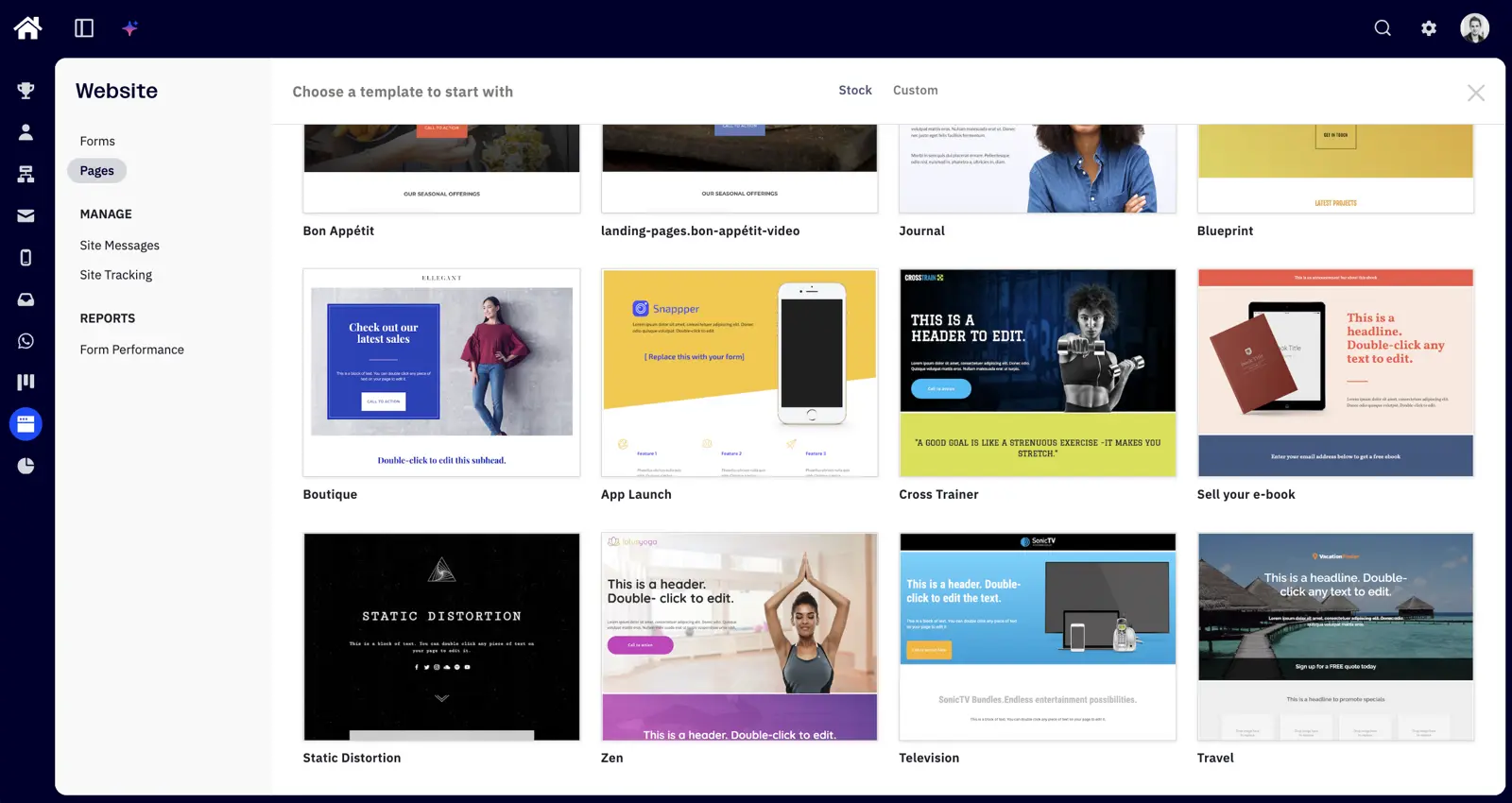
While the landing page builder itself is easy and intuitive to use, it lacks any kind of advanced functionality for personalising your pages. That’s a real miss given the CRM and rich contact data sitting right next to it — though most ActiveCampaign users probably aren’t trying to run dozens of PPC landing pages or their full website from here (the way some HubSpot users do).
Instead, this area of ActiveCampaign is little more than a lightweight page builder for publishing simple landing pages without the need of a developer.
08What forms does ActiveCampaign offer?
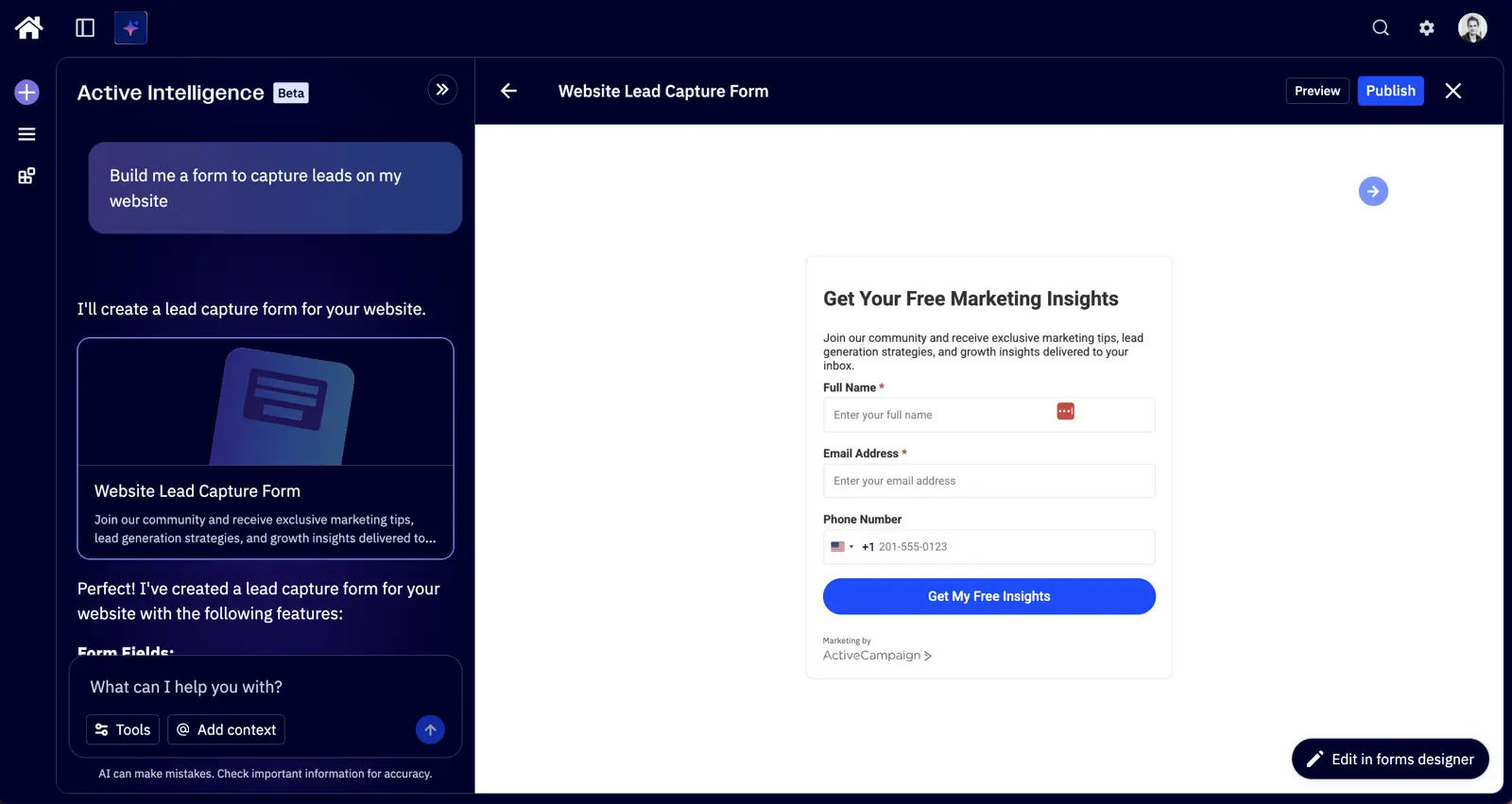
ActiveCampaign offers four types of forms – inline, floating bars, modals, and floating boxes. They’re nothing special, but they do the job.
One nice feature with the addition of Active Intelligence is that you can now just ask AI to build forms for you rather than mindlessly dragging blocks.
As already mentioned, ActiveCampaign’s integration ecosystem is very extensive so connecting these forms into third-party tools is rarely an issue. If you do happen to be using something a little niche, the Zapier integration is a good fallback.
09What’s ActiveCampaign’s customer support like?
In all our use of ActiveCampaign, I’ve only had to contact support a handful of times — usually around minor things integrating ActiveCampaign with our SaaS products and pushing app event data over the API.
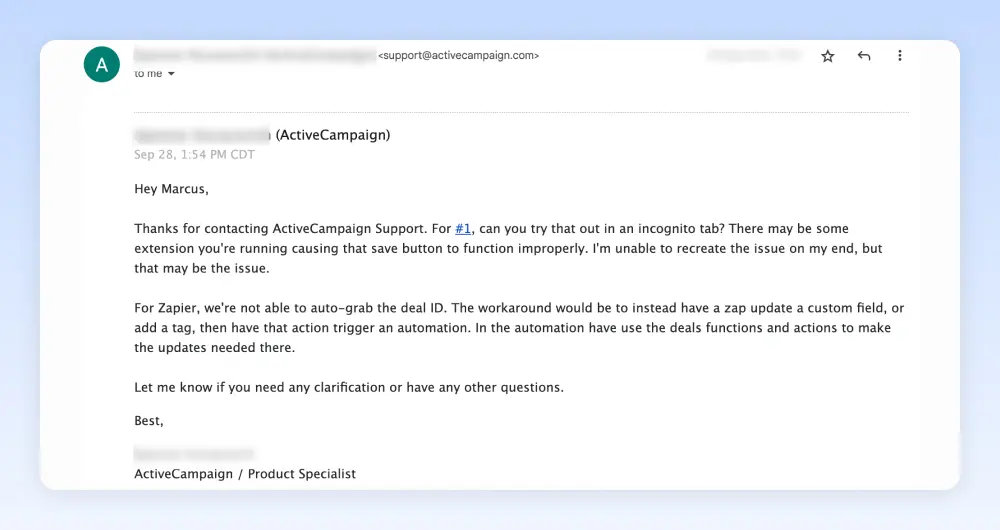
The uncomfortable bit is that finding a human now takes more effort than I would expect from a premium-priced platform. In the latest test I asked the AI assistant how AI activity credits work, because the pricing around translations and enrichment is easy to misread.
The answer came back in seconds and was useful: one activity per contact running through the action, and one activity per translated recipient per send. That is enough for most support questions I actually ask. I still want an obvious route to a person when billing or deliverability is on the line.
ActiveCampaign does put a lot of emphasis on prevention over cure. You get access to:
- ActiveCampaign University - a series of videos and guides to get started
- Free 1-to-1 strategy sessions
- A free migration service
- In-person events and workshops
- An active community forum, Slack community and Facebook group
- A help centre with a huge range of how-to guides
The help centre and community are good. Support loses points because the AI-first route feels less reassuring than HubSpot, Omnisend or Constant Contact when you want a human quickly.
10Does ActiveCampaign have good email deliverability?
Deliverability is arguably the most important factor when choosing an email marketing tool — if your emails don’t reach the inbox, nothing else matters.
Across our own ActiveCampaign accounts we’ve seen a 99.4% deliverability rate with a 2.74% unsubscribe rate. In the latest controlled test, a default ActiveCampaign template came back at 9.5/10 in Mail Tester after removing the points lost for my missing DMARC setup.
The remaining half-point was for an HTML-heavy template. That is on ActiveCampaign, though the score still lines up with what we’ve seen after sending 124,000+ emails through the platform.
ActiveCampaign achieves this through a combination of infrastructure and features that help you stay out of spam folders:
- Authentication: SPF and DKIM are required before sending, with a setup wizard to walk you through it. DMARC is encouraged.
- Dedicated IPs: Available on Enterprise plans for high-volume senders, pre-warmed to avoid cold-start reputation issues.
- Automatic list hygiene: Inactive addresses are flagged and cleaned, and contacts who mark you as spam are auto-suppressed.
- Spam check tool: Pre-send analysis that assesses how likely your email is to be filtered.
- Predictive sending: ML-based send-time optimisation that delivers emails when each individual contact is most likely to engage, instead of using an average best time for the whole list.
- Campaign preview covers cross-browser, cross-inbox, and cross-device testing before you hit send.
It’s worth noting that deliverability results can vary depending on test methodology and sending conditions. Different independent tests produce different numbers. Either way, ActiveCampaign’s deliverability setup gives you plenty to work with, and in our experience the platform has consistently landed emails where they need to go.
Rating Details
I’ve rated ActiveCampaign across the eight tests I ran.
Contact Importing
★★★★
4.0 / 5
ActiveCampaign imported 40 of the 42 valid contacts from a deliberately messy CSV and gave clear reasons for the rows it rejected. Two valid records still failed, so it misses the full score.
Email Builder
★★★★
4.0 / 5
I rebuilt a reference newsletter about 90% of the way in 15 minutes. Revision history, content metrics and HTML editing are useful, though padding and exact font control took more fiddling than they should.
Deliverability
★★★★★
5.0 / 5
A default template scored 9.5/10 in Mail Tester once I removed the DMARC points caused by my own setup. Our account-wide deliverability is 99.4%.
Pricing
★★★
3.0 / 5
ActiveCampaign is priced fairly for teams using automation and AI heavily. It is no longer the cheap default, and the November 2025 all-contact billing change makes list hygiene more important.
Customer Support
★★★
3.0 / 5
The AI assistant answered my AI activity-credit question quickly and usefully. Human support was harder to find than I would expect at this price, especially compared with HubSpot or Omnisend.
Automation Builder
★★★★★
5.0 / 5
This is still the strongest part of ActiveCampaign. The builder has 135+ triggers, 1,000+ recipes, split testing, goals, webhooks, CRM actions, AI actions and enough clarity that new teammates can learn it quickly.
Active Intelligence
★★★★
4.0 / 5
Active Intelligence built segments, critiqued a live sequence and implemented useful automation changes. It fell down on one-shot email constraints, A/B test setup and MCP automation creation, so it still needs supervision.
Product Breadth
★★★★
4.0 / 5
Email, SMS, WhatsApp, forms, landing pages, CRM and reporting all live in one platform. The automation layer ties them together well, but the CRM, reports and page builder feel less loved.
That gives ActiveCampaign 32/40 in the latest test, or 4.0/5 as the star rating.
Who is ActiveCampaign best for?
It depends on what you’re trying to do. Here’s my take by business type.
Is ActiveCampaign good for small and mid-sized businesses?
Verdict: yes — this is the sweet spot.
If you have a list between 1,000 and 25,000 contacts and you need automation that actually does something, ActiveCampaign is the platform we'd recommend. The Plus plan at $49/mo (or ~$189/mo at 10K contacts) gives you the visual automation builder, lead scoring, conditional content and split-testing of automation paths — all of which directly drive revenue once your list is at meaningful size.
Most of our ventures landed on Plus, with a few on Pro for the predictive sending and revenue attribution. The split-testing capability alone typically pays for the platform many times over once your list is generating revenue.
Is ActiveCampaign good for SaaS companies?
Verdict: yes, especially for lifecycle marketing.
We've used ActiveCampaign as the lifecycle email engine on our own SaaS products. Pushing app event data into ActiveCampaign over the API and triggering nurture sequences, reactivation flows and free-to-paid upsells just works — and the visual automation builder makes the logic legible to non-engineers, which matters when product, marketing and customer success all want to weigh in on a sequence.
What pushes it ahead for SaaS specifically: site tracking, the ability to split-test entire automation paths (test sending 10 emails over a week vs 5 over a month), conditional content keyed to plan or feature usage, and predictive sending for trial conversion windows. Pair the Plus or Pro plan with whichever CRM your sales team prefers.
Is ActiveCampaign good for eCommerce (Shopify, WooCommerce)?
Verdict: capable, but Omnisend is a better fit if you're pure-play Shopify or WooCommerce.
ActiveCampaign has deep native integrations with Shopify, WooCommerce, BigCommerce and Square — abandoned cart, post-purchase follow-up and product recommendations all work well. If your business is half eCommerce and half service, content or B2B (which is true of several VH ventures), ActiveCampaign's flexibility wins because you don't need a separate platform for the non-eCommerce side.
If you're a pure-play Shopify or WooCommerce store, Omnisend is purpose-built for that and tends to be more cost-effective at scale, with eCommerce-specific reporting and SMS bundled in. We cover the trade-offs in our eCommerce email marketing guide.
Is ActiveCampaign good for content sites and publishers?
Verdict: yes.
We run ActiveCampaign on several of our own content sites. The combination that makes it work for content: site tracking ties article visits to specific subscriber profiles, segmentation lets you ladder readers from broad newsletter into vertical-specific lists based on what they actually read, and lead-magnet automations turn one-off downloaders into engaged subscribers.
The downside for content specifically is that the platform is more capable than most newsletter operators need on day one. If your content site is monetised purely through display ads and you don't have a paid product or downstream funnel, MailerLite or Kit will be cheaper and simpler. If you have any kind of nurture-to-purchase logic — affiliate funnels, info products, paid memberships — ActiveCampaign earns its keep.
Is ActiveCampaign good for B2B service companies?
Verdict: yes — particularly if cost or automation depth matter more than closed-loop attribution.
ActiveCampaign is a strong B2B marketing automation choice. Lead scoring, conditional nurture sequences and segment-based personalisation all work well for B2B service companies — and at roughly a tenth of the cost of HubSpot Pro for equivalent automation depth. Add in 1,000+ integrations including native ties to Salesforce and HubSpot CRM, and you can run ActiveCampaign as the marketing execution layer on top of whichever CRM your sales team already uses.
The honest distinction: if your business genuinely needs HubSpot's closed-loop revenue attribution (B2B service company doing $1M+ revenue with 30+ day sales cycles), HubSpot earns its bill there. For everyone else — which is most B2B service businesses — ActiveCampaign delivers ~90% of the automation value at a fraction of the spend.
Is ActiveCampaign good for agencies?
Verdict: yes — strong choice for agencies running automation as a service line.
ActiveCampaign has a dedicated agency partner programme with margin on accounts you bring in, account dashboards for managing multiple clients from one login, white-label options on higher tiers, and partner-only support. The platform's depth means you can deliver almost any email and automation engagement inside one stack — lifecycle, lead nurture, eCommerce, B2B nurture — without stitching together a different tool per client.
For agencies whose service offer is built around marketing automation strategy and execution (rather than pure deliverability or transactional sending), ActiveCampaign is hard to beat for the price-to-capability ratio. The free migration service also makes it easy to onboard new clients off whatever they were using before.
Is ActiveCampaign good for enterprise marketing teams?
Verdict: yes for marketing automation; pair with your existing CRM.
ActiveCampaign Enterprise (from $145/mo, scaling with contact volume) gives you SSO, custom reporting, dedicated IPs, advanced security and compliance, premium integrations and a dedicated account manager. For organisations that already run Salesforce, HubSpot, Microsoft Dynamics or another enterprise CRM as the system of record, ActiveCampaign Enterprise is a strong marketing execution layer at meaningfully lower cost than HubSpot Marketing Hub Enterprise.
What are the best ActiveCampaign alternatives?
When friends ask which email automation platform I’d recommend, there are only three instances where I’ve suggested a different tool to ActiveCampaign:
- If you’re an eCommerce business you may want to consider Omnisend, which is dedicated solely to eCommerce email marketing.
- If you’re a B2B service business with high-value leads (and a decent budget) you may want to consider HubSpot.
- If you’re a coach, trainer or educator looking to build out sales funnels with a membership site or gated content you may want to consider Clickfunnels.
ActiveCampaign is still unusual because it combines deep automation, useful AI and fair pricing for mature teams. Most competitors make a trade-off in at least one of those areas, which is why they are harder to recommend for automation-led businesses.
Here’s a quick side-by-side to help you compare. For a deeper analysis, see our full email marketing software comparison — or, if you’ve narrowed it to a head-to-head, our ActiveCampaign vs Mailchimp and ActiveCampaign vs HubSpot comparisons go deeper on both.
| ActiveCampaign | HubSpot | Mailchimp | Omnisend | |
|---|---|---|---|---|
| Starting price | $15/mo | $20/mo | $13/mo | $16/mo |
| Free plan | No (14-day trial) | Limited free tools | Yes (250 contacts) | Yes (250 contacts) |
| At 10K contacts | ~$189/mo | ~$890/mo | ~$110/mo | ~$132/mo |
| Built-in CRM | Yes (Plus+) | Yes (native) | No | No |
| Automation depth | Advanced (135+ triggers) | Advanced (expensive) | Basic-intermediate | Advanced (ecommerce) |
| Integrations | 1,000+ | 1,700+ | 300+ | 130+ |
| Best for | SMBs needing automation | B2B with big budgets | Beginners, newsletters | Ecommerce (Shopify) |
| Key weakness | Pricing complexity | Cost escalation | Limited automation | Weak outside ecommerce |
If ActiveCampaign fits what you need, you can start an ActiveCampaign trial for free here.
11 Reader Comments
Thanks Marcus for this extensive review. Lot of value here! In the beginning however I read who it is not suited just now in one of the comments I learned that it is better to use other software for e-commerce or SaaS. Are there any other examples of use cases in which it is not a good fit?
This was super helpful!
Thank you Marcus!
Hi Marcus,
Thank you for this excellent article with so many detailed ideas about how one could use ActiveCampaigns.
Reading it, I realized that you have a quite large staff. We are a 2 person online business. A consultant friend has told us we need to implement marketing automation to get users and to scale.
Can a small home-based business such as ours handle something as complex (though intuitive) as ActiveCampaigns?
Would appreciate hearing your thoughts.
Thank you,
Linda
Hey Linda,
On the contrary, my team is currently six people. However, I feel like we'd be a 50 person company if it wasn't for all the automation ????
I would say that absolutely ActiveCampaign is right for a small team size. I started using ActiveCampaign when it was just myself and have grown with it. Compared to other good tools out there (such as Hubspot, Autopilot etc), the benefit with ActiveCampaign is that it remains quite affordable as you grow and has a good balance of power/ease of use/affordability.
Most other tools only have two of those three ingredients. That doesn't make them less good, it just makes them less suitable for all use cases, whereas ActiveCampaign is universally a very 'safe' tool regardless of use case.
The only exception I'd say is perhaps for SaaS or eCommerce tools, where something like Autopilot/Omnisend would be a better fit.
Thank you Marcus for putting this together.
Learnt quite a lot
Marcus, thank you for this detailed review of Active Campaign.
You've shared a lot of value here.
In particular, I enjoyed reading about your ideas for automating business functions outside of sales and marketing e.g. recruitment/hiring and accounts receivable.
It's clear that automation can be extremely valuable.
I can't wait to start applying some of the tactics you've shared here.
Thanks again!
Dan Hodgins
Great, thanks Dan ????
Thank you very much for your very helpful article.
I really like your way of structuring and automating whole marketing and sales process.
One thing I am not sure, how do you exactly setup the scoring for cold lead, MQL and SQL.
Would you mind sharing your insights on how you approach the scoring itself from strategic point of view?
Thank you very much.
Hi Ladislav,
From a strategic point of view, we just created a list of all of the criteria that we felt increase or decrease a lead's propensity to convert across two axes: engagement and fit. The point system is weighted, so for example opening an email may add 1 point to their engagement score, whereas visiting our pricing page may add 3 points.
From there, we set thresholds (e.g. if the fit score ever goes above 7 points, we consider that lead a 'good fit' and add a tag).
This way, all leads fall into one of four quadrants:
- Good Fit Engaged (put into sales funnel)
- Good fit Not engaged (put into nurturing funnel)
- Bad fit engaged (disqualify remove from lists)
- Bad fit not engaged (remove from lists)
At a tactical level, this is all configured with tags and lead scoring inside ActiveCampaign and is 100% automated.
Hope that helps!
Marcus - I know you wrote this a while back, but it's still great. Appreciate you taking the time.
Anytime ????
Thanks Rebecca