


Omnisend has been a fixture in our top 10 email marketing tools roundup since 2017, and for eCommerce specifically, it’s the platform we recommend by default.
In this review I’ll walk through what stands out about the product — the email builder, the omnichannel automation, Omnisend AI, and the revenue attribution reporting — and where it falls short. Where I make a claim, I’ll show you what’s behind it rather than just asking you to take my word for it.
Review Summary
Omnisend was built from the ground up for stores, and it shows in every part of the product. When you connect Shopify or WooCommerce, Omnisend automatically pulls in your product inventory, store styling, and customer list — most stores are sending their first campaign within 15-20 minutes of signup.
The standout feature for me is revenue attribution. Every dollar (or pound) of revenue is traced back to the exact email or SMS campaign that influenced it, including which A/B test variant drove the sale. It turns email optimisation into a clear, measurable process rather than an exercise in guesswork.
Beyond that, Omnisend’s omnichannel automation lets you build a single workflow that combines email, SMS, and push notifications — without stitching together separate tools. Omnisend AI (the writer, segment builder, and Campaign Booster) is one of the few AI implementations in this space that holds up beyond the initial demo.
And if you’re currently on Klaviyo, ActiveCampaign, Mailchimp, or any other ESP, migration is genuinely a non-issue. Omnisend has a self-serve migration tool that syncs your contacts, properties, tags, and engagement data automatically — and on any paid plan, their team will help with the move at no extra cost. The biggest barrier most teams cite when they consider switching ESPs (the migration sprint) just isn’t there.
It’s not the right tool for everyone. If you’re B2B, a creator, or running anything that isn’t an online store, Omnisend’s feature set will feel irrelevant. But if you are selling products online, this is the platform I’d choose.
Plans & Pricing
Omnisend has three tiers — a free plan and two paid plans:
- Free Plan — 250 contacts, 500 emails per month, 500 web push notifications, and $1 of free SMS credit to try the channel. Crucially, this isn’t a stripped-down trial — automation, segmentation, A/B testing, and reporting are all available. You can run a small store entirely on the free plan until you outgrow the contact limit.
- Standard Plan — Starts at $16/month for 500 contacts and includes 6,000 emails per month, the full automation suite, Forms AI, and 24/7 support. This is where most growing stores will start.
- Pro Plan — Starts at $59/month for 2,500 contacts, with unlimited emails and free global SMS credits equal to your monthly plan cost (i.e. $59 in SMS credits each month on the $59 plan). Adds advanced reporting, personalised content, and an account expert option for larger lists.
| Free | Standard | Pro | |
|---|---|---|---|
| Up to 250 contacts | $0 | $16/mo | $59/mo |
| 500 contacts | NA | $16/mo | $59/mo |
| 2,500 contacts | NA | From ~$35/mo | $59/mo |
| Larger lists | NA | Use calculator | Use calculator |
Pricing scales with contact list size — for an exact quote at your specific list size, use the Omnisend pricing calculator. Stores above 150,000 active profiles move to a custom plan negotiated with Omnisend’s sales team.
For most eCommerce stores, Omnisend works out meaningfully cheaper than Klaviyo at equivalent contact tiers, while bundling SMS into the Pro plan rather than charging it as a separate add-on.
Pros & Cons
As part of our annual email marketing software research, we survey thousands of email marketing software users every year. The pros and cons below summarise the most commonly highlighted points across Omnisend user feedback, plus what we’ve found in our own hands-on testing.
-
Effortless setup — Connecting your store auto-imports your product inventory, store styling, and customer list. Most stores are sending their first campaign within 15-20 minutes of signup.
-
Revenue attribution — Trace every dollar of revenue back to the exact email, SMS, automation, or A/B test variant that drove it. This is the feature I rely on most.
-
Omnichannel automation — Email, SMS, and push notifications in a single visual workflow. No Zapier glue, no separate tools.
-
Omnisend AI is actually good — The AI writer is trained on millions of real eCommerce campaigns, the natural-language segment builder genuinely works, and Campaign Booster optimises send times per contact.
-
Free, done-for-you migration — From Klaviyo, ActiveCampaign, Mailchimp, or any ESP. Their team handles list imports, automation rebuilds, and template recreation.
-
Generous free plan — 250 contacts and the full feature set. Not a 14-day trial that pulls features as soon as you commit.
-
Better value than Klaviyo — At 10K contacts, Omnisend Standard is ~$132/mo versus Klaviyo’s $150+. At higher tiers, the gap widens.
-
Built around eCommerce — If you’re not running an online store, the entire product feels mis-fitted. Service businesses, creators, and B2B teams should look elsewhere.
-
Reporting could be more customisable — The default dashboards are great, but power users will want more flexibility in building custom reports.
-
SMS pricing varies by country — Credit costs differ across destination countries, which can make budgeting for international SMS tricky.
Detailed Platform Review
We tested ten areas of Omnisend’s product in detail. Each section below explains what we found and how Omnisend compares to the alternatives.
- Setup & Migration
- Email Marketing
- Omnichannel Automation
- Omnisend AI
- Revenue Attribution & Reporting
- Segmentation
- Forms & Popups
- Templates & Brand
- Customer Support
- Deliverability
01Setup & Migration
This is where Omnisend immediately pulls ahead of every other ESP I’ve used. Setup takes 15-20 minutes and is mostly automated when you connect your store. Once you authenticate Shopify or WooCommerce, Omnisend automatically pulls in:
- Your product inventory (so you can drop products into emails without uploading anything)
- Your store styling — fonts, colours, and brand assets are extracted and applied across templates
- Your customer list and order history, segmented and ready to use
- A set of pre-built automation flows (welcome series, abandoned cart, browse abandonment, post-purchase) wired up to your data and ready to switch on
There’s no CSV uploading, no manual brand kit setup, no rebuilding flows from scratch. The contrast with Mailchimp or even ActiveCampaign — where you’re often spending half a day on initial configuration — is stark.
Migration from Klaviyo, ActiveCampaign, or Mailchimp
If you’re already on another ESP, the bigger question isn’t “how easy is setup?” but “how painful is the migration?” — and this is the question that stops most teams from switching.
Omnisend offers two migration paths and both are designed to remove that friction:
- Self-serve migration tool. Available to anyone, this automatically syncs your contact data, properties, tags, segments, and engagement stats from platforms like Klaviyo and Mailchimp. No engineering required and no CSV juggling.
- Premium migration support. Available at no extra cost on any paid plan, Omnisend’s team helps you with the move directly — including rebuilding your automation flows from their template library so you’re not starting from a blank canvas.
In Omnisend’s own words: “No need to worry about moving from another ESP. We’ll pack, carry, set up, and switch on the lights — you just walk in and start selling.”
This is enough on its own to take Omnisend seriously. Switching ESPs is normally the kind of project that sits on a roadmap for two years before someone finally bites the bullet — Omnisend removes that friction entirely.
02Email Marketing
Omnisend’s email builder is purpose-built for eCommerce, and it’s where the platform’s design choices really show. The drag-and-drop builder is fast, auto-saving, and the content blocks include everything you’d expect (text, images, buttons, dividers) plus the ones you actually need for store emails:
- Product picker — Drop products from your catalogue directly into an email. Pricing, images, and links are pulled live from your store, so you never have to update an email when a product detail changes.
- Dynamic product recommendations — “Recently viewed”, “Similar to past purchases”, “Best-sellers”, and “Most viewed” — all generated per-recipient based on their behaviour.
- Discount codes — Generate unique, single-use codes inside the email builder without leaving the editor.
- Gift boxes and scratch cards — Interactive elements that genuinely move the needle on click-through rates for promotional emails.
- Countdown timers — Real-time countdowns for sale endings, included as a native block.
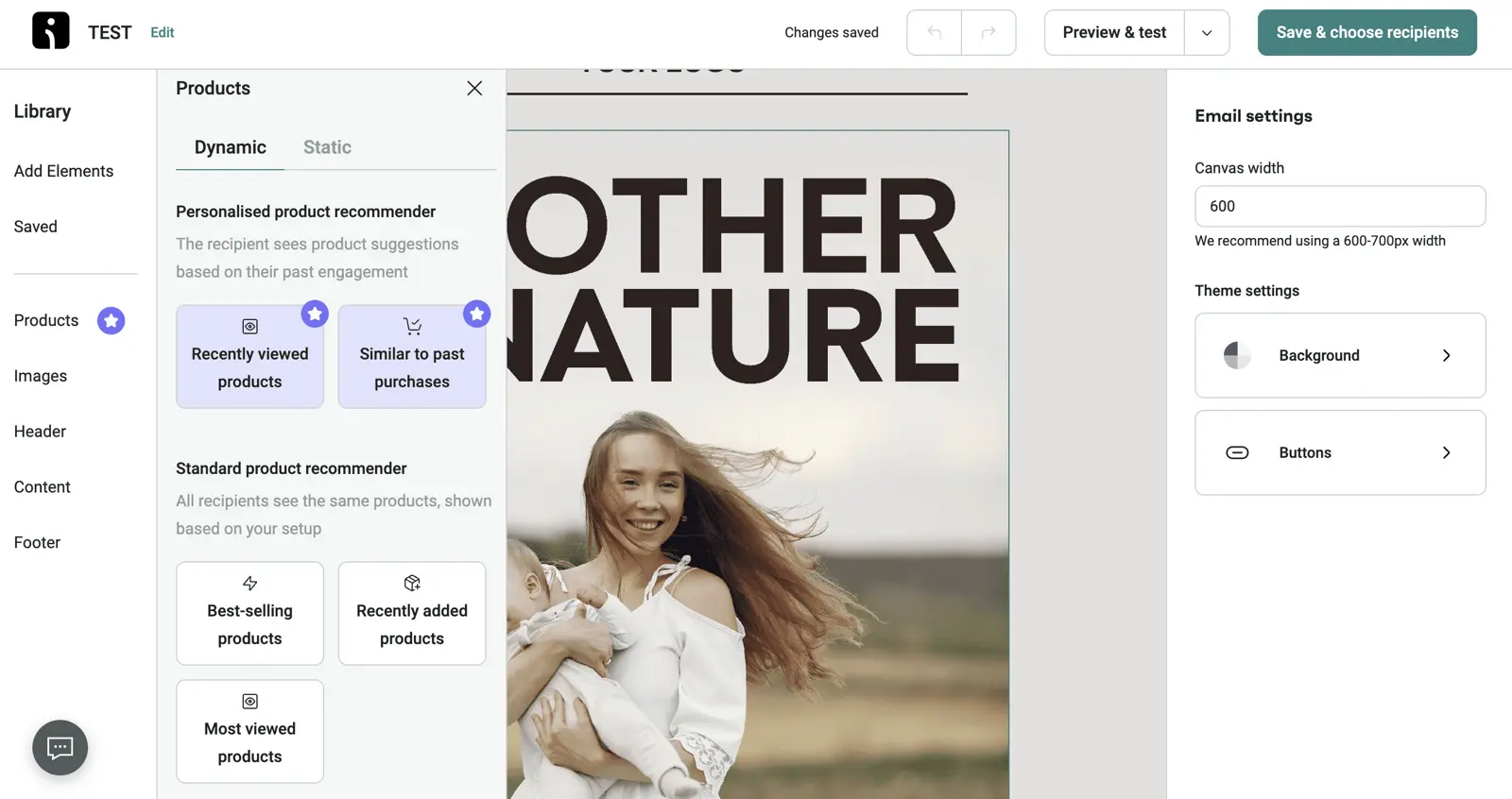
The product recommender is the most interesting block in the editor. Instead of hand-picking products for each campaign, you drop in a “Similar to past purchases” or “Recently viewed” block and Omnisend personalises the products shown to each recipient based on their actual store behaviour. Personalised product blocks tend to materially outperform static product blocks on click-through rate, and they remove the manual product-curation work from each send.
When it comes to templates, Omnisend ships with 350+ pre-built templates organised by use case (welcome, abandoned cart, post-purchase, win-back, seasonal, BFCM, etc.). They’re well-designed by default, and Brand Assets AI applies your store’s fonts and colours automatically — so even the templates you don’t customise heavily come out looking on-brand.
A/B testing is available on every campaign and supports multivariate testing across subject line, preheader, sender name, and content. Results feed back into Omnisend’s reporting (more on that below) so you can attribute revenue per variant, not just opens or clicks.
03Omnichannel Automation
Omnisend’s automation builder is its other standout feature. It’s a visual flowchart-style builder (similar to ActiveCampaign or Klaviyo) but with email, SMS, push notifications, and web push as native messaging steps in the same workflow.
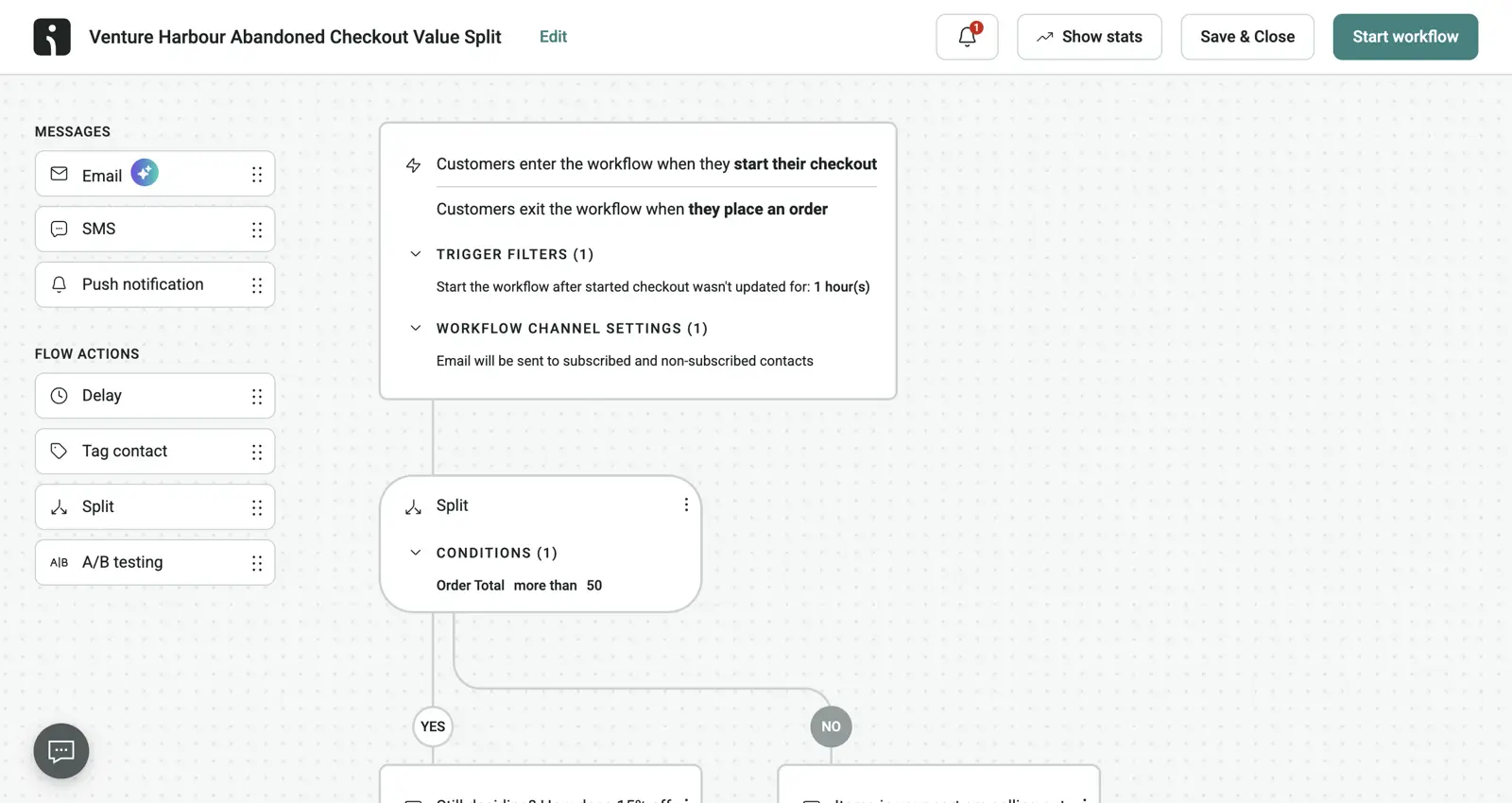
The screenshot above shows a typical abandoned checkout workflow built in Omnisend. It splits high-value carts (over $50) from low-value ones, sends an immediate email, follows up with SMS if the email goes unopened, and uses A/B testing on the discount amount inside the high-value branch. All of that runs from a single workflow — no Zapier glue, no separate SMS tool to manage, no sync issues between systems.
Pre-built workflows
Omnisend ships with a library of pre-built workflows for the eCommerce flows you actually need:
- Welcome series
- Abandoned cart recovery
- Browse abandonment
- Post-purchase upsells and cross-sells
- Win-back / re-engagement
- Customer reactivation
- Birthday and anniversary
- Order and shipping confirmations
- Product review requests
- Replenishment reminders (great for consumables)
Each workflow is pre-wired to your store data, so switching them on is a matter of reviewing the copy, adjusting timing, and turning them live. For most stores, getting the abandoned cart and welcome series alone running well will recover more revenue than anything else you do in your first month.
Triggers, conditions, and actions
Triggers include behavioural events (cart abandoned, product viewed, order placed, customer created), date-based events (birthdays, anniversaries, x days after first purchase), list-based events (subscribed to list, tag added), and custom events you can fire via the API.
Conditions support if/else branching, splits (great for A/B testing entire workflow paths), delays, and goal-based exits. Actions cover email, SMS, push, web push, tag/untag, and custom HTTP requests for advanced integrations.
A/B testing inside automations
Few automation tools let you A/B test entire paths of a workflow, but Omnisend does. You can test things like:
- “Does adding an SMS step to abandoned cart recover more revenue than email-only?”
- “Does sending the second cart email at 24 hours vs 48 hours improve conversion?”
- “Does a 10% discount or a free shipping offer recover more carts?”
Because revenue attribution is baked into the platform (more on this below), the A/B test results show you the revenue lift per variant, not just opens or clicks. This is the closest I’ve come to a “set and forget” optimisation loop in any ESP.
04Omnisend AI
Omnisend’s AI is one of the strongest AI implementations I’ve seen in the eCommerce email space — and it’s the area of the product that has improved most over the past 18 months.
A few features worth calling out specifically:
- AI Writer (subject lines, body copy, SMS): Trained on millions of real eCommerce campaigns, so the output sounds like a campaign rather than the obvious LLM filler you get from generic AI tools. Subject line generation is particularly strong — generate 10 options and you can usually use one near-verbatim.
- Natural-language segment builder: Describe the customer you want to reach in plain English (e.g. “lapsed buyers who spent over $200 last year and haven’t ordered in 90 days”) and Omnisend builds the segment for you, drawing on RFM analysis, churn prediction, and high-value-customer scoring under the hood.
- AI product recommendations: Personalised per-recipient based on browsing and purchase history, dropped into emails as a single block.
- Campaign Booster: Send-time optimisation that schedules each contact’s email at the time they’re most likely to open. Not just a “best send time for the whole list” — it’s optimised 1:1.
- Brand Assets AI: Pulls your fonts, colours, and logos and applies them across every campaign and automation. Keeps everything visually consistent without you having to format each send from scratch.
- AI Subject Line Tester: Predicts open rates for subject lines before you send, based on historical performance across your list.
Omnisend’s own data suggests personalised AI emails drive a 2,361% higher CTR — that number is obviously cherry-picked, but the underlying point is fair: the AI features genuinely shave hours off campaign production, and the campaigns tend to perform better than equivalent non-personalised sends.
05Revenue Attribution & Reporting
This is my favourite feature in Omnisend, full stop. Revenue attribution traces every dollar of revenue back to the exact email or SMS campaign that influenced it — including which A/B test variant generated the sale.
Inside the reporting dashboard you can see:
- Revenue per campaign — How much each email or SMS broadcast generated
- Revenue per automation — How much each automation has generated lifetime, and per-step inside it
- Revenue per A/B test variant — Not just open/click rates, but actual revenue lift
- Channel-level revenue — Email vs SMS vs push, broken down by automation
- Average revenue per recipient — A useful proxy for list health and content quality
Because Omnisend integrates directly with your store, attribution isn’t based on UTM tagging guesswork — it’s based on actual order data tied back to the campaign that drove the customer to the store. The accuracy is much higher than what you’d get from Google Analytics alone, especially for SMS where UTM-based attribution falls apart.
The practical impact: instead of asking “did this email do well?” you’re asking “how much revenue did this generate, and which segment drove most of it?” That’s a much sharper question, and it makes the optimisation loop feel like a science rather than guesswork.
For standard reporting, Omnisend covers all of the basics — list growth, open and click-through rates, click maps, send-time analysis, deliverability metrics, and engagement breakdowns. The dashboards are clean and well-designed, though power users may want more flexibility in building custom reports (this is the one area where Omnisend’s reporting falls slightly behind Klaviyo’s enterprise tier).
06Segmentation
Omnisend’s segmentation is one of the most powerful in the eCommerce space — which makes sense, given how much store data the platform has access to once integrated.
You can segment on:
- Behavioural data — Cart abandoners, browse abandoners, product viewers, repeat buyers, lapsed customers
- Order data — Total spend, average order value, last purchase date, products bought, categories purchased
- Customer lifecycle — New vs returning, RFM scores, lifetime value tiers
- Engagement data — Email opens, clicks, SMS responses, web push interactions
- Demographic and custom data — Anything you’ve captured via forms, integrations, or the API
Segments are dynamic by default — they update in real time as customer behaviour changes, which is essential for things like win-back campaigns where you want to catch lapsed customers the moment they hit your “lapsed” threshold.
The natural-language segment builder (mentioned in the AI section above) is particularly useful here — it removes the friction of building complex segments from scratch and lets non-technical marketers spin up sophisticated audiences without a logic-builder learning curve.
07Forms & Popups
Forms play a critical role in growing your list, and Omnisend offers a solid range of form types built for eCommerce conversion:
- Popups — Standard exit-intent and timed popups
- Signup boxes — Inline and floating
- Wheel of Fortune / spin-to-win — Gamified popups that consistently outperform standard popups for capturing first-time visitors
- Landing pages — Lightweight standalone pages for campaigns, lead magnets, or pre-launch waitlists
Each form type is fully customisable, supports A/B testing, and connects directly into your automation workflows. Conditional rules let you target popups by page, traffic source, device, or whether the visitor has already subscribed.
The Wheel of Fortune popup is the format that tends to drive the biggest signup rate uplift on stores running it for the first time — it feels gimmicky, but the numbers consistently support it.
If your needs go beyond Omnisend’s form builder (e.g. multi-step quizzes for product recommendation), you’ll likely want a dedicated tool — but for 90% of eCommerce signup capture use cases, Omnisend’s forms cover everything you need.
08Templates & Brand
Omnisend ships with 350+ templates organised by use case, season, and industry. They’re well-designed by default and most are straightforward to customise — though for stores with a strong existing brand, the Brand Assets AI feature is what really earns its keep. It auto-extracts your fonts, logos, and colour palette from your website and applies them across every template, automation, and form.
This means even the templates you grab off the shelf come out looking on-brand without any manual setup. For stores doing high-volume campaigns (BFCM, multi-touch product launches), this saves a meaningful amount of design time.
Custom templates can be built from scratch in the drag-and-drop editor or imported as HTML if you have an existing template you want to bring over. Brand kits can be saved and reused across multiple stores if you’re running a portfolio.
09Customer Support
Omnisend’s customer support is genuinely best-in-class. The team operates 24/7 live chat and email support with an average response time of around 4 minutes — the fastest we’ve seen in this category by some margin. Answers are substantive rather than scripted, and it’s clear the support team actually understands how eCommerce stores work.
Available support channels:
- 24/7 live chat and email support on all paid plans (including the free plan, with slightly slower response times)
- Priority support on the Pro plan
- Dedicated customer success manager on Pro plans above certain contact tiers
- Free migration team when you’re moving from another ESP
- Omnisend Academy — A library of video courses, webinars, and certifications
- Help centre with hundreds of how-to articles
- Community forum and active Facebook group
What stands out about Omnisend’s support is the combination of speed and substance. Questions about flow logic or attribution edge cases tend to be answered by people who clearly understand how stores actually work — not generic SaaS support scripts.
10Deliverability
Deliverability is the foundation that everything else sits on. Omnisend’s deliverability rates are consistently strong in independent testing, and the platform takes a “good infrastructure, good defaults” approach to keep you out of spam folders.
Deliverability features include:
- SPF, DKIM, and DMARC setup — Required before sending, with a setup wizard to walk you through it
- Dedicated sending domain — Available across plans
- Automatic list hygiene — Inactive contacts are flagged, hard bounces are auto-suppressed, and spam complainers are auto-removed
- Spam test before sending — Pre-send analysis that flags issues likely to cause filtering
- Dedicated IPs — Available for high-volume senders, pre-warmed to avoid cold-start reputation issues
- Deliverability expert — Pro plan customers above certain tiers get a dedicated expert who proactively monitors sending reputation
The combination of generally good deliverability infrastructure plus the Pro plan’s deliverability expert makes this a non-issue for most stores. Where deliverability problems do crop up on Omnisend, they tend to trace back to content choices (spammy subject lines or sending to disengaged segments) rather than the platform itself.
Rating Details
Here’s how I rate Omnisend across each of the ten areas covered in this review.
Setup & Migration
★★★★★
5.0 / 5
Setup takes 15-20 minutes and is mostly automated when you connect your store — Omnisend pulls in your product inventory, store styling, customer list, and pre-builds your core automations. Migration is supported via a self-serve sync tool, plus free premium migration help on any paid plan. One of the lowest-friction onboarding experiences in this space.
Email Marketing
★★★★★
4.5 / 5
The drag-and-drop builder is fast, the eCommerce-native blocks (product picker, dynamic recommendations, unique discount codes, countdown timers) are best-in-class, and 350+ templates cover every store use case. Loses half a star only because power users may occasionally want more flexibility in custom HTML editing.
Omnichannel Automation
★★★★★
5.0 / 5
Email, SMS, push, and web push as native steps in a single visual workflow. Library of pre-built eCommerce flows (welcome, abandoned cart, post-purchase, win-back, etc.) wired up to your store data on day one. A/B testing across entire workflow paths with revenue-level attribution. This is best-in-class for eCommerce.
Omnisend AI
★★★★★
4.5 / 5
AI Writer trained on real eCommerce campaigns, natural-language segment builder, AI product recommendations, Campaign Booster for send-time optimisation, and Brand Assets AI. Genuinely useful day-to-day, not bolted-on filler. Loses half a star only because the AI features keep evolving — expect this rating to climb.
Revenue Attribution
★★★★★
5.0 / 5
The single best feature in the platform. Every dollar of revenue is traced back to the exact campaign, automation step, A/B variant, and channel that drove it. No UTM-tag guesswork — direct integration with your store means attribution is based on real order data.
Segmentation
★★★★★
4.5 / 5
Powerful behavioural, order, lifecycle, and custom data segmentation, all dynamic by default. The natural-language segment builder removes the friction of complex segment construction. Loses half a star only because Klaviyo’s enterprise segmentation has a marginal edge for very large or complex stores.
Forms & Popups
★★★★
4.0 / 5
Solid range of forms (popups, signup boxes, Wheel of Fortune, landing pages) with full A/B testing and conditional targeting. The gamified popup formats genuinely move the needle on signup rates. Not as customisable as a dedicated form tool like Typeform, but covers 90% of eCommerce capture use cases comfortably.
Templates & Brand
★★★★
4.0 / 5
350+ well-designed templates and Brand Assets AI to auto-apply your fonts, colours, and logos. The templates lean polished-and-modern rather than highly bespoke — if you want a hand-coded artisanal email aesthetic, you’ll need to import HTML.
Customer Support
★★★★★
5.0 / 5
24/7 live chat and email on all paid plans with an average response time of around 4 minutes — the fastest in the category by some margin. Free migration team, dedicated CSM at higher tiers, active community. Support staff genuinely understand eCommerce — answers are from people who’ve run stores, not from a generic SaaS support script.
Deliverability
★★★★★
4.5 / 5
Consistently strong inbox placement in independent testing, SPF/DKIM/DMARC setup wizard, automatic list hygiene, dedicated IPs available for high-volume senders, and a dedicated deliverability expert at the top of the Pro plan. Solid infrastructure with sensible defaults.
If we sum these stars (46) and divide by ten we get a 4.6/5 star rating.
Is Omnisend the right eCommerce email platform for you?
-
Shopify, WooCommerce, BigCommerce, Wix, and Squarespace stores doing more than $50k/year in revenue.
-
Stores currently on Mailchimp or Klaviyo who want better automation, lower cost, or both.
-
Anyone who needs email + SMS + push in a single platform without cobbling tools together with Zapier.
-
Stores that care about revenue attribution as a primary optimisation lens (i.e. anyone serious about email as a revenue channel).
-
Teams who’ve been putting off an ESP migration because of the perceived effort — Omnisend’s done-for-you migration removes that barrier entirely.
-
B2B service businesses with complex sales cycles (look at HubSpot or ActiveCampaign instead).
-
Creators, newsletter operators, or coaches (look at Kit instead).
-
SaaS companies needing transactional + marketing email under one roof (look at Brevo or a Resend-style API tool instead).
-
Anyone who isn’t selling products online — most of Omnisend’s value lives in the store integration, and without it the platform is a poor fit.
What are the best alternatives to Omnisend?
Omnisend is our default recommendation for eCommerce, but it’s worth knowing where the alternatives land:
- ActiveCampaign — If your business is half eCommerce, half service-based, ActiveCampaign’s automation is the most flexible across both contexts. See our full ActiveCampaign review.
- Klaviyo — Stronger enterprise segmentation depth at the very top end (50K+ contacts with complex data models). Pricier than Omnisend at every tier and the omnichannel UX is less integrated.
- HubSpot — If you’re more B2B than B2C, HubSpot’s CRM-first approach makes more sense than an eCommerce-first ESP.
- Kit — For creators and newsletter operators, Kit is purpose-built and much better than trying to bend Omnisend to a non-eCommerce use case.
Here’s a quick side-by-side. For a deeper analysis, see our full email marketing software comparison, where Omnisend is our top eCommerce pick.
| Omnisend | Klaviyo | ActiveCampaign | Mailchimp | |
|---|---|---|---|---|
| Starting price | $16/mo | $20/mo | $15/mo | $13/mo |
| Free plan | Yes (250 contacts) | Yes (250 contacts) | No (14-day trial) | Yes (500 contacts) |
| At 10K contacts | ~$132/mo | ~$150/mo | ~$189/mo | ~$110/mo |
| Email + SMS + push native | Yes | Yes | SMS + WhatsApp | No (SMS via add-on) |
| Revenue attribution | Best-in-class | Strong | Good | Basic |
| eCommerce integrations | Native, deep | Native, deep | Good | Basic |
| Free migration | Yes | No | Yes | No |
| Best for | eCommerce | Enterprise eCommerce | SMBs, automation | Beginners, newsletters |
| Key weakness | Weak outside eCommerce | Pricing at scale | Pricing complexity | Limited automation |
If you have any questions about Omnisend that we haven’t covered in this review, feel free to drop them in the comments below — otherwise you can start an Omnisend free plan here. It’s free up to 250 contacts with the full feature set available, so there’s nothing stopping you from kicking the tyres before committing.