


I’ve been testing email platforms since 2012 and use four across my own businesses. My email marketing tests include rebuilding reference newsletters, importing deliberately messy contact files and asking support awkward billing questions.
A beginner can get stuck long before needing clever automation. An import fails without explaining why, the editor won’t put a button where you want it, or the free plan runs out halfway through the month.
The bill needs a little arithmetic too. Sending four campaigns to 1,000 people uses 4,000 emails, before anyone receives a welcome message. A plan with room for 1,000 contacts may still have too few sends for that schedule.
I would test with the newsletter you actually want to send. Rebuild its layout, import a small sample of your contacts and ask support about the plan you’d need at twice your current list size.
What does each beginner plan include?
| Tool | Best For | Starting cost | First limit to check |
|---|---|---|---|
| Constant Contact | Occasional small-business campaigns | $6/mo (Starter Email) | 2,500 monthly sends |
| Mailchimp | Designing a first commercial newsletter | Free; Essentials from $13/mo | 250 contacts; 500 monthly sends on free |
| EmailOctopus | Regular newsletters on a small budget | Free; Pro from $10/mo | Free allows 2,500 subscribers and 10,000 monthly sends |
| Sender | Free newsletters with welcome sequences | Free; Standard from $9/mo | Free allows 2,500 subscribers and 15,000 monthly sends |
| Buttondown | Small writing-led newsletters | Free for the first 100 subscribers | Analytics and automations cost extra |
Prices in USD with monthly billing.
01Constant Contact
Test Lab Partner (Paid)Constant Contact is a member of our Test Lab Programme, which means we receive a fee to conduct hands-on testing of their platform. Learn more about our Test Lab Programme →For small businesses sending occasional newsletters
Constant Contact is where I’d start if you run a small business and send a newsletter now and then. The editor is straightforward, a real person picked up the phone in about a minute when I had a billing question, and Starter Email costs $6/month.
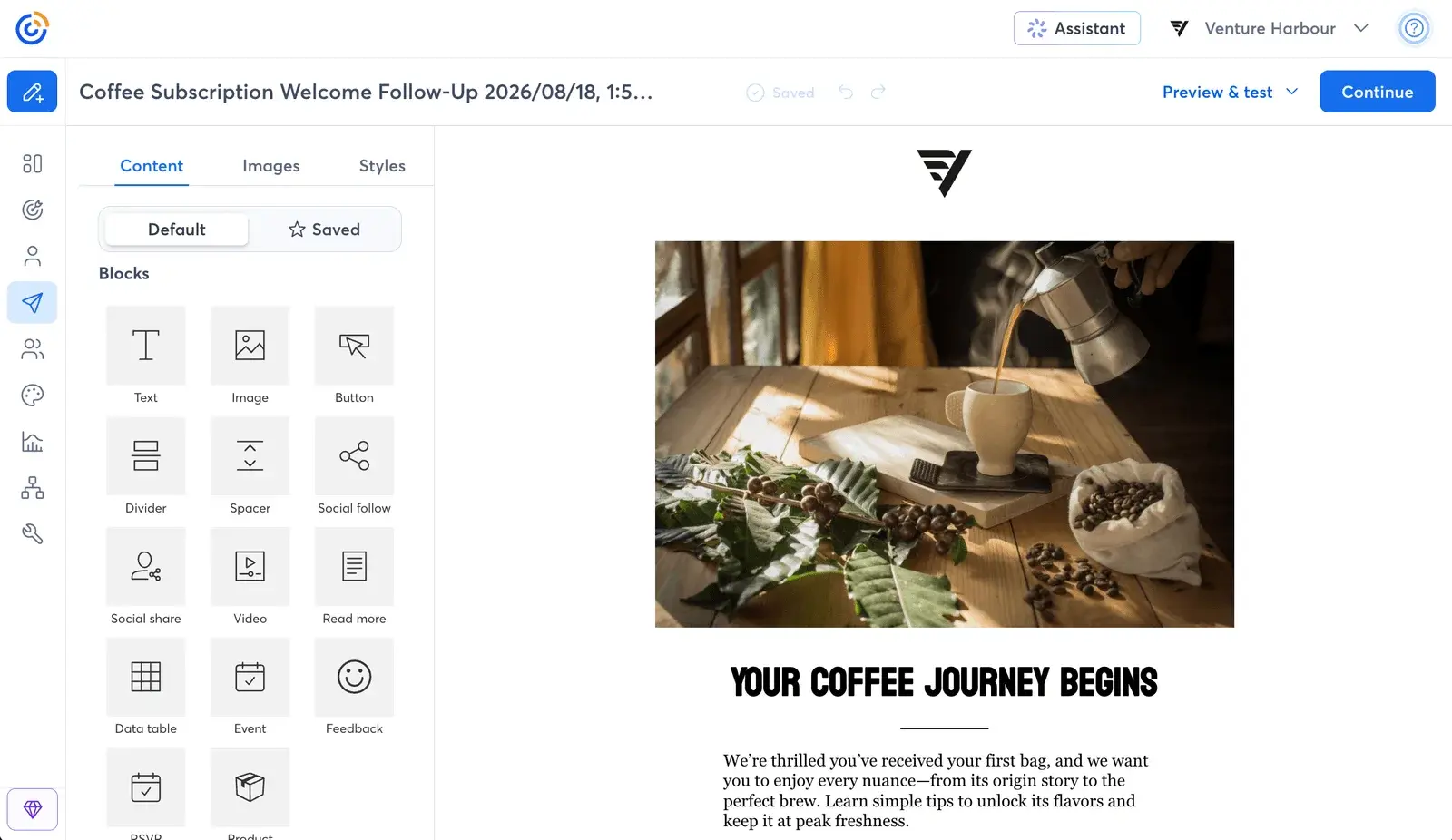
I rebuilt a coffee subscription email using its drag-and-drop blocks, with predictable spacing controls and only minor friction. Someone sending a straightforward newsletter should be able to get the layout together without learning HTML.
Custom CSS and custom fonts were missing from the Starter Email editor I tested. There was no searchable stock-image library either, so bring the images you intend to use.
My first contact upload failed with an error that didn’t say which rows were the problem. Even the successful import needed checking against the original file.
How far does the $6 plan stretch?
Starter Email costs $6/month, with unlimited contacts and 2,500 monthly sends. That suits a business collecting subscribers ahead of occasional launches, provided it can keep the sending volume under that ceiling.
Unlimited contacts sounds generous until you try to email them. You can store 5,000 people on that plan, but cannot send one campaign to all of them within a single month’s allowance.
With 500 contacts, four full-list campaigns use 2,000 sends. With 1,000 contacts, two campaigns use the same amount, leaving 500 sends for anything else. I’d write down the next month’s campaigns before choosing this plan.
Constant Contact’s broader Core product uses contact-based pricing. The regular starting prices are $12/month for Lite, $35 for Standard and $80 for Premium, each at up to 500 contacts.
| Plan | Starting monthly price | Sending allowance | Main restriction for a beginner |
|---|---|---|---|
| Starter Email | $6 | 2,500 emails total | Email-only product with a firm send cap |
| Lite | $12 | 10× contact tier | One user and one automation template |
| Standard | $35 | 12× contact tier | Three users and three automation templates |
| Premium | $80 | 24× contact tier | Higher starting cost for broader automation |
Keep Starter Email and Lite separate when comparing quotes. Lite’s price rises with your contact tier, while Starter Email costs the same as contacts grow. A temporary discount on Lite also doesn’t make it the same product.
For a beginner, paying $35 instead of $6 should follow a specific requirement. If you need three users or subject-line testing, consider Standard. A monthly announcement alone gives me little reason to start there.
What’s support like?
I asked phone and chat support a billing question containing a false premise. The phone agent answered in roughly a minute, corrected my misunderstanding and explained that reducing active contacts could lower the Core bill.
The chat response also explained that Core billing follows the highest active-contact tier reached. Neither response gave the complete cost-saving answer without prompting, but both helped me understand what I would pay.
That would reassure me more than an AI button when setting up a first account. Constant Contact’s AI generated complete email layouts, then missed the discount code I had explicitly requested and mixed images with different styles.
On Core, I asked the assistant for a three-email welcome sequence. It produced one email, so I built the sequence manually. The path builder handled delays and tags, but its conditions and step duplication were limited.
Our default email scored 9/10 in Mail Tester, with no material spam or blocklist problems.
Across all eight tests, Constant Contact scored 30/40. I’d put it first for a non-technical small business sending occasionally because of its straightforward editor, accessible support and low Starter Email cost.
-
Approachable editor: Rebuilt the coffee subscription newsletter with only minor friction.
-
Useful human support: A phone agent answered in about a minute and corrected the billing premise.
-
Low cost for occasional sending: Starter Email costs $6/month with unlimited contacts.
-
Firm sending ceiling: Starter Email allows 2,500 emails per month.
-
Unhelpful import errors: The first failed upload didn’t explain which rows needed fixing.
-
Restricted design controls: The tested editor lacked custom CSS and custom fonts.
Small businesses collecting contacts for occasional announcements, where a straightforward editor and access to support are worth a small monthly bill.
Weekly publishers whose sending volume already exceeds 2,500 emails, or teams needing complex behavioural sequences. Compare the actual Core quote with the alternatives before upgrading.
02Mailchimp
Test Lab Partner (Paid)Mailchimp is a member of our Test Lab Programme, which means we receive a fee to conduct hands-on testing of their platform. Learn more about our Test Lab Programme →For beginners who want to design their own campaigns
Mailchimp’s email editor is the easiest I’ve tested. I rebuilt a reference campaign in eight minutes, getting roughly 90% of the way to the original design. Content blocks and images were where I expected them to be.
You can bring images in from Canva, Instagram, Giphy or stock libraries. That removes some of the uploading and switching between tools involved in assembling a newsletter.
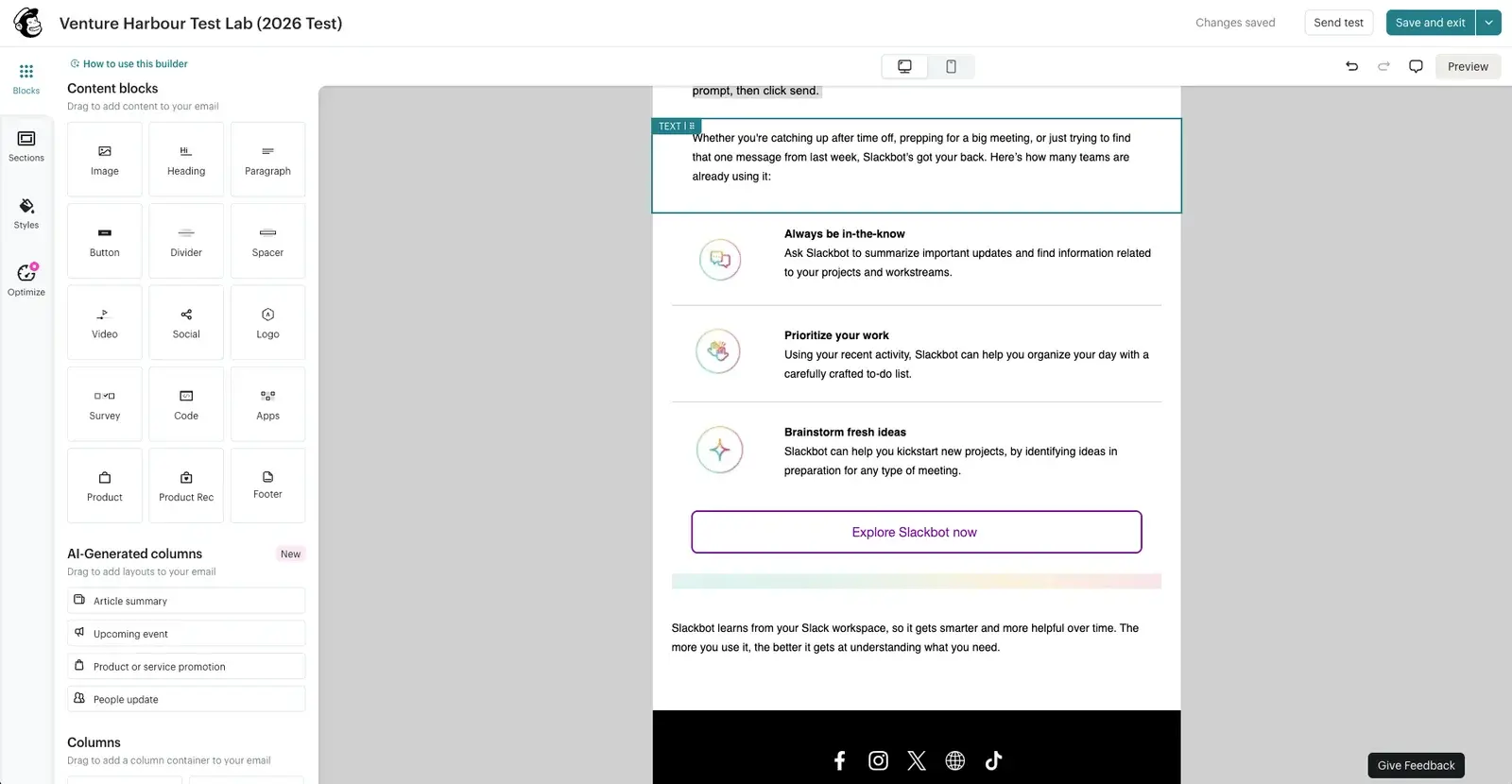
I would try rebuilding one real campaign before deciding how much that convenience is worth. If changing a heading or replacing an image takes several attempts in another editor, the same problem will recur every time you send.
Mailchimp earned its place in our email marketing comparison through that day-to-day usability. Its overall test score was 34/40, above Constant Contact’s 30/40; the smaller Starter Email bill is why Constant Contact leads for occasional sending.
Mailchimp pricing
Mailchimp’s free plan stops at 250 contacts and 500 monthly sends. At the full contact allowance, two newsletters use the entire month’s quota. I’d treat it as somewhere to learn the editor before budgeting for a paid plan.
Essentials starts at $13/month for 500 contacts. Standard starts at $20/month at the same size and is worth comparing if you need branching automations. Essentials limits automations to four steps without branching.
Unsubscribed contacts count towards the bill unless you archive them. During our support test, a human agent explained archiving as a way to reduce the charge, after correcting the premise of my billing question.
| Plan | Price at 500 contacts | Reason to consider it | Limitation |
|---|---|---|---|
| Free | Not available at this size | Testing with up to 250 contacts | 500 monthly sends |
| Essentials | From $13/mo | Regular campaigns for a small list | Four-step automations without branching |
| Standard | From $20/mo | Campaigns needing branching | Contact-based costs increase as the list grows |
For someone learning email marketing, I’d choose the plan against the next campaign and welcome sequence. Paying for a higher tier because you might eventually need it is an expensive way to leave features untouched.
Mailchimp’s AI writing tools operate inside the editor. Intuit Assist can generate text blocks and subject lines, and its article summary block pulls a title, summary and image from a URL.
I liked having the generated copy inside the layout I was already editing. Its suggestions for improving the campaign were generic when I wanted a critique of the structure and potential clicks.
Analytics AI returned plain-English campaign insights when asked about the previous 30 days. Our test account had little data, so I couldn’t establish how useful those recommendations become with a larger sending history.
The editor was the strongest part of the test, and its usefulness doesn’t require a large campaign history.
-
Quick campaign assembly: The reference email rebuild took eight minutes.
-
Convenient image sources: Canva and stock-library access sit alongside the editing work.
-
Practical support: A human agent explained how archiving contacts could reduce the bill.
-
Small free allowance: 250 contacts and 500 monthly sends leave little room to grow.
-
Billable unsubscribes: Contacts still count unless you archive them.
-
Limited entry-plan automation: Essentials stops at four steps without branching.
Owner-operators building designed newsletters and product announcements, with enough budget for a paid plan once the first 250 contacts arrive.
Beginners whose main requirement is sending regularly to thousands of contacts for free. EmailOctopus and Sender have larger free allowances.
03EmailOctopus
Test Lab Partner (Paid)EmailOctopus is a member of our Test Lab Programme, which means we receive a fee to conduct hands-on testing of their platform. Learn more about our Test Lab Programme →For regular newsletters with a smaller software bill
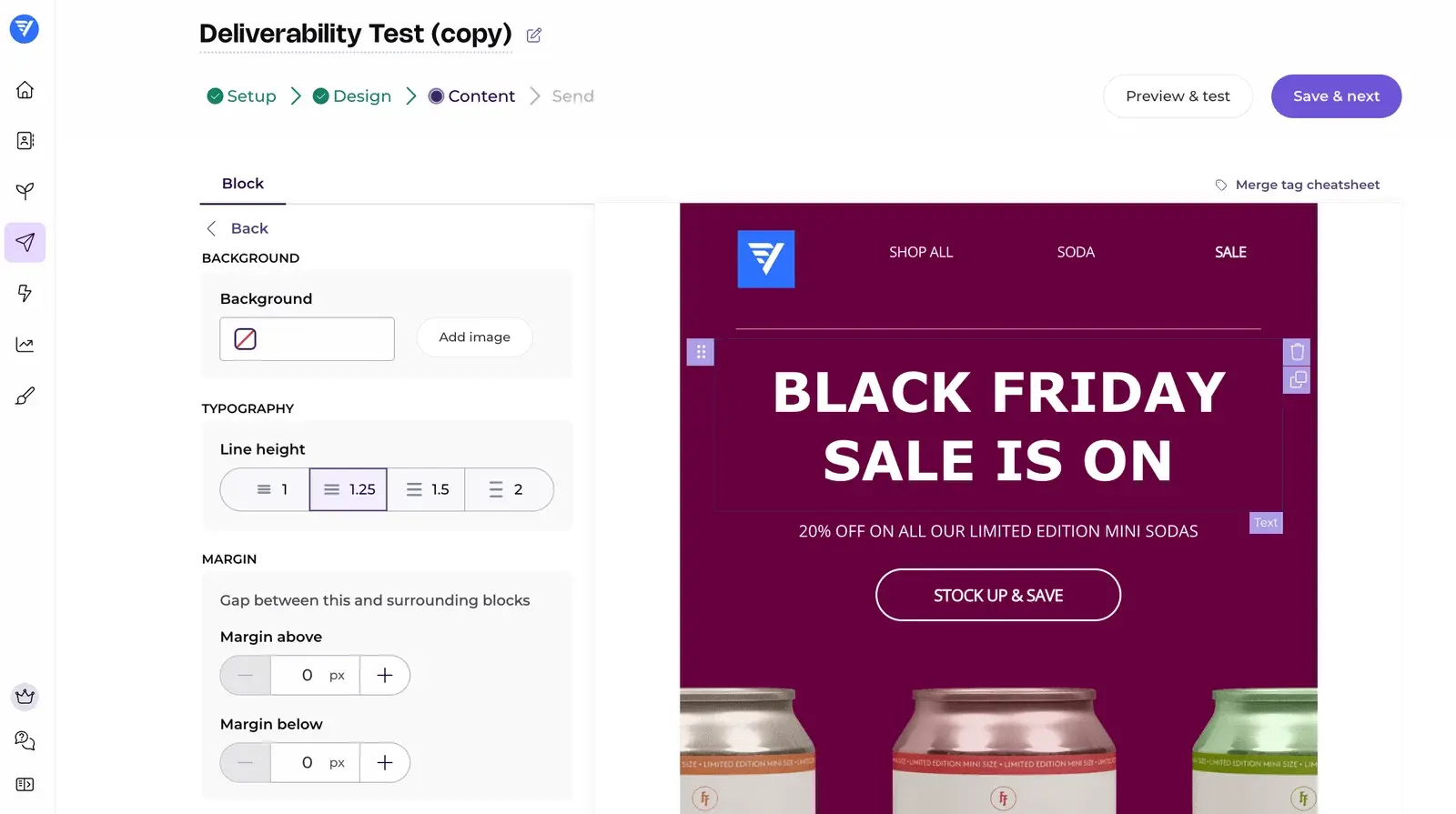
EmailOctopus let me rebuild a designed newsletter without much struggle. I wanted a 38px font and had to settle for 36px, while changing the relative width of two columns wasn’t obvious.
Those restrictions would annoy someone matching a brand design precisely. For a beginner putting together a readable newsletter, I found the editor straightforward enough to hand to a less technical teammate.
Its free plan allows 2,500 subscribers and 10,000 emails a month. At the full list size, that covers four newsletters with no allowance left for welcome emails or other automated messages.
With 1,000 subscribers, four newsletters would use 4,000 sends, leaving 6,000 for follow-up. That is a more comfortable starting point if sending regularly is already part of your plan.
Importing your contacts
Our messy contact file imported the valid rows despite errors elsewhere in the CSV. The downloadable error report explained rejected rows, giving me something specific to fix before trying again.
That is useful when your first list comes from a spreadsheet you have been maintaining by hand. You can compare the rejected records with the original instead of repeatedly uploading the file and hoping it works.
On live chat, I reached a person in about 40 seconds and had a useful answer in under two minutes.
The automation canvas handles emails, delays and conditions based on opens, clicks or tags. The free plan stops at five steps, and the tested builder lacked webhooks and actions in other applications.
I’d sketch the welcome sequence before setting it up. A short introduction followed by one useful follow-up may fit comfortably; a sequence with several conditions needs its steps counted against the limit.
What do you pay to remove the branding?
Pro starts at $10/month for 500 subscribers. It removes EmailOctopus branding and retains reports indefinitely, while the free plan retains them for 30 days. It also adds unlimited landing pages, forms and users.
The free contact limit covers stored subscribers, including people you aren’t emailing that month. Support confirmed that keeping more than 2,500 requires Pro, so sending to only a smaller segment won’t avoid the upgrade.
Our published comparison records these monthly Pro prices. Compare the quote at your actual list size rather than the $10 starting figure.
| Subscribers | Free plan | Pro per month |
|---|---|---|
| 500 | Available | $10 |
| 1,000 | Available | $13.50 |
| 2,500 | Available | $20 |
I would start with the standard EmailOctopus service. The separate Connect product uses your own Amazon SES account and adds a platform fee to that sending bill; it introduces another account for a beginner to manage.
-
Useful free capacity: 2,500 subscribers and 10,000 monthly emails.
-
Clear import feedback: Rejected CSV rows came with explanations.
-
Responsive support: Live chat produced a useful answer in under two minutes.
-
Limited design precision: Font presets and column controls restricted the reference rebuild.
-
Five-step free automations: Longer sequences require an upgrade.
-
Short report history on free: Reports remain available for 30 days.
Small businesses sending regular newsletters with a short welcome sequence, especially when the contact list is large relative to the budget.
Teams needing precise layout control or automations that change records in other applications. Those requirements went beyond the editor and workflow builder we tested.
04Sender
Test Lab Partner (Paid)Sender is a member of our Test Lab Programme, which means we receive a fee to conduct hands-on testing of their platform. Learn more about our Test Lab Programme →For free newsletters and automated follow-up
Sender’s free plan includes 2,500 subscribers, 15,000 monthly emails and automation. That gives you six full-list sends before allowing for automated messages, with Sender branding on the emails.
My account initially needed review, which prevented me from publishing landing pages. Support approved it in 31 minutes after two messages. I would get that check finished before promising a launch time.
Once approved, a landing-page signup arrived in the correct subscriber group, ready to trigger a welcome sequence.
Our import test also needed a second look. Sender brought in the 42 expected valid contacts plus one extra, and field mapping was manual. Compare the imported count and fields with your spreadsheet before sending.
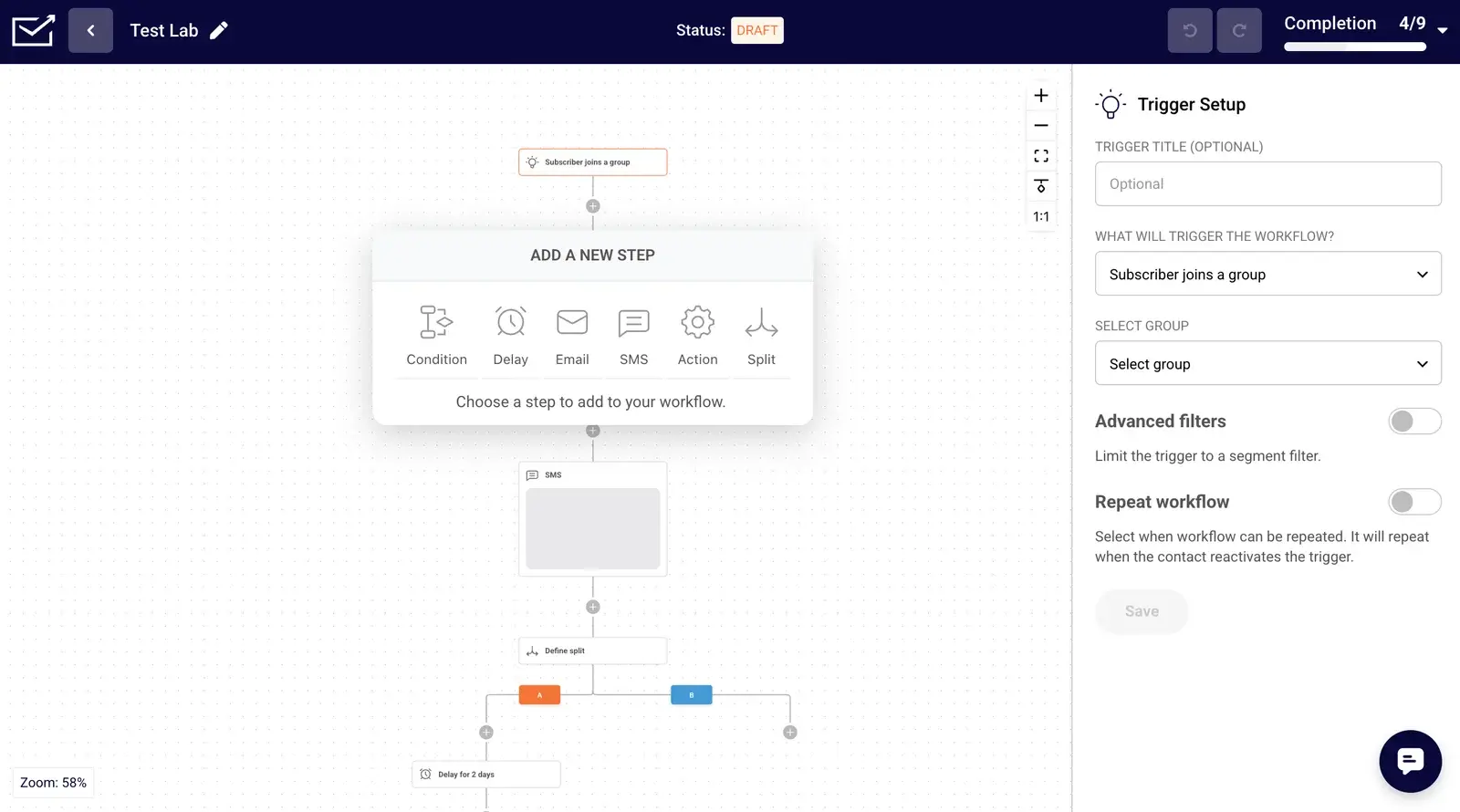
I also used Claude to build a three-email welcome sequence through Sender’s MCP connection. It created the draft with subject lines and delays, then revised the designs when asked.
The sequence had an activation problem flagged, so I wouldn’t count that as a finished campaign.
Paid Standard starts at $9/month for 500 subscribers and removes Sender branding. Its sending allowance is 12 times the subscriber tier, so check both numbers before upgrading from the larger free subscriber allowance.
| Sender plan | Monthly price | Subscriber allowance | Monthly sends |
|---|---|---|---|
| Free | $0 | 2,500 | 15,000 |
| Standard starting tier | $9 | 500 | 6,000 |
The free plan already includes automation. I would pay when list size or removing the branding justifies it, rather than assuming a welcome sequence requires a subscription.
-
Large free sending allowance: 15,000 monthly emails for up to 2,500 subscribers.
-
Automation on free: A newsletter can run alongside a welcome sequence.
-
Working lead capture: Our landing-page signup reached the intended subscriber group.
-
Approval can delay publishing: Our landing pages were blocked during account review.
-
Imports need inspection: The test imported one extra contact and required manual field mapping.
-
AI drafts need checking: Our generated sequence had an activation problem flagged.
Beginners who want to practise newsletters and welcome sequences with a substantial free sending allowance.
Open Sender's WebsiteTeams needing reliable AI-generated workflows or immediate landing-page publishing.
05Buttondown
For a small newsletter centred on writing
Buttondown’s published pricing includes rich-text and Markdown editors, a custom sending domain and hosted newsletter archives. The first 100 subscribers are free.
I’d consider it for a small newsletter where the writing is the point, and you’d rather type in Markdown than drag blocks around.
The add-ons can change the bill quickly. Analytics costs an extra $9/month, tagging and segmentation another $9, and automations another $29. Those three together add $47/month before the subscriber-based charge.
Its standard pricing assumes no more than one email a day to your whole list. If you need more frequent sends, Buttondown asks you to discuss usage-based pricing.
For writing to a small audience without those extras, the free tier is worth trying. If you need automation and reporting immediately, price the complete setup before moving your list.
Choosing your first account
I’d start with Constant Contact for occasional small-business campaigns that fit the Starter Email allowance. For a weekly newsletter on a free plan, I’d choose EmailOctopus; if welcome sequences need more sending room, I’d choose Sender.