

I’ve used ActiveCampaign across eight companies for over a decade, sending more than 124,000 emails. Our Claude tests with ActiveCampaign and Omnisend asked a narrower question: could the assistant turn account context into a usable email sequence?
One returned a plan that still needed building. The other created a workflow with a discount code we couldn’t send to customers. Both outcomes were more useful than another batch of subject lines, and both left work on our side of the screen.
Connecting Claude to an email account changes what you can ask it. Instead of describing your audience from memory, you can have it retrieve account information before proposing the next campaign. The awkward part is working out where its access stops, particularly when a confident response sounds like a completed job.
ActiveCampaign and Omnisend have hands-on Claude findings behind their entries. MailerLite, Klaviyo and Loops qualify on documented capabilities; we haven’t run equivalent connector tests with those three. Loops has no affiliate link here.
What can Claude actually do inside an email platform?
Claude can read data and perform the actions an email platform exposes through its connector. These connections use Model Context Protocol, usually shortened to MCP. Support for MCP alone doesn’t establish whether Claude can read a report, edit a campaign or construct an entire automation.
I’d separate those jobs before choosing software. If the weekly nuisance is finding campaign figures, a reporting connection may be enough. If you want a welcome sequence built while you write the offer, you’ll need evidence that the connector can create the relevant workflow steps.
An email platform’s built-in AI is also a separate product surface. A successful demonstration inside its own editor doesn’t prove Claude can perform the same task. ActiveCampaign gave us a particularly clear example of that distinction.
The shortlist starts with platforms covered in our email marketing research and AI email tests, alongside a wider search that brought in Loops. Each has a documented direct connection and a specific job worth trying through Claude.
These are five options for different working habits, rather than a scorecard from identical prompts. ActiveCampaign takes the first position for lifecycle teams willing to finish implementation in its builder. A shop asking Claude to construct cart recovery has stronger task-specific evidence from Omnisend.
| Tool | Best For | Claude task to try | Evidence and limitation |
|---|---|---|---|
| ActiveCampaign | Teams maintaining lifecycle campaigns | Plan an activation sequence from account context | Tested plan and copy; automation build failed |
| Omnisend | Shops building cart recovery | Create a disabled abandoned-cart draft | Tested workflow creation; coupon needed replacing |
| MailerLite | Newsletter teams | Review clicks and prepare a campaign draft | Documented tools; no comparable account test |
| Klaviyo | Shops investigating existing flows | Analyse campaign and flow performance | Documented reporting; conclusions need verification |
| Loops | SaaS teams using product events | Inspect contacts and trigger a published workflow | Documented actions; workflows must already exist |
01ActiveCampaign
Test Lab Partner (Paid)ActiveCampaign is a member of our Test Lab Programme, which means we receive a fee to conduct hands-on testing of their platform. Learn more about our Test Lab Programme →ActiveCampaign left us with a sequence we could use, but also an automation we still had to build. Claude retrieved account context, planned a 14-day activation sequence and wrote plain-text emails with A/B variants. Asking it to implement that plan exposed the connector’s limit in our test.
For a team maintaining onboarding and re-engagement campaigns, the planning work has value. Starting with account context gives you something more specific to challenge than a generic welcome sequence. You still need a marketer to decide whether the proposed behaviour fits the product.
Our ActiveCampaign review gives that result some background: the visual automation builder remains its strongest feature, while CRM and reporting lag behind. Connecting Claude doesn’t remove those weaknesses. It adds another way to work with the account.
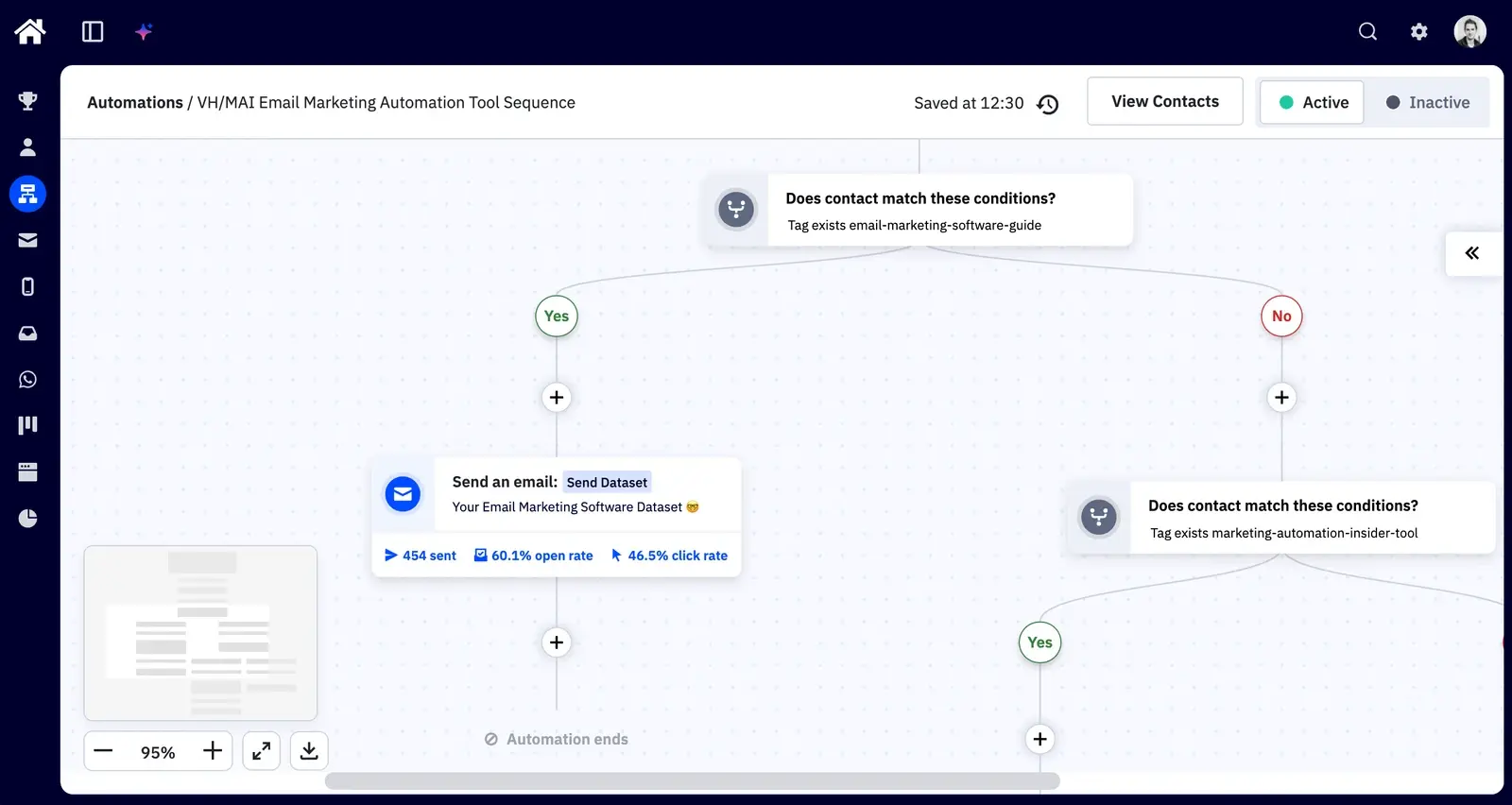
This is our existing automation from the review, showing where we inspect the conditions and email steps. Claude did not build the workflow pictured. Keeping the editor open alongside the conversation is how I’d judge whether a proposed change has actually reached the account.
The useful hand-off between Claude and ActiveCampaign
I’d begin with one existing journey and one outcome, such as getting trial users to complete their first project. Ask Claude to identify the account information available for that journey before drafting anything. Missing product events should become questions for your team, rather than guessed milestones in the copy.
A starting prompt could be: “Use the account context available to plan a 14-day activation sequence. Explain the entry condition and when each contact should leave. Draft the emails, and identify anything you cannot build.”
That is a suggested brief, rather than a transcript of our test. Its last instruction makes the hand-off explicit (otherwise you can spend a while admiring work that exists only in the conversation). Inspect the proposed sequence before implementing it in the builder.
I would also ask for a reason behind each delay. A two-day wait may suit someone trying a project management tool, but make little sense when the next step depends on a colleague accepting an invitation. Your product’s actual usage should decide that timing.
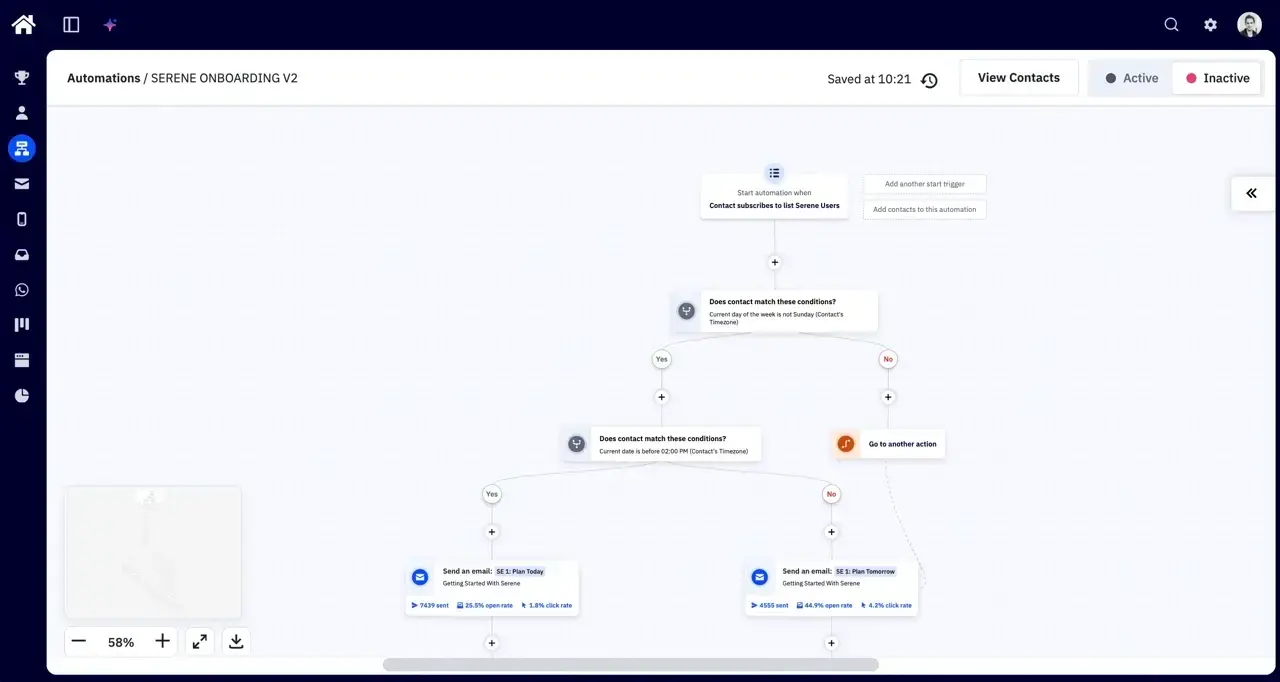
This existing Serene workflow shows why the implementation deserves its own review. The sequence branches on day and time before choosing an email. A tidy set of draft messages leaves those operational decisions unresolved unless someone checks the conditions too.
The in-app Active Intelligence tests went further in some areas. It created a requested segment after checking the contact count, and its sequence critique identified an unfinished A/B test, high unsubscribes and a missing preheader. Its first email build also ignored our layout instructions.
When asked to implement improvements, Active Intelligence added goal exits, a day-seven re-engagement branch and a 48-hour resend to non-openers. Those changes happened inside ActiveCampaign. They should not be credited to the external Claude connector.
It also failed to add A/B split actions, and its new email variant changed too much to isolate one hypothesis. I’d keep the control email intact and check the variant against a single question. Otherwise a winning result tells you little about what to repeat.
Connecting it and budgeting for the work
ActiveCampaign’s MCP documentation links to its Claude setup instructions and available tools. The setup uses the private Remote MCP URL from Settings, then Developer, inside ActiveCampaign. In Claude, choose ActiveCampaign under Connectors and complete the connection with that URL.
Corporate Claude accounts require administrator approval for the connection. Treat the account-specific URL as a credential, and check that you connected the intended account before requesting changes. A first request for existing list names is easier to verify than a bulk contact update.
Starter begins at US$15/month for 1,000 contacts on annual billing, with a 14-day trial and no permanent free plan. Our review budgets for Plus or Pro when the work needs more automation depth. Check the plan comparison against your actual sequence before subscribing.
Newer accounts are billed for unsubscribed and bounced contacts too. Clean up an imported list and understand the archiving rules before estimating the bill. Claude’s ability to inspect a contact doesn’t make that contact worth paying to store.
-
Account-aware planning: Our Claude test produced a 14-day activation sequence with email variants.
-
Established workflow editor: We can inspect and maintain the conditions behind the campaign.
-
Incomplete external execution: Claude could not build the automation in our test.
-
Ongoing checking: In-app AI mishandled layout instructions and A/B test construction.
-
Weak spots remain: Reporting and CRM trail the automation builder in our review.
I’d choose ActiveCampaign if lifecycle automation already deserves someone’s time each week and Claude will help that person plan the work. An occasional newsletter gives you much less reason to pay for this depth. Expect to retain ownership of the builder.
02Omnisend
Test Lab Partner (Paid)Omnisend is a member of our Test Lab Programme, which means we receive a fee to conduct hands-on testing of their platform. Learn more about our Test Lab Programme →Omnisend completed the more ambitious build in our Claude testing. Asked for an eight-email abandoned-cart sequence, Claude inspected the account, planned the messages and saved the workflow as a disabled draft. The discount email still contained a placeholder coupon code.
That makes it a useful candidate for a shop that wants help assembling recovery campaigns. It also leaves a specific launch task: replacing and checking the offer before anyone receives it. Saving a draft established that the connection could build the workflow, with no measured sales improvement attached.
The proposed sequence began with reminders, introduced a 10% discount, then moved into feedback and a final follow-up. The conditions and delays appeared inside Omnisend alongside the emails. Our AI email marketing tests show the request and resulting draft.
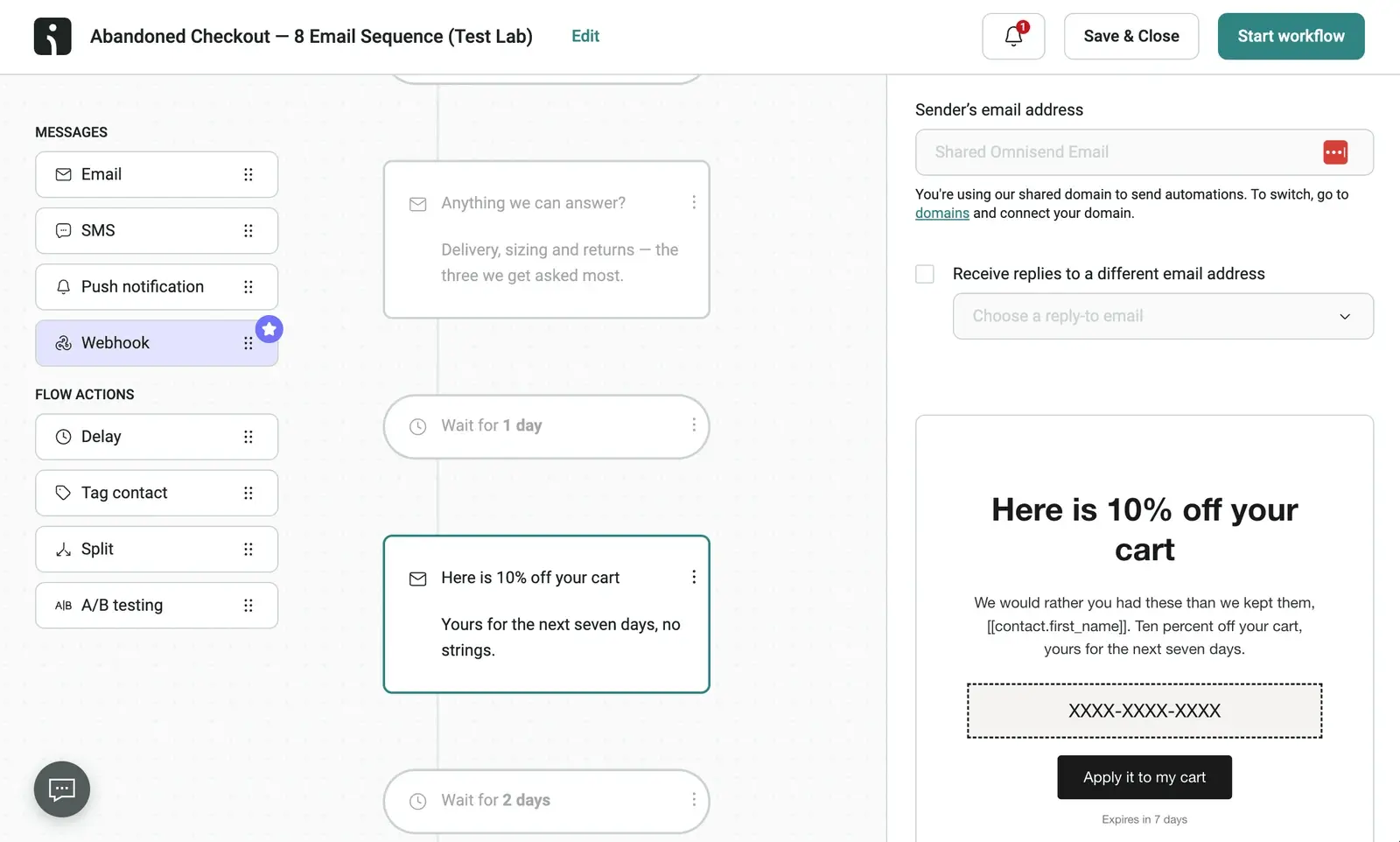
I’d question the eight-email brief before activating the result. Eight was the requested count, not evidence that every shop should send eight reminders. A low-cost repeat purchase and an expensive first order give you different reasons to follow up.
The coupon deserves the same scrutiny. Check whether it works on the intended products, when it expires and whether it can be combined with another offer. A discount that generates an order can still produce a poor result after fulfilment costs (the assistant isn’t paying those).
Review the journey before you start it
My first check would be the purchase exit. Someone who completes checkout should stop receiving messages asking them to complete it. Then I’d inspect the delay between emails and look for overlap with the shop’s other campaigns.
Next, send the draft messages to an address you control and follow the links. Confirm that the cart destination works and the offer matches the email. Our screenshot also shows the sending-domain setup awaiting attention, which belongs on the same pre-launch list.
A sensible follow-up prompt would be: “Explain the entry and exit conditions for this draft. List every placeholder and offer that needs my approval. Leave the workflow disabled.” That gives you something concrete to inspect before changing its status.
Omnisend’s connection instructions describe its official Claude connector, with access to campaigns, automations, contacts and performance data. That documented access is useful for investigating what already runs in the shop. It doesn’t establish that every requested edit will succeed.
Our ActiveCampaign and Omnisend tests used different briefs. Omnisend finished its cart-recovery build while ActiveCampaign left its activation workflow unbuilt, but that doesn’t support a universal ranking of their execution capabilities. It supports trying Omnisend when cart recovery is your actual job.
Standard starts at US$16/month for 500 contacts before introductory discounts. The free plan allows 250 contacts and 500 emails per month. A multi-email sequence consumes that allowance alongside any regular campaigns, so budget for both.
I’d pick Omnisend ahead of a broader platform if you run a shop and want Claude helping with purchase-related journeys. Our Omnisend review also flags the email designer as a weaker area. Expect some manual design work, especially if your brand needs more than the default layout.
03MailerLite
MailerLite is worth considering when the routine job is producing newsletters and keeping subscriber groups organised. Its MCP tool reference includes campaign drafts, subscriber activity and link-click data. We haven’t tested that connector against our own campaign results, so this is a documented fit rather than a measured time saving.
I’d begin with the last few comparable newsletters and ask which links attracted clicks. Keep the audience and purpose consistent: a product launch and a weekly reading list answer different questions. Then ask Claude to propose a draft for an existing subscriber group.
The useful part is making the source material explicit. Ask it to identify the campaigns it used and separate observed clicks from proposed explanations. A popular link can suggest a topic to explore, but it doesn’t establish why readers clicked.
For drafting, give it the actual article or offer and the intended action. I’d ask for one version first, then edit it before requesting alternatives. Generating ten options is an efficient way to give yourself ten things to review (a familiar sort of productivity).
MailerLite provides a hosted MCP connection with authentication, so you don’t need to maintain a server. Its documentation also exposes scheduling actions. Keep drafting and scheduling as separate requests, and inspect the audience in MailerLite before approving a send.
The Free plan costs US$0 and allows 250 subscribers with 2,500 emails per month. MCP access on Free is limited; sending through MCP requires a paid plan. Paid pricing varies with list size and sending needs, so check the calculator for your audience.
That free allowance gives a small newsletter room to evaluate the workflow, but it is easy to outgrow the subscriber ceiling. MailerLite says sending locks when Free exceeds its active-subscriber limit. I’d choose it for a modest newsletter operation after checking both the draft quality and the upgrade price.
04Klaviyo
For a shop already using Klaviyo, I’d try Claude on a reporting question before considering a migration. Klaviyo’s MCP documentation covers campaign and flow performance alongside account actions. We haven’t run an equivalent hands-on connector test, so I wouldn’t attach a performance claim to it.
Start with a question whose answer you can check in the existing report. Ask which welcome-series email generated the most clicks over a specified period, and request the underlying figures. Then compare Claude’s response with the platform before asking it to explain the difference.
Klaviyo documents a read-only configuration in its connection reference, linked from the MCP documentation. For its hosted server, this requires a custom Claude connector; the listed connector cannot accept those configuration parameters. I’d set it up for an initial reporting session before allowing campaign changes or sending.
The distinction between observation and explanation becomes especially useful here. A fall in campaign revenue might coincide with a different audience, a smaller send or a weaker offer. Ask Claude which evidence supports its explanation before you change a flow on that basis.
I’d also insist on consistent reporting windows. Comparing a campaign sent yesterday with one that has collected orders for a week invites a poor decision, however tidy the answer looks. Get the dates and selected conversion metric into the request before asking for recommendations.
Klaviyo’s free plan includes 250 active profiles and 500 emails per month. Paid pricing depends on profile count and the services selected. The free sending allowance is small for a running shop (two full-list emails use all 500 sends).
For an existing Klaviyo customer, investigating the connector costs less disruption than rebuilding flows elsewhere. For a new business with almost no campaign history, there is less for a reporting assistant to investigate. Choose the underlying email platform for the shop you operate, then evaluate Claude on a question with a verifiable answer.
05Loops
Loops deserves a place for SaaS teams whose email follows product activity. Its hosted MCP server can manage contacts, send events that start published workflows and send transactional messages from published templates. We have no affiliate link for it and haven’t run a hands-on Claude test.
The requirement for published workflows is a useful boundary. Claude can work with an existing product-email setup, but this documented capability doesn’t promise to design every journey from scratch. Someone still has to decide what an event means and prepare the corresponding workflow.
I’d start by looking up a test contact and checking its properties, then inspect the published workflow before sending an event. Confirm the team selected during authentication too. Sending an event to the wrong account is a surprisingly expensive way to test whether a connection works.
Its Claude setup instructions use the connector directory and a browser sign-in. That makes it accessible to someone working in Claude Desktop, alongside the developer setup options. The account can still perform real sends, so use a contact you control for the first trial.
The free plan allows 1,000 subscribed contacts and 4,000 combined marketing and transactional sends in a rolling 30-day window. Paid plans start at US$49/month for up to 5,000 contacts, with unlimited sends. Product notifications share the free allowance with campaigns, which can reduce the headroom for a newsletter.
I’d shortlist Loops if your first question is about a user’s product state and the email that should follow it. A team primarily producing editorial newsletters has less reason to organise its work around product events. Keep the trial focused on one existing journey before committing the rest of your email.
Start with the workflow you already need
Choose ActiveCampaign if Claude will help plan lifecycle campaigns that your team can finish in the automation builder. Choose Omnisend if you want a shop’s cart-recovery draft built inside the platform and will review the offer before activation. If your current tool already supports the task, try its connector before paying to move the list.
Update Log
23 September 2026: Added five Claude-connected email platforms, existing account findings, review screenshots and documented pricing limits.