


If you’re looking for an omnichannel platform for SMS and email marketing, it’s not always easy to find one tool for both. There’s no shortage of email marketing tools but support for SMS is patchy. Most tools don’t provide SMS features at all and many that do only treat it as an afterthought.
An omnichannel platform lets you integrate both channels and manage campaigns from one place. Your SMS and email strategies can then work together and improve each other’s results.
What are the best omnichannel SMS & email marketing tools?
Every year we update our annual review of the best email platforms. We do this because email marketing is crucial to our business and we need to know we’re still using the best tools for us. An added bonus is this helps us advise others on the best tools for their needs.
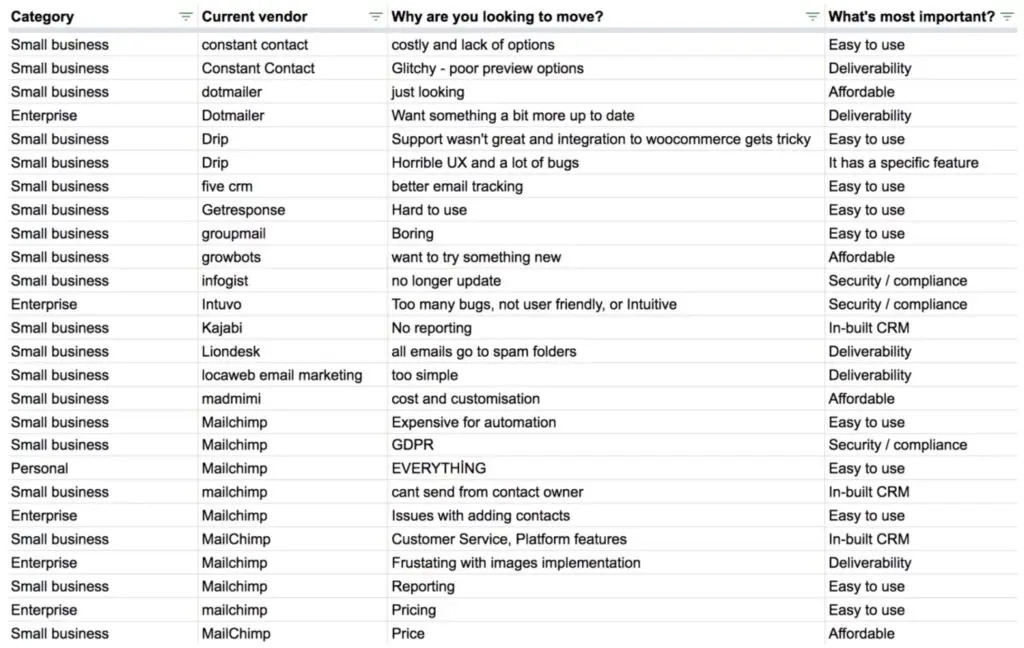
We’ve analysed more than 670 email marketing tools in our analysis. Now, if you’re looking for an omnichannel SMS and email marketing system, you can forget about 662 of these. Only seven of the tools in our analysis offer sufficient SMS and email features to make our list of recommendations:
- ActiveCampaign –
- Ontraport –
- Omnisend –
- Brevo –
- GetResponse –
- Sendlane –
- Klaviyo –
Before we take a look at each platform, let’s quickly run through some of the most important things to look for in SMS and email marketing software.
What to look for in SMS & email marketing software
If you’re looking for an omnichannel SMS and email marketing tool, finding the right mix of features can be difficult. Finding a good email marketing system is one thing but finding a platform that also provides the SMS features you need is something else.
In most cases, you’ll find the SMS features don’t live up to the email marketing tools.
Here are some key things to check when you’re looking at potential tools:
- SMS marketing: Check that potential platforms include the SMS marketing features you need.
- Messaging apps: Consider whether you want support for messaging apps like WhatsApp.
- Send limits: Take a look at the monthly email and SMS limits — you’ll often find the SMS limits are more restrictive.
- SMS pricing: Most platforms give you a set number of SMS messages on each plan. You’ll often have to upgrade or pay additional fees once you exceed this.
- CRM: A customer relationship management system keeps your email, phone and other customer data in one accessible place.
- Email marketing: You also need a system capable of creating and managing email campaigns with builders, templates and, ideally, A/B testing.
- Marketing automation: With the core features covered, the next thing to look out for is marketing automation for (at least) both channels: SMS and email.
- Automation templates: You want automation templates for both SMS and email workflows.
- Reporting: Make sure the reporting features provide detailed insights for SMS and email campaign performance.
01ActiveCampaign
Test Lab Partner (Paid)ActiveCampaign is a member of our Test Lab Programme, which means we receive a fee to conduct hands-on testing of their platform. Learn more about our Test Lab Programme →We’ve used ActiveCampaign across eight portfolio companies since 2012, but our SMS use has been limited to basic reminders. Our recommendation comes mainly from building email automations, rather than running large SMS campaigns.
ActiveCampaign is the option we’d choose if you need automated journeys that change with a contact’s behaviour. SMS costs extra on Plus, Pro and Enterprise, and the CRM and reporting are weaker than the automation builder.
Our Serene onboarding workflow checks the contact’s day and local time before choosing which welcome email to send. That is the sort of branching you can build around SMS reminders too, although the screenshot below shows email steps only.
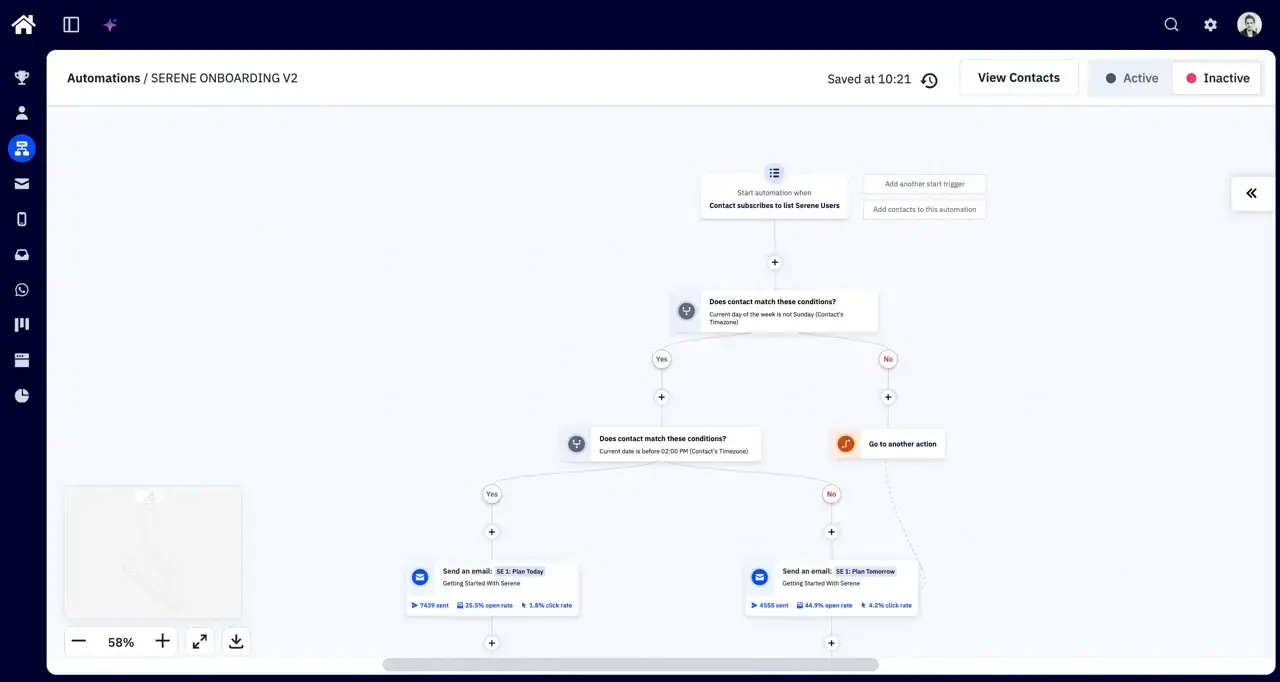
You can add a text-message follow-up when an email goes unopened, keeping both channels within the same workflow. SMS also supports replies through an inbox, so two-way messaging is no longer a reason on its own to choose another platform.
You’ll still need to check country support and credit costs before building those journeys. Unused SMS credits expire each month, and the enhanced CRM is a separate add-on (you don’t need it just to send email and SMS).
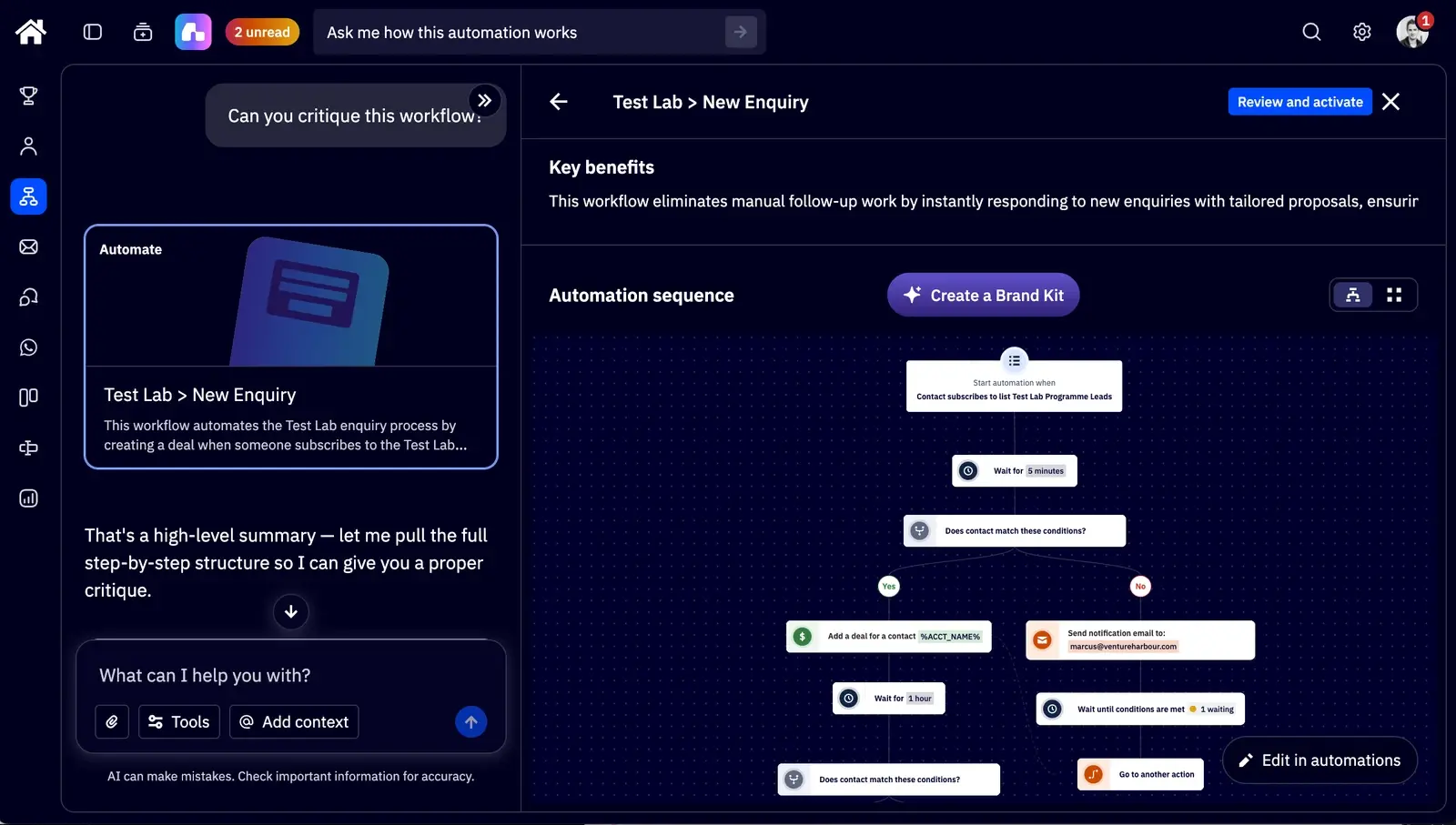
Active Intelligence can help with segmentation and reviewing existing sequences. In our latest review tests, it spotted an unfinished A/B test and suggested improvements, but it couldn’t add the split actions itself. We’d use it to critique a workflow, then check the changes ourselves.
Pricing
The email plans below match the prices listed in our ActiveCampaign review, on annual billing. Starter begins at $15/month for 1,000 contacts, but you’ll need at least Plus to buy the SMS add-on.
| Starter | Plus | Pro | Enterprise | |
|---|---|---|---|---|
| 1,000 contacts | $15 | $49 | $79 | $145 |
| 2,500 contacts | $39 | $95 | $149 | $255 |
| 5,000 contacts | $79 | $145 | $205 | $375 |
| 10,000 contacts | $149 | $189 | $375 | $589 |
| 25,000 contacts | $319 | $389 | $629 | $879 |
Our review lists the SMS add-on from $16.83/month for 1,000 credits. On those figures, Plus with 1,000 contacts and 1,000 SMS credits comes to $65.83/month on annual billing, before any CRM add-on.
Credits renew monthly even when billed annually, and the number needed per message varies by destination. Confirm the current package cost in your account before purchasing — the public pricing page doesn’t display every SMS credit tier.
Accounts created on or after 3 November 2025 are billed for all contacts, including unsubscribed and bounced contacts. Clean your list before importing it, and check ActiveCampaign’s pricing against your total contact count.
What we like:
The automation builder lets you coordinate email and SMS around contact behaviour, with Active Intelligence available to help review sequences. That flexibility is useful for onboarding and follow-up campaigns, but takes more setup than a simple newsletter or occasional text reminder.
Where they could improve:
SMS and the enhanced CRM add to the bill, while unused SMS credits don’t roll over. Our review also found the CRM and reporting fairly average, and reaching human support took more effort than we’d expect at this price.
Who should use it?
We’d choose ActiveCampaign if automated onboarding or lead nurturing already contributes to revenue and you want to add SMS to those journeys. For occasional broadcasts, the extra subscription costs and workflow setup are harder to justify.
Marcus’s review video shows the automation and Active Intelligence tests behind that recommendation, including where the AI needed supervision.
02Ontraport
Ontraport isn’t as powerful as ActiveCampaign but it includes email marketing and SMS automation on all of its plans. You don’t need to worry about any add-ons and you also get a CRM on all plans with upgrade options for more advanced features.
This is a simpler setup and Ontraport is also a more affordable option.
Ontraport isn’t as capable for email marketing. The templates aren’t too inspiring and the email builder is pretty basic. It covers all of the essentials but you quickly realise email isn’t Ontraport’s biggest strength.

SMS marketing is one of Ontraport’s strengths, with two-way text messaging so customers can reply to your messages. ActiveCampaign now supports an SMS inbox too, although it requires the SMS add-on.
You can also define a personal phone number using the system so customers can save you as a contact and always know it’s you getting in touch.

With Ontraport, you can automate SMS and email messages. You can use and edit automation templates or build your own workflows using the drag-and-drop builder.
This is the platform’s worst builder but it’s fine for covering the basics. It’s a serious downgrade from ActiveCampaign.
Ontraport simply can’t keep up but it’s also not asking for the same monthly fees.

Pricing
Ontraport runs four plans with email, SMS and the CRM available on every plan. Pricing is determined by the number of contacts you have on the system and how many user seats you need.

Ontraport’s pricing allows you to send unlimited emails and SMS messages. The first phone number on your system is free but you’ll have to pay for any additional phone numbers you want to send from.
You can get a complete breakdown of pricing and features on the company’s pricing page.
What we like:
- Email & SMS – Ontraport is worth considering if you want one system for automating email and SMS campaigns.
- Built-in CRM – The platform includes a built-in CRM on every plan.
- Pricing – Ontraport offers affordable entry prices and remains good value as your email list grows.
Where they could improve:
- Usability – With so many features crammed into one system, usability suffers.
- Email builder – The email builder is OK but it feels dated and a little awkward to use.
- B2B – Ontraport is better suited to eCommerce product-oriented businesses, not so much B2B and service providers.
Who should use Ontraport?
I’d suggest Ontraport if you want an affordable SMS and email marketing tool that’s ready to use right out of the box. You don’t need to worry about any add-ons or bundled plans to get email, SMS and a CRM from the same system.
Unfortunately, the day-to-day usability of the platform isn’t as enjoyable as the initial setup. You’re also getting a far less capable system (admittedly for less money). Ontraport delivers some quality SMS features but it falls short on email marketing and automation.
03Omnisend
Omnisend is an email marketing platform designed for eCommerce businesses. If you’re running an online store with tools like Shopify or WooCommerce, this is a great way to integrate an omnichannel SMS and email strategy.
Everything about Omnisend is designed to make multichannel marketing easier for eCommerce companies.
It’s not the most powerful email marketing system and some features lack a little depth (eg: A/B testing). Even still, the eCommerce focus, excellent software design and affordable pricing make this a great all-round option for online retailers.
In addition to SMS and email marketing, you can also implement web push notifications, popups and forms on your website. Every feature is designed specifically for eCommerce, too. The reporting system includes insights on revenue, online sales and campaign performance – for SMS, email, notifications and more.
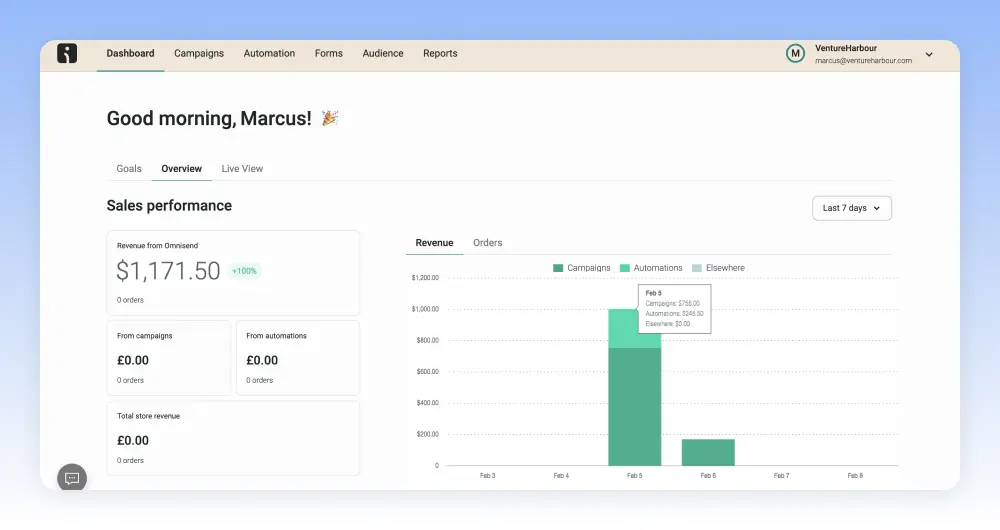
Omisend is pretty capable as a marketing automation system, too. You can’t create the same level of dynamic workflows as you’ll achieve with ActiveCampaign. However, Omnisend’s strengths lie in its eCommerce focus and balance between simplicity and powerful features.
Its library of automation workflows isn’t the most in-depth, but it doesn’t need to be. It includes templates for the most common interactions along the eCommerce customer journey – and this is all it needs.
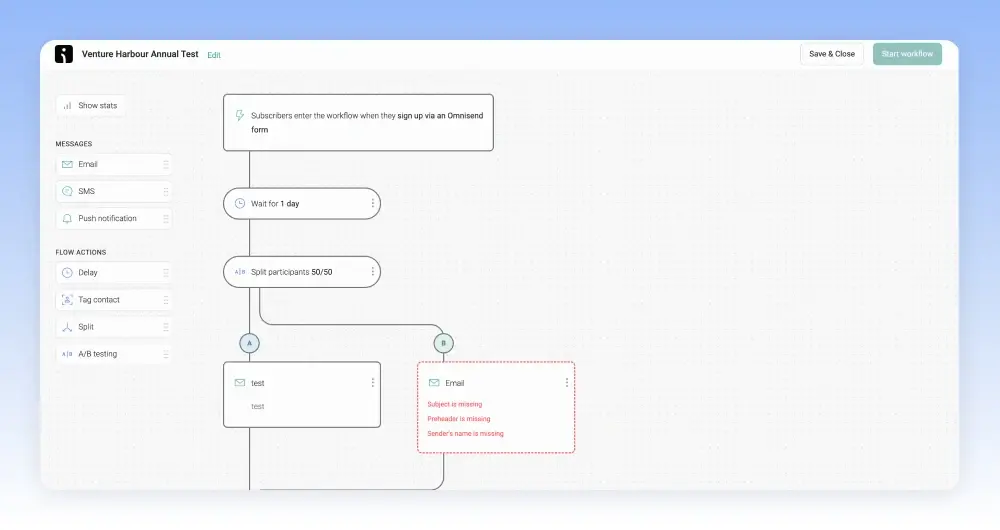
Then, you’ve got its automation builder, which you can use to edit templates or build your own workflows. Again, it’s a relatively simple builder but it’s super intuitive and easy to use. This combination of templates and intuitive builders allows you to automate all of the essentials pretty quickly.
Yes, if you want to create complex, personalised automations, you might need to look elsewhere. However, if you want a simple, fast and relatively affordable way to cover the basics (and more), Omnisend is hard to beat.
Pricing
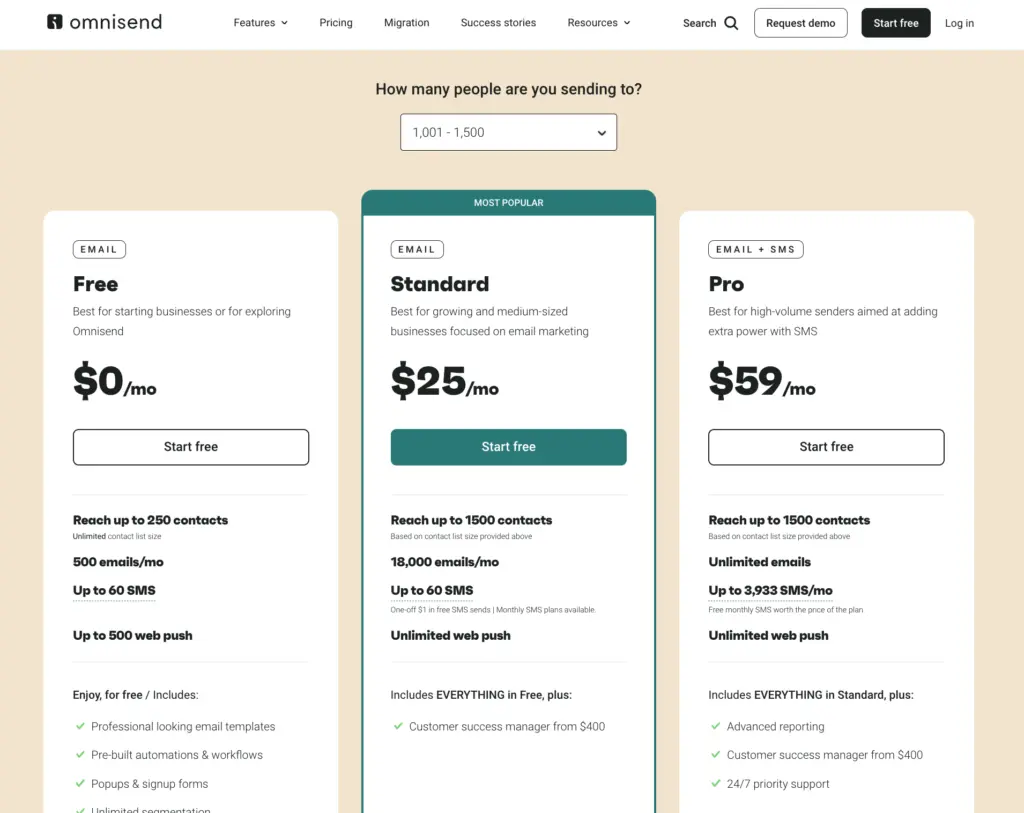
Omnisend offers one of the most generous free plans for eCommerce email marketing. This covers you for up to 250 contacts and 500 emails per month but you’re limited to 60 SMS messages.
However, you can buy SMS credits on any Omnisend plan, even if you’re signed up for the free plan. SMS messages are priced at $0.015 per message to the United States. So you can purchase 100 messages for $1.50, a thousand for $15 and so on.
Keep in mind that SMS messages are priced differently, depending on the country you send them to.
You can check how much it’ll cost you to buy SMS messages for your required countries on Omnisend’s pricing page.

Upgrading to the Standard plan starts from $16/month for up to 500 contacts. This allows you to send up to 6,000 emails every month but you’re limited to 60 SMS messages without buying additional credits.
If you’re serious about SMS marketing, you’ll want to consider Omnisend’s Pro plan. This is where pricing starts to get a little more complex. The plan starts from $59/month for up to 2,500 contacts with prices increasing as your list grows. You can send unlimited emails every month on this plan and the starting price covers you for up to 3,933 SMS messages per month, too.
Basically, whatever you’re paying per month for the Pro plan, you get the equivalent amount of SMS credits included for free. So, if you’re paying $59/month, you get $59 worth of SMS credits. If your contact list grows to 5,000, your monthly fee increases to $90/month and you get $90 worth of SMS credits (6,000).
Again, you can find all the information you need on the company’s pricing page.
What we like:
- SMS pricing – If you sign up for the Pro plan, you get a great deal on SMS pricing.
- Deliverability – Omnisend offers a range of features to maintain high deliverability, including email warm-up (sending emails gradually to improve your sender reputation) and insightful reports to monitor your deliverability and reputation.
- eCommerce content blocks – Omnisend offers lots of content blocks to integrate products and discounts directly into your email campaigns. Their form templates also include a range of creative ways to engage visitors – such as with a wheel of fortune.
Where they could improve:
- A/B testing limitations – While you can add splits in automation sequences, we weren’t able to set a goal to run effective A/B tests within an automation sequence.
- Templates – The templates are visually underwhelming.
- The campaign builder – Performance is a little sluggish compared to the other tools we’ve tested.
Who should use Omnisend?
Omnisend is ideal for eCommerce companies that want an affordable and truly omnichannel system for SMS and email marketing. The eCommerce focus allows this system to strike a real balance between power and simplicity. It’s never going to match the full capabilities of a platform like ActiveCampaign but it punches well above its asking prices.
The downside is you have to sign up for its most expensive plan to get the best value. That being said, Omnisend is more affordable than most systems at comparable list sizes. And, best of all, it matches your monthly spend with the equivalent amount of SMS credits – a huge saving over buying them separately.
04Brevo
Brevo is a more flexible alternative to Omnisend, suitable for all business types. On paper, it’s similarly affordable, too, but this changes once you get involved in SMS marketing. Unlike Omnisend, you have to pay for every SMS message you send. You don’t get any credits included with your plan so make sure you understand Brevo’s pricing model.
We’ll take a good look at this in a moment.
If you’re an eCommerce business, Omnisend is clearly better value for money but it’s only an option for online retailers. Brevo, on the other hand, is an option for all business types and it’s the more capable platform overall.
It’s got the better email marketing features, slightly better automation capabilities and it also supports online messaging via WhatsApp. Brevo also includes some of the best transactional email features around. In fact, we still use Brevo as our second email system because of its transactional emails.

Brevo is also more omnichannel than Omnisend. In addition to SMS, email and push notifications, the platform also supports live chat and chatbots. The platform includes its own CRM that’s completely free to use. This houses all of your customer data, allowing you to tie multichannel campaigns together and use insights to increase relevance with every interaction.
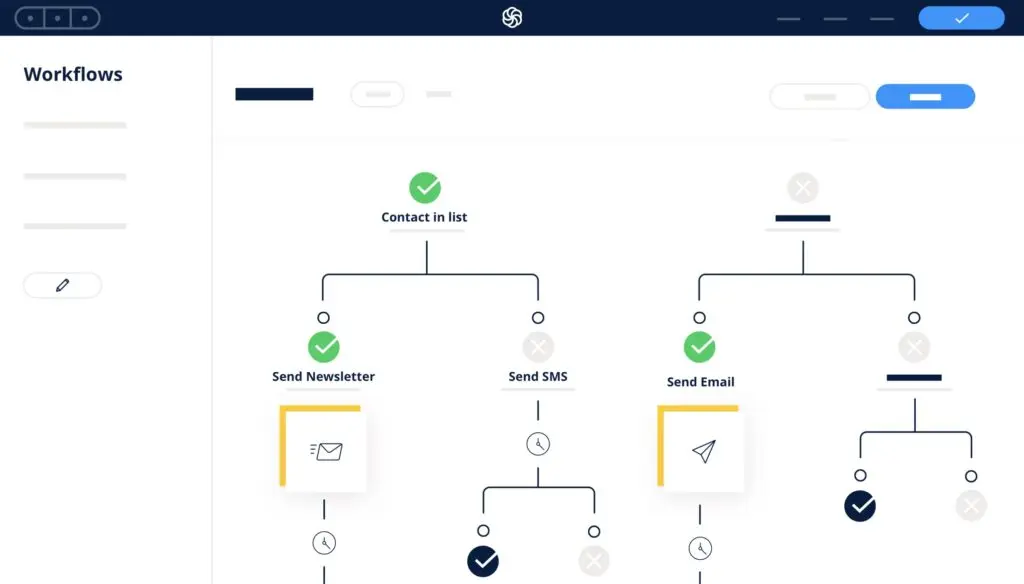
Brevo isn’t as intuitive as Omnisend (few tools are) and it’s a more expensive SMS solution. However, it’s also a more capable system overall that incorporates all of the modern marketing channels into one system.
Pricing
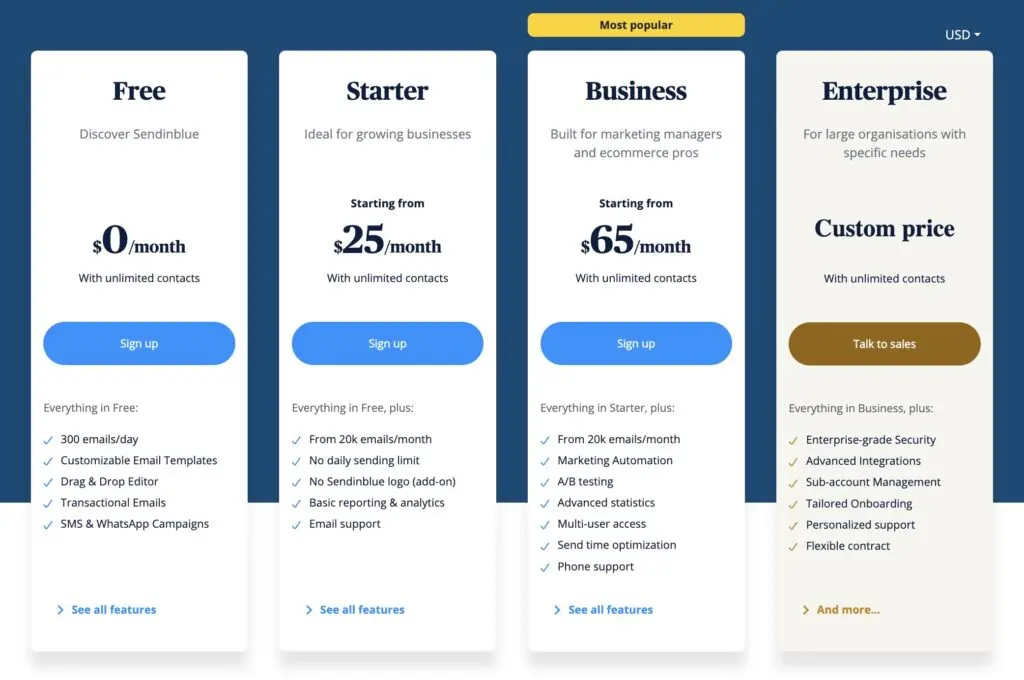
Brevo is one of the most affordable email marketing systems on the market. Its generous free plan is great for new and small businesses while the Start and Business plans both offer great value.
However, the platform gets more expensive once you start using it to manage your SMS strategy. On paper, Brevo gives you more credits for your money than Omnisend. With Omnisend, $90 gets you 6,000 SMS credits but Brevo gives you 10,000 credits for $109 (both to the US).

However, Omnisend’s pricing model matches your monthly and includes the equivalent number of credits on your plan. Overall, this makes Brevo the more expensive option but you are getting more features for your money elsewhere.
What we like:
- Omnichannel – Brevo brings web chat, chatbots and more into a truly omnichannel system.
- Transactional emails – Few tools at this price point offer transactional emails, let alone on a free plan.
- Free plan – Brevo offers one of the most generous free plans for email marketing – but you don’t get any SMS credits.
Where they could improve:
- SMS pricing – With no SMS credits included in your plan, you have to pay for every SMS message you send.
- Basic automation – Brevo offers slightly better automation features than Omnisend but it can’t compete with the likes of ActiveCampaign.
- Email templates – The email templates are also quite basic and you can only do so much with the editor.
Who should use Brevo?
Brevo is best suited for companies that want to manage the full set of marketing channels it supports with one system. This means email marketing, SMS, WhatsApp messaging, push notifications, web chat and more.
Overall, Brevo is very affordable but the SMS pricing does negate this to some extent. As a result, this is probably best suited to companies that use SMS marketing as a backup to other channels.
05GetResponse
Alongside SMS* and email, GetResponse offers push notifications, web chat, forms, popups, webinars and paid advertising tools.
The platform also gives you a website builder, landing pages, automation and optional eCommerce features.
You have to sign up for its most expensive plan to get its SMS marketing features (hence the asterisk).

GetResponse helps you manage bulk campaigns and integrate SMS messaging into your marketing strategy. You can personalise messages, optimise send times, shorten links to save characters and track delivery rates.
GetResponse SMS delivery rates are some of the best we’ve had, too. You can also track open rates, click-through rates and other insights with its reporting features.

You can create autoresponders, send messages for key events (like birthdays) and integrate SMS messages into other channels. You can capture email signups on your website, send automatic email responses and follow up with a text message for users who visit specific URLs.
Pricing
The pricing information on GetResponse’s website is of no use to you if you want its SMS marketing features. These are only available on its MAX2 plan and the company doesn’t publish pricing information for this plan.
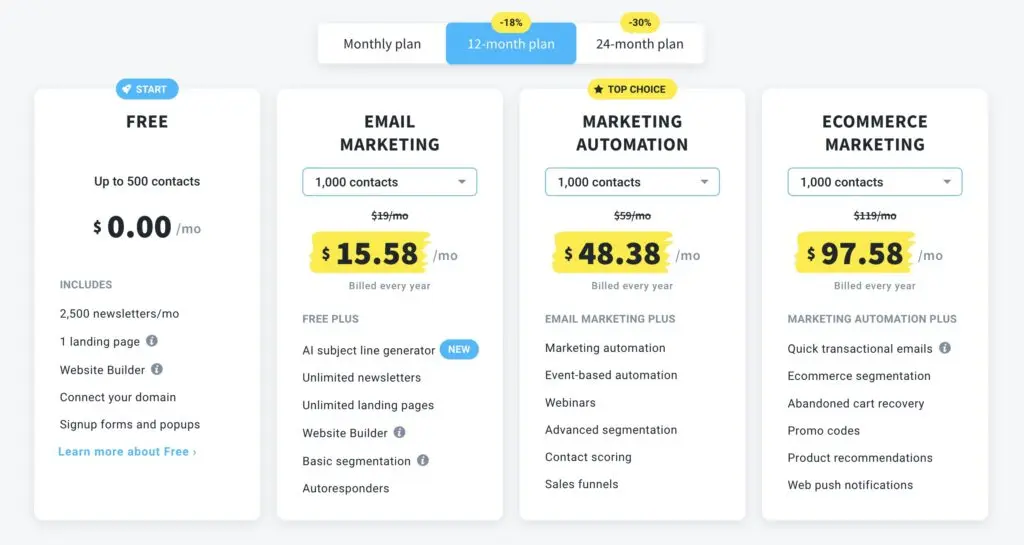
This means you’ll have to get a quote from GetResponse’s sales team for pricing info. Your quote mostly depends on usage factors like the size of your contact lists and how many emails and SMS messages you need to send each month.
The MAX2 plan comes with 5000 monthly SMS credits as standard but you can increase this limit.
What we like:
- Multichannel features – Email marketing, SMS, chat, push notifications and more.
- Quality SMS features – Personalisation, send-time optimisation and link shortening, although they’re only available on the most expensive plan.
- Easy automation – The system offers basic automation actions as built-in features, making them easy to set up.
Where they could improve:
- SMS availability – We wish GetResponse offered basic SMS features on its cheaper plans.
- Builders – The builders lack some flexibility and default mobile optimisation.
- Focus on eCommerce – GetResponse has shifted focus to eCommerce recently, which doesn’t suit everyone.
Who should use GetResponse?
GetResponse is worth considering if you need SMS alongside email, chat and push notifications. You have to sign up for its most expensive plan to get any SMS features at all. We wish it offered basic or restricted features on its cheaper plans to create an upgrade path for companies on a budget.
If you’re ready to pay for MAX2, we’d suggest GetResponse for combining SMS marketing with those other channels. Its email marketing features are less capable — the appeal is having those channels in one platform.
06Sendlane
Sendlane calls itself a unified email and SMS system for eCommerce companies. This puts it in direct competition with Omnisend but the platform squarely focuses on email and SMS. So, it’s less omnichannel as a platform but this gives it space to focus more closely on email and SMS features.
On the email marketing front, you can create campaigns using email templates or build your own with the drag-and-drop editor. You can schedule bulk emails, segment your audience and optimise send times for different audiences with Sendlane’s built-in toolkit.
Sendlane also includes its own intelligent popup system that helps you capture more email leads. You can create popups for lead gen campaigns and prevent exit actions like cart abandonment.

Sendlane’s SMS features give you the same freedom to implement SMS and MMS messaging into your campaigns. You can create your messages in the visual builder and preview them before you send anything.
The system supports two-way messaging so recipients can reply to your messages — and you to theirs. Chat histories are stored on the system for 30 days and you can schedule messages/replies for the most effective times.

With Sendlane’s automation tools, you can automate campaigns with email and SMS interactions. You can manage both channels separately, integrate them or use SMS to back up key messages. If customers don’t respond to your retargeting emails, you can automatically send SMS follow-ups with the same offer.
Pricing
Sendlane’s pricing depends on the number of contacts you have and the amount of monthly SMS credits you need. The minimum thresholds cover you for up to 5,000 contacts with 75,000 email credits included.
The SMS features are optional and 5,000 credits is the minimum threshold, once again. This gives you a starting price of $173/month for both email and SMS feature sets, if you pay annually. However, Sendlane recommends 25,000 SMS credits for 6,250 contacts and this would bump you up to $511/month.

So we’re not talking about the cheapest SMS and email marketing system here. The entry prices alone are higher than most of the other tools. If you have far fewer than 5,000 contacts, this probably isn’t the system to start with.
For the complete breakdown of Sendlane’s pricing and features, you can visit its pricing page.
What we like:
- SMS features — Sendlane combines two-way SMS and MMS messaging with email marketing tools.
- Deliverability — Sendlane achieves good deliverability rates for both email and SMS.
- Usability — The user interface is easy to use, with visual builders for both channels.
Where they could improve:
- Entry prices — High entry prices will rule out Sendlane for new and smaller retailers.
- eCommerce integrations — Currently, Sendlane only supports full integrations with Shopify, WooCommerce, Miva and ClickBank.
Who should use Sendlane?
I’d consider Sendlane if you want an easy-to-use system focused on SMS and email marketing. It’s more expensive than many alternatives, and the high entry prices will rule it out for a lot of smaller eCommerce businesses. The limited integration options will also rule it out for retailers using non-supported systems.
This leaves a small group of eCommerce businesses willing to pay for ease of use and dedicated support. Sendlane combines good email and SMS delivery rates with intuitive tools, but you’ll need to justify that $173/month starting price.
07Klaviyo
Klaviyo is another eCommerce SMS and email marketing system. It’s a direct rival to Sendlane and, to a lesser extent, Omnisend. However, like Sendlane, Klaviyo focuses on email marketing and SMS messaging while Omnisend incorporates more channels.
Klaviyo is one of the few platforms matching the quality of Sendlane’s SMS features, too.
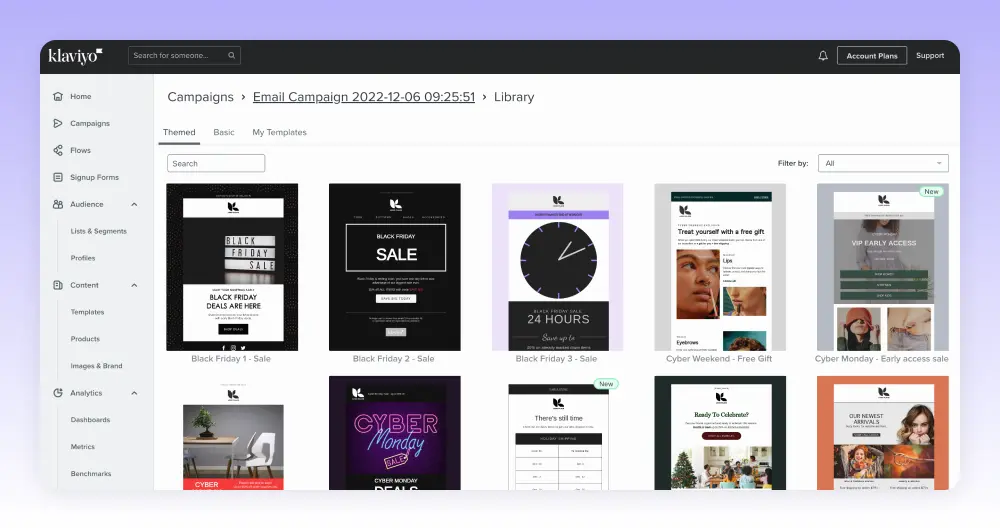
You can create targeted, personalised SMS messages and automate campaigns. You can integrate them with email campaigns or incorporate both channels within campaigns. The system supports two-way messaging and Klaviyo has reporting features for both email and SMS insights.
Klaviyo is the more capable system but Sendlane is more usable.

Klaviyo also includes more integration options for a wider variety of eCommerce platforms. So, if you’re not using Shopify or WooCommerce, this is the better option.
Klaviyo performs well with deliverability, too. We got slightly better rates with Sendlane but the difference is pretty minimal — not enough to influence your choice between the two.
Klaviyo gives you slightly more to work with on marketing automation but the automation builder isn’t as easy to use. This is typical of the differences between these two platforms. Klaviyo just about edges it with feature depth but the added complexity widens the usability gap with Sendlane.
Your choice depends on how much of that extra functionality you need.
Pricing
Klaviyo also offers a free plan for up to 250 contacts and 500 emails per month. It also allows you to send up to 150 SMS messages per month. This could be useful if you’re just starting out, but the SMS allowance gives you little room to grow.
For higher SMS and email allowances, you’ll need to sign up for Klaviyo’s Email and SMS plan. This starts from $35/month for up to 500 contacts and 1,250 SMS/MMS credits. Pricing increases as your contact list grows and you send more SMS messages per month.
By the time you have 1,001-1,500 contacts, you’ll be looking at $60/month with the same SMS allowance.
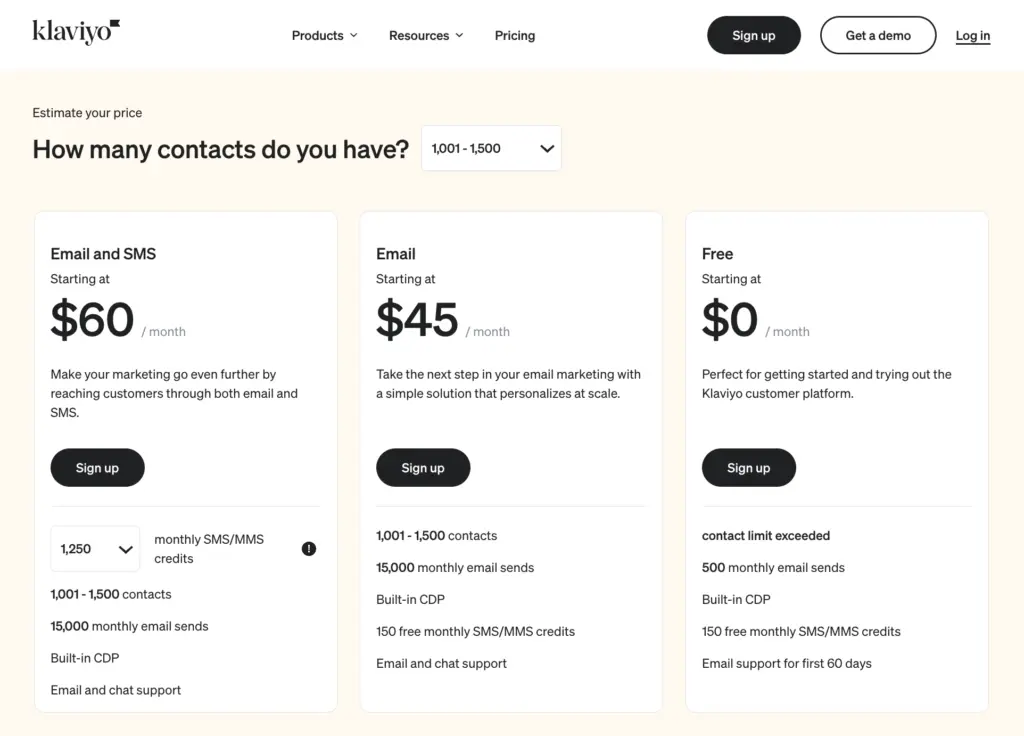
Klaviyo provides a significantly cheaper entry price than Sendlane. Sendlane plans start with allowances for 5,000 contacts and 5,000 SMS credits for $173/month. If we set allowances of 3,501-5,000 contacts and 5,000 SMS credits with Klaviyo’s Email and SMS plan, the monthly fee rises to $145/month.
So, the pricing isn’t too far apart once you start dealing with similar contact lists and SMS allowances.
What we like:
- SMS features — Like Sendlane, Klaviyo offers targeted, personalised campaigns and two-way messaging for eCommerce businesses.
- Reporting — Klaviyo’s reporting features include predictive insights and benchmarks.
- Entry price — Klaviyo’s lower entry prices make it more accessible than Sendlane for companies with smaller contact lists.
Where they could improve:
- Email campaign editor — A tad basic and it offers only one eCommerce-specific content block (a list of products from a product feed).
- Automation — The range of automation actions is limited, lacking options such as split testing paths.
- Interface — The interface feels a little clunky, especially if you’ve come from trying out Sendlane.
Who should use Klaviyo?
Klaviyo is best for larger eCommerce companies that will benefit the most from its predictive insights. It’s a more capable alternative to Sendlane but usability suffers a little as a result.
Lower entry prices create a better upgrade path for new companies although prices are comparable to Sendlane at similar allowances. This puts Klaviyo among the more expensive solutions as your list grows.
Choosing the right SMS & email marketing software
Choosing the right SMS and email marketing tool can be tricky. Support and pricing for SMS features can vary wildly between providers — more so than email marketing features, in most cases.
Compare pricing
The first table shows the lowest amount you’ll pay with each product for contact list sizes: 2.5k, 10k and 10k contacts. The second shows the minimum you’ll pay for the same number of SMS credits on each platform: 2.5k credits, 10k credits and 100k credits.
Many providers offer plans that don’t include SMS support. So the prices below show the minimum you’ll pay for each contact list size — on plans that include SMS messaging.
| Tool | Monthly price for 2,500 contacts | Monthly price for 10,000 contacts | Monthly price for 100,000 contacts |
|---|---|---|---|
| ActiveCampaign | $95 + SMS add-on | $189 + SMS add-on | Confirm current quote |
| Ontraport | $83 | $208 | $583 |
| Omnisend | $59 | $150 | $1,150 |
| Brevo* | $0 | $16 | $181* |
| GetResponse | N/A | N/A | N/A |
| Sendlane | $173 | $319 | $1,007 |
| Klaviyo | $75 | $165 | $1,395 |
ActiveCampaign’s row uses the Plus-plan prices from our review on annual billing, with SMS charged separately. Confirm pricing for 100,000 contacts directly before budgeting.
Unfortunately, GetResponse doesn’t publish any pricing information for its only plan that includes SMS messaging. All we can say is that it’s among the more expensive tools.
Also, unlike most email marketing software providers, Brevo doesn’t price its plans according to contact list size. Instead, it charges for the number of emails you send per month. So we’ve shown the prices that allow you to send an average of two emails per month to each contact.
For the equivalent number of SMS credits, you can expect to pay the following amounts.
| Tool | Monthly price for 2,500 credits | Monthly price for 10,000 credits | Monthly price for 100,000 credits |
|---|---|---|---|
| ActiveCampaign | $36.83 | $88.83 | Confirm current quote |
| Ontraport | $19.75 | $79 | $790 |
| Omnisend | $37.50 | $150 | $1,500 |
| Brevo | N/A | $109 | $1,090 |
| GetResponse | N/A | N/A | N/A |
| Sendlane | $90 | $180 | $900 |
| Klaviyo | $25 | $90 | $900 |
ActiveCampaign’s credit prices above are those listed in our review, separate from the email subscription. Confirm the current SMS package in your account — we have not verified a 100,000-credit price.
Keep in mind that sending SMS messages outside of the US normally costs more than one credit. You may also need to send more than one SMS message to each contact per month.
Also, different pricing strategies make it difficult to give precise numbers with some providers. So, use these figures as a rough guide, nothing more.
Our verdict
ActiveCampaign is our first choice if you need behaviour-based email automations with SMS follow-ups. Our experience is much deeper on the email side, and the SMS add-on, contact billing and fairly average CRM need weighing against that automation depth.
If budget is your priority, you’ll need to crunch the numbers and pay close attention to SMS pricing. It comes down to how many messages you need to send every month.
Ontraport and Klaviyo are probably the most affordable options if you need to send a lot of SMS messages.