


Sender has been on my radar for years, but I hadn’t quite understood why I’d choose it. After putting it through eight tests, the free plan and its ability to build automation sequences through Claude gave me two good reasons.
With Sender, I rebuilt a reference newsletter, created a welcome sequence and tested everything from contact imports to support. The email editor was the part that slowed me down.
Who is Sender for?
Test Lab Partner (Paid)Sender is a member of our Test Lab Programme, which means we receive a fee to conduct hands-on testing of their platform. Learn more about our Test Lab Programme →I’d start with Sender if you want to collect subscribers and follow up automatically without committing much budget. The free allowance gives a small business room to run a useful list. You’ll have Sender branding on that plan.
-
Small businesses with up to 2,500 subscribers looking for a free starting point.
-
Teams building welcome sequences with delays and conditions.
-
Marketers comfortable connecting Claude to create draft workflows.
-
Teams needing extensive CRM actions inside their automation builder.
-
Designers who want precise visual control over every email block.
-
Anyone expecting to generate an AI workflow directly inside Sender without connecting another tool.
How much does Sender cost?
Sender’s free plan gives you 15,000 monthly emails for up to 2,500 subscribers. At the full contact allowance, that’s six sends to your whole list each month. Email automation is included, which makes it worth trying for a small newsletter with a welcome sequence.
The paid plans scale with your subscriber count. At 500 subscribers, the pricing page currently advertises these first-year annual offers:
| Plan | Price | Subscriber allowance | Monthly emails |
|---|---|---|---|
| Free Forever | $0 | 2,500 | 15,000 |
| Standard | $6.30/month equivalent, $75.60 billed for the first year | 500 at this price | 6,000 |
| Professional | $10.50/month equivalent, $126 billed for the first year | 500 at this price | 12,000 |
| Enterprise | Custom quote | Agreed with Sender | Unlimited |
These are USD prices checked on 6 October 2026. The paid figures include a 30% first-time-user annual discount; they aren’t month-to-month rates. Check the live pricing calculator on Sender’s website for your list size and billing term.
| Plan | Main reason to choose it | Limitation to budget for |
|---|---|---|
| Free Forever | Email automation without a subscription | Sender branding and the free sending cap |
| Standard | Remove branding and add paid email features | Monthly sends capped at 12 times your subscriber allowance |
| Professional | SMS automation and extra email editor features | Higher subscription cost; monthly sends capped at 24 times your subscriber allowance |
| Enterprise | Larger sending requirements | You need a quote |
I’d begin on Free and consider Standard once branding or list size becomes a constraint. Professional makes more sense if you need SMS automation or send frequently enough to use its larger allowance. SMS costs also depend on the destination country.
What I liked and where Sender needs work
-
Room to grow for free: 2,500 subscribers and 15,000 monthly emails cover a useful small-business list.
-
AI that builds workflows: Claude created the welcome sequence and wrote the emails directly in my account.
-
Straightforward lead capture: My landing-page signup appeared in the correct subscriber group.
-
Quick support resolution: Two messages to support helped get my account approved within 31 minutes.
-
Button styling, padding limits and inconsistent fonts slowed down my newsletter build.
-
I had to connect Claude to Sender before generating the workflow.
-
The builder focused on activity within Sender, with fewer native actions for other tools.
-
The messy CSV test imported one more record than expected and needed manual field mapping.
Can you build a welcome sequence in Sender?
Sender’s automation builder is a good fit for small businesses that want to follow up based on subscriber behaviour. The visual canvas makes sequences easy to follow, with delays, conditions and split paths to control who receives each email.
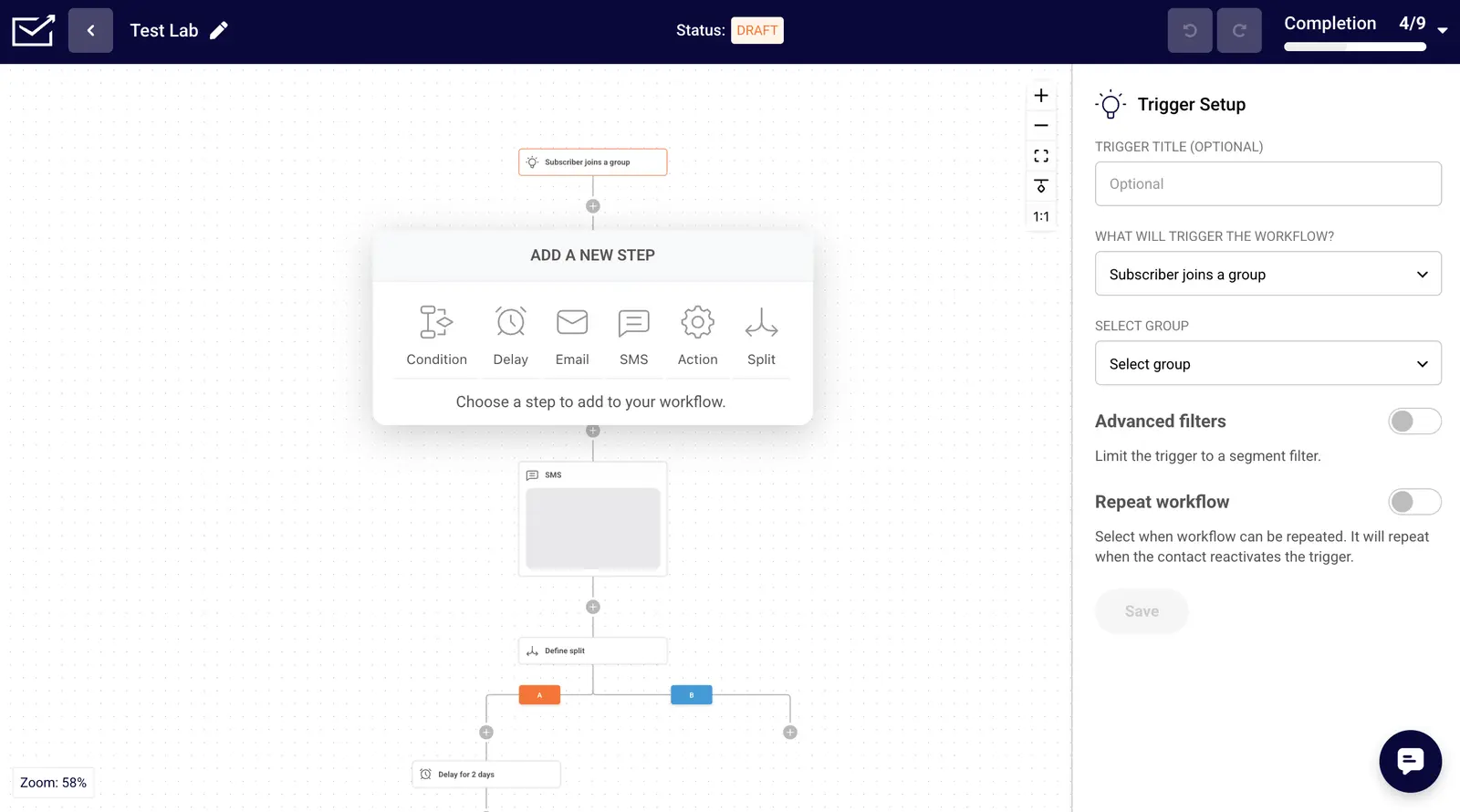
My welcome sequence spaced emails two days apart and made the third depend on someone opening the second. Group changes and custom-field updates give you ways to organise subscribers as they move through a sequence. You can also add SMS steps or test different paths with an A/B split.
Sender is less suited to automation spanning several applications. I saw fewer native CRM actions than in ActiveCampaign or HubSpot, so connecting those processes would mean more setup with webhooks.
How useful is Sender’s AI?
Sender’s connection to Claude makes it easier to get a welcome sequence off the ground. From a short brief about a fictional coffee roastery, Claude created a draft workflow with three emails, subject lines and delays already in place.
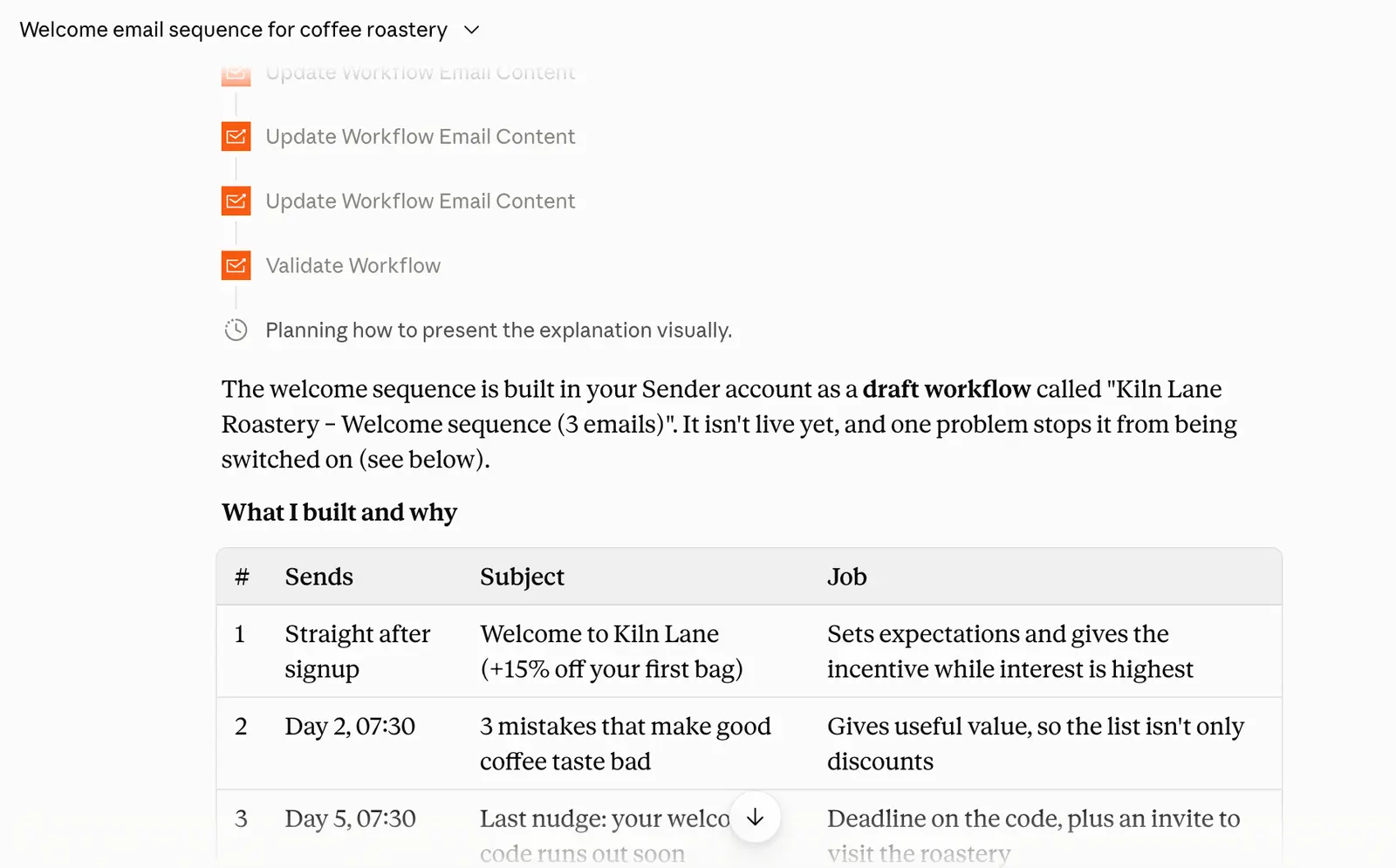
Being able to revise those emails through the same conversation was useful. I asked Claude to improve the plain first draft, and it updated the email designs directly in Sender. I’d still refine them before sending to customers.
You need to connect an external assistant through Sender’s MCP connection to use this workflow. I’d prefer to have that prompting option inside Sender itself. The sequence also remained in draft with an activation problem flagged, so it needed checking before going live.
I’d try this if you already work in Claude and want help turning an idea into an editable sequence. Expect to review the copy and design, and check that the automation is ready to run.
What is the email editor like?
Sender’s email editor has good templates and enough content blocks for straightforward newsletters. I’d be happy using it for a small-business campaign built around one of those templates. Precise design work is where it becomes frustrating.
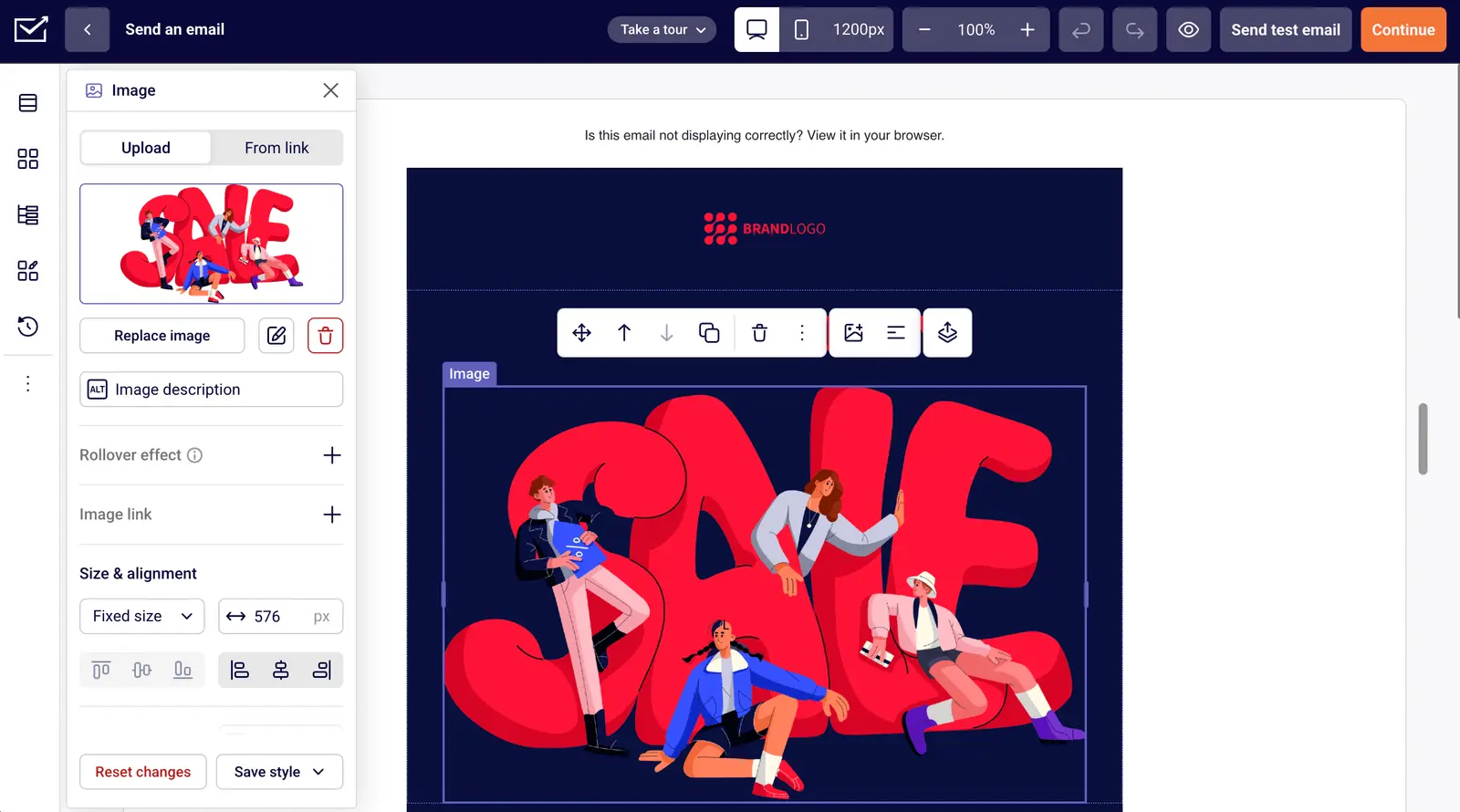
Rebuilding a Slack newsletter from Really Good Emails exposed how much fiddling the styling controls can require. After 16 minutes, I’d made less progress than in eight or nine minutes with some other builders. Button colours didn’t apply as expected, and the padding limit stopped me matching the reference heading’s width.
If you mainly want to edit a template and send a newsletter, Sender has the building blocks I’d look for. If every campaign needs to match a detailed design, I’d test one of your own emails before switching. The time spent adjusting it could outweigh the subscription savings.
What are Sender’s landing pages & forms like?
Sender’s landing pages and forms work well for collecting leads and organising them for follow-up. I could adapt a lead-capture template, add a name field and choose which subscriber group the form would populate. My test signup arrived in the correct group.
That gives a small business a straightforward route from a signup page into a welcome sequence. Groups are available as automation triggers, so you can use the form’s destination group to start that follow-up.
Account approval can hold up a launch. I couldn’t publish landing pages while my account was under review, so I’d get that sorted before scheduling a campaign around a new page.
What happened in the spam and import tests?
Sender performed well on the technical spam checks, with a default-template email scoring 9.5/10 in Mail Tester. The reported issue was three images missing alt attributes. I’d add descriptive alt text before sending a campaign.
That result covers one email’s technical checks. It doesn’t establish how often Sender reaches real subscribers’ inboxes across Gmail, Outlook or other providers.
Contact importing needs closer attention if you’re moving an existing list. Sender accepted the 42 expected valid contacts from my messy CSV, plus one extra record. Field mapping required manual work, and the error log didn’t clearly explain the results.
I’d check the imported records before starting a campaign, especially if the old list contains incomplete or questionable addresses.
How quickly did support help?
Sender’s support was useful when account approval blocked landing-page publishing. After two messages from me and a completed questionnaire, the account was approved within 31 minutes. That was inside the hour I’d been promised.
I’d be comfortable asking support for help with setup based on that experience. I couldn’t confidently tell whether every reply came from a human, and the account review meant I had to wait before publishing.
Rating Details
Email Builder
★★★
3.0 / 5
I could build the newsletter, but button styling, padding limits and font inconsistencies made it slower than I’d like.
List Growth
★★★★★
5.0 / 5
The landing-page test signup arrived in the correct group. Publishing was blocked separately while my account awaited approval.
Automation Builder
★★★★
4.0 / 5
The welcome sequence supported delays, conditions and split paths. Native actions involving other applications were more limited than in ActiveCampaign or HubSpot.
AI Functionality
★★★★
4.0 / 5
Claude created and revised a draft workflow with email content. The external connection and need to check the result keep it below full marks.
Deliverability
★★★★★
5.0 / 5
Our template email scored 9.5/10 in Mail Tester. This score reflects the spam check; we didn’t measure an inbox placement percentage.
Contact Importing
★★★★
4.0 / 5
Sender imported the 42 expected valid contacts plus one extra. I had to map fields manually, and the error log didn’t clearly explain the import results.
Customer Support
★★★★★
5.0 / 5
The account review was resolved within 31 minutes after two messages. I couldn’t confirm whether the chat replies were all human.
Pricing
★★★★★
5.0 / 5
The free allowance and paid-plan sending limits earned full marks in the test. Branding, subscriber caps and SMS requirements determine when you’ll need to pay more.
Would I choose Sender?
I’d shortlist Sender for a small business that needs newsletters and automated follow-up at a low cost. The free plan gives you enough room to test it properly, and the Claude workflow creation was more capable than I expected.
If your priority is quickly reproducing detailed email designs, I’d also try Mailchimp. I got further with its builder in less time during the newsletter test. For automation involving a CRM and other applications, I’d compare ActiveCampaign.
With Sender, I’d start by building one newsletter and a welcome sequence on the free plan. That will tell you whether the editor’s quirks are worth accepting for the savings. You can try Sender here.
Update Log
6 October 2026: Revised the feature assessments to explain where Sender fits, with selected examples from testing.
6 October 2026: Published the eight-test review with the recorded results, supplied screenshots and verified pricing offers.