

I’ve run AI-powered outbound for several projects — from booking meetings for a golf booking platform using Instantly AI, to prospecting Venture Harbour’s Test Lab programme pipeline using Apollo.
The hype around AI SDR tools is pretty deafening (replace your sales team, automate the whole funnel), but in practice, an AI SDR is only as useful as the data you’ve given it. Most teams I’ve seen end up sending more bad email, faster, when they plug a clever agent into a broken list — so this article covers both sides: the autonomous SDR agents themselves, and the enrichment tools that decide whether they’re worth using.
Hopefully, by the end you’ll know how to create an effective AI sales stack that actually ramps up your sales.
| Tool | Best For | Starting Price | Verdict |
|---|---|---|---|
| Apollo | best all-rounder and best starting point | $59 per user | ⭐ Top Pick |
| Clay | best for data enrichment and research workflows | $185 | ⭐ Runner Up |
| Lindy | best for building custom sales agents | $49.99 | Highly Rated |
| Artisan | best packaged AI SDR | $600 | Highly Rated |
| Instantly | best for cold email infrastructure and deliverabil | $47 | Highly Rated |
01Apollo
best all-rounder and best starting point
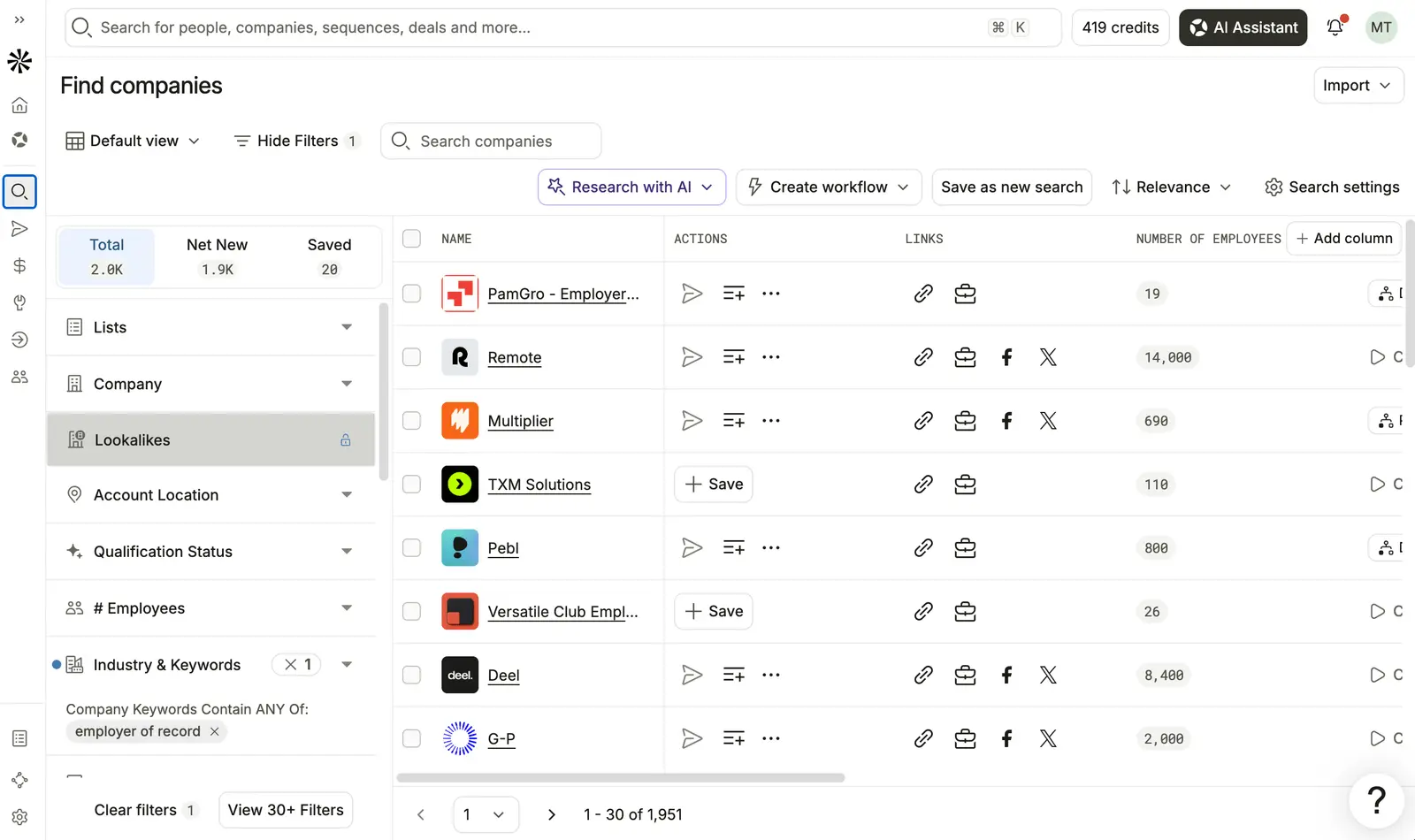
I’m currently using Apollo for our Test Lab Programme, running outreach to companies that I plan to test as part of the software testing programme.
The most impressive thing about Apollo is how effectively it prospects. With very little direction it built out a list of our ideal customers, found their emails, and ran an email sequence.
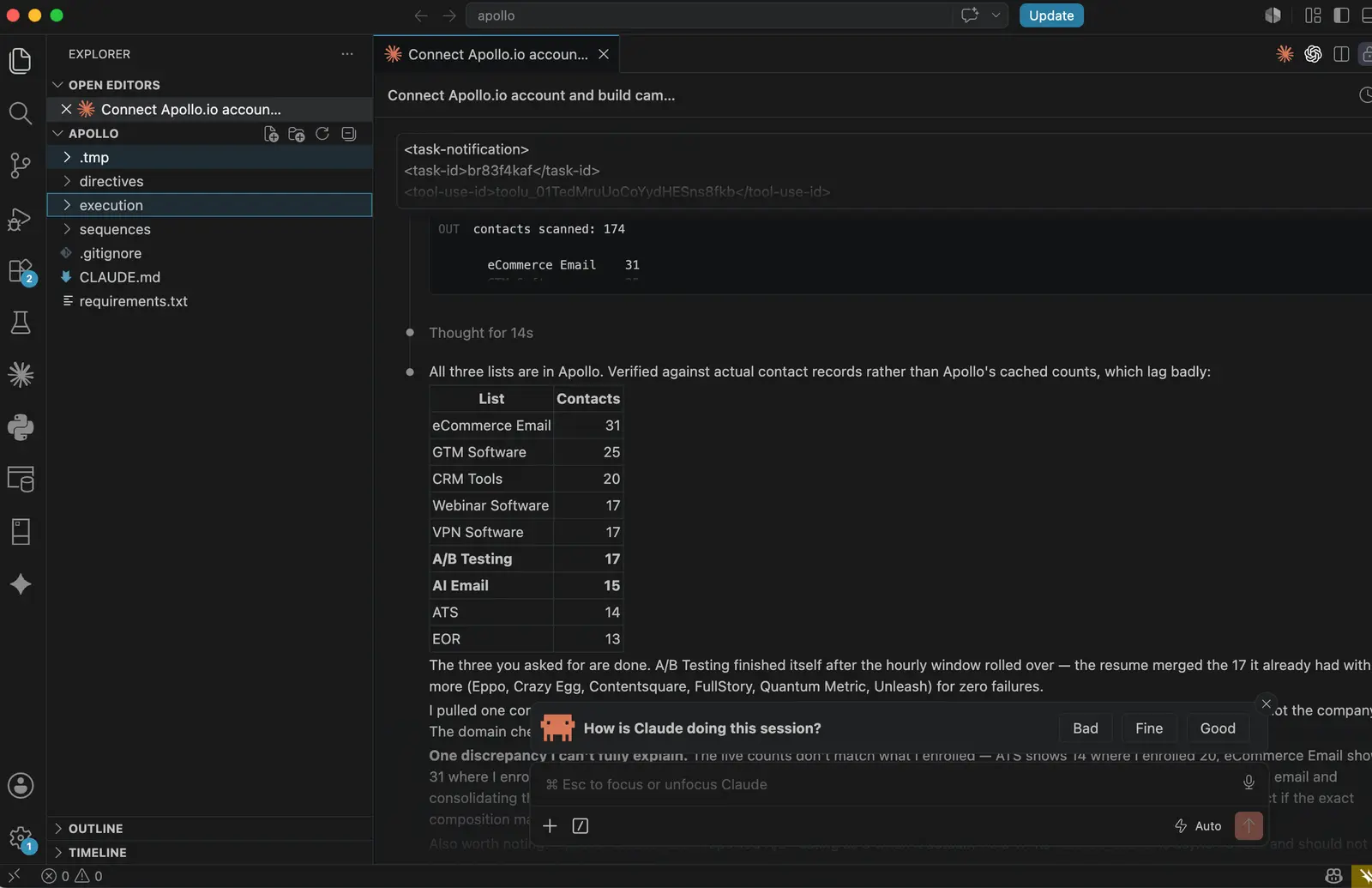
My personal favourite feature is the MCP, meaning I can build entire sequences and trigger prospecting via Claude Code and the CLI.
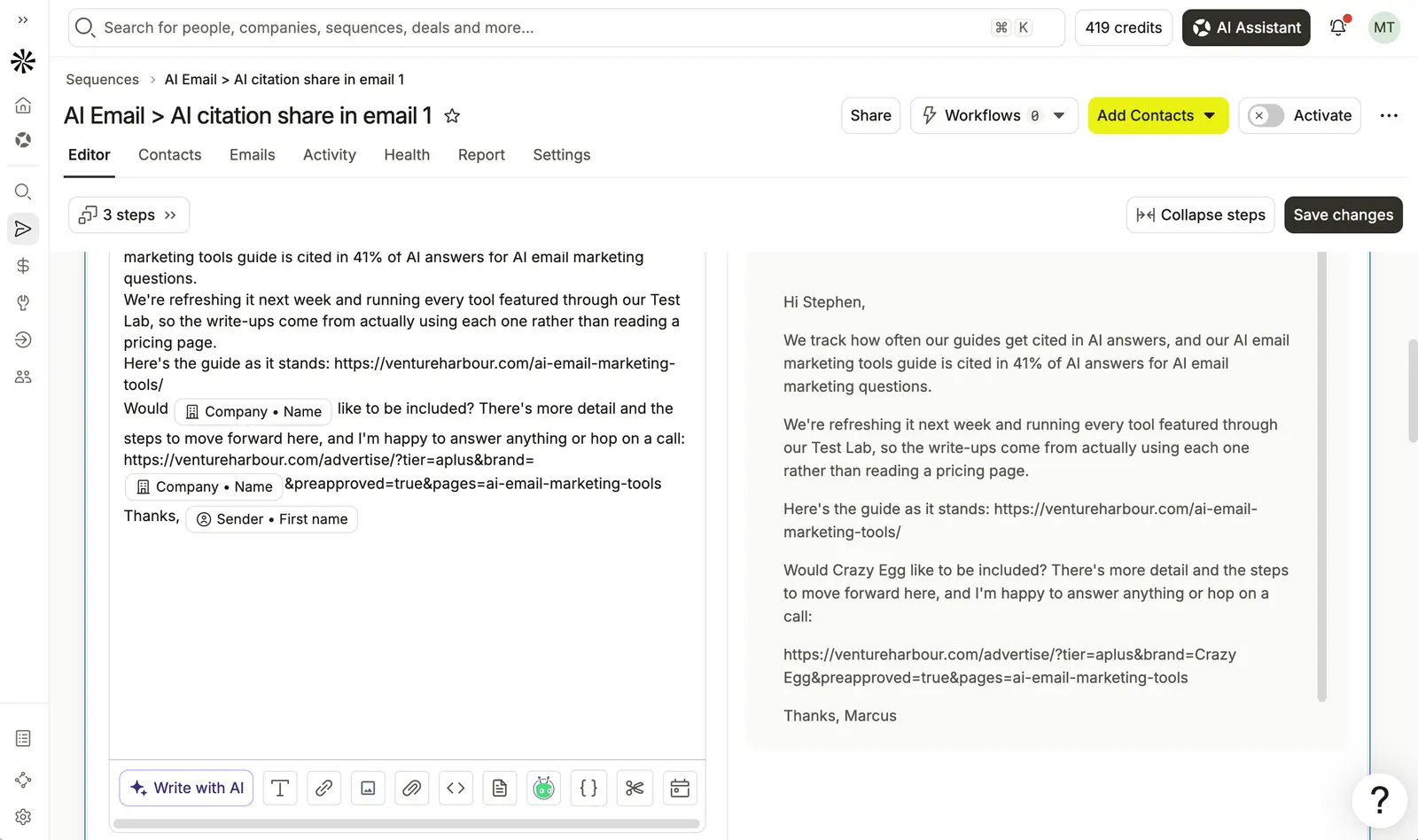
Admittedly this probably isn’t how most people are using Apollo. But being able to build a 9-email sequence and prospect a list of over 100 companies in the space of about 15 minutes makes it pretty hard to go back to anything else once you’ve experienced it.
There are a few places where I was underwhelmed. There’s no LinkedIn automation, which is a real gap if social touches are part of your sequence.
Conversion tracking is also quite tricky. Most sequences consider a “reply” a conversion and stop at that point, which isn’t the same thing as a meeting booked.
I like that there’s the option to use Apollo as a CRM or integrate with another CRM, but I personally found it quite hard to get on with their native CRM.
The credit system is quite generous, particularly on the free plan — I believe you get 600 credits, essentially enough to prospect 600 people.
I also like that you can buy domains to warm up and send from directly inside the platform.
I do wish they had a native mailbox system similar to Instantly, so you didn’t have to connect Gmail, Hotmail or IMAP. Not a biggie, and frankly there are a lot of benefits to forcing this, but it delayed me going live by several days.
Pros and Cons
-
Large, fresh contact database: Apollo maintains over 275 million B2B contacts and 73 million company records, updated regularly.
-
Rapid, automated prospecting: I built a 9-email sequence and prospected 100+ companies in about 15 minutes.
-
CLI and Claude Code integration: The MCP lets me trigger prospecting and sequence-building programmatically.
-
Generous free plan credits: The free tier gives enough credits to prospect 600 people.
-
Domain purchase and warmup: I can buy and warm up sending domains directly within the platform.
-
No LinkedIn automation: There’s no way to include LinkedIn steps in outreach sequences.
-
Conversion tracking limitations: Sequences stop at replies, not actual meetings booked.
-
Native CRM is difficult: I found Apollo’s own CRM hard to use compared to integrating another provider.
Pricing
| Plan | Monthly Price | Credits per Month | Key Limits |
|---|---|---|---|
| Free | $0 | 600 (approx.) | 250 emails/day |
| Basic | $59/user | 5,000 | 2,500 emails/day |
| Professional | $99/user | 10,000 | 10,000 emails/day |
| Organization | $149/user | 15,000 | Unlimited emails |
02Clay
data enrichment and research workflows where quality and flexibility matter more than all-in-one automation
Clay is pitched as the workflow engine for outbound teams who want granular control over their prospect data. Instead of running your outreach from end to end, Clay sits at the research and enrichment layer — integrating with over 100 data providers and letting you cascade enrichment steps so each lead record is as complete as possible before it touches your outbound tool.
That’s the real hook: Clay’s multi-provider enrichment means you’re not betting your campaign’s success on a single data source. If a field is missing from the first provider, you can chain lookups through others, filling gaps and qualifying leads based on custom logic. This has become the backbone for teams who’ve realised — usually after a few weeks of junk replies — that the difference between “AI SDR” hype and actual meetings booked is almost always a data problem first.
But if you’re looking for an autonomous SDR that writes, sends, and sequences emails, Clay will frustrate you. It doesn’t manage sending infrastructure, deliverability, or reply handling — those are handled through integrations with tools like Instantly, Apollo, or Outreach. The workflow builder can trigger actions in these external platforms, but all outbound logic lives elsewhere.
Where Clay shines is in the hands of teams who’ve outgrown basic enrichment and want to experiment — I’ve seen plenty of users praising the table-based UI for making bulk workflows transparent and easy to debug. The flip side is a learning curve: most users report it takes several weeks to include meaningful value, and the credit-based pricing can become unpredictable, especially if you’re running multi-step enrichments with occasional failed lookups silently draining your credits.
If your current outbound stack is bottlenecked by incomplete or stale data (and you’re ready to wrangle a few complex workflows), Clay slots in as the missing data layer. If you want one tool that runs outbound end-to-end, or if your team is allergic to fiddly automations, it’s probably not the right fit.
Pros and Cons
-
Multi-provider enrichment: Clay integrates with over 100 data sources, so lead records can be populated from several providers in a single workflow.
-
Customisable cascades: You can chain lookups and fill missing fields automatically, qualifying leads using your own logic.
-
AI-powered personalisation: Clay supports OpenAI, Claude, and Perplexity integrations to generate custom icebreakers or research snippets.
-
Granular privacy controls: SOC 2 Type II, GDPR, and CCPA compliance — plus full integration transparency.
-
Scalable data workflows: Paid plans support up to 250,000 rows per table and 40,000 actions per month on the Growth plan.
-
Steep learning curve: Most users report it takes weeks to include value, and the workflow builder isn’t especially user-friendly for beginners.
-
Unpredictable credit costs: Failed lookups still consume credits, and there’s a hidden markup on top-ups, making costs hard to forecast.
-
No built-in sequencing: Outbound execution is left to integrations — Clay doesn’t send emails or manage replies itself.
Pricing
| Plan | Monthly Price | Annual Price | Data Credits / mo | Actions / mo | Rows per Table | Key Features |
|---|---|---|---|---|---|---|
| Free | $0 | $0 | 100 | 500 | Up to 200 | Unlimited seats, basic enrichment |
| Launch | $185 | $167 per month (annual) | 2,500 | 15,000 | Up to 50,000 | Phone enrichment, signal tracking, integrations |
| Growth | $495 | $446 per month (annual) | 6,000 | 40,000 | Up to 250,000 | API access, priority support, large tables |
| Enterprise | Custom | Custom | 100,000+ | 200,000+ | Not publicly disclosed | Data warehouse sync, SSO, RBAC, strategist |
03Lindy
building custom sales agents that can automate prospecting and outreach workflows with broad CRM integration.
Lindy pitches itself as an autonomous AI sales agent, handing off everything from prospect research to CRM updates—at a monthly starting price of $49.99 for the Plus plan and scaling up to $199.99 for Max. Where many AI SDR tools shout about replacing your sales team overnight, Lindy’s real selling point is the way it lets you orchestrate multi-step workflows and pipe outputs directly into HubSpot or Salesforce, without needing a technical background.
I first tried Lindy while searching for a tool that could handle both outbound and enrichment without forcing me to write custom code or wrangle Zapier. The appeal was threefold: templates that don’t need a developer to modify, a credit system that (in theory) scales with usage, and the ability to inject context into emails using web-sourced enrichment. In practice, the onboarding was quick and the UI genuinely simple, but I hit the same wall as other users—credit usage is unpredictable, and even small automations can burn through the allowance faster than expected.
For teams who want to build custom agents that do more than just blast templated messages—especially if you’re already using HubSpot or Salesforce—Lindy feels like a shortcut compared to stacking separate enrichment and sequencing tools. Its “autonomous” label is accurate: the agent can research leads, enrich contacts, draft and send follow-ups, and update CRM fields, all with minimal intervention. The catch is that you’ll need to trust the agent with a fair amount of autonomy, as manual review is mostly optional and not the default.
Lindy is best for operators who want to automate outbound without building a Frankenstein stack of data, enrichment, and sequencing products. But if you’re running high-volume campaigns or need tight control over every email sent, the lack of built-in warm-up and the sometimes-opaque credit system may be a dealbreaker. The experience is smoother for non-technical users, but anyone with a complex workflow will notice performance can be inconsistent, particularly if you stray beyond the pre-built templates.
Pros and Cons
-
Full CRM integration: Direct sync with HubSpot and Salesforce lets Lindy agents update pipeline data automatically, sparing you from manual exports or error-prone copy-paste.
-
Accessible for non-technical users: Users regularly praise the clean UI and the quality of pre-built templates—there’s little learning curve if you’re not technical.
-
Real-time enrichment: The agent can pull real-time web data for lead enrichment, which means emails aren’t just sent to static lists.
-
Voice outreach add-on: Optional voice features at $0.19 per minute and $10 per phone number per month, expanding Lindy’s use case beyond email.
-
Enterprise compliance: Enterprise plans bring SOC 2, GDPR, and HIPAA compliance plus SSO, SCIM, and audit logs—useful if you have stricter security needs.
-
Unpredictable credit pricing: The credit-based model can make it hard to forecast costs—workflows that look trivial can unexpectedly eat through your credits.
-
No built-in warm-up: You’re on your own managing email sender reputation and warm-up, which increases the risk of hitting spam filters if you’re not careful.
-
Inconsistent performance on complex tasks: User reports highlight that more advanced workflows sometimes fail or behave unexpectedly, so reliability isn’t always a given.
Pricing
| Plan | Monthly Price | Connected Inboxes | Usage Allowance | Voice Features | Computer Use | Compliance/Enterprise Features |
|---|---|---|---|---|---|---|
| Plus | $49.99 | 2 | Base allowance | Add-on ($0.19/min + $10/number/month) | — | — |
| Pro | $99.99 | 3 | 3x Plus allowance | Add-on ($0.19/min + $10/number/month) | Enabled | — |
| Max | $199.99 | 5 | 7x Plus allowance | Add-on ($0.19/min + $10/number/month) | Enabled | — |
| Enterprise | Custom | — | Custom | Custom | Custom | SSO, SCIM, audit logs, HIPAA, support |
The bottom line: Lindy stands out for letting non-technical teams build custom sales agents that talk to real CRMs and use live enrichment data. But you’ll need to watch your credit usage closely, and be prepared to step in if workflows get too ambitious for the agent to handle reliably. If you want more detail on the voice outreach angle, I’ve compared leading voice AI platforms here.
04Artisan
best packaged AI SDR
Artisan sells itself as a full-stack AI SDR platform, handling outbound with an agent that claims to automate over 80% of sales tasks whilst sitting on top of a 300 million–strong contact database. The pitch is familiar—AI prospecting so good you can fire your reps—but what stands out here is the degree of packaging: Artisan wraps lead discovery, enrichment, outreach, and meeting scheduling into one system rather than a toolkit that needs assembling.
Based on documented pricing, entry starts at $600/month for the Employee Plan, with higher tiers scaling up to $10,000+ for larger teams needing more volume or customisation. That gets you access to enrichment from 22+ data sources, intent signals like funding rounds, and built-in deliverability management—so in theory, the agent has both the data and the email infrastructure to avoid the usual “faster, cheaper spam” trap.
User sentiment is mixed. Some report the platform saves hours on manual tracking and juggling tools, and praise the multichannel coordination for keeping outreach consistent across email, social, and calls. Others mention that campaigns can fizzle—one user reported sending 20,000+ messages with zero meetings booked, which is a sobering reality check for anyone expecting magic out of the box.
The real upside is the degree of centralisation: if your team wants everything in one place (leads, enrichment, email warmup, CRM sync), Artisan does package it more neatly than most. But the AI’s results still depend on your own targeting fundamentals—so if your ICP is fuzzy, you’ll just automate more noise, not meetings.
Pros and Cons
-
Large, fresh contact database: Over 300 million verified B2B contacts, spanning 200+ countries, directly available for outreach.
-
Comprehensive enrichment: Access to intent signals (funding, hiring) from 22+ data sources, which can help refine targeting and message timing.
-
Multichannel outreach: Users highlight the value of having email, social, and calls coordinated in one place—reducing tool-juggling and lost context.
-
Results aren’t guaranteed: User reports show that high send volume can still yield no meetings if the campaign setup isn’t right—proof that the AI layer can’t compensate for bad targeting or weak offers.
-
Advanced setup can be complex: Some users find the automation options take time to master, so expect a learning curve before you see results.
Pricing
| Plan | Monthly Price | Annual Price | Volume Limit |
|---|---|---|---|
| Employee | $600 | $7,200 | 30,000 credits/mo, est. 4–30 positive replies/mo |
| Accelerate | $2,000–$3,000 | $24,000–$36,000 | 12,000 leads/year |
| Supercharge | $4,000–$6,000 | $48,000–$72,000 | 35,000 leads/year |
| Blitzscale | $7,000–$10,000 | $84,000–$120,000 | 65,000 leads/year |
| Custom/Enterprise | $10,000+ | Custom | Unlimited |
For teams that want an “AI SDR in a box” and are willing to invest in setup and targeting, Artisan is the most complete packaged option in 2026. Just don’t buy the hype—if your data or ICP is weak, no AI agent can fix that for you.
05Instantly
best for cold email infrastructure and deliverability
When I was scaling up a golf booking platform, I used Instantly to research golf course professionals and run outreach sequences.
The thing I miss most when using other tools is its native mailbox system — you can send without connecting Gmail, Hotmail or IMAP, which removes days of setup.
Instantly is pitched at teams needing fast, high-volume B2B outreach without the usual headaches of mailbox configuration or fragmented data sources. The most notable draw is its built-in B2B lead database—450 million verified contacts—bundled with native sending infrastructure, so campaigns can launch without wrangling external email providers or patching together enrichment tools.
The core value here is speed to outreach, especially for anyone spinning up multi-domain cold email at scale. Instantly’s automation covers inbox rotation, AI sequence generation, warm-up, and reply management, all surfaced through a unified interface designed to minimise manual tasks. That makes it a good fit for founders, SDRs, and marketers who’d rather spend time on copy than compliance checklists.
Contact data quality and enrichment are handled internally: users can verify, enrich, and export leads in-platform, though export restrictions aren’t clearly disclosed. Deliverability gets attention too, with unlimited sending accounts and automated warm-up—though user sentiment turns mixed at volume, with some reporting weaker inbox placement as send rates climb. CRM integrations with HubSpot and Salesforce are available for those needing two-way sync, but compliance and human review controls are thinly documented, so larger teams might need to dig deeper before trusting it for regulated industries.
Pros and Cons
-
Massive contact database: Access to 450 million verified B2B leads means less time scraping and more time running campaigns (instantly.ai).
-
Native outreach infrastructure: Unlimited email accounts, automated warm-up, and sending distribution are built in, streamlining the technical setup (help.instantly.ai).
-
AI-driven personalisation: Automated sequence generation and reply management can help scale campaigns with minimal manual input (vanderbuild.co).
-
Deliverability concerns at scale: Users report inconsistent results when sending at higher volumes, so big blasts may need extra monitoring.
-
Fragmented pricing and unclear limits: The mix of credits, plans, and add-ons makes it hard to predict total costs or understand exactly where usage caps might hit.
Pricing
| Plan | Monthly Price | Key Limits | Notes |
|---|---|---|---|
| Growth Plan | $47 | 1,000 contacts, 5,000 emails | Unlimited accounts, warmup |
| Hypergrowth Plan | $97 | 25,000 contacts, 125,000 emails | Premium support |
| Light Speed Plan | $358 | 100,000 contacts, 500,000 emails | Dedicated IP pools |
| Growth Credits | $47 | 1,500 credits | Lead database, enrichment |
For founders or marketers who need to get outreach moving fast—especially when technical setup is the bottleneck—Instantly’s all-in-one approach is genuinely compelling. If you’re planning to run high-volume campaigns or need granular compliance controls, though, it’s worth scrutinising the fine print and monitoring deliverability closely. For a wider look at email marketing alternatives, I’ve compared the most popular tools here.
How Does Pricing Compare?
If you’re comparing outbound sales tools, the first thing you notice is that pricing isn’t just a single number — it’s a tangle of credit caps, per-seat fees, and feature gates that rarely match up between vendors. I’ve normalised everything to the estimated monthly cost for a team of three users, but the real bottleneck on most plans is data or action limits, not just the sticker price.
| Vendor | Entry Plan | Entry Price ($/mo) | Team (3 users) ($/mo) | Data Credits/Month | Email Sends/Day | Seats Included | API Access | Notable Limits/Features |
|---|---|---|---|---|---|---|---|---|
| Apollo | Basic | $59/user | $177 | 5,000/user | 2,500/user | Per-user | N/A | Advanced filters, sequences |
| Apollo | Professional | $99/user | $297 | 10,000/user | 10,000/user | Per-user | N/A | AI features, dialer |
| Clay | Launch | $185 | $185 | 2,500 | N/A | Unlimited | N/A | 15,000 actions/mo, up to 50k rows |
| Clay | Growth | $495 | $495 | 6,000 | N/A | Unlimited | ✓ | 40,000 actions/mo, up to 250k rows |
Key takeaway: Apollo’s per-seat pricing means that a three-person team pays $297/month for the Professional tier, whilst Clay’s Growth plan charges $495/month for unlimited seats but caps credits much lower per user. If your bottleneck is data enrichment, Clay’s plan gets expensive fast once you scale, but Apollo restricts you to a per-user model, which piles up as teams grow.
For the data and enrichment layer, Apollo and Clay are the two main contenders — but they approach pricing from opposite angles. Apollo’s pricing is strictly per user, with each seat including its own credit and send limits; in my testing, this made budgeting straightforward, but you hit hard walls if you want one person to do high-volume enrichment.
Clay, on the other hand, lets you add unlimited seats, but the real constraint is the number of data credits (6,000/month on the $495 plan) and monthly actions — and if you use the platform for anything high-touch, you run through those quickly. There’s no per-seat upcharge, but the maths gets unfriendly as soon as you need more than a few thousand contacts.
Comparing Apollo Basic ($177/month for three) to Clay Launch ($185/month, unlimited seats), Apollo gives each user 5,000 data credits, while Clay splits 2,500 per account — so for small teams, Apollo’s model looks generous, but this flips as table size and workflow complexity increase. For teams with fluctuating seat requirements or complex enrichment flows, Clay’s model looks more attractive, but only if you keep within the credit cap.
Deliverability layers and AI SDR agents introduce separate fees (not shown here) — and that’s where Apollo’s integrated sending becomes notable, as it’s included in the per-seat price. If you need bulk outreach and compliance guardrails, most standalone sending platforms charge extra. I’ve found that in real-world use, the cheapest plan is rarely the best fit; you end up upgrading for credits or features long before you hit a headcount ceiling.
Pricing in this space is a moving target — but by mapping spend to your actual outreach volume and workflow, you’ll avoid the classic mistake: picking by sticker price, then getting tripped up by hidden caps a month in.
Which Tools Have the Best Features?
Most sales automation tools make big promises, but the devil is in the detail — and the feature set you actually get depends on which part of the workflow you care about. I’ve split this comparison into three layers: the data/enrichment layer (who you can find and what you know about them), the sending/deliverability layer (how reliably your outreach lands in the inbox), and the AI SDR/agent layer (how much autonomy the tool actually takes over prospecting and messaging). If you’re not sure which layer your problem lives in, this is the place to start.
You’ll spot Apollo cropping up in both the data and sending categories — which is rare, and a big reason it tends to sit at the top of feature rankings. Most others stick to their lane.
| Feature | Apollo | Clay | Instantly | Artisan | Lindy |
|---|---|---|---|---|---|
| Contact Data Size & Freshness | 275M contacts, 73M cos, AI/crowd refreshed | Not publicly disclosed | N/A | N/A | N/A |
| Data Enrichment Quality | Firmographic, technographic, intent signals | N/A | N/A | N/A | N/A |
| Data Export & Credit Limits | 12000 contacts/month on Professional plan | N/A | N/A | N/A | N/A |
| Sending Infrastructure & Deliverability Management | Own infra, deliverability tools | N/A | Dedicated infra, warmup | N/A | N/A |
| Compliance & Privacy Controls | GDPR, CAN-SPAM tools | N/A | N/A | N/A | N/A |
| Autonomy Level in Outreach | Sequence automation, human review required | N/A | N/A | Full AI SDR | Full AI SDR |
| Personalisation Quality | AI-driven, dynamic fields | N/A | N/A | Contextual AI | Contextual AI |
| Human Review & Approval Workflow | Manual approval supported | N/A | N/A | Optional manual review | Optional manual review |
| CRM Integration | HubSpot, Salesforce, Pipedrive native | N/A | N/A | N/A | N/A |
| Email Warmup Automation | Built-in | N/A | Built-in | N/A | N/A |
| Multi-channel Outreach Support | Email + phone | N/A | Email only | Email + LinkedIn | Email + LinkedIn |
| AI Model Customisation | N/A | N/A | N/A | N/A | N/A |
| Conversation Intelligence & Coaching | N/A | N/A | N/A | N/A | N/A |
| Team Collaboration Features | Templates, sequences, reporting, RBAC | N/A | N/A | N/A | N/A |
| Pricing Model Transparency | Clear per-seat pricing | N/A | N/A | N/A | N/A |
| Outbound Volume Scalability | 1000s/day (with infra controls) | N/A | N/A | N/A | N/A |
| Integration with Marketing Automation | N/A | N/A | N/A | N/A | N/A |
| Reporting & Analytics | Detailed campaign analytics | N/A | N/A | N/A | N/A |
| Multi-language Support | N/A | N/A | N/A | N/A | N/A |
| Data Security & Privacy Certifications | N/A | N/A | N/A | N/A | N/A |
Key takeaway: Only Apollo covers both the data/enrichment and sending/deliverability layers, with 275 million contacts and built-in compliance tools — the others focus narrowly on either outreach mechanics (Instantly) or AI-driven autonomy (Artisan, Lindy), but lack proprietary data.
In practical terms, Apollo is the only vendor that lets you prospect, enrich, and send at scale from a single platform, whilst Instantly and Clay require you to bring your own data. If you want an AI agent that can autonomously run entire outbound campaigns, Artisan and Lindy both offer that — but you’ll be pasting in your own lists (and policing compliance) yourself.
Apollo’s 12,000 monthly contact export limit on the Professional plan is the main bottleneck for high-volume teams. For smaller teams, it’s usually enough — but I’ve hit that wall surprisingly quickly when running intensive campaigns on my own projects.
The standout contrast: Apollo’s native CRM integrations and compliance controls are unique at this level, whilst Instantly is stronger if you only care about sending infrastructure and already have your own data. Artisan and Lindy look shiny for full AI autonomy, but they’re still dependent on the groundwork being done elsewhere.
What Do Users Say?
User sentiment across these platforms in 2026 is, at best, conflicted—no tool escapes mixed reviews, and the same themes recur regardless of which badge is on the login screen. The most consistent praise centres on user-friendly interfaces, practical automation, and the time saved on manual sales tasks, but every tool also attracts a steady stream of gripes about pricing opacity, data accuracy, and support.
Most users value how these platforms compress hours of outreach, enrichment, and follow-up into a handful of clicks—Apollo, for instance, is repeatedly described as an “all-in-one” solution with a free plan that delivers genuine utility, whilst Clay’s workflow automation and enrichment tools are called “much more powerful than some competitors.” Lindy stands out for non-technical accessibility and well-designed templates, and Artisan’s multichannel outreach is appreciated for minimising tool-switching. Instantly wins points for making large-scale cold email approachable, with one user describing it as “essential for our outreach, sending over 100,000 emails across multiple domains with strong reply rates and qualified leads.”
But these wins are counterbalanced by a litany of frustrations. The credit-based pricing model is a near-universal pain point—users of Apollo, Clay, and Lindy all complain about unpredictability, “confusing and hard to predict” usage, and campaigns stalling when credits run out. Data accuracy is another widespread issue: whether it’s Apollo’s outdated contact info, Clay’s inconsistent enrichment, or Lindy’s variable results at the contact level, nobody is immune. Support experience is divisive—some users celebrate standout help from the Customer Success Team at Artisan, while others, particularly at Clay and Instantly, report slow or AI-reliant responses, and several mention being pushed towards self-service AI assistance rather than human troubleshooting.
Surprisingly, even with significant spend, users often feel left to fend for themselves—one Clay user, after paying a high monthly fee, found support “unhelpful” and told to “rely on AI assistance for debugging.” Volume exposes cracks too: Instantly’s email deliverability drops at scale, and Artisan users have seen entire campaigns (over 20,000 messages) yield zero meetings. International users flag unique complaints—European Lindy customers, for instance, question the clarity of GDPR compliance compared to rivals.
In short, these platforms are praised for making prospecting and outreach manageable, but the same friction points—opaque pricing, unreliable data, and support that sometimes feels like an afterthought—crop up everywhere. If you’re picking a tool in 2026, expect to trade one set of irritations for another. That’s the category, not just the product.
Which Tool Is Best For You?
Best for Developers
If you’re building custom sales agents or want the flexibility to tweak every step, Lindy stands out. I’ve found its agent builder approach more open-ended than the packaged SDR options—ideal if you want to design flows that go beyond simple sequencing.
Best for Non-Technical Users
Artisan is the closest you’ll get to an “AI employee” out of the box. It bundles data, sequencing, and reply management into one interface, so you can get started without touching any code or complex integrations.
Best for Enterprise
For larger sales teams with complex requirements, Apollo’s all-in-one platform covers the essentials—database, enrichment, and sequencing—in a single system. Its scale and breadth mean most enterprise use cases are covered before you need to bolt on niche tools.
Best for Startups
Apollo is also my first choice for startups, mainly because you can get everything working—prospecting, enrichment, and outreach—without wrestling with multiple vendors. I’ve used it as a launchpad before adding more specialised tools as the team and needs grew.
Best on a Budget
Instantly offers a more affordable route if your main concern is sending lots of cold emails without deliverability headaches. Its native mailbox system lets you scale outreach without paying extra for third-party inbox management—a genuine point of difference from Apollo’s Gmail or IMAP reliance.
Best for Data Enrichment and List Research
Clay is hard to beat for building targeted lists with deep enrichment. Its waterfall approach (chaining multiple data providers) gives you richer data than anything I’ve found elsewhere—especially when you need to go beyond surface-level contact info.
Best for Packaged AI SDR
If you want a hands-off “AI SDR” experience, Artisan is the most complete package in the space. You get sequencing, reply handling, and integrated data with minimal setup, though you do trade off some customisability compared to Lindy.
Best for Deliverability
Deliverability is where Instantly pulls ahead. When I ran outreach for a golf booking platform, its built-in mailbox system meant I didn’t have to worry about Gmail limits or IMAP headaches—just connect and send, which saved real time at scale.
Best for Research-Heavy Workflows
For workflows where list quality and research depth matter most, Clay’s data chaining sets it apart. It’s the only platform here where I could reliably combine multiple enrichment sources to get the right leads, rather than just the most leads.
Updates
07 August 2026: Initial comprehensive review of 5 ai sales & sdr tools. Tested all platforms hands-on with real-world use cases.