

I’ve spent the last 30 days testing five AI visibility platforms head-to-head, tracking 25 prompts per tool and acting on their recommendations to see which tool I want to use for VentureHarbour.com moving forward.
I’ve been openly sceptical about AEO and GEO as a category, partly because it feels like every digital agency’s latest attempt to stay relevant by jumping on whatever’s trending. But with roughly 30% of Venture Harbour’s traffic now coming from AI search (without even trying), ignoring this space is starting to look naive.
Every tool here is ultimately judged on two jobs: how well it tracks your (and your competitors’) presence in AI results, and how actionable its recommendations are for improving that visibility. Here’s the five tools I’m testing:
| Tool | Best For | Starting Price | Verdict |
|---|---|---|---|
| OmniSEO | Teams that want actionable recommendations | $89 | ⭐ Top Pick |
| Profound | Teams that want automation and integrations | $99 | ⭐ Runner Up |
| HubSpot AEO | Existing HubSpot customers | $50 | Highly Rated |
| AirOps | Teams generating new content at volume | $200 | Highly Rated |
| Peec AI | Teams that want daily, multi-engine visibility tracking | $95 | Highly Rated |
01OmniSEO
teams who want recommendations they can actually act on
I didn’t love the first half hour using OmniSEO. It felt like the platform was full of meaningless jargon and vanity metrics.
Like, what does having a 13.6 brand visibility that is 66% behind hubspot.com actually mean? Is a 92% average fit on a 12,000 PQV opportunity good? Who knows.
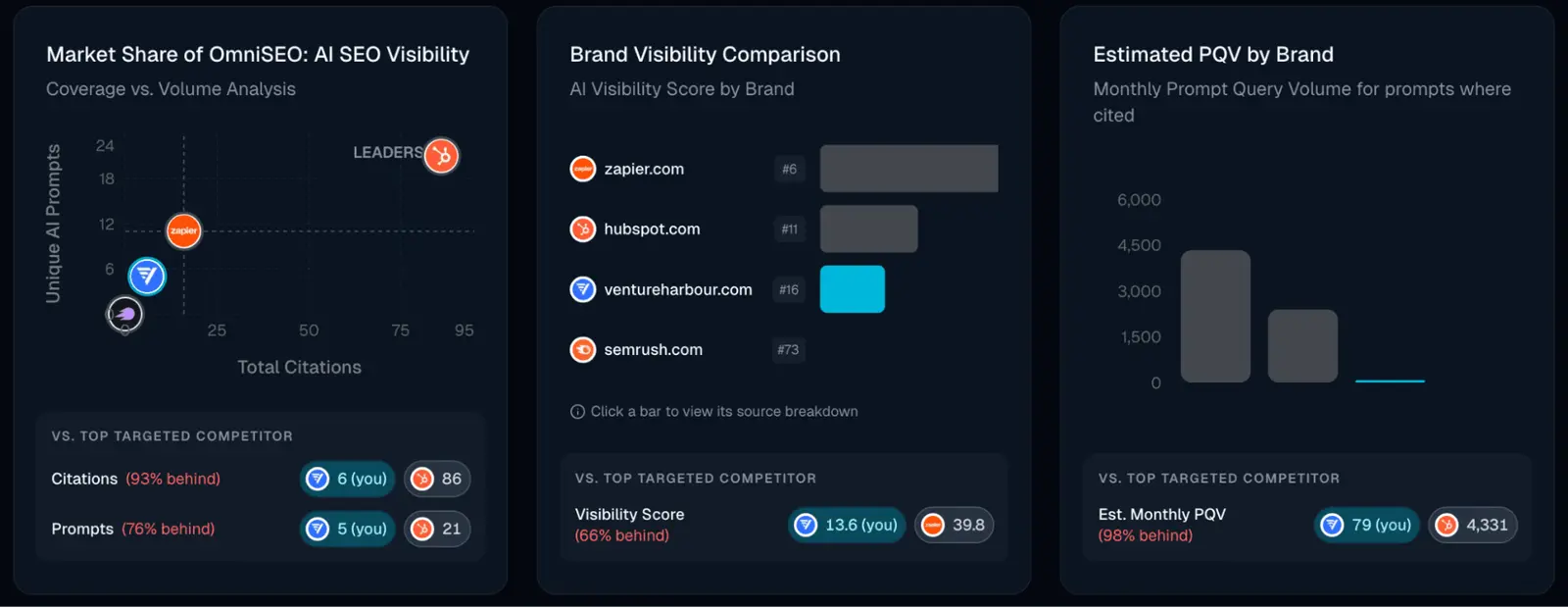
But after persevering through what felt like learning a new language, and wrapping my head around Prompt Query Volumes, AI Search Brand Interaction Scores and countless other pseudo-metrics, the clearer it became that this is a notch above some of the other tools.
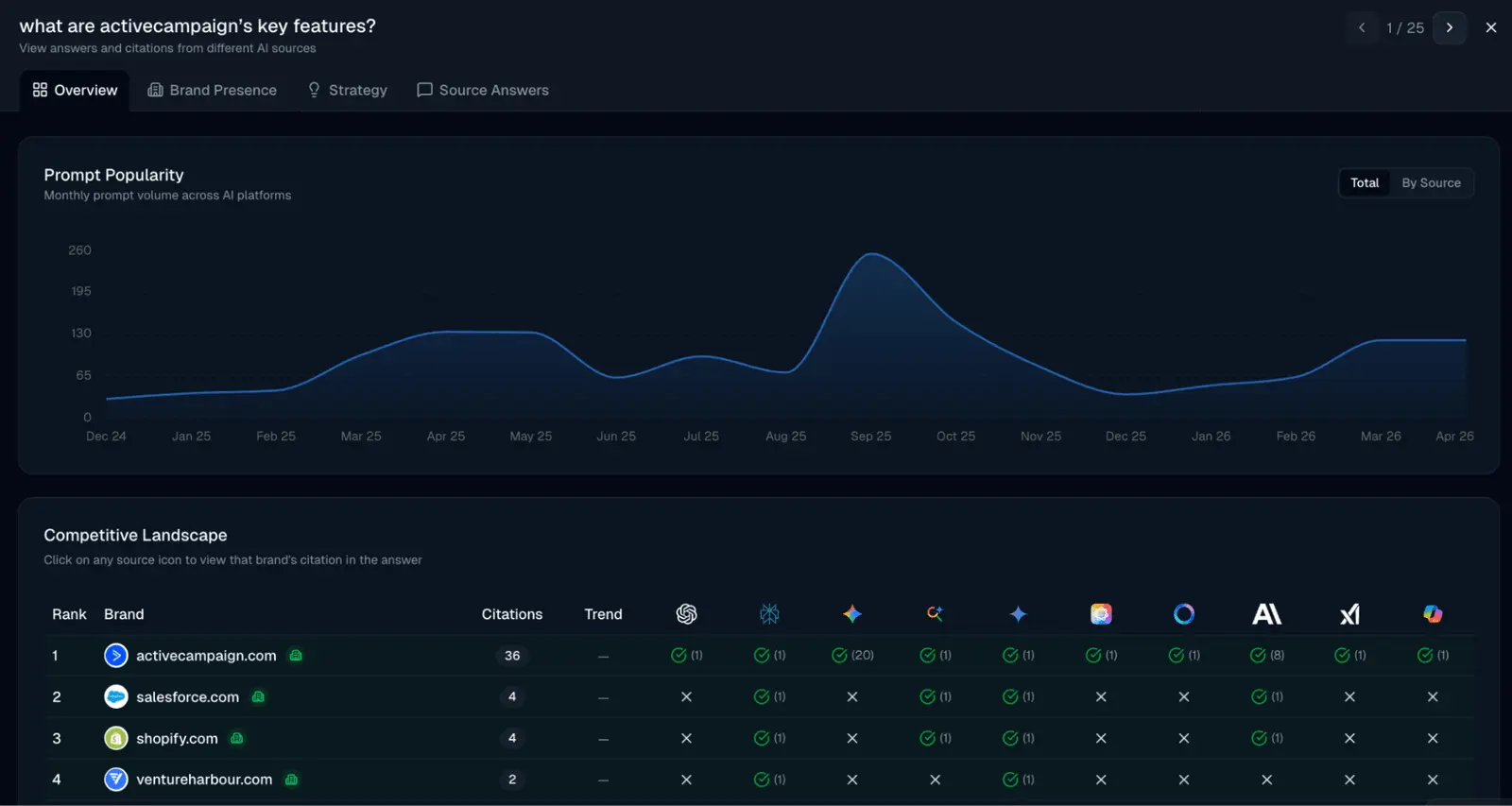
For starters, you can see the popularity of tracked prompts over time across different AI search engines. That makes it easy to spot the gaps where you are invisible on prompts people are actually asking, and feed those gaps straight into your content plan.
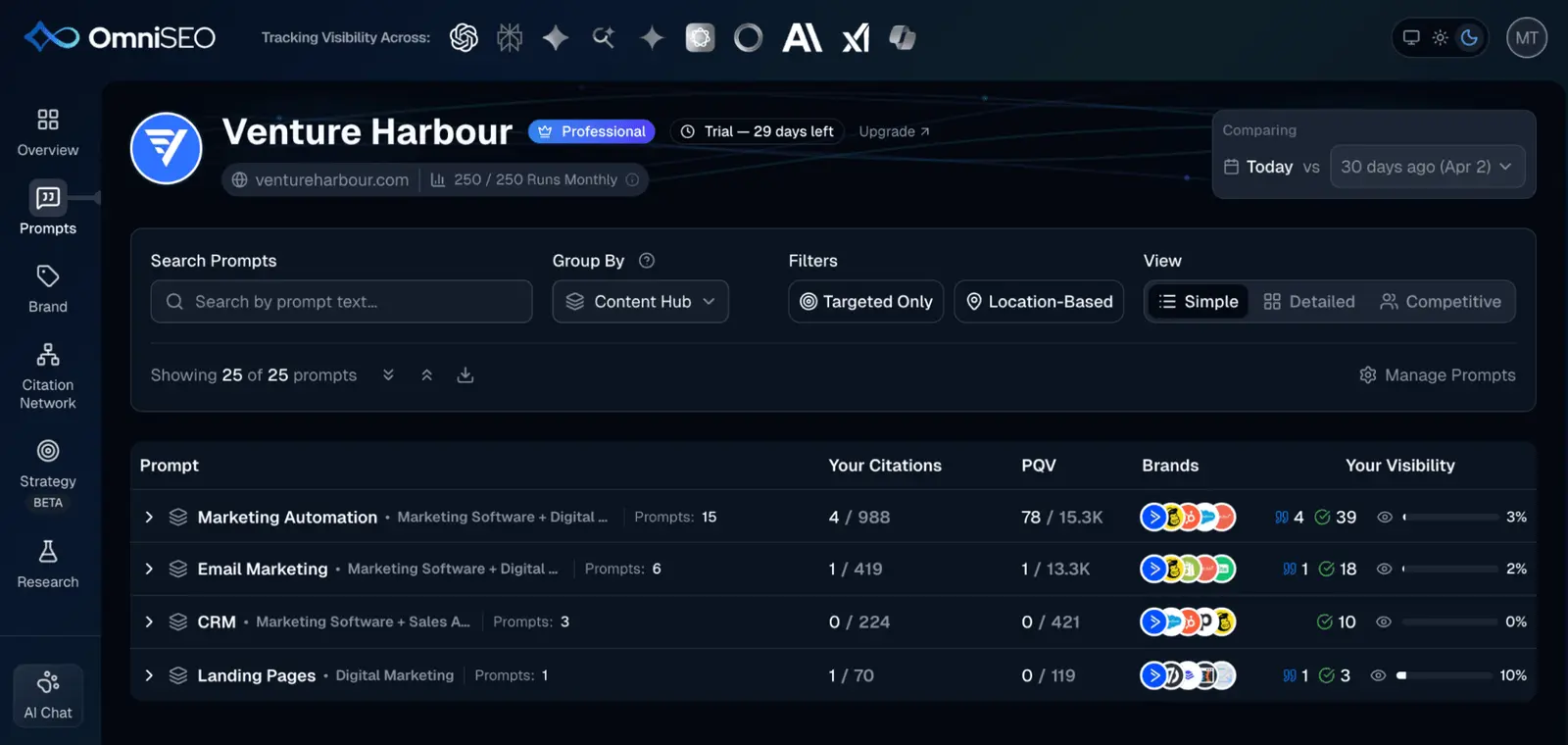
Grouping those prompts by content hub is what made the gaps obvious. Our marketing automation prompts sat at 3% visibility across 15 prompts, and CRM at 0% across three.
The recommendations are also significantly better than what I’ve seen in other platforms. While most of the tools in this post aggressively recommend creating swaths of new content and spamming Reddit for citations, OmniSEO made suggestions that were closer to what I’d expect from an experienced marketer.
For example, it recommended rewriting the first 40-60 words after each of our H2 headings, so the direct answer sits exactly where AI crawlers tend to lift their extracts from.
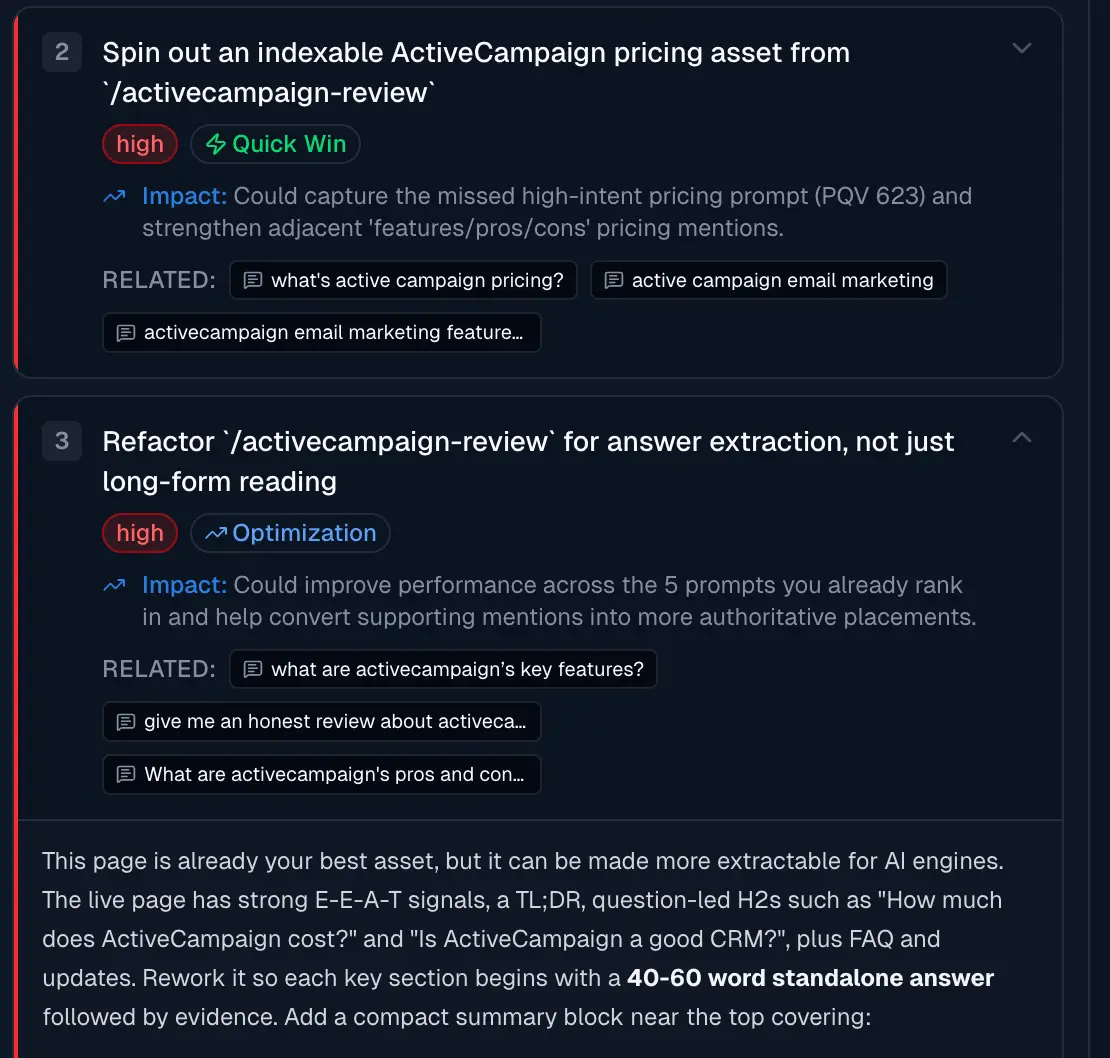
It also groups the gaps into quick wins — prompts where competitors are showing up and you aren’t, sized by how much volume sits behind them.
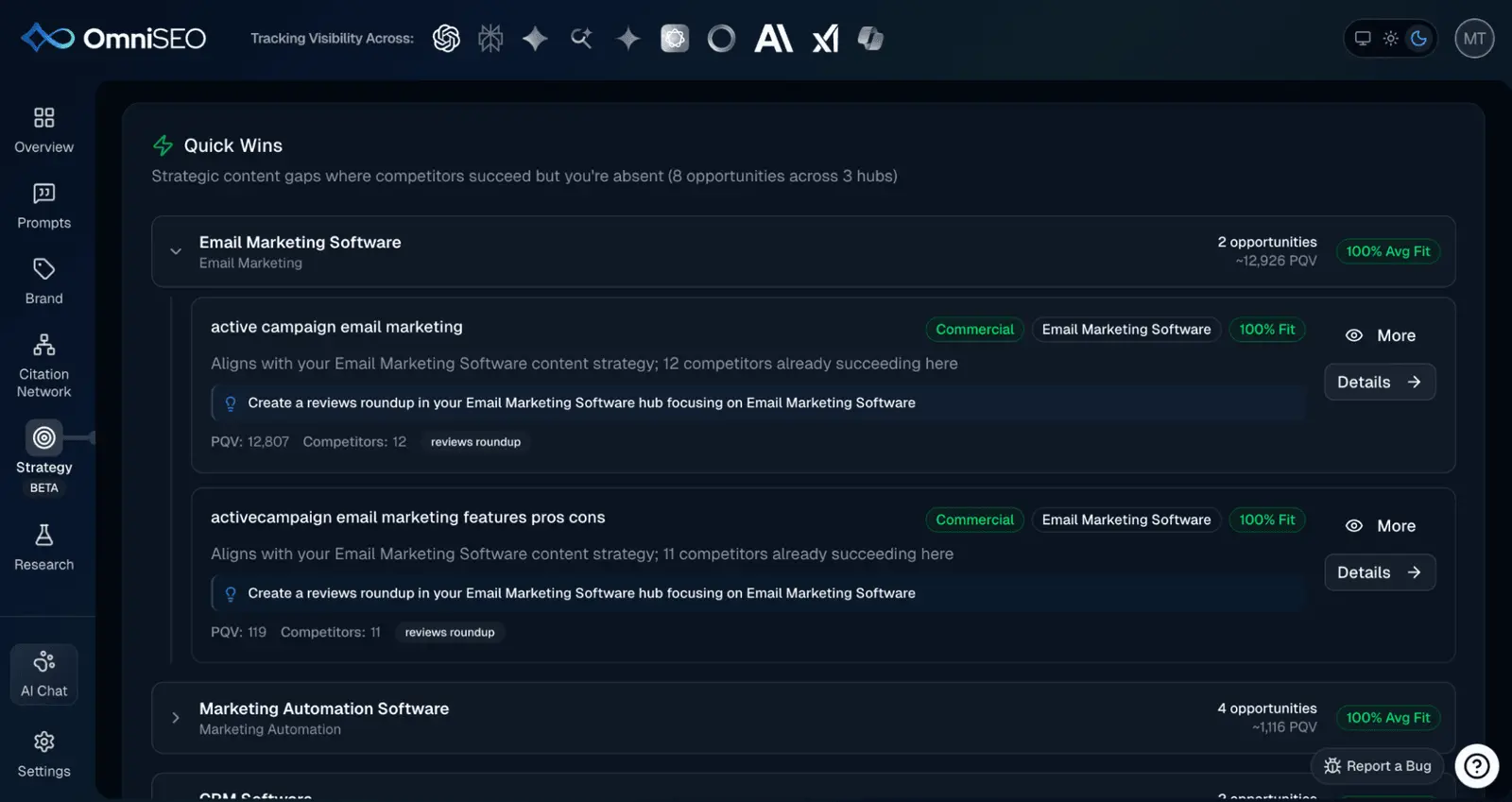
Its new site coverage tool is also genuinely useful — it shows which of your pages are being cited by AI search and which are being ignored entirely, which is a far more actionable starting point than a single brand visibility score.
It does have a few downsides. By default it only checks citations once a month, so you have to wait a month to see whether your changes have led to any improvements.
Pros and Cons
-
Actionable prompt tracking: I could see which prompts drove AI search visibility and feed those gaps into my content plan.
-
Recommendations feel expert-driven: The suggestions were what I’d expect from an experienced marketer, not generic automation.
-
Site coverage tool highlights ignored pages: It was obvious which pages were being cited by AI search and which were invisible.
-
Real-time and historical AI visibility: The platform offers real-time scores and trend analysis across several major AI engines.
-
Transparent pricing structure: Multiple plans are available for different team sizes and requirements.
-
Jargon-heavy onboarding: The first half hour felt like deciphering a new language, packed with pseudo-metrics.
-
Citation checks only monthly by default: I had to wait a month to see if changes had any effect.
-
Partial integration with legacy SEO tools: Traditional SEO tool integration is not fully supported.
Pricing
| Plan | Monthly Price | AI Channels | Seats |
|---|---|---|---|
| Essentials | $89 | 4 | 5 |
| Professional | $349 | 10 | 10 |
| Enterprise | $899+ | 10+ | Unlimited |
02Profound
automation and integrations for teams with an existing publishing stack
There’s a lot to like about Profound. Prompts are tracked daily, the integrations and automation features are incredible, and the platform is probably the easiest to use despite being one of the most feature-rich.
Which is probably why it’s become one of the most popular AEO/GEO tools used by digital agencies.
There are three particular features in Profound I really like.
Firstly, the content optimiser. Give it the URL of an existing piece of content and it does a decent job of identifying opportunities to improve it.
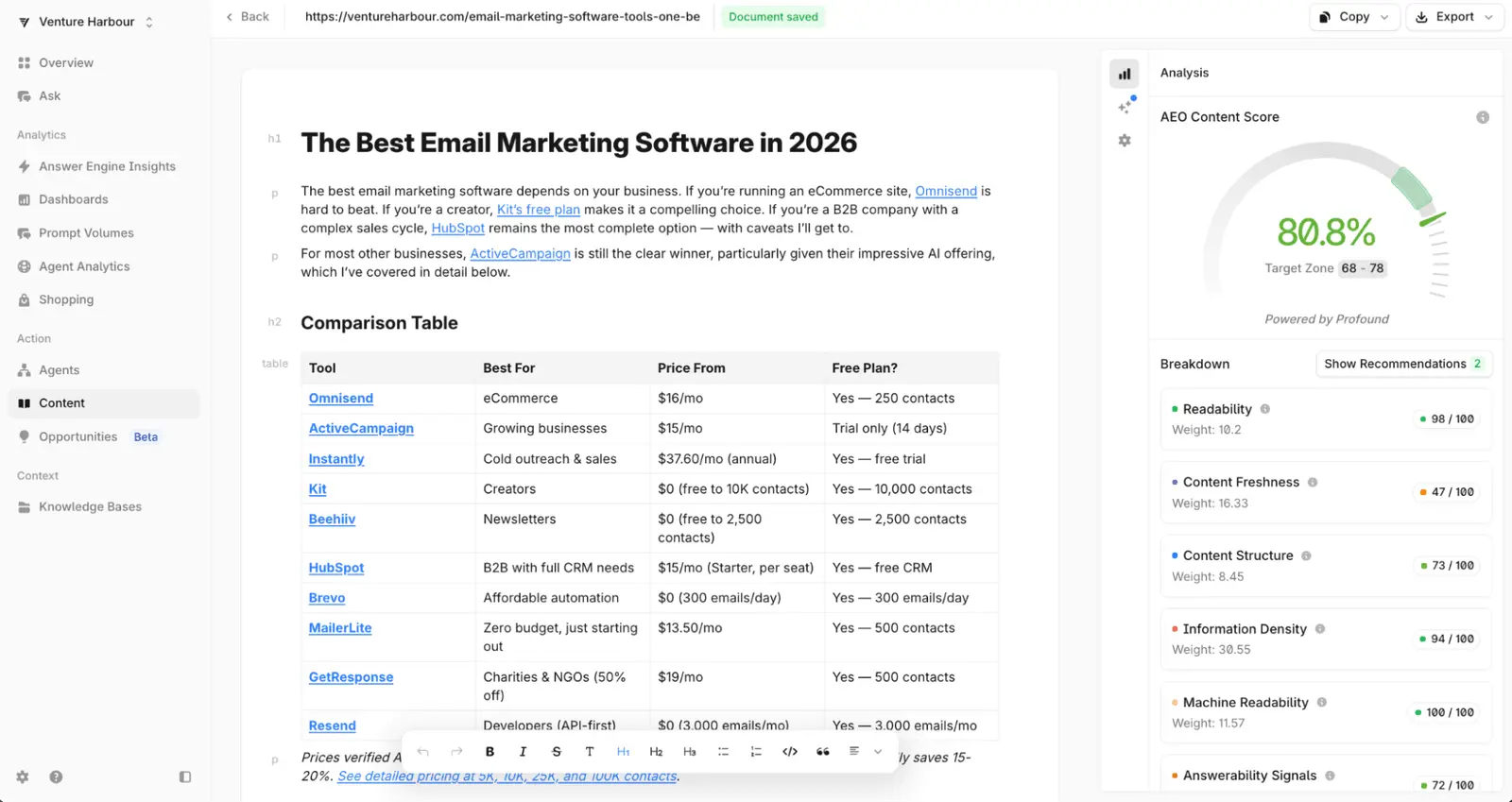
Secondly, the daily tracking. Because prompts are checked every day rather than monthly, you can actually connect a change you made to a movement in visibility instead of guessing a month later.
Lastly, perhaps the biggest differentiator with Profound is the ability to connect it with your existing tools. It integrates nicely with Framer, WordPress and Webflow, as well as Notion and Google Drive, making it easier to pipe insights from Profound into your content research and publication workflow.
Then, if you want to dial automation up a notch, you can use Profound’s agent builder to create Zapier-like workflows for researching, updating and creating content.
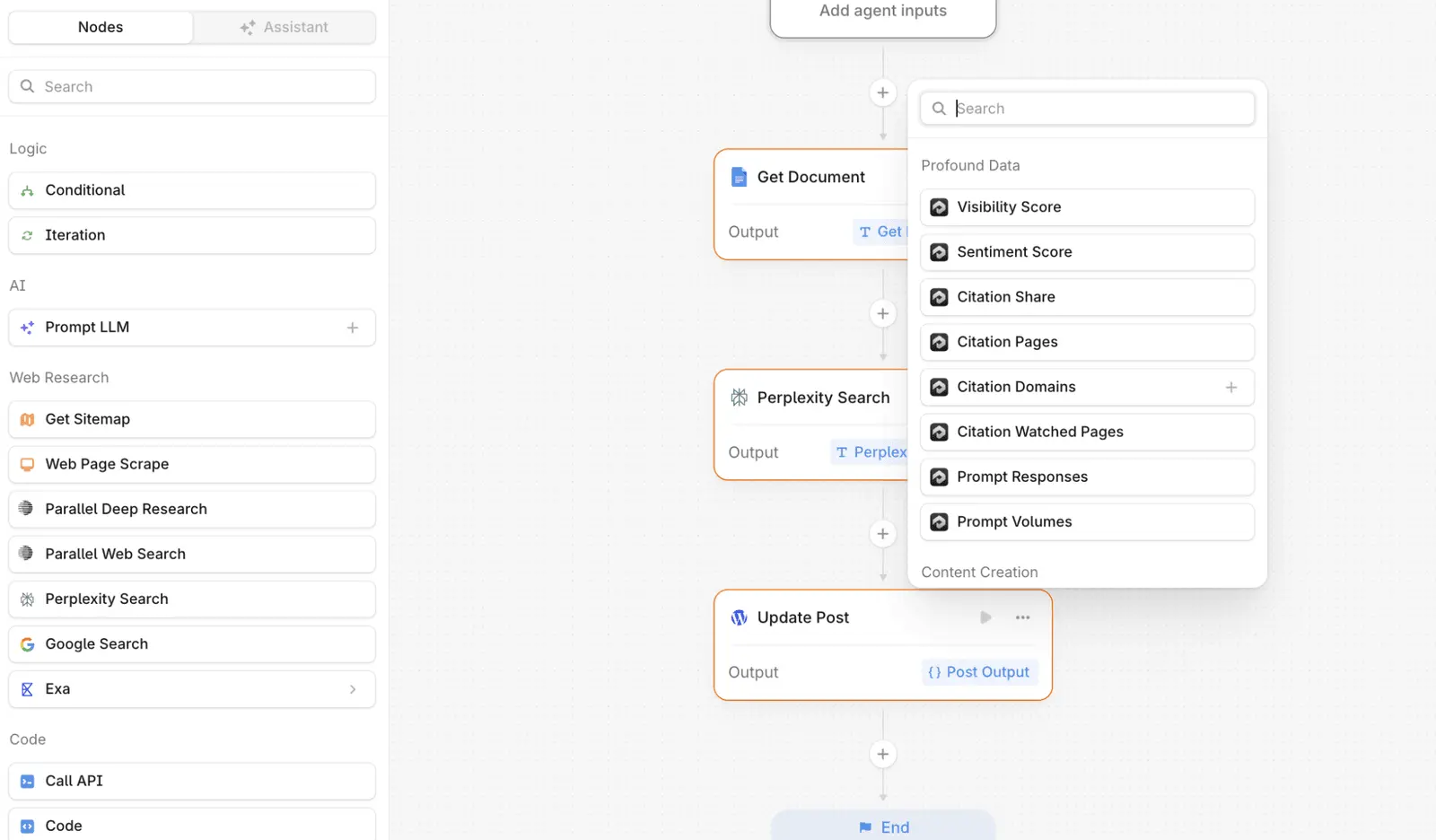
Interestingly, when you create a new piece of content in Profound it actually runs a pre-built workflow like this in the background to generate content. You can see in the screenshot below the nine default steps in Profound’s content generation workflow — which, if you click on them, open up a workflow like the one above.
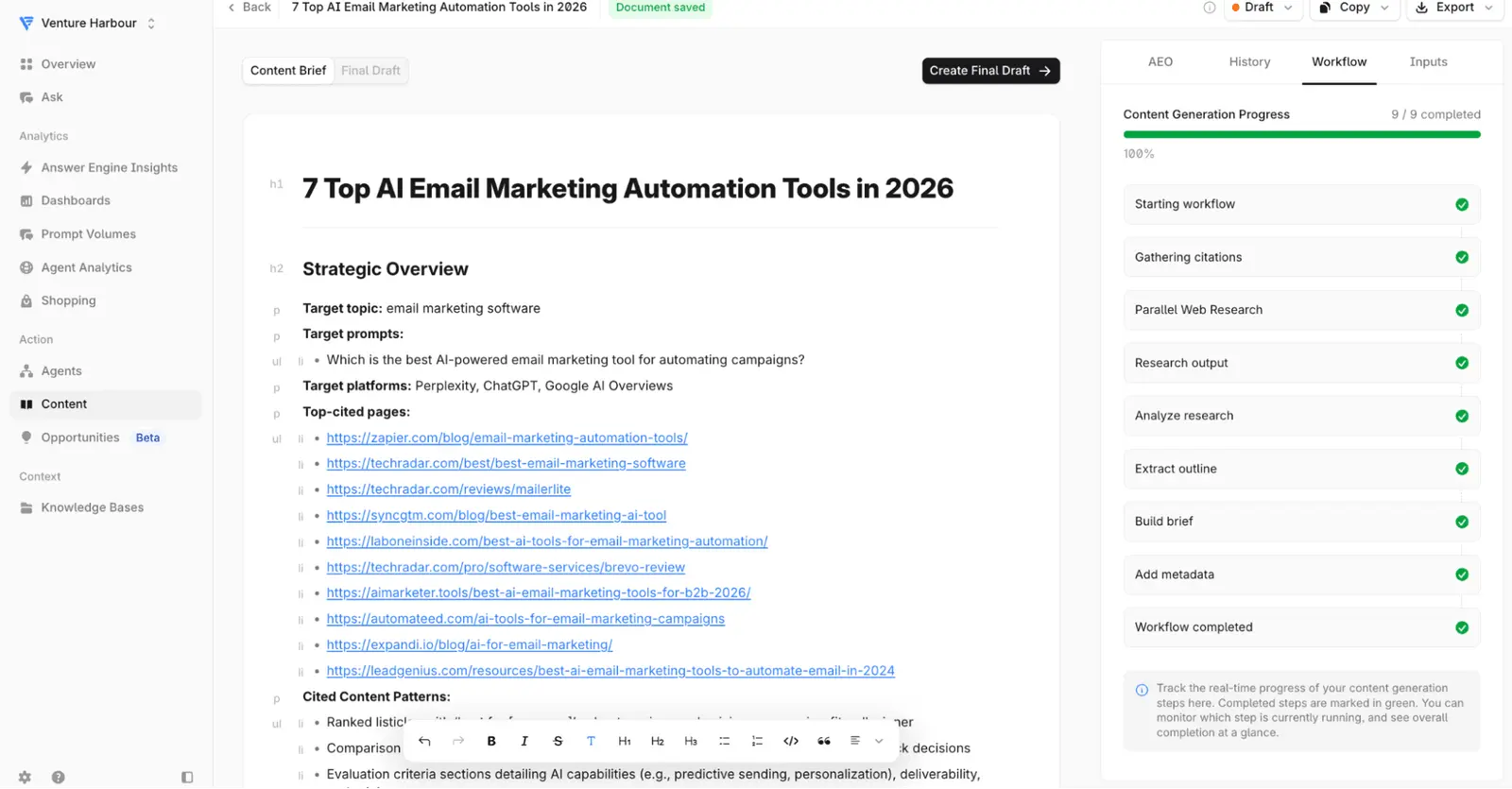
The main downside with Profound is the price tag. At $399/mo it was the most expensive tool I tested, which is difficult to justify unless AI search is already driving meaningful traffic to your site.
Pros and Cons
-
Daily prompt tracking: Prompts are checked every day, making it easier to link changes to results.
-
Simple, feature-rich interface: The platform is the easiest to use of those I’ve tested, despite a broad feature set.
-
Content optimiser for URLs: It identifies practical improvement opportunities on existing content.
-
Strong integrations: It connects well with Framer, WordPress, Webflow, Notion, and Google Drive.
-
Automation through agent builder: Profound lets you build custom workflows for content research and publishing.
-
High pricing: At $399/month, it’s the most expensive tool I tested.
-
Lower value for low-traffic sites: The cost is hard to justify unless AI search already drives meaningful traffic.
-
No two-job benchmark support: Specific support for the ‘Two-Job Benchmark’ isn’t mentioned or available.
Pricing
| Tier | Monthly Price | Prompts Included | Seats |
|---|---|---|---|
| Starter | $99 | 50 | 1 |
| Growth | $399 | 100 | 3 |
| Enterprise | Custom quote | Custom | Custom |
03HubSpot AEO
Existing HubSpot customers
I didn’t plan to include HubSpot, but as I was running this experiment HubSpot rolled out their AEO offering in beta, after acquiring XFunnel.
For fun, I gave it a list of queries from our HubSpot review. I did enjoy watching HubSpot’s analysis reel off a long list of cons and disadvantages of its own platform.
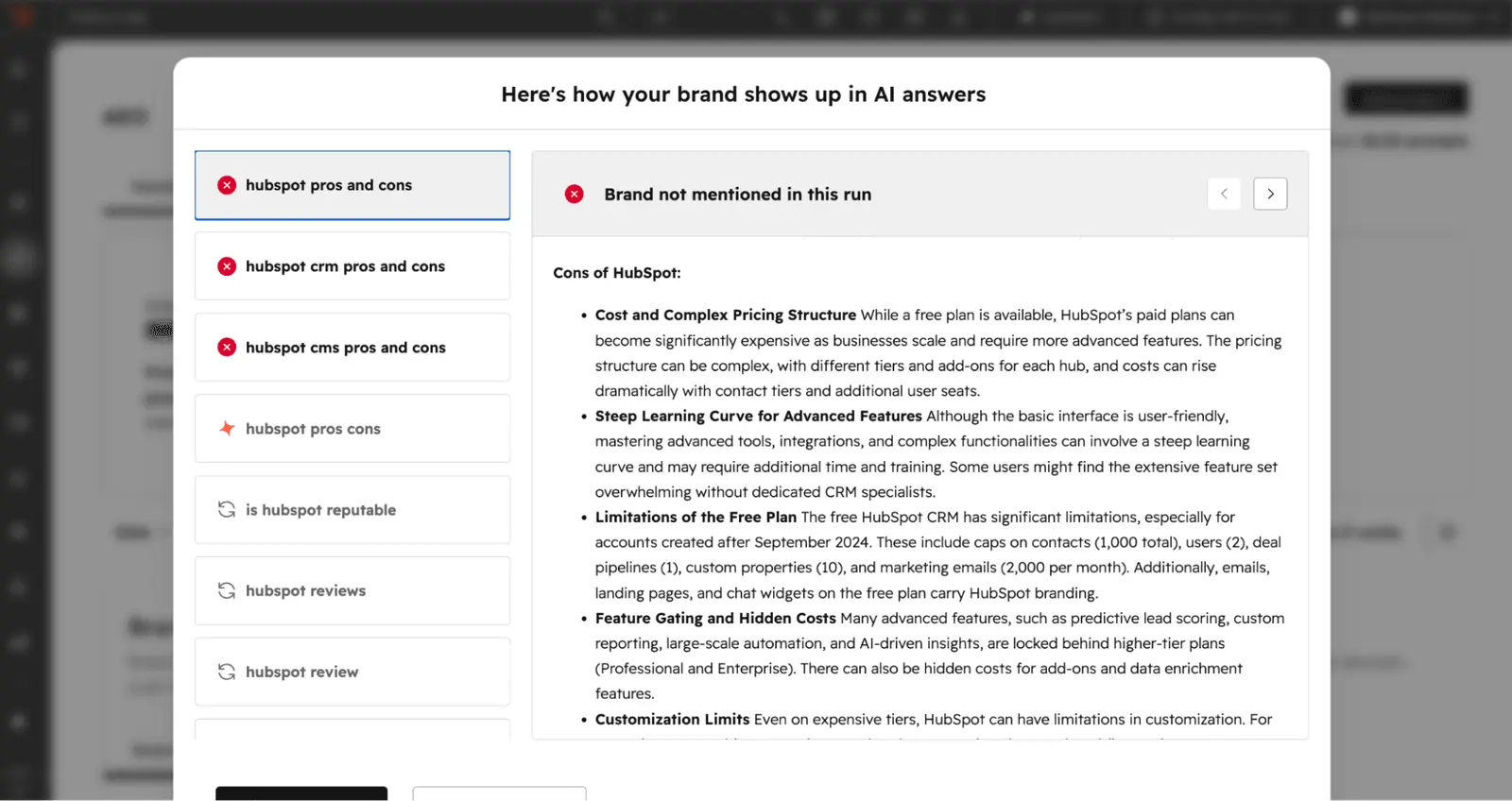
After analysing our visibility, HubSpot recommended commenting on four Reddit threads and adding 25 new articles to this website about HubSpot. Which, given the article it was analysing is a review of HubSpot, is quite the suggestion.
I didn’t do that. But I did feed all of the recommendations into Claude Code to plan a rewrite of the article that addressed the underlying points, which was a more useful outcome than the recommendations themselves.
HubSpot AEO is a new entrant to the answer engine optimisation space, arriving after HubSpot’s acquisition of XFunnel. It aims to help brands understand and improve their visibility in AI-generated search results—specifically across ChatGPT, Gemini, and Perplexity—by tracking when and how often their brand appears in AI answers.
For most businesses already using HubSpot, the AEO module feels like a natural add-on. The tool monitors AI search results in real time, offering a unified visibility score and competitor tracking, which can be especially handy for teams already invested in the HubSpot ecosystem. Instead of sprawling dashboards, it condenses visibility, sentiment, and citations into a single interface, which lowers the barrier for those new to AI search.
The platform’s actionable recommendations are meant to help users boost their mentions in AI answers, though there’s a tendency for these suggestions to lack context or specificity—particularly when it comes to niche products or unique business models. HubSpot AEO’s integration with the broader Marketing Hub does let users pair AI visibility tracking with traditional SEO and CRM data, but direct connections to non-HubSpot SEO tools are not specified. For those seeking deep technical transparency, the underlying methodology behind its visibility scores and share of voice remains undisclosed.
Whilst the entry point is accessible—$50 per month for the standalone plan—the prompt quota is capped at 25 prompts per portal, limiting its usefulness for agencies or larger organisations wanting to track multiple brands or a wide range of queries. The onboarding and support for lower-tier plans also draw criticism, as hands-on assistance is mainly reserved for those on the higher-priced Marketing Hub tiers.
Pros and Cons
-
Accessible pricing: Entry-level plan starts at $50/month, making AEO tracking available to smaller businesses.
-
User-friendly interface: The dashboard is designed for easy adoption, with visibility scores and recommendations in one place.
-
Native HubSpot integration: For those already using HubSpot CRM, the AEO module fits neatly into existing workflows.
-
Low prompt limits: Tracking is capped at 25 prompts per month for standalone plans, which restricts breadth for larger teams.
-
Opaque metrics: The methodology behind visibility scores is not publicly disclosed, limiting trust in the data.
Pricing
| Plan | Monthly Price | Prompts/Month | Key Features |
|---|---|---|---|
| Free Trial | $0 | 25 | 3 engines, 2,500 answers |
| HubSpot AEO Standalone | $50 | 25 | 3 engines, add-on prompts |
| Marketing Hub Professional | $1,300 | 50 | Full site audit, topic analysis |
| Marketing Hub Enterprise | $4,700 | 50 | Advanced marketing tools |
HubSpot AEO positions itself as an entry-level AI visibility tracker for brands already invested in the HubSpot ecosystem. The ease of use and CRM integration appeal to those wanting a quick start, but the limited prompt capacity and lack of transparency on scoring hold it back from being a fit for agencies or technical SEO specialists seeking in-depth coverage. For more comprehensive marketing tool comparisons, see email marketing software compared.
04AirOps
teams generating new content at volume, not optimisation
I put AirOps in charge of our AI avatar software post. After feeding it 25 relevant queries from Google Search Console, it benchmarked our current performance at 12.5%.
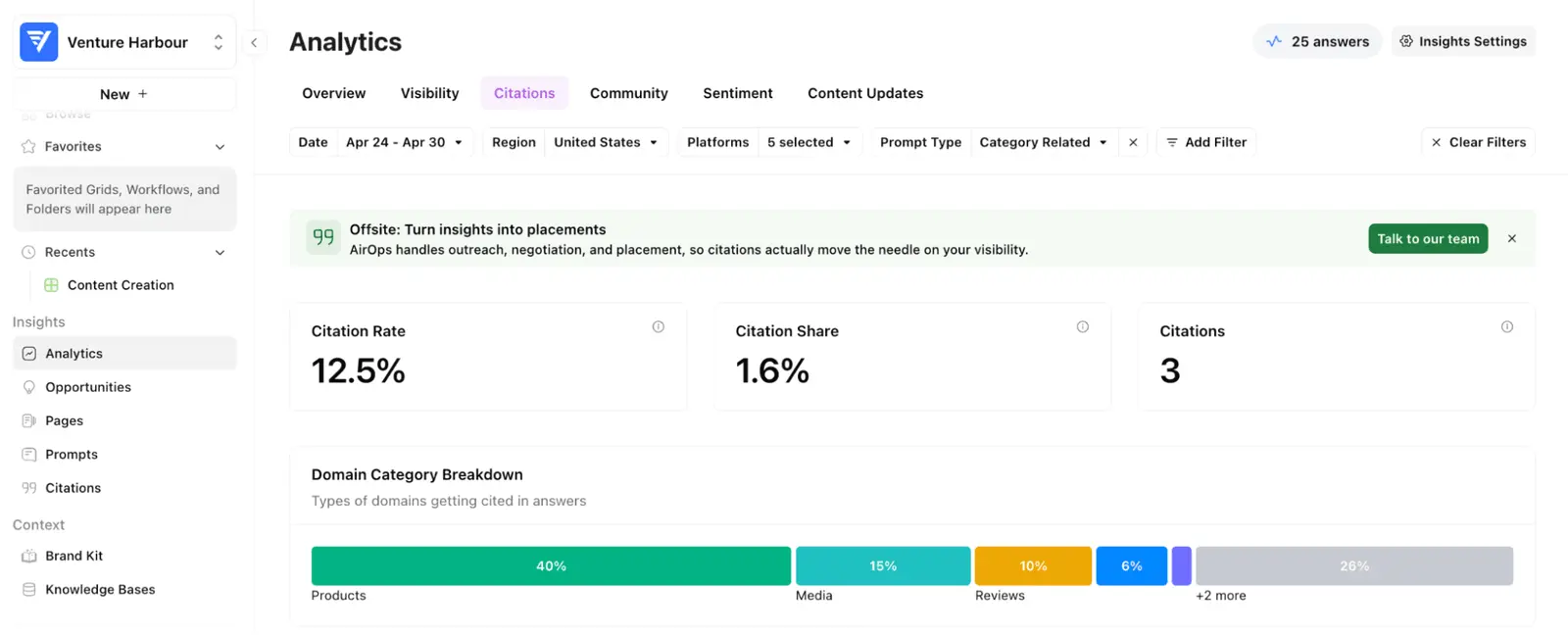
After generating a “brand kit” — essentially a system prompt with our tone of voice — it advised me to generate 7 new articles and run a Power Agent workflow. Despite being editorially questionable, I gave it a spin out of curiosity.
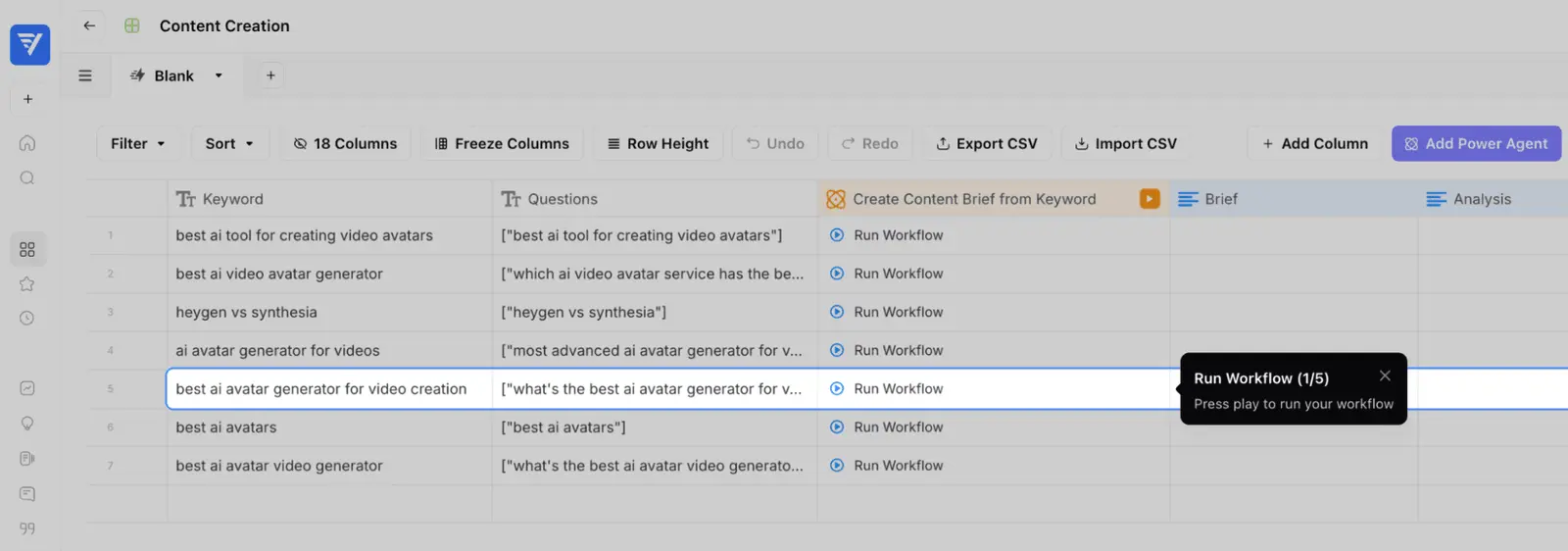
This essentially created a brief for a long-tail article targeting a specific prompt which, once finished, triggered a cascade of daisy-chained prompts doing everything from adding internal links to finding outbound link opportunities.
This would be pretty smart if I wanted to add new content, but in this case I was looking to optimise what I already had. In that regard, the suggestions were non-existent.
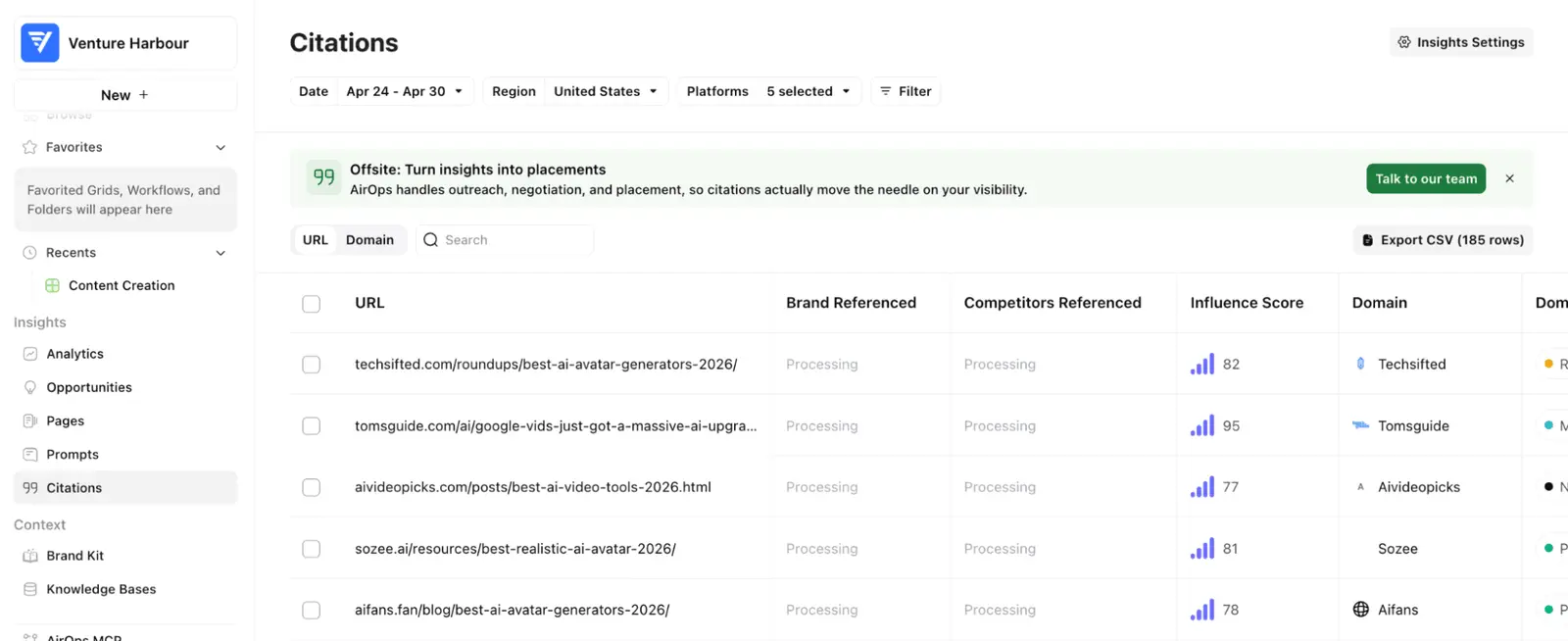
The more I used AirOps, the more it felt like a software front for their outreach service. Granted, link outreach is generally the most manual and time-consuming part of the process, but I was looking for software I could run myself rather than a service I’d end up buying.
Pros and Cons
-
Comprehensive AI visibility monitoring: AirOps tracks brand presence across AI search platforms like ChatGPT, Perplexity, and Gemini.
-
Automated article workflows: I found the Power Agent workflow triggered a full content creation and linking process for new articles.
-
Free entry tier available: There’s a no-cost Insights plan for measuring AI and traditional search visibility.
-
Limited for content optimisation: I received no meaningful suggestions for improving existing content.
-
Service-centric approach: The experience felt more like a lead-in to their outreach service than standalone software.
Pricing
| Tier | Monthly Price | Users | Key Limits |
|---|---|---|---|
| Insights | $0 | 1 | 1,000 tasks/month |
| Solo | $200 | 1 | 20,000 tasks/month |
| Pro | $2,000 | Unlimited | 75,000 tasks/month |
| Enterprise | Custom | Unlimited | Custom |
05Peec AI
Teams that want daily, multi-engine AI visibility tracking but can live without hands-on optimisation advice.
Peec AI tracks brand and competitor mentions across ChatGPT, Perplexity, Google AI Overviews, and more — but limits the included engines to three on every non-Enterprise plan. I started out sceptical, since the pitch sounded like a cut-up SEO dashboard with a new coat of AI paint, but after a month of tracking 25 prompts across Venture Harbour’s main sites, a few things stood out.
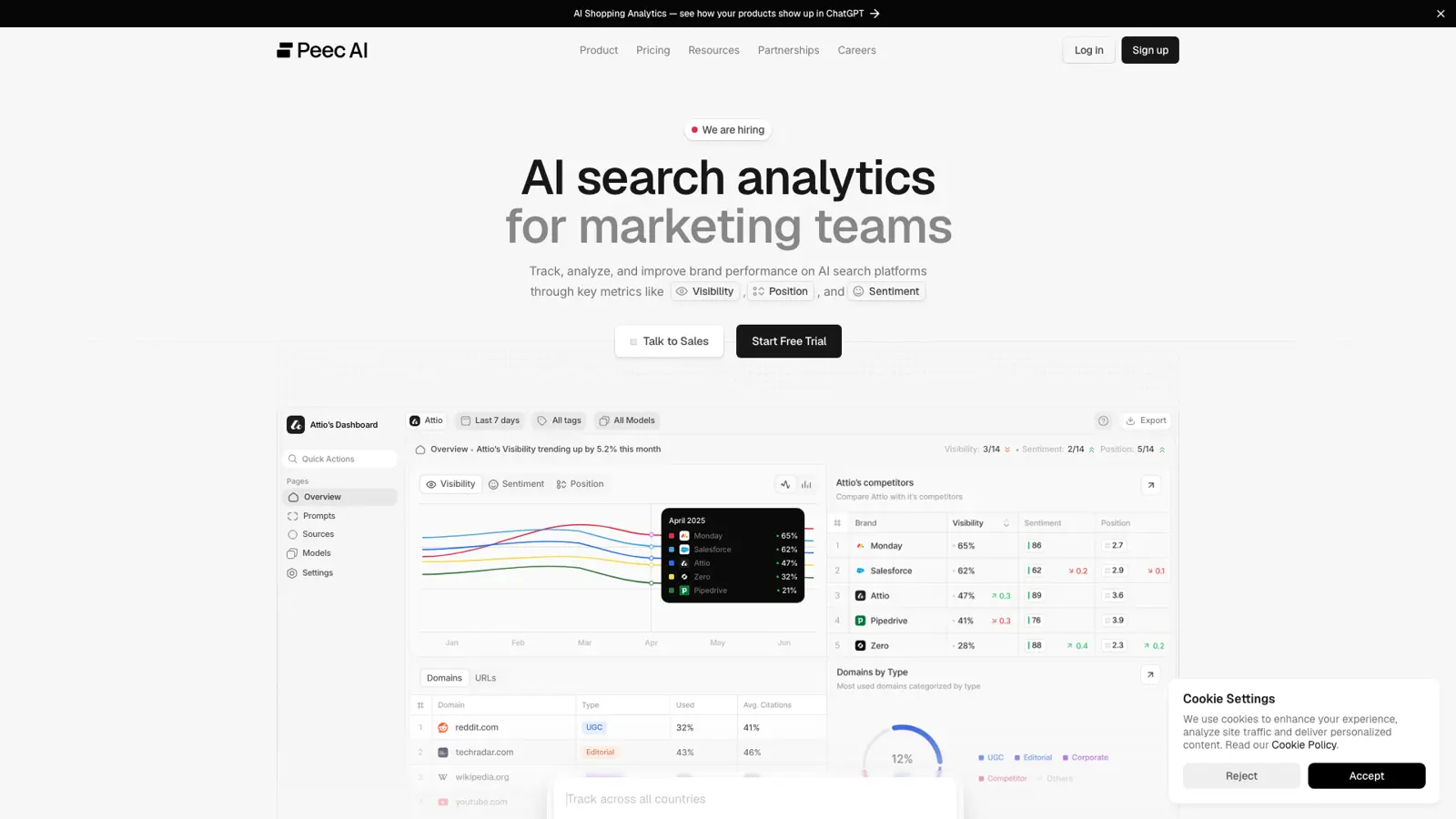
First, the interface is unusually clean for this category — I had everything connected and prompts set up within an hour, and I was able to grant access to the rest of my team without worrying about user limits (all plans offer unlimited users, which is rare at this price point). Daily tracking worked as promised, and Peec AI picked up several mentions in Perplexity and Gemini that I hadn’t noticed through manual spot checks. Sentiment analysis and share-of-voice breakdowns helped me spot where the brand was being misrepresented or omitted, but — and this is the catch — the tool stops short of telling you what to do about it.
Peec AI’s biggest differentiator is multi-platform coverage, with support for at least six engines (ChatGPT, Perplexity, Google AI Overviews, Claude, Gemini, and AI Mode), though only three are included in the base plans and adding more quickly drives up costs. That makes it best suited to companies that already know what to do with visibility data and just need a way to track it systematically across multiple geographies and languages. If you’re hoping for actionable, step-by-step recommendations to improve your AI search footprint, you’re on your own — the platform provides the diagnosis but not the prescription.
The metrics are transparent and the dashboards are genuinely useful for spotting trends and gaps, but the lack of direct optimisation features or content suggestions means you’ll need to bring your own strategy. Users in the public feedback echo this: praise for the ease of setup and interface, but frustration that the tool shows where you’re missing out without helping you fix it. At $95/month for the lowest tier (Starter), it’s not a casual purchase, and there’s a premium if you want to track more than three engines.
Pros and Cons
-
Unlimited user access: Every plan allows unlimited team members, which is unusual at the Starter and Pro pricing levels.
-
Daily tracking across multiple AI engines: Monitors up to three engines per project by default, with the potential to add more on higher tiers.
-
Transparent, detailed reporting: Dashboards break down visibility, sentiment, and share-of-voice in a way that’s easy to interpret.
-
No actionable recommendations: The platform highlights gaps but doesn’t suggest or automate fixes, so you’ll need in-house expertise.
-
High costs for broad coverage: Only three AI engines are included on most plans, and extra engines add significantly to the bill.
Pricing
| Plan | Monthly Price | Annual Price | Prompts | AI Engines | Projects | Users | Countries per Project | Tracking Frequency |
|---|---|---|---|---|---|---|---|---|
| Starter | $95 | $1,140 | 50 | 3 | 1 | Unlimited | Unlimited | Daily |
| Pro | $245 | $2,940 | 150 | 3 | 2 | Unlimited | 3 | Daily |
| Advanced | $495 | $5,940 | 350 | 3 | 5 | Unlimited | 3 | Daily |
| Enterprise | Custom | Custom | Custom | All models | Unlimited | Unlimited | Unlimited | Daily/Weekly |
How Does Pricing Compare?
Most providers in this category price their monitoring and optimisation tools on a monthly subscription, but the gulf between entry-level and “full” access is hard to miss. If you’re picking based on cost per seat or per prompt, the differences become stark rather quickly.
Here’s how the main vendors stack up for comparable tiers—focused on monthly price, core limits, and published unit pricing.
| Vendor | Tier | Monthly Price | Annual Price | Core Limits | Seats | Normalised Unit Price ($/mo) | Pricing Link |
|---|---|---|---|---|---|---|---|
| OmniSEO | Essentials | $89 | $890 (2 months free) | 4 AI channels, 50 prompts, 5 comps | 5 | $291 | OmniSEO Pricing |
| Professional | $349 | $3490 (2 months free) | 10 AI channels, 100 prompts, 5 comps | 10 | |||
| Enterprise | $899+ | N/A | 10+ AI channels, 500+ prompts, custom | Unlimited | |||
| Profound | Starter | $99 | N/A | 50 prompts | 1 | $399 | Profound Pricing |
| Growth | $399 | N/A | 100 prompts | 3 | |||
| Enterprise | $2,000+ | N/A | Custom | N/A | |||
| HubSpot AEO | Free Trial | $0 | $0 | 25 prompts/day, 3 engines, 2500 answers | N/A | $50 | HubSpot AEO Pricing |
| Standalone | $50 | $45 | 25 prompts/day, 3 engines, 2500 answers | N/A | |||
| Marketing Hub Pro | $1,300 | $15,600 | 50 prompts, 3 engines, 5000 answers | N/A |
Key takeaway: HubSpot AEO’s standalone tier is the cheapest published option for routine monitoring, at $50/month, whilst Profound charges $99/month for a similar prompt limit but restricts access to just one seat. On a per-seat and per-prompt basis, OmniSEO’s Essentials tier ($89/month) offers a middle ground, but the price for larger teams rises quickly—Profound’s Growth tier jumps to $399/month for three seats, and OmniSEO’s Professional is $349/month for ten.
The gap widens at the top end—Profound’s Enterprise tier starts around $2,000 per month, compared to OmniSEO’s Enterprise from $899, though both require custom quotes for full usage details. If you need more than a few seats or high prompt volumes, published pricing will only get you so far—at this level, every vendor expects you to negotiate.
HubSpot’s free trial is the only true free option for up to 25 daily prompts, but you’re capped on engines and volume. For most real-world jobs, the “just try it” route won’t last long.
Cheapest for basic jobs: HubSpot AEO. Most scalable (before hitting opaque pricing): OmniSEO’s Professional. Profound’s unit costs climb fast if you add seats.
What Do Users Say?
Most users describe AI search and analytics platforms as either a time-saver or a source of new complications—sometimes both in the same review. Positive sentiment generally clusters around two themes: intuitive interfaces that reduce manual work, and actionable data that helps teams communicate results to leadership.
Users consistently praise platforms like OmniSEO for bringing clarity to AI search visibility, especially through dashboards that aggregate data from sources like ChatGPT and Google AI Overviews. Several reviewers highlight that these tools have replaced hours of manual work with simple trend tracking and straightforward metrics. Profound, meanwhile, earns approval for high-quality analytics and frequent feature updates, though users warn about its steeper learning curve—data complexity can overwhelm new users before it starts paying off for analytical teams.
Pricing and plan limits crop up as the most common complaints. OmniSEO’s Essentials plan restricts tracking to four AI channels and five competitors, which fast-growing brands and agencies find limiting. Profound faces criticism for high enterprise pricing and occasional bugs, with some users noting slow data exports as a bottleneck. HubSpot AEO is seen as an affordable way in, but its 25-prompt tracking cap and limited support on lower tiers frustrate users with bigger ambitions.
Sentiment is rarely black and white. Platforms often receive mixed reviews, with HubSpot AEO and AirOps both described as easy to adopt but lacking depth or flexibility for power users—especially agencies. A recurring theme is that user experience depends heavily on scale: what feels smooth for a solo marketer can be constraining for a multi-team operation. As one OmniSEO reviewer put it, “Before using OmniSEO, we spent hours manually running searches and logging results to measure our visibility on AI platforms like ChatGPT and AI Overviews.” That sense of relief is common, but so is the realisation that most platforms still leave advanced users wanting more.
Which Tool Is Best For You?
Best for Developers
If you want to wire AI content insights directly into existing publishing stacks or build custom automations, Profound is the obvious pick. It was the only tool in the test with an agent builder for Zapier-style workflows, and in my hands-on, it actually delivered daily prompt tracking without the usual configuration pain.
Best for Non-Technical Users
OmniSEO starts off rough—expect jargon and a lot of fluff metrics in the first session—but once you get past that, it’s the only tool that spits out recommendations you can actually follow without needing to learn a new system. If you just want to improve rankings and need advice that doesn’t sound like a checklist from ChatGPT, this is the one I’d send most people to.
Best for Enterprise
Profound stands out for larger teams juggling multiple channels or complex approval chains. Automation, integrations, and the daily monitoring made it feel more like a platform than a product, though you pay for the privilege. If you’re already running a bespoke content stack, Profound gets you visibility without forcing a migration.
Best for Startups
AirOps is built for teams just starting to produce content who want to go from zero to something publishable—fast. The workflow builder made batch-content surprisingly manageable, but if you’re looking to optimise existing content, it’s not the right tool.
Best on a Budget
HubSpot AEO comes bundled if you’re already a HubSpot customer, so there’s nothing else to pay. I found the recommendations pretty generic—think “publish more content” and “comment on threads”—but if you’re cost-sensitive and already paying for HubSpot, the price is hard to argue with.
Best for Content Optimisation You’ll Actually Use
OmniSEO is the only one from the test that gave me advice I wanted to implement, not just “publish more”. If your priority is clear, actionable SEO recommendations that go beyond surface-level tips, it’s worth tolerating the onboarding quirks. It’s the best fit for teams who want practical optimisation, not just dashboards and charts.
Updates
07 August 2026: Initial comprehensive review of 5 ai visibility (aeo/geo) tools. Tested all platforms hands-on with real-world use cases.