
After using Brevo (formerly Sendinblue) for over a decade – and its competitors for even longer, I’m well aware of the platform’s strengths and weaknesses.
When I wrote our original guide on the best transactional email tools, we weren’t aware of Brevo (as it was known back then). After receiving numerous recommendations in the comments, I decided to test it out on our latest venture at the time – Leadformly. The platform has since rebranded to Brevo and evolved significantly, so I’ve updated this review to reflect where things stand today.
In this review, I’m not only going to look at the platform’s key features, but also help you understand how well Brevo meets your email marketing needs.
Brevo overview and pricing

Brevo still offers one of the most generous free plans on the market, allowing you to send up to 300 emails per day to up to 100,000 contacts. If you’ve been looking at other email marketing platforms, you’ll know this puts Brevo at the most affordable end of the spectrum, and I’m happy to report its pricing remains far more transparent than many other providers.
While plenty of email marketing platforms offer cheap starting packages, they tend to get more expensive as you scale up. Brevo is one of the few providers that charges you based on the number of emails you send rather than the number of contacts on your list. If you have a large contact database but send relatively infrequently, this pricing model can save you a significant amount compared to competitors like Mailchimp.
Brevo now offers five plans: Free, Starter, Standard, Professional, and Enterprise.
The Starter plan begins at $9/month for 5,000 emails and removes the daily sending limit. However, it still includes Brevo branding on your emails – removing that costs an extra $10.80/month, which is worth noting as it effectively more than doubles the base price of the plan.
The Standard plan starts at $18/month for 5,000 emails and is where things get genuinely useful. It includes marketing automation, A/B testing, advanced email reporting (including click heatmaps, geography and device reports), landing pages, and AI send time optimisation. Brevo branding is removed by default on this plan.
The Professional plan starts from 150,000 emails per month and adds multi-user access (10 seats included), WhatsApp messaging, popups, web and mobile push notifications, AI segmentation, contact scoring, phone support, and access to a deliverability specialist.
Enterprise customers get custom pricing with dedicated IPs included, SSO/SAML, custom data integrations, multi-account management, a loyalty engine, tailored onboarding, and a dedicated customer success manager.
Brevo also offers a pay-as-you-go option with prepaid email credits that never expire – one credit equals one email. This is ideal if your sending volume fluctuates or you only send campaigns occasionally. There’s also a 10% discount available on annual plans across the board.
In terms of contact management, the Free plan allows up to 100,000 contacts, with automation available for up to 2,000 contacts. On the Free and Starter plans, automation is capped at 2,000 contacts, while the Standard plan and above remove this limit.

While you do get basic reporting on the Free and Starter plans, this doesn’t include location or device reports, heatmaps, or advanced open and click stats. The full suite of reports is available from the Standard plan upwards.
The only limitation on support and integrations is that Professional users get phone support and a deliverability specialist, while Enterprise customers get a dedicated customer success manager. Every Brevo user gets full access to the API and plugins, documentation, and 150+ integrations with tools like Shopify, WordPress, Stripe, and Zapier.
Brevo’s Email Designer
With Brevo, you get 40+ responsive email templates to work with, along with a drag-and-drop email editor so you can create custom designs from scratch. There’s also a brand library feature where you can define your colours and fonts and save reusable content blocks like footers – a nice time-saver once you’ve set it up.

You can upload and customise templates or create your own layouts by dragging elements like headers, text boxes and images from the menu. It’s a quick and easy tool to get to grips with and you’ll be building custom email designs in no time – without writing a single line of code. Brevo has also added an AI content generator that can help draft email copy, which I’ve found useful for getting past blank page syndrome.
In truth, Brevo’s email designer still isn’t quite as polished as Mailchimp‘s email builder (which remains one of the best on the market), and some users have reported occasional bugs with the drag-and-drop interface. But for most use cases, it gets the job done.
Contact Management

Brevo’s contact management features remain a major strength of the platform. You can search, segment, categorise and create lists that update automatically based on your chosen criteria. Advanced segmentation is available across all plans, and the Professional plan adds AI-powered segmentation for more sophisticated targeting.
This is crucial for an effective email marketing strategy and Brevo offers a lot more in this regard than many of its more expensive alternatives. Combined with its automation features, which are also available to all users (although limited to 2,000 contacts on lower plans), Brevo’s contact management means you can target people on your email lists with personalised messages as their consumer needs change.
The platform also offers forms – including popups, embedded forms, and slide-ins on higher plans – with built-in GDPR compliance features like consent checkboxes and double opt-in confirmation. This is precisely what you want to be doing in email marketing.
Campaign Reports

Reporting is one of the main areas where Brevo differentiates its lower-tier plans from the more capable ones. You get basic reporting on the Free and Starter plans, but Standard, Professional and Enterprise users also get the following:
- Geography and device reports
- Click heatmaps
- Advanced open and click reports
- AI send time optimisation data
If Brevo is your only email marketing platform (I also use ActiveCampaign) then it’s worth investing in at least the Standard plan for these reporting tools. The heatmaps give you a better idea of how effective your email designs are and the advanced open and click reports tell you how compelling your subject lines and content actually are.
Marketing Automation

Unlike Mailchimp, Brevo has invested heavily in automation and it shows. The Standard plan includes full marketing automation with workflow-based triggers, while the Free and Starter plans limit automation to 2,000 contacts.
Whether this is a problem for you depends entirely on how many people you have on your email lists.

Brevo’s automation features are considerably more extensive than Mailchimp’s, allowing you to trigger campaigns based on email engagement, website behaviour, ecommerce activity, and contact data. You can build welcome sequences, abandoned cart emails, re-engagement campaigns, lead scoring workflows and more.
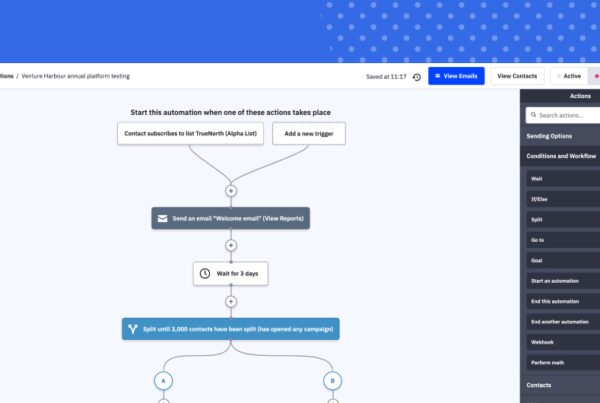
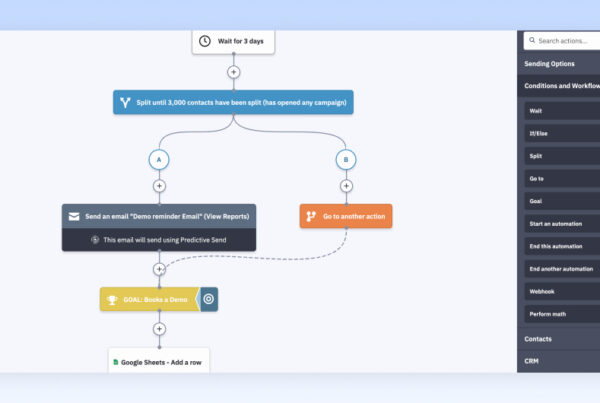
You can also create custom automation using the workflow builder. For example, you can send an email to first-time buyers with a coupon to encourage a second purchase while adding repeat buyers to another list to target them with loyalty messages – all automatically.
Brevo has also introduced AI-powered features including predictive send time optimisation and an AI Data Analyst on the Professional plan. These are genuinely useful additions that help you get more from your campaigns without additional manual effort.
Brevo has come a long way on automation. Without these features it would be difficult to recommend it as a standalone email solution, but I’m confident this platform now offers more than enough for the majority of businesses (I’ll explain this in more detail at the end of the review).
Transactional Messaging
This is the feature that makes Brevo a key part of my email marketing strategy. While I rely on ActiveCampaign for our core automation and CRM, Brevo’s transactional email features remain excellent.
This matters if you need to send order confirmations, payment receipts, password resets, shipping notifications and other transactional emails that keep your customers engaged with your brand. All Brevo plans include access to transactional email features, including RESTful APIs, SMTP relay, outbound webhooks, and unlimited log retention.
This is one area a lot of email marketers (and email marketing platforms) overlook. Thankfully, Brevo takes this part of the customer journey very seriously, offering dedicated transactional email templates, delivery features and reports specifically for transactional messaging. You can also build automations that trigger follow-up emails based on transactional email interactions – for example, sending a review request a few days after someone opens their order confirmation.

This means I’m able to automate transactional emails for a wide range of customer actions (purchases, receipts, subscriptions, sign-ups, password resets, unsubscriptions and a whole lot more). I also get reports telling me how many of these are landing in people’s inboxes (not their junk folder), how often they’re being opened and when people have given us an invalid email address.
For me, this is still the feature that sets Brevo apart from other email marketing platforms and this is precisely why I’ve been using it happily for all these years.
Multichannel Capabilities
One area where Brevo has expanded significantly since my original review is multichannel marketing. Beyond email, the platform now supports SMS marketing with flexible pay-as-you-go credits, WhatsApp campaigns (on Professional and Enterprise plans), web and mobile push notifications, live chat, and even a chatbot feature.
This multichannel approach means you can build customer journeys that start with an email, follow up with an SMS if they don’t respond, and layer in WhatsApp messages for good measure – all from one platform. For ecommerce businesses in particular, this is a compelling proposition that you’d struggle to find elsewhere at this price point.
Deliverability

There’s nothing worse than investing the time and resources to build an email list, create your campaign and then realise only 50% of people are actually receiving your emails. Making sure your emails end up in recipients’ inbox – not their spam folder – is a challenge every email marketer faces.
Brevo is well aware of this and its platform is optimised to help you get the highest possible delivery rates.
There are a number of reasons people might not see your emails:
- They request to stop receiving emails from you
- You have a high level of hard bounces (emails sent to invalid addresses)
- Your emails are being marked as spam
- Your domain name and/or IP address has a poor reputation
- Your contact is receiving too many emails and yours are being lost in the mix
To help you maximise deliverability, Brevo comes with a number of built-in features. Email addresses that trigger a hard bounce are automatically blacklisted to prevent you from sending further emails to them. You can also sort your contacts based on whether or not they have opened your email within the past 6-12 months and target them with a campaign to re-engage or remove them from campaigns.
Dedicated IP addresses are available on the Professional plan as a paid add-on ($251/year) and included by default on Enterprise. The Professional plan also gives you access to a deliverability specialist, which is a genuinely useful resource if email deliverability is critical to your business.

It’s worth noting that some users have reported deliverability concerns on lower-tier plans where you’re sending from shared IP pools. If deliverability is a priority (and it should be), it’s worth considering the Professional plan or purchasing a dedicated IP separately.
There are plenty of other features working under the hood to help you maximise deliverability, many of which are automated for you. Brevo also provides extensive documentation and best practices on deliverability and other topics to help you get the best results from email marketing.
Brevo verdict
There are two key things that have kept me using Brevo for over a decade: transactional emails and deliverability. Of all the email marketing platforms I’ve used, Brevo remains noticeably ahead of the competition with these two feature sets and you definitely want these in your email marketing strategy.
So why don’t I use Brevo as my only email platform?
Well, a key reason is that when I first adopted the platform, it didn’t have the automation features I needed. I also wanted more on the CRM side of things and this is where ActiveCampaign really proves its worth as an enterprise email, CRM and marketing automation suite.
Here’s a look at the feature differences to give you a better idea of what ActiveCampaign has to offer:

Brevo has made enormous progress since those early days and it’s now a much more convincing all-in-one marketing platform. The automation features are solid, the multichannel capabilities are impressive, and the addition of AI-powered tools like predictive send time and AI segmentation show the platform is keeping pace with the market. For a lot of brands, Brevo is going to be more than enough – and at this price point, you won’t find a better deal elsewhere. As far as I’m concerned, Brevo still blows Mailchimp out of the water as an email platform.
If you’re a small or medium-sized business, I’d recommend giving Brevo a try on at least the Standard plan – you probably won’t find a better email marketing tool at this price point. For enterprise brands or businesses that need more extensive CRM and automation features, Brevo might not quite offer enough depth (as was the case for me), but I’m still using it for its excellent transactional emails and deliverability features – and the multichannel additions make it an even stronger complement to a dedicated CRM platform.