

Email marketing is the most profitable channel for eCommerce businesses. Insights from Omnisend find email marketing generates an average of $40 in revenue for every $1 spent on campaigns. That adds up to a 3,900% ROI from email marketing and almost double the $22.24 SEO generates for every $1 of spend (the second most profitable channel for eCommerce).
Those are some impressive numbers but it takes a lot of work to run a high-ROI email marketing strategy.
If you’re using WordPress to make content management easier, you know the power of a tool that simplifies something complex. This article looks at the best email marketing software for WordPress so you can bring similar power to every email campaign you run.
What are the best email marketing tools for WordPress?
We’ve invested a lot of time into finding the perfect email marketing system for our needs at Venture Harbour. We’ve tested more than 670 different tools and we revisit them every year to update our findings and make sure we’re still using the best system for us.
You can access our analysis in the latest version of our annual review of the best email platforms.
As a WordPress user, you get pretty good support from email marketing providers that offer native integrations with the CMS. You’ll also find many providers have developed their own WordPress plugins that allow you to complete tasks within your WordPress dashboard.
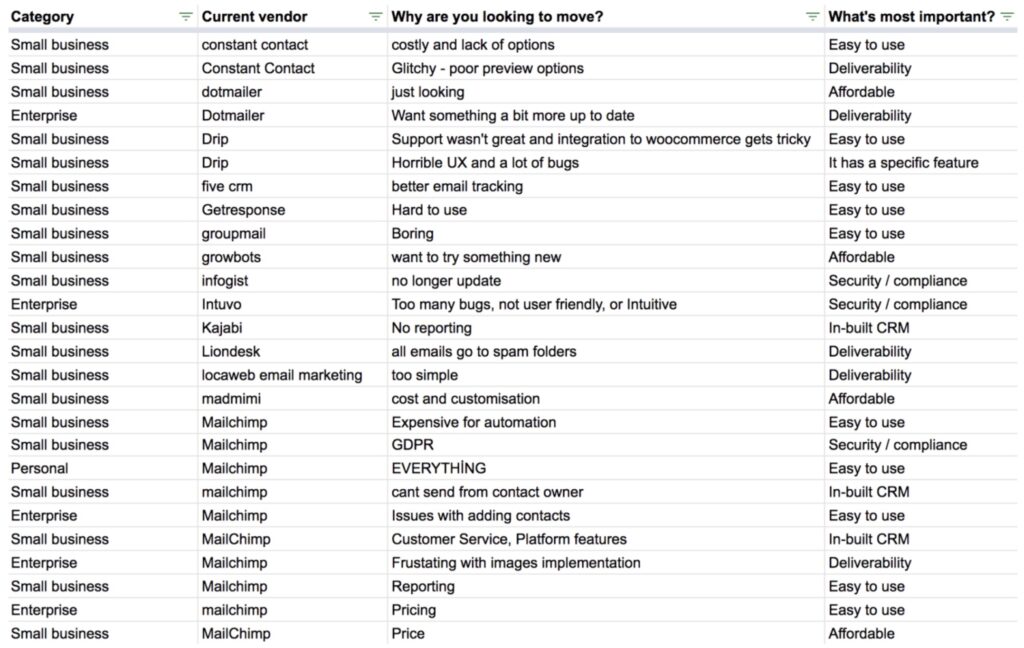
If we narrow your list of options to the very best email marketing tools for WordPress, we end up with a shortlist of seven:
Before we take a closer look at each of these email marketing tools, let’s quickly explain why email marketing software is so important for WordPress websites.
Why do you need email marketing software for WordPress?
WordPress is capable of sending emails but the dashboard doesn’t include a UI for creating and sending emails, as standard. You have to use a plugin for this or set up an external system and send emails from another service like Gmail.
So you need some sort of email marketing software for your WordPress website, whichever way you look at it.
However, there’s a big difference between sending out the odd email to contacts and managing a complete email marketing strategy. The latter requires you to manage a fleet of email campaigns targeting different, build your email marketing lists and target different audience segments with multiple touch points throughout the customer journey.
That’s a hefty workload right there. Even if you’re only dealing with one customer, you have to capture their email, send confirmation emails, transactional emails, purchase confirmations and respond to any customer support tickets – among many other potential touch points.
You simply can’t do this manually for every customer and grow your business without overstretching resources.
This is why email marketing software is so important and automation is at the heart of every strategy.
With this in mind, let’s quickly look at some of the key features you need from WordPress email marketing software.
WordPress integration
WordPress integration is important for obvious reasons – you want your email marketing software to work seamlessly with your website. Luckily, WordPress’ extensive library of plugins is one of the platform’s biggest strengths and software providers can develop their own official plugins with dedicated support.
Many email marketing software companies clearly promote their WordPress plugins but not all of them make it so obvious. It’s often quicker to visit the WordPress plugin page and search for email marketing tools to see which plugins are available.
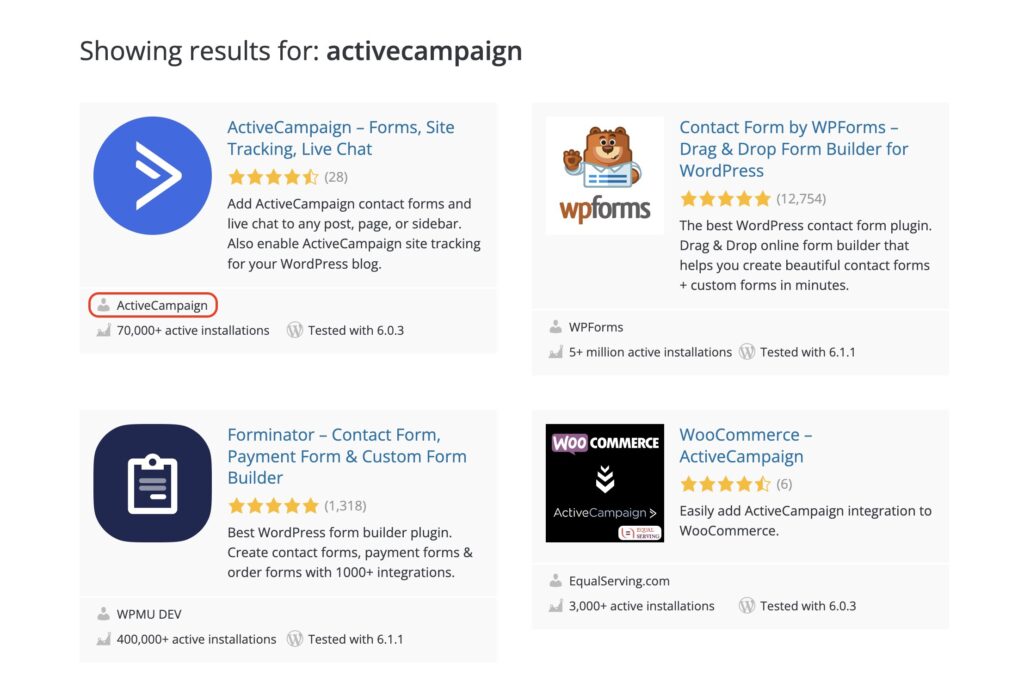
Check the developer names to make sure you’re getting official plugins from the same company – eg: ActiveCampaign, as shown above. Some email marketing software providers will have multiple WordPress plugins for different purposes so don’t panic if you see more than one plugin from the same company.
There are plenty of quality third-party plugins for many email marketing tools but it’s always preferable when the email provider itself develops its own plugin.
Email builder
Quality emails are the substance of every email marketing campaign and you want a capable builder that makes it as quick and easy as possible to design winning emails. Drag-and-drop email builders allow you to pull elements into the page and customise them visually – without writing any code.
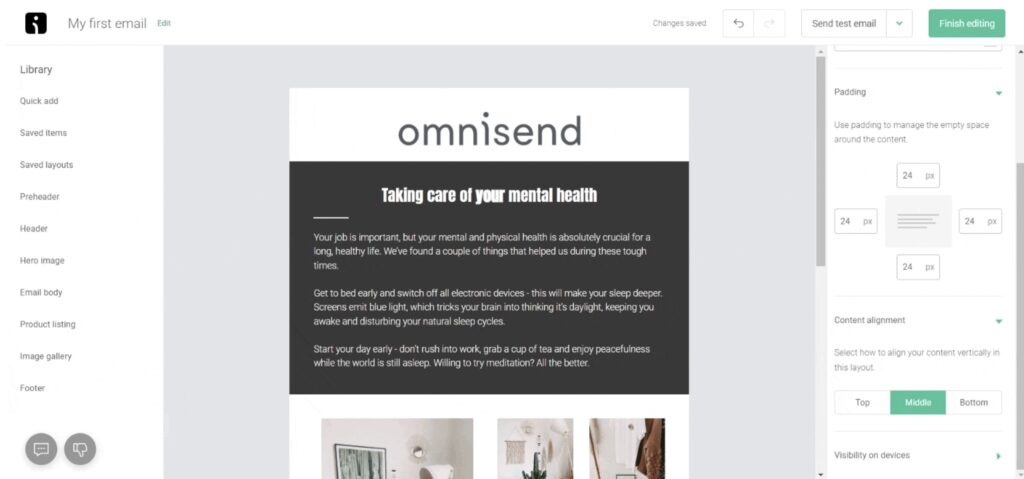
The best email builders should include all of the elements you need to create compelling designs (images, video headings, CTA buttons, etc.) and you may also want the option to add custom HTML and CSS code.
Some email builders are more feature rich than others but you don’t always want the most complicated tool.
For example, if you’re an eCommerce company, you want an email builder that makes it easy to add product listings to your emails. However, if you don’t sell physical products to your customer, this feature will potentially get in the way and slow you down.
You also want an email marketing system with a solid library of email templates that you can select and customise to complete designs faster. Templates save you from creating every email from scratch and they provide a good example of what you can achieve with each platform’s email builder – so always take a look at these.
Email automation
Email automation is crucial for running campaigns on a large scale. You simply can’t manage an email marketing strategy for all of your leads and customers by doing everything manually. You want to create your campaigns and set them to run on autopilot, automatically sending emails to customers at the key moments.
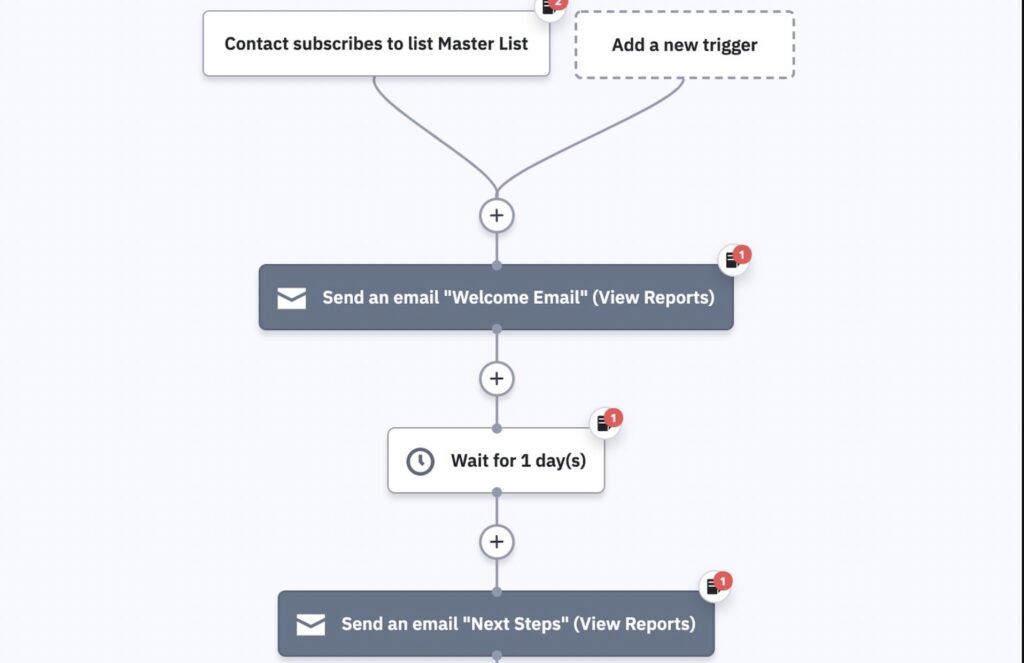
Some email marketing platforms provide more advanced automation features than others. This is something we’ll reference in each review so you can choose a platform that maximises the impact of your email marketing strategy while minimising the manual workload.
Email reporting
As with any marketing strategy, you want to know your email campaigns are getting results and identify the ones that aren’t. So you need dedicated email reporting that tracks all of the most important metrics like open rates, CTRs, conversions, etc.
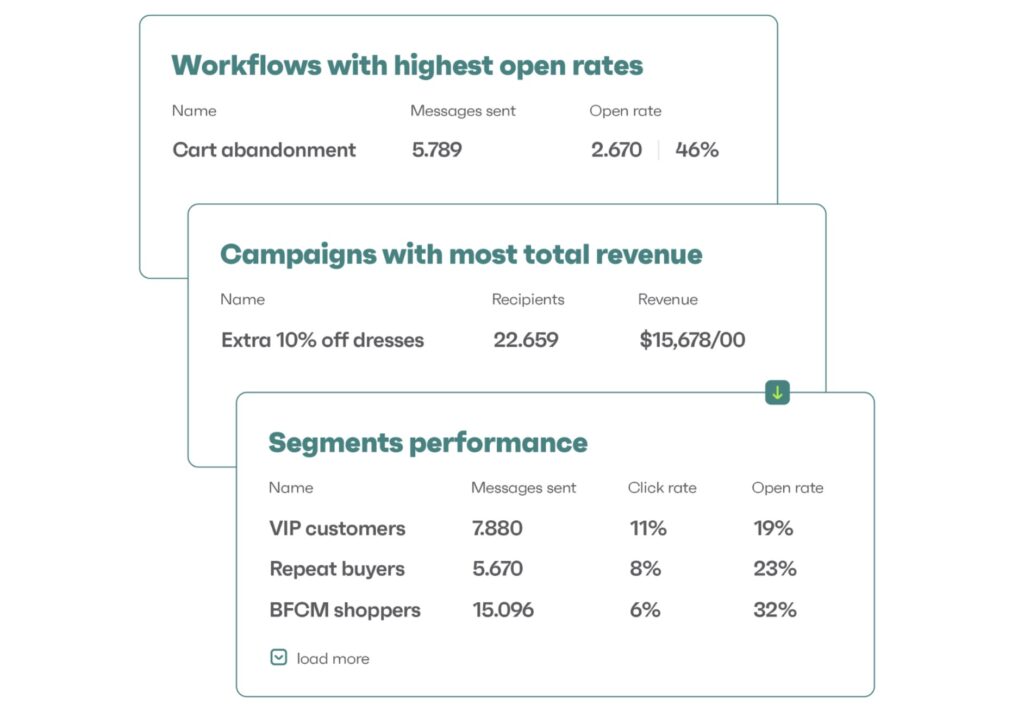
Again, the quality of email reporting varies a lot between different email marketing software tools. Of course, you can always integrate other analytics tools to enhance the reporting features of your email marketing system.
However, it’s always a bonus to get the reporting you need from one platform – so we’ll flag up the tools that do a particularly good/poor job with reporting.
A/B testing
No email marketer can get everything right on the first attempt. To maximise the performance of your campaigns, you need to test variations to identify opportunities for improvements. For this, you want email marketing software that allows you to run A/B tests or split tests on emails.
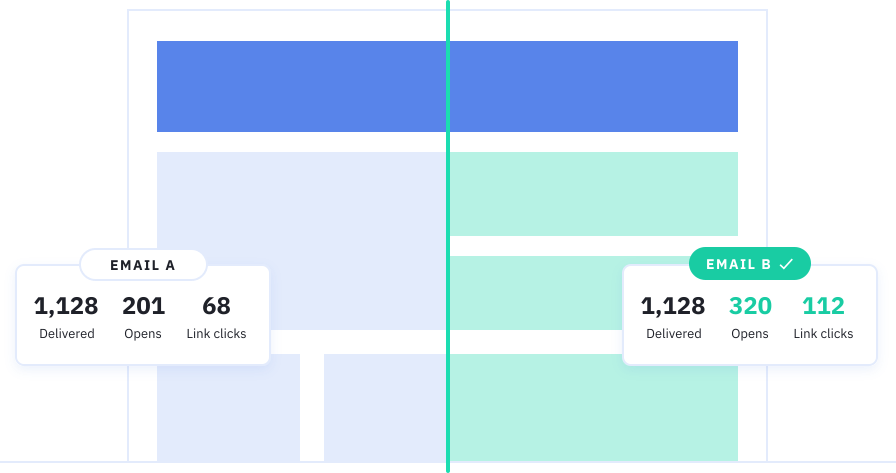
Ideally, you want a platform that also allows you to A/B test automation workflows to see which ones generate the best results. For example, you might want to test different sequences, delivery times or the times set between events and triggers.
Customer relationship management (CRM)
Email marketing is a data-driven strategy and you need somewhere to store and access all of your customer data. A customer relationship management (CRM) system puts all of your customer data into contact profiles, allowing you to use this data to trigger campaigns.

Some email marketing platforms include a full CRM system but many of them don’t. Again, you can always integrate with a dedicated CRM platform but it makes sense to have an all-in-one system for your CRM and email marketing software.
Now that we’ve covered the most important features to look for in WordPress email marketing software, let’s take a look at our first tool. We’re kicking things off with ActiveCampaign and this platform pretty much ticks all of the boxes for WordPress users.
1. ActiveCampaign
5. Brevo
Brevo is a simple but surprisingly powerful email marketing and automation platform. The company has expanded its software system over the years into four key products:
- Marketing Platform – for email marketing and automation.
- Chat – for adding chat widgets to your website and managing conversations.
- Sales CRM – a free CRM for storing and managing customer data.
- Transactional emails – for sending secure transactional emails for bills, payment requests, etc.
Brevo also offers a generous free plan, making it a great option for new and very small businesses using WordPress.
Aside from pricing, simplicity is the biggest selling point of Brevo. This is one of the easiest email marketing platforms to pick up and use if you don’t have previous experience with this type of software.
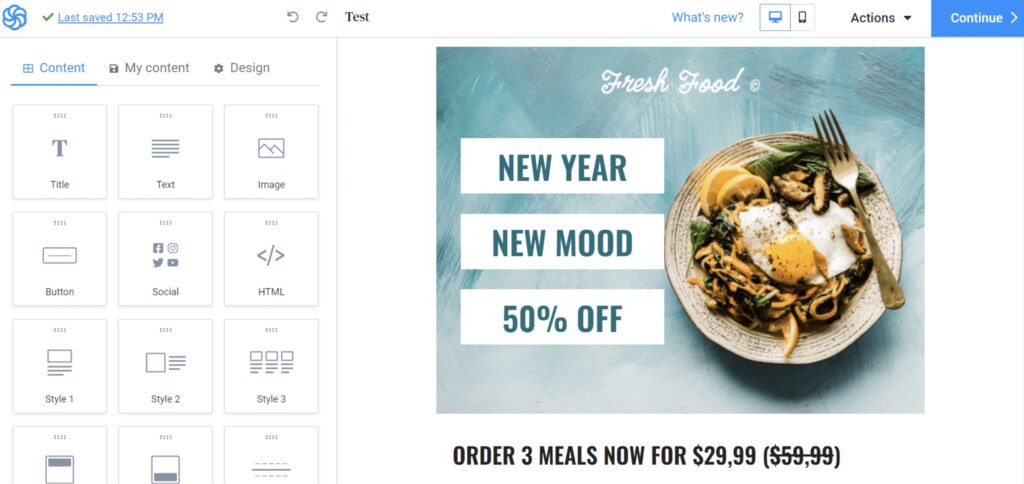
The email builder is a perfect example of what to expect from Brevo as an email marketing system. It doesn’t give you the same design freedom as some other tools but it’s fast and easy to use. The company has improved its email templates a lot in recent years, too.
The templates are decent enough to start with and the builder makes it easy to customise basic email design.
Unsurprisingly, Brevo isn’t going to compete with platforms like ActiveCampaign when it comes to automation. That being said, it’s more capable than the price tag might suggest.
Brevo includes a library of “beginner” and “advanced” automation workflows. You can use and edit these templates using the platform’s automation builder or create your own. The builder isn’t quite as intuitive as the system’s email builder but it’s easy enough to figure out.
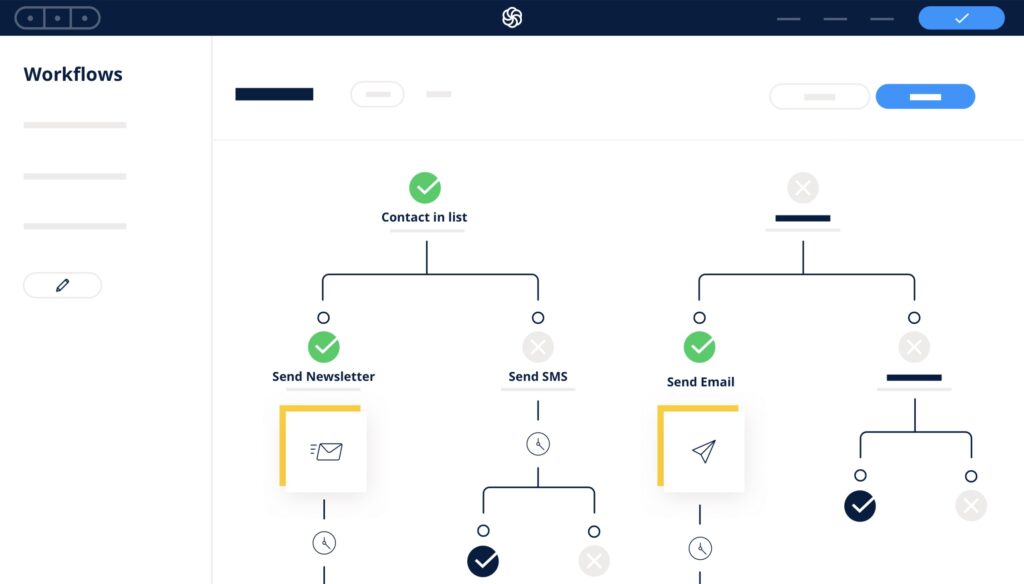
You can also split test automation workflows, which isn’t a feature you always get from products in this price category. You can test different messages, delays between triggers and events, multichannel combinations and plenty more.
Pricing
Earlier, I mentioned Brevo offers a generous free plan that makes it great for new and small businesses using WordPress. The free plan covers you for up to 300 emails per day and unlimited contacts, which is a great combination with Brevo’s free CRM.
You can also send transactional emails on this plan (they’re counted in your 300/day limit) on this plan. The free plan also allows you to send SMS texts and WhatsApp messages but you have to pay for credits.
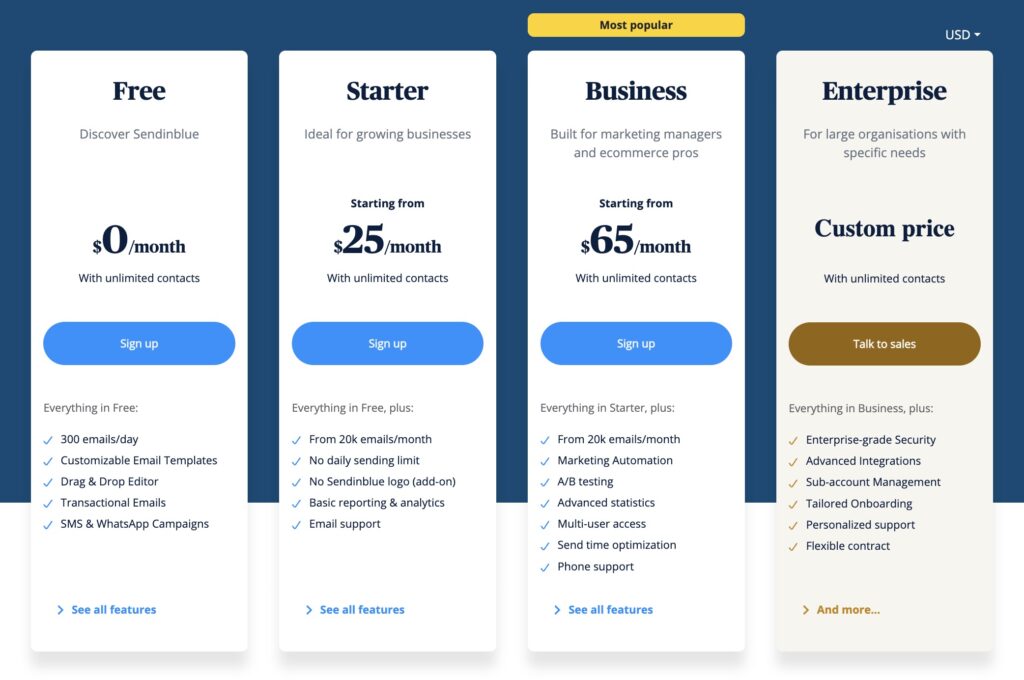
Paid plans start from $25/month with the Starter plan allowing you to send up to 20,000 emails per month with no daily limit.
You get the best features from Brevo’s Business plan but the price jump is pretty big. The plan starts from $65/month for the same 20k emails/month as the Starter plan. However, you unlock the platform’s marketing automation features, A/B testing and its advanced reporting system.
It’s a big upgrade but affordability takes a serious hit.
At this price point, you have to consider Brevo’s unlimited contacts allowance and the monthly email limits. For relatively small email lists, you can get better value and features from elsewhere.
However, Brevo is one of the cheapest options overall for companies with big email lists. For example, you can send 1 million emails per month to any number of contacts for under $700/month.
Brevo includes detailed pricing information and customisable estimates on its pricing page.
What we like:
- Free plan – Send up to 300 emails per day with Brevo’s free plan.
- Transactional emails – Few tools at this price point offer transactional emails, let alone on a free plan.
- Easy to use – Brevo is very easy to learn and use, even if the UX feels a little dated.
Where they could improve:
- Feature depth – Brevo combines most of the features you could want from an email marketing tool but they often lack the same depth as other tools in this article.
- Basic automation – Brevo makes basic automation easy but flexibility is limited.
- Email templates – The email templates are also quite basic and you can only do so much with the editor.
Who should use Brevo?
Brevo is a great email marketing system for new and small businesses using WordPress. You can send up to 300 emails per day to an unlimited number of contacts on its free plan. The platform’s features can’t compete with the likes of ActiveCampaign and Brevo’s more expensive plans aren’t a good match for companies with smaller email lists.
You’ll get better features for your money elsewhere if you’ve got, say, fewer than 6,000 contacts.
However, if you’ve got a large list of contacts or want to send a lot of emails, Brevo starts to look very affordable again. Yes, you have to accept the platform’s feature limitations. Even still, few other tools allow you to send such high volumes of emails at a comparable price point.