

Last month, LinkedIn rolled out an exciting new feature for lead generation ads. Lead Gen Forms are designed to increase mobile conversion rates by placing CTAs on your ads, making it easier for users to take action.
LinkedIn says 80% of engagement with sponsored content happens on mobile and the network realises web forms are a common obstacle to conversions. So it’s decided to take action by creating user-friendly forms on your behalf and prompting users to convert inside the LinkedIn app.
Sounds good, right? Well, let’s take a close look.
What are LinkedIn Lead Gen Forms?
LinkedIn Lead Gen Forms are available for sponsored content campaigns. You can choose whether to use them or not and they won’t cost you anything, so it’s certainly worth trying them out to see what impact they have on lead generation.
Essentially, Lead Gen Forms add a call-to-action to your sponsored content ads, asking users to sign-up, download your e-book, or whatever action you’re targeting. When users click the CTA they’ll be greeted by a sign-up form inside the app, but instead of filling out fields LinkedIn will automatically pull in the details from their account – so all users have to do is confirm their email address and hit the submit button.
Next, they’ll be greeted by a thank you page and a link to your content or website, depending on where you want to send them. This does involve a bit of setting up on your part, though, so let’s look at how you can create LinkedIn Lead Gen Forms.
How do I set up LinkedIn Lead Gen Forms?
To get started with Lead Gen Forms you’ll want to create a promoted content ad – this is the only format that supports the feature. Next, you’ll be asked whether you want to increase traffic with your ad or generate leads using Lead Gen Forms. Naturally, you’ll need to select the second option to use this feature.

Once you’ve named your campaign and selected Lead Gen Forms you’ll be asked to choose which post you want to sponsor – or create new sponsored content from scratch. You can also go to Campaign manager and create Lead Gen Forms for existing campaigns.
Once you’ve chosen (or created) the content you want to promote, you’ll be asked to create your form template. You can either choose the default format or create your own:
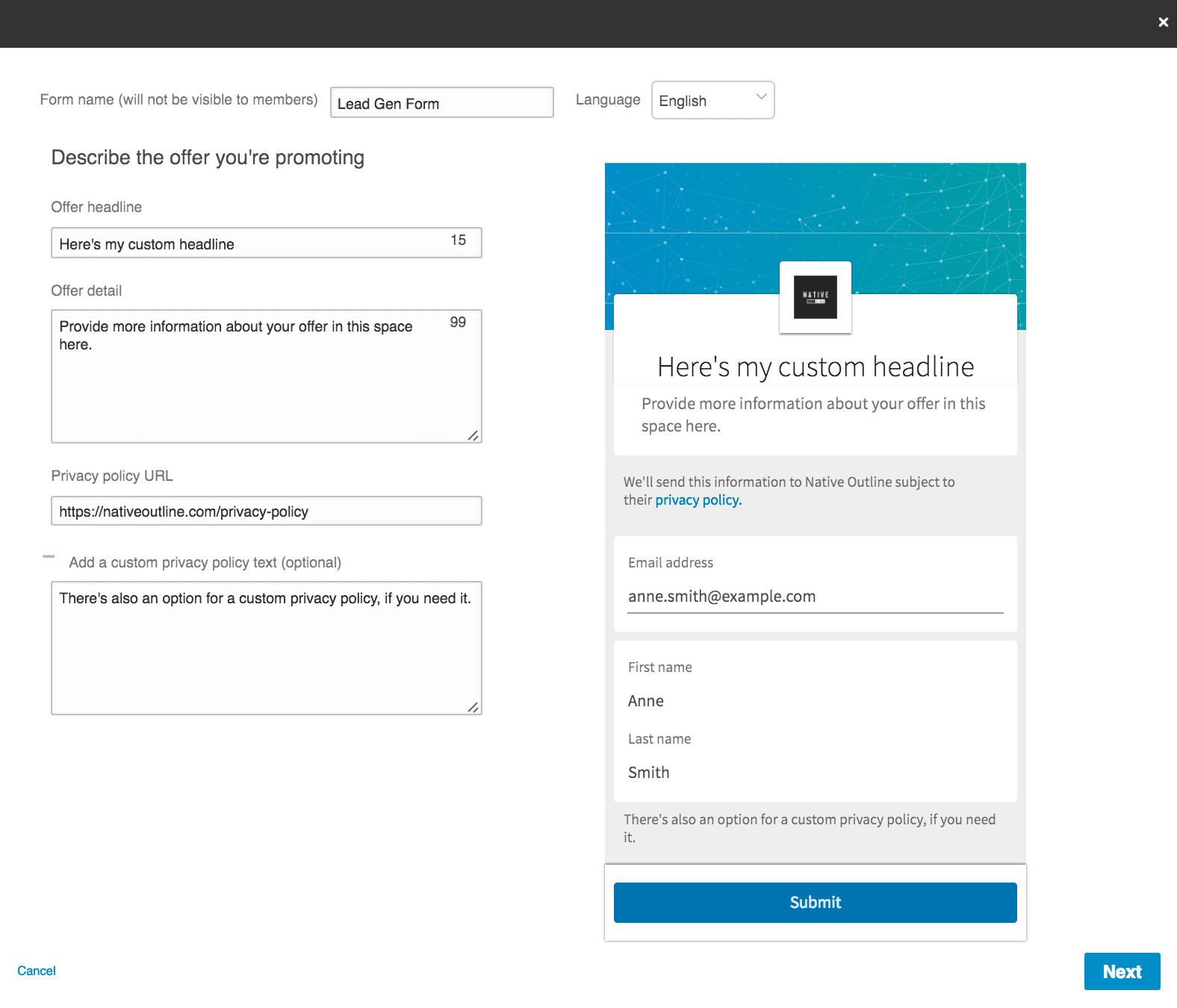
Nothing complex here. You simply have to name your form (users won’t see this), choose your headline and provide any additional information you want about your offer. There’s also the option to add custom privacy policy details if you want to reassure users about their data.
One thing worth mentioning is you need a valid URL for your privacy policy page.
Next, you can choose which details LinkedIn collects from user accounts (a maximum of seven fields). First name, last name and email address are selected by default but you can also request additional contact, location and professional details that your Lead Gen Form will automatically collect.
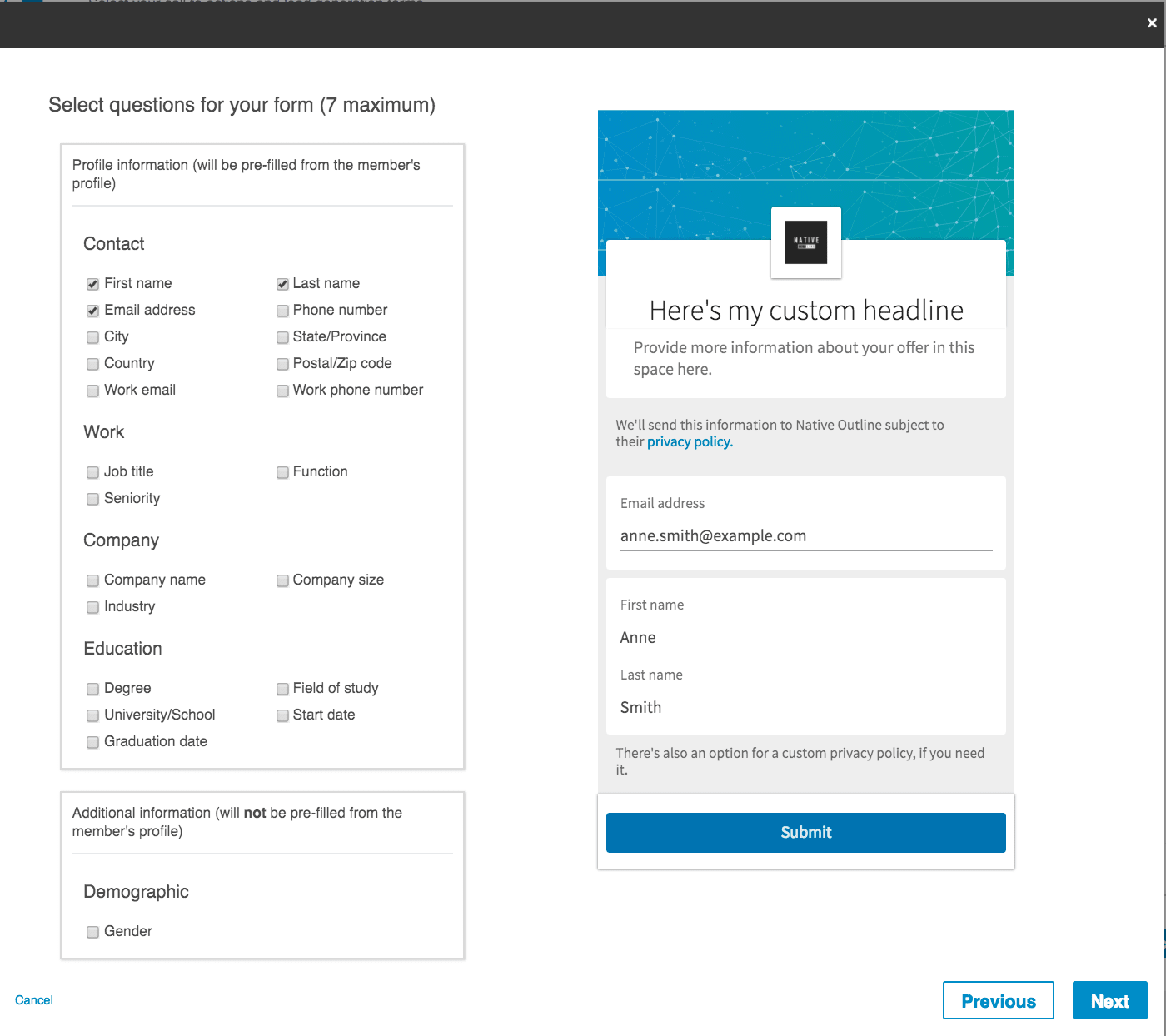
Users will be able to see what information you’re collecting from them on your Lead Gen Forms, so be considerate of how much info you think they’ll be willing to hand over. These forms remove the need to type anything out but they don’t necessarily remove the reluctance to hand over personal details. Bare this in mind and understand you might need to experiment a bit to maximise conversions from these forms.
The final step is to choose the thank-you message you want users to see after they submit.
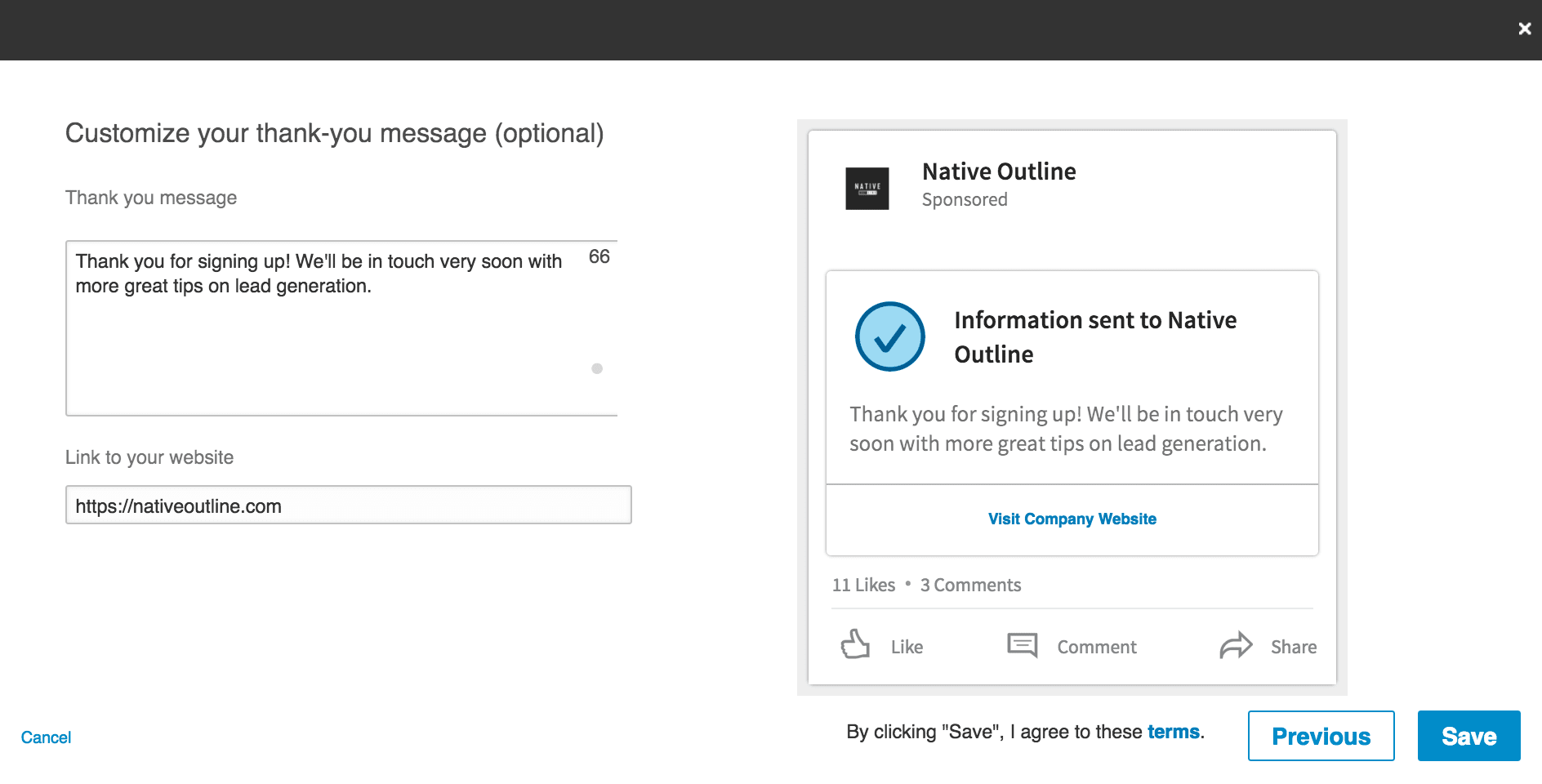
Once you’re done, click Save and that’s it. Now you can set your ad targeting options as normal and your new Lead Gen Form is good to go.
Why Should I use LinkedIn Lead Gen Forms?
As I say, the whole point of LinkedIn Lead Gen Forms is to boost conversion rates from your lead generation campaigns. It’s a pretty good implementation, too, and there are a number benefits to using the new feature.
Remove friction
The aim of the game with Lead Gen Forms is to make it easier for users to convert by removing friction. All it takes is two clicks for users to convert – an impressively low commitment required on the part of users. This adds up to a serious improvement for mobile users compared to the standard promoted content format.
Fewer steps, more info
Lead Gen Forms prove you can ask for more information from people without killing conversion rates. It all comes down to how you design the experience of completing forms and LinkedIn is doing a pretty good job here. This gives you the chance to collect more data without hurting conversions but also choose which kind of information to collect and create advertising campaigns accordingly.
Want to sign up CEOs? Then create your campaigns with them in mind and select “Job title” as one of your fields to confirm you’re getting the right sign-ups.
Potential for double conversions?
Something I’ll be keeping an eye on over the coming months is the potential for double conversions with LinkedIn Lead Gen Forms. After users hit the submit button, they’ll be greeted with your thank you message and prompted to visit your site, which gives you the option of targeting them with another offer.
Of course, you’ll already have their email address by this point so the aim is to bag yourself a more valuable conversion – e.g.: free trial sign-ups, product purchases, social shares or whatever else you think could add value to this lead.
Integration with third-party tools
By using Driftrock, Zapier or Oracle Eloqua, you can integrate LinkedIn Lead Gen Forms with a wide range of third-party marketing tools. This means you can collect your data from LinkedIn and automate the process of nurturing your leads from the new feature.
Are there any downsides to using Lead Gen Forms?
While I’m excited about working with LinkedIn Lead Gen Forms there are a few potential downsides I can already see. None of these are confirmed (just like the potential benefits) but I’ll be keeping an eye on a few things over the coming months.
They don’t solve the web form problem
Actually, this one doesn’t need to be confirmed. Lead Gen Forms have a lot to offer LinkedIn advertising campaigns but let’s be clear: they don’t solve the form design problem most brands are suffering from.
If your web forms are designed and optimised the way they should be, then LinkedIn Lead Gen Forms won’t make much of a difference because your forms will already be converting across all devices, for all of your ad campaigns, on every network.
The reason LinkedIn has come up with this feature isn’t because promoted content ads were failing; it’s because brands are failing to create an intuitive experience once users land on their site.
Instead of waiting for Google, Facebook and everyone else to design a bunch of web forms for you, take control of your own lead generation by creating and optimising forms that convert.
The right form optimisation tool will also help you improve performance and increase conversion rates – something you won’t get from LinkedIn Lead Gen Forms.
They could add friction
Let’s say you have an intuitive sign-up process on your site, designed to capture leads from LinkedIn and your other lead generation channels. If this is the case, then Lead Gen Forms could actually add friction to the conversion process.
Instead of clicking right through to your site and instantly accessing your content, the CTA on promoted content ads will take users through a multistep sign-up process – before they’ve accessed your content.
This is where I see a potential problem.
Goodbye traffic?
There’s always a downside to in-app conversions: the risk that traffic will never reach your site. If you’ve already got their email address, you might consider this a small price to pay but missing out on traffic can rob you of other conversions, useful analytics data, potential ad revenue and other branding opportunities.
All of the advertising giants are creating their own “walled garden” systems, making it more difficult for users to leave their platform. It would be a shame to see LinkedIn take the same route and Google and Facebook.
Test them out for yourself
Don’t let me or anyone else tell you how good LinkedIn Lead Gen forms will/won’t be for your business. If you’re advertising on the network, try them out for yourself and see what kind of difference they make to your lead generation results. Just bare in mind your results will vary depending on the kind of content, ads and campaigns you create. Lead Gen Forms won’t do everything for you.
Also, consider what I said earlier about creating the best form and lead generation experience you can on your own site. Your time and effort might be better spent on improving this process to get better results from all of your advertising/marketing channels.
FAQ
LinkedIn Lead Gen Forms dramatically increase mobile conversion rates by eliminating the need for users to leave the platform and fill out external forms. Since 80% of engagement with sponsored content happens on mobile, these forms remove friction from the conversion process and allow prospects to submit their information directly within LinkedIn’s native environment.
Lead Gen Forms auto-populate user data from LinkedIn profiles, so prospects don’t need to manually enter information like name, email, and company. When users click your ad’s CTA, a form appears directly on their mobile device pre-filled with their LinkedIn profile information, making submission a single-click action rather than a time-consuming process.
Lead Gen Forms work best for B2B campaigns targeting professionals, such as software demos, webinar registrations, whitepaper downloads, and consultation bookings. Any campaign where you need contact information from LinkedIn users can benefit—from recruiting ads to enterprise software trials—because the forms capture verified professional data directly from active LinkedIn members.
LinkedIn Lead Gen Forms can auto-populate standard profile fields including name, email address, company, job title, and phone number, with the option to add custom questions. You can customise which fields appear based on your specific lead qualification needs, allowing you to gather only the information most relevant to your sales process.
Yes, Lead Gen Forms consistently outperform traditional landing page redirects because they eliminate friction and keep users within LinkedIn. The pre-filled data and mobile-optimised experience result in higher completion rates, lower cost-per-lead, and better quality leads since the information comes directly from verified LinkedIn profiles rather than user-entered data.
Lead Gen Forms only work within the LinkedIn ecosystem and cannot be embedded on external websites or used for non-LinkedIn advertising. Additionally, form abandonment can still occur if your questions feel too invasive or if you ask for too many custom fields beyond LinkedIn’s auto-populated data, so strategic field selection is essential for maintaining high conversion rates.
Leads are automatically captured in your LinkedIn Campaign Manager and can be downloaded as CSV files or integrated directly into your CRM through LinkedIn’s native integrations. Automated lead routing to your sales team is possible through platforms like Zapier or direct API connections, ensuring prospects are contacted quickly while engagement is high.
Lead Gen Forms capture contact information whilst Conversation Ads initiate direct messaging between prospects and your organisation. Lead Gen Forms are ideal for building email lists and nurturing campaigns, whereas Conversation Ads work better for immediate engagement and qualifying prospects through real-time dialogue.