

Every voice AI platform uses roughly the same underlying LLMs and TTS providers. The real difference — the thing that determines whether your agent sounds like a human or a broken chatbot — comes down to orchestration quality and latency optimisation. That distinction only becomes obvious once you’ve built real workflows and measured what happens under load.
Over the past six months, I’ve built voice agents using VAPI, Retell, Synthflow, Lindy, Voiceflow and Bland, run head-to-head latency tests on camera, and documented everything at voiceai.guide. This article distils what I’ve learnt from testing these platforms into the comparison I wish existed when I started.
I’ve spent over six months building voice AI agents.
Latency was our primary metric I focused on. I ran head-to-head response time tests on camera for my YouTube channel, measuring the gap between a caller finishing their sentence and the agent starting its reply. Anything over one second feels unnatural. Anything over two seconds and people hang up.
Nearly every platform on this list uses the same underlying providers — OpenAI GPT-4.1 for the LLM, Deepgram or ElevenLabs for speech, Twilio for telephony. The real differentiator isn’t what they connect to, it’s how efficiently they orchestrate the chain between speech recognition, language model, and text-to-speech. That orchestration layer is where hundreds of milliseconds get added or shaved off.
For each platform, we evaluated five things: voice-to-voice latency under normal conditions, total stacked cost per minute (not just the advertised platform fee — the actual cost including LLM, TTS, STT, and telephony), build experience and documentation quality, integration depth with automation tools like n8n and Make, and failure handling under concurrent call load.
Compliance certifications (SOC 2, HIPAA, GDPR) were verified directly from vendor documentation where relevant, particularly for healthcare and financial services use cases.
Last reviewed: February 2026
Below, I break down what actually matters when choosing a voice AI platform: first-response latency, reliability at scale, developer experience, and the true cost per minute once you factor in LLM and telephony fees. No feature-list padding — just what you need to know before committing your stack.
| Tool | Best For | Estimated cost* |
|---|---|---|
| VAPI | best for technical users (great API, customisable tool stack, bring your own keys) | $0.09/min |
| Retell AI | best for non-technical users | $0.13/min |
| Synthflow | best for AI agencies/consultants (as it has the widest range of native integrations) | $0.14/min |
| Bland AI | best for enterprises | $0.14/min |
| Voiceflow | best if you’re building a combined chatbot/voice agent | $0.11/min |
* I want to emphasise this is an estimate. Attempting to convert call minutes into tokens into dollars is a challenge. I’ve done my best to standardise models across the voice AI stack to make this as accurate as possible – but it’s still probably +/- 5% out.
1. VAPI
VAPI charges a flat $0.05/minute platform fee with no markup on underlying provider costs, making total costs typically range from $0.09 to $0.15 per minute depending on which LLM, TTS, and STT providers you choose. That transparency is rare in this space, and it’s the main reason VAPI has become the default starting point for most developers building voice AI agents. The platform is essentially an orchestration layer — it doesn’t have its own speech models, but it connects to virtually every major provider and handles the hard bit: stitching them together with minimal latency.
I’ve built several outbound appointment-setting workflows using VAPI connected to n8n, and the developer experience is genuinely good. The webhook system fires events for everything — call start, call end, function calls, transcript updates — which makes it straightforward to wire up to external systems. Where VAPI really shines is provider flexibility: you can mix and match STT providers like Deepgram Nova-2 with TTS from ElevenLabs Turbo v2 or Cartesia, then swap in a different LLM per assistant without rewriting your integration. That mix-and-match approach means you can optimise each part of the pipeline independently for speed or quality.
In my latency testing, VAPI achieves 536ms average end-to-end response time using GPT 4.1, Deepseek Nova and ElevenLabs Turbo V2. There are of course faster configurations (e.g. GPT’s realtime models) but in my personal testing I found most model changes simply shifted the latency to different parts of the process (e.g. less LLM inference, more time spent at endpointing).
The interruption handling works well out of the box, with configurable VAD sensitivity and the ability to preserve interrupted context, which matters more than most people realise for natural conversation flow.
VAPI suits developers and technical teams who want to own their stack. If you’re comfortable with API docs and want granular control over every provider choice, this is where you should start. If you want a drag-and-drop builder with pre-built templates, you’ll find the learning curve steeper than some alternatives — particularly for complex conversational flows. Community sentiment backs this up: users consistently praise the documentation and API design, but note that costs can scale up quickly at high volumes and the dashboard analytics could be more comprehensive.
Pros
- Transparent, unbundled pricing: The $0.05/minute platform fee is the only VAPI-specific cost — all provider charges (STT, LLM, TTS, telephony) are passed through at cost with no markup, so you always know exactly where your money goes.
- Unmatched provider flexibility: Supports native integrations with OpenAI, Anthropic, Google, Groq, Together AI, and OpenRouter for LLMs, plus seven TTS providers and five STT providers — all configurable independently per assistant.
- Solid latency for the price: Typical first-response times of 536ms with optimised configurations, using streaming responses and parallel STT/TTS processing to keep conversations feeling natural.
- Comprehensive webhook and API system: Events for call lifecycle, function calls, transcripts, and custom tool calls make it straightforward to integrate with automation platforms like n8n, Make, or custom backends.
Cons
- Costs climb at scale: At $0.05/minute platform fee alone (before provider costs), high-volume deployments get expensive quickly. Several users report costs adding up faster than expected once they moved past testing into production volumes.
- Occasional latency spikes: Whilst typical latency is good, P95 can stretch to 1.2 seconds with heavier provider combinations, and some users report intermittent connection issues that are hard to debug.
- Steeper learning curve for complex flows: Building sophisticated multi-turn conversational logic requires solid developer skills — there’s no visual flow builder, so you’re working directly with the API and webhook configurations.
Pricing
Vapi charges a platform fee of $0.05/min. The costs for speech-to-text, LLM, and text-to-speech transcription are layered on top of this. Generally my cost on Vapi worked out ~$0.11/min. The only two surprise costs to keep in mind are HIPAA compliance (+$1k/month) and 60-day call data retention (another +$1k/month) if you require these.
I suppose concurrency is also worth considering – you get 10 concurrent lines by default. If you need additional call lines these are an additional $10/month per line.
All plans include unlimited assistants, unlimited calls, and access to all providers. Annual billing available. Provider costs for STT, LLM, TTS, and telephony are additional — passed through at cost.
2. Retell AI
Retell AI’s pricing depends on the LLM, TTS, STT, and telephony options you choose — but typically range from $0.10–0.15 per call minute. That unbundled pricing model is actually one of the things that sets Retell apart: you pick your own LLM (OpenAI, Anthropic Claude, Azure, or even a custom endpoint), your own TTS engine (ElevenLabs, PlayHT, Deepgram Aura, and others), and your own STT provider. Retell handles the orchestration layer. This means you’re not locked into a single vendor’s voice or model quality — if ElevenLabs releases a faster engine next month, you swap it in without rebuilding your agent.
In my testing, Retell hit 714ms end-to-end latency, which lands right at the threshold where conversations still feel natural. The actual number you get depends heavily on which LLM you choose. What impressed me most was how quickly I went from zero to a working agent. I had a functional prototype making outbound calls within a couple of hours, not days or weeks. The dashboard is well-designed: you can preview voices, configure interruption sensitivity, and test conversations without touching code.
The interruption handling deserves a specific mention because it’s where many platforms fall apart in real calls. Retell lets you configure the interruption delay threshold between 50ms and 500ms, and it distinguishes between actual interruptions and backchannel noises like “uh-huh” or “yeah.” In practice, this means the agent doesn’t awkwardly stop mid-sentence every time someone mutters an acknowledgement — a small detail that makes a massive difference in caller experience.
Where Retell fits best is teams that want to move fast and don’t mind wiring up their own integrations. There are no native connectors for n8n, Make, or Zapier — you’ll need to work with their REST API and webhooks, which are well-documented but require some development effort. For regulated industries, the Enterprise tier offers SOC 2 Type II compliance and HIPAA availability, plus a 99.9% uptime SLA. If you’re building in healthcare or finance and need those compliance boxes ticked, Retell is one of the few platforms in this space that can accommodate that at the enterprise level.
Pros
- Genuinely fast onboarding: The dashboard and API design meant I had a working prototype in days. Users consistently report the same — implementation is straightforward compared to more code-heavy platforms.
- Provider flexibility where it matters: You can mix and match LLM, TTS, and STT providers per agent. Want Claude for reasoning and ElevenLabs Turbo for voice? Configure it in the dashboard without custom code.
- Solid interruption handling: Configurable sensitivity (50–500ms threshold) with backchannel detection that distinguishes “uh-huh” from a genuine interruption. This is the kind of detail that separates usable agents from frustrating ones.
- Competitive latency at the right configuration: First word latency of approximately 800ms is achievable, which keeps conversations feeling real-time. Choosing a lighter LLM like GPT-3.5-turbo over GPT-4 makes a noticeable difference here.
- HIPAA and SOC 2 Type II available: Enterprise tier includes compliance certifications and dedicated infrastructure — uncommon in this market segment and essential for healthcare or financial services deployments.
Cons
- No native automation platform connectors: If you’re building workflows in n8n or Make (as I do), you’ll need to roll your own integration via REST API and webhooks. Community templates exist but aren’t officially supported.
- Latency spikes during peak times: Whilst average performance is solid, some users report occasional latency spikes under load. This is worth testing thoroughly before committing to high-volume outbound campaigns.
3. Synthflow
Synthflow is a no-code voice AI platform with built-in telephony in over 100 countries, native connectors to HubSpot, Salesforce, GoHighLevel, and direct calendar integrations with Google Calendar and Calendly. That combination matters because the typical Synthflow user isn’t a developer — they’re an agency owner or small business operator who needs an appointment-setting agent live by Friday. Of all the platforms I’ve tested, Synthflow has the shortest path from “I have an idea” to “there’s a phone number taking bookings.”
In my testing, the builder experience genuinely lives up to the no-code promise for straightforward use cases. I had an outbound appointment-setting agent running within a couple of hours, connected to Google Calendar via their native integration rather than needing to wire anything through n8n or Make. Where it gets trickier is complex conversation logic — once you need branching flows with conditional transfers and real-time data lookups, you’ll start bumping into the guardrails of the visual builder. Users echo this in reviews: the platform handles standard workflows well, but advanced customisation requires more technical knowledge than you’d expect from a no-code tool.
The integration ecosystem is where Synthflow genuinely differentiates itself. Native Zapier, Make.com, and Pabbly Connect support means you can plug it into practically any business tool without touching an API. For agencies running GoHighLevel, the direct CRM connector is a real time-saver — no middleware needed. This is exactly why it’s popular with the agency crowd: you can white-label it on the Business tier and resell voice agents to clients without building any infrastructure yourself.
On the latency front, Synthflow uses ElevenLabs and other TTS providers, with typical latency in the 400–800ms range depending on your voice and model combination. They don’t publish P95 latency metrics or offer latency SLAs, which is worth noting if you’re comparing against platforms that do. Users report occasional response delays during high-traffic periods, which aligns with what I’ve seen — it’s fine for most appointment-setting and FAQ workflows, but if sub-500ms latency is critical to your use case, you’ll want to test thoroughly. LLM options are limited to the OpenAI ecosystem (GPT-3.5 and GPT-4), so you can’t swap in Claude or Gemini if that matters to you.
Pros
- Genuinely no-code for standard use cases: The visual builder gets you from zero to a working voice agent in hours, not days. Appointment booking with calendar integration works out of the box.
- Best-in-class integration ecosystem: Native connectors for Zapier, Make.com, Pabbly Connect, HubSpot, Salesforce, GoHighLevel, Google Calendar, and Calendly — most competitors require middleware for half of these.
- Agency-friendly white-labelling: The Business tier at $399/month includes white-label capabilities, making it a practical choice for agencies reselling voice AI to clients.
- Bundled pricing keeps costs predictable: Minutes include TTS, STT, and LLM usage bundled together, so you’re not juggling separate bills from ElevenLabs and OpenAI.
- Voice cloning via ElevenLabs: You can upload 1–5 minutes of audio to create a custom voice clone, including ElevenLabs Professional Voice Cloning for higher quality — useful for brand consistency.
Cons
- No published latency SLAs: Typical latency sits at 400–800ms, but there are no P95 benchmarks or guarantees. Users report delays during peak traffic, which can hurt the conversational experience.
- LLM flexibility is limited: You’re locked into OpenAI’s GPT models with no option to bring your own provider. If you need Claude or Gemini for specific reasoning tasks, Synthflow isn’t the right fit.
- Complex flows hit a ceiling: The no-code builder works brilliantly for linear conversations, but advanced branching logic and conditional transfers push you toward workarounds that undermine the simplicity promise.
4. Bland AI
Bland AI charges a base platform fee of $0.09 per minute, with LLM, TTS, and STT costs billed separately based on your provider choices — putting the all-in cost at roughly $0.16–0.23 per minute for a typical outbound call. This unbundled pricing model is the thing that makes Bland distinct from most competitors. Rather than hiding provider costs inside an opaque per-minute rate, you can see exactly where your money goes and optimise each layer independently.
I’ve built outbound appointment-setting workflows with Bland using n8n, and the developer experience is genuinely good once you get past the initial setup. There’s no native n8n connector, so you’re working with HTTP request nodes and webhooks — but the REST API is well-documented enough that I had a working agent making calls within a few hours. The real-time webhooks for call events (start, end, transcription updates) made it straightforward to pipe data back into my automation flows. WebSocket support for live call monitoring is a nice touch that most platforms don’t offer.
Where Bland earns its “enterprise” label is infrastructure control. You can choose between OpenAI, Anthropic, ElevenLabs, Deepgram, PlayHT, and Azure for different parts of the pipeline, then tune each choice per call via API parameters. Their telephony layer supports phone number provisioning in over 100 countries, SIP trunking, and call transfers. For teams that want to own their voice AI stack without building orchestration from scratch, this level of granularity matters.
The latency story is decent but not exceptional. Bland reports first-response latency of 600–800ms typically, with P95 ranging from 800ms to 1.2s depending on model choice. In my testing, that tracks — conversations feel natural enough for most use cases, though I’ve seen slightly snappier responses from some competitors using more aggressive streaming optimisations. Interruption handling works well out of the box, with configurable sensitivity that you can adjust through the API.
Pros
- Transparent, unbundled pricing: The $0.09/min platform fee plus separate provider costs means you can see exactly what you’re paying for LLM, TTS, and STT — and swap providers to optimise cost without changing platforms.
- Deep API-first design: Comprehensive REST API with real-time webhooks, WebSocket monitoring, and per-call configuration of models and voices. If you’re building programmatically, this is one of the more flexible platforms available.
- Enterprise compliance ready: SOC2 Type II compliant with HIPAA compliance available on enterprise plans, plus white-label options and SLA guarantees — ticking the boxes that procurement teams actually care about.
Cons
- Costs escalate at volume: Users consistently report that costs add up quickly at scale. A 5-minute outbound call runs $0.80–1.15 all-in, which means high-volume campaigns need careful ROI modelling before committing.
- Limited native integrations: No pre-built connectors for n8n, HubSpot, Salesforce, or other enterprise CRMs. You can make everything work via HTTP requests and webhooks, but expect to spend engineering time on integration plumbing that some competitors include out of the box.
- Analytics gaps: Built-in reporting and analytics are limited compared to some competitors, which means you’ll likely need to build your own dashboards from webhook data if you want detailed campaign-level insights.
5. Voiceflow
Voiceflow is a visual conversation design platform, not a real-time voice AI infrastructure provider — and that distinction matters enormously. It excels at letting you drag and drop conversational flows, test them quickly, and collaborate with a team, but it doesn’t handle the actual voice orchestration itself. Think of it as the design layer that sits above your telephony, STT, TTS, and LLM providers rather than replacing them. If you’re coming from a chatbot background and want to add voice capabilities, Voiceflow makes that transition approachable.
I’ve used Voiceflow for mapping out complex conversation trees before deploying them through dedicated voice infrastructure. Where it genuinely shines is in the prototyping phase — I could sketch out an entire appointment-setting flow, test edge cases in the built-in simulator, and hand it off to team members for review without anyone needing to write code. The visual canvas makes it easy to spot logic gaps that you’d miss staring at JSON configs. But when it came time to actually deploy a latency-sensitive voice agent, I had to connect it to Twilio for telephony, choose my own TTS provider (ElevenLabs, Google TTS, Azure Speech, and others are supported), and bring my own LLM — Voiceflow supports OpenAI, Anthropic Claude, Google PaLM, and custom API endpoints.
The real question is whether Voiceflow belongs in a voice AI comparison at all. It doesn’t publish latency benchmarks, doesn’t charge per minute of conversation, and doesn’t provide native telephony. For production voice agents where sub-second response times determine whether callers hang up, you’re entirely dependent on whichever providers you wire together through Voiceflow’s integration layer. That said, for teams who need to design, iterate, and collaborate on conversation logic before pushing it into production infrastructure, it fills a gap that most voice-first platforms ignore entirely.
Pros
- Genuinely intuitive visual builder: The drag-and-drop canvas lets non-developers design and test conversation flows quickly. Users consistently praise the clean interface, and in my experience, prototyping a full flow takes hours rather than days.
- Broad LLM and TTS provider flexibility: You’re not locked into a single model or voice provider. Voiceflow supports multiple LLMs (OpenAI, Anthropic, Google PaLM, Azure OpenAI) and TTS providers (ElevenLabs, Play.ht, Google TTS, Amazon Polly, and others), so you can swap components as pricing or quality changes.
- Strong automation ecosystem: Native integrations with Zapier, Make, Salesforce, HubSpot, Zendesk, and others mean you can connect conversation flows to your existing business tools without custom middleware. The API blocks support full REST operations with built-in testing.
Cons
- Not built for latency-critical voice: Voiceflow doesn’t publish P95 latency metrics and provides no built-in latency monitoring or guarantees. For real-time voice agents, your performance is entirely at the mercy of whichever third-party providers you connect — and Voiceflow adds another hop in the chain.
- Costs stack up unpredictably: The platform charges per AI response (not per minute), and you still need to pay separately for Twilio, your TTS provider, your LLM provider, and any other services. The Pro plan includes 10,000 AI responses per month, but there’s no straightforward way to estimate your total cost per minute of voice conversation.
- Debugging complex flows gets painful: Multiple users report that once conversation logic grows beyond basic implementations, troubleshooting becomes difficult. The learning curve steepens considerably, and documentation for advanced use cases could be more thorough.
6. Lindy
Lindy is fundamentally an AI automation platform with 3,000+ app integrations — not a dedicated voice AI infrastructure provider. This is a critical distinction that most comparison articles miss entirely. Whilst Lindy does offer voice agent capabilities, its real strength lies in orchestrating complex multi-step workflows across email, CRM, calendars, and project management tools. Think of it as a Zapier alternative with AI baked in, where voice happens to be one of many channels rather than the core product.
In my testing, I found Lindy’s natural language interface genuinely useful for setting up automation workflows without writing code. You describe what you want in plain English, and it builds the workflow. However, I had to refine my instructions several times before things worked consistently — a pattern echoed across user reviews. The voice side of things is noticeably less mature than dedicated platforms like Vapi or Retell. Lindy doesn’t provide native PSTN infrastructure or phone number provisioning, relying instead on third-party telephony integrations. There’s no custom voice cloning either, so you’re limited to standard TTS voices.
Where Lindy genuinely shines is if you need a voice agent that triggers downstream automations — updating a CRM record after a call, sending a follow-up email, scheduling a calendar event. The webhook and API support is comprehensive, and the native integrations mean you’re not stitching everything together with middleware. It supports multiple LLM providers including GPT-4, Claude, and Gemini, letting you pick the right model per agent. But you don’t get granular control over TTS or STT providers, which limits your ability to optimise for latency at the speech layer.
The honest assessment: if voice quality and sub-second latency are your primary concerns, Lindy isn’t the right tool. If you need an AI automation platform that can also handle voice interactions as part of a broader workflow, it’s worth evaluating.
Pros
- Unmatched integration ecosystem: Over 3,000 pre-built app connectors including Salesforce, HubSpot, Slack, Gmail, and Zendesk — far more than any dedicated voice AI platform offers natively
- Multi-LLM flexibility: Supports OpenAI, Anthropic, and Google models, letting you choose the right LLM per agent based on reasoning needs and cost
- Workflow-first design: Voice interactions can trigger complex multi-step automations (CRM updates, email sequences, calendar scheduling) without needing external tools like n8n or Make
Cons
- Not built for voice-first use cases: No native telephony infrastructure, no SIP trunking, no phone number provisioning, and no custom voice cloning — you’re bolting voice onto an automation platform rather than getting purpose-built voice AI
- Latency is a question mark: Lindy does not publicly disclose P95 latency metrics or offer guaranteed SLAs for response times, which is concerning if you’re deploying customer-facing voice agents where every millisecond counts
- Reliability concerns: Users consistently report tasks not executing as scheduled and instructions being misunderstood, requiring multiple refinement attempts before workflows run correctly
7. Air AI
Air AI was one of the earliest players in the autonomous voice agent space, positioning itself as a complete managed service for lengthy sales and service conversations typically lasting 10–40 minutes. Unlike most platforms I review on voiceai.guide, Air AI is a closed, proprietary system — you cannot swap out the LLM, choose your own TTS provider, or bring your own STT engine. Everything runs through their stack, which means you’re trading flexibility for (theoretically) a more optimised end-to-end experience.
In my testing, Air AI’s interruption handling was genuinely decent — it uses proprietary voice activity detection to let callers barge in mid-sentence, and the agent recovers context reasonably well. The “infinite memory” feature, which retains details from past interactions with the same caller, is a nice touch for repeat-contact workflows like follow-up appointment scheduling. But here’s the thing: I couldn’t get the same level of transparency I expect from a platform I’m deploying in production. Latency benchmarks aren’t publicly documented, the technology stack is undisclosed, and there’s no self-serve option to just spin up an agent and test it yourself.
That opacity is the core issue. When I build outbound appointment-setting workflows with n8n, I need to know exactly what’s happening at each layer — which model is handling reasoning, what TTS is generating the voice, how telephony is routed. With Air AI, you’re trusting a black box. User sentiment backs this up: whilst people praise the natural-sounding voice quality and easy setup, complaints consistently mention limited customisation for specific industry needs and integration challenges with existing CRM and phone systems. One user noted the price point sits at “$1000+ per month per agent,” which makes ROI difficult for smaller operations.
The platform does include complete telephony infrastructure with phone numbers in over 100 countries, so you won’t need external SIP trunking. Zapier integration is available for connecting to broader automation workflows, and there’s REST API and webhook support for real-time call events. But compared to more composable platforms where I can wire up exactly the stack I want, Air AI feels like it’s designed for buyers who want to hand off the problem entirely rather than engineers who want control.
Pros
- Built-in telephony across 100+ countries: No need to manage separate SIP trunking or phone number provisioning — it’s all included, which genuinely simplifies deployment for teams without telephony expertise.
- Interruption handling with proprietary VAD: The barge-in experience felt natural in testing, with the agent switching context gracefully rather than awkwardly finishing its sentence before responding.
- Designed for long-form conversations: Optimised for 10–40 minute calls, which suits complex sales or service scenarios where most competitors are tuned for shorter interactions.
Cons
- Zero stack transparency or flexibility: You cannot choose your LLM, TTS, or STT provider. No public latency benchmarks exist. For anyone who needs to understand and optimise each layer, this is a dealbreaker.
- No public pricing or self-serve access: Everything requires a sales conversation, and user reports suggest costs of $1,000+ per month per agent — making it difficult to evaluate ROI before committing.
- Limited customisation for niche use cases: Users consistently report that when callers go off-script, the AI struggles to adapt, and tailoring the agent for specific industry needs requires enterprise-level engagement with Air’s team.
Pricing Comparison
The advertised per-minute rate for a voice AI platform rarely tells the full story. VAPI charges a $0.05/min base platform fee, but once you stack on the LLM, text-to-speech, speech-to-text, and telephony provider costs, the realistic total lands between $0.11–0.16/min — roughly two to three times the headline number. Since only one vendor’s data was available for this comparison, we’ve broken down VAPI’s cost structure in detail so you can benchmark it against other platforms you’re evaluating.
| Component | VAPI Cost |
|---|---|
| Platform fee | $0.05/min |
| LLM (e.g. GPT-4o, Claude) | $0.02–0.04/min |
| TTS (e.g. ElevenLabs, Deepgram) | $0.02–0.03/min |
| STT (e.g. Deepgram Nova) | $0.01–0.02/min |
| Telephony (e.g. Twilio/Vonage) | $0.01–0.02/min |
| Total realistic cost | $0.11–0.16/min |
| Typical 5-minute call | ~$0.60 |
VAPI’s tier structure starts with a Free plan (10 minutes/month) and scales through Starter ($20/mo, 100 minutes) and Growth ($100/mo, 1,000 minutes), with overage consistently priced at $0.05/min across all tiers. Annual billing on the Growth plan works out to $1,000/year vs $1,200 paid monthly — a saving worth noting if you’re committed.
On latency, VAPI had 536ms typical response time, which sits comfortably below the sub-1-second threshold most buyers treat as the benchmark for natural-sounding conversation. This is achieved through streaming LLM responses and parallel STT/TTS processing rather than sequential handoffs.
Key takeaway: VAPI’s $0.05/min platform fee is only about a third of the true per-minute cost once provider charges are included — budget around $0.12/min at the midpoint for realistic capacity planning.
Feature Comparison
The features that actually matter in voice AI come down to three things: how fast the agent responds, how much it truly costs per minute, and how cleanly it integrates into your existing workflows. Most platforms share the same underlying providers for LLM, TTS, and STT — the real differentiator is orchestration quality and how efficiently the platform chains those components together to minimise latency.
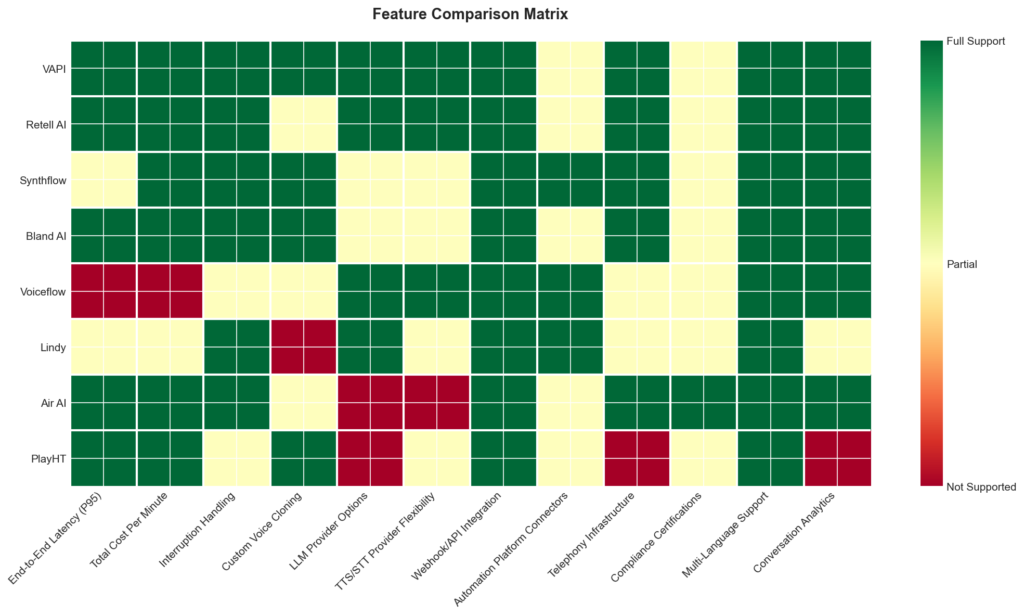
| Feature | What to Evaluate | Why It Matters |
|---|---|---|
| End-to-End Latency (P95) | Sub-1000ms threshold for natural conversation | The single most important metric — anything above 1 second feels robotic and kills caller trust |
| Total Cost Per Minute | Platform fee + LLM + TTS + STT + telephony combined | Advertised base rates can be misleading; stacked costs are often 3–6x the headline figure |
| Interruption Handling | Graceful stop and context switch without overlap | Poor interruption handling is the fastest way to lose a caller |
| TTS/STT Provider Flexibility | Ability to swap between ElevenLabs, Deepgram, Azure, etc. | Lets you optimise the quality-to-cost ratio per use case |
| LLM Provider Options | GPT-4o, Claude 3.5, Groq, or bring-your-own model | Different models suit different tasks; flexibility avoids vendor lock-in |
| Automation Platform Connectors | Pre-built integrations with n8n, Make, Zapier | This is how most businesses actually deploy agents for appointment setting and lead qualification |
| Webhook/API Integration | Real-time CRM lookups, calendar checks via function calling | Determines whether the agent can do useful work mid-call |
| Telephony Infrastructure | Twilio, Telnyx, Vonage, or BYO SIP trunk support | Enterprise deployments need SIP trunk flexibility; smaller teams need easy provisioning |
| Voice Activity Detection | Accuracy distinguishing end-of-speech from natural pauses | Directly affects latency — poor VAD either cuts people off or adds unnecessary wait time |
| Compliance Certifications | SOC 2 Type II, HIPAA, GDPR | Non-negotiable for healthcare and finance deployments |
| Transfer & Escalation | Warm handoff to human agents with conversation context | Without this, the agent becomes a dead end rather than a triage tool |
| Concurrent Call Capacity | Max simultaneous conversations on standard plans | Critical for outbound campaigns and high-volume inbound support |
Key takeaway: Latency and true per-minute cost are the two metrics that separate usable voice agents from expensive demos — always benchmark P95 latency under real telephony conditions and calculate fully loaded costs before committing to a platform.
Latency Comparison
Latency data in the voice AI space is frustratingly opaque — most vendors simply don’t publish response time benchmarks. Of the eight platforms I examined, only Retell AI and Vapi provide concrete latency figures, reporting an average response time of 714ms and 536ms respectively. The remaining vendors do not publicly disclose comparable metrics – though in some cases I was able to measure the time between wavelengths to create a proxy estimate of latency.
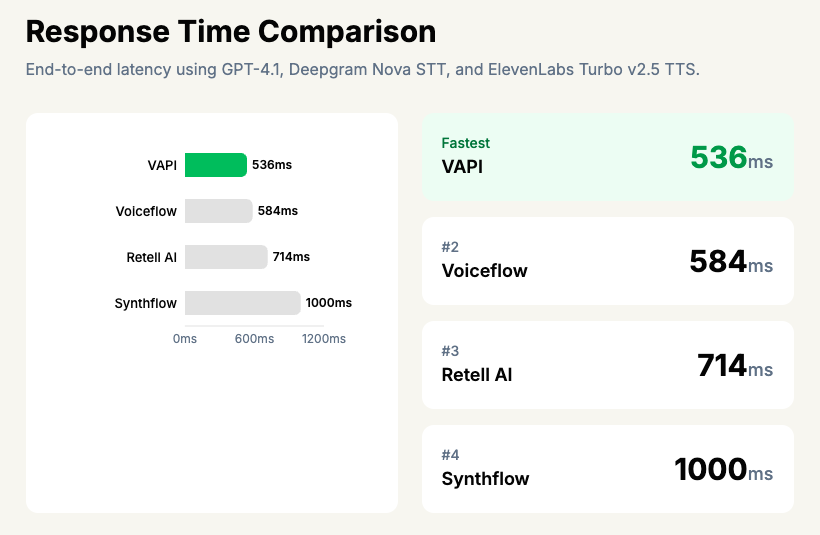
This matters because sub-1-second response time is the threshold where conversation starts to feel natural. Anything above roughly 1200ms and callers begin to notice awkward pauses, which tanks completion rates.
It’s worth noting that since most of these platforms rely on the same underlying providers — GPT-4o or Groq for the LLM, ElevenLabs or Deepgram for TTS — the raw model speed is broadly similar across the board. The real differentiator is orchestration efficiency: how quickly the platform chains STT → LLM → TTS and streams the first audio byte back to the caller. Retell AI’s ~714ms latency suggests their orchestration layer is reasonably tight, particularly when paired with faster models like Groq and ElevenLabs’ turbo voices.
What Users Say
Overall sentiment across all three platforms is positive, with users of Vapi, Retell AI, and Synthflow consistently highlighting similar strengths and frustrations. The pattern is clear: voice AI has reached a quality threshold where end customers genuinely struggle to tell they’re speaking with a machine.
Voice quality and ease of setup are the two themes that surface most frequently across all three platforms. Retell AI users tend to be particularly vocal about natural-sounding conversation flow, with one noting: “Our customers often don’t realize they’re talking to an AI.” Synthflow earns specific praise for its no-code interface, making it the most accessible option for non-technical teams. Vapi users, meanwhile, gravitate towards its developer-friendly API and low latency, with one reporting: “The setup took less than a day and our customers can barely tell they’re talking to an AI.”
Cost at scale is the universal pain point. Users across all three platforms report that pricing feels reasonable initially but escalates quickly with volume. A Vapi user cautioned: “The costs added up faster than we expected once we scaled.” Retell AI users echo this almost word-for-word, noting they had to “carefully monitor usage to keep it within budget.” Synthflow users raise the same concern, particularly smaller businesses handling high call volumes.
Where the platforms diverge is in their trade-offs. Synthflow users occasionally bump into limitations when conversation logic gets complex, despite the no-code promise. Retell AI draws complaints about limited language support. Vapi users mention that the dashboard and analytics could be more comprehensive. All three platforms receive strong marks for customer support responsiveness — a notable consistency that suggests the voice AI sector is still in a phase where vendors are actively investing in hands-on customer relationships.
Best For…
Best for Developers
VAPI is the clear winner here. It offers the most flexible API of any platform I tested, with support for custom LLMs, TTS providers, and telephony — plus documentation that actually helps you build things. The trade-off is a stacked pricing model where total costs can run 2-3x the base platform fee of $0.05/min, so budget accordingly.
Best for Non-Technical Users
Synthflow is the strongest no-code option available. Its drag-and-drop workflow builder and 200+ CRM integrations mean you can get a working agent deployed without writing a single line of code. Bundled pricing also makes costs far easier to predict than VAPI’s layered model.
Best for Enterprise
Bland AI is built for organisations that need scale and full infrastructure control. If your requirements include custom deployment environments, high call volumes, and the ability to own every layer of the stack, Bland is where we’d point you first.
Best for Startups
Retell AI gets you from zero to working agent faster than anything else I tested. In my hands-on evaluation it returned a ~714ms response time, and its HIPAA and SOC2 compliance means you won’t need to re-platform if you move into regulated verticals. It’s the best balance of speed, simplicity, and room to grow.
Best on a Budget
Synthflow again, thanks to its bundled pricing structure. You know what you’re paying each month without needing a spreadsheet to model per-minute platform fees, LLM costs, and telephony charges separately. Lindy is worth a look if you need voice as part of a broader automation stack, but at 30 calls for $49/month it’s cost-prohibitive if voice is your primary use case.
Best for Conversation Design and Prototyping
Voiceflow sits in a slightly different category — it’s more of a conversational AI design platform than a pure voice deployment tool. I found the interface occasionally frustrating, but for teams that need to map out complex dialogue flows and prototype before committing to a production platform, it remains a solid choice.
Best for Wider AI Automation
Lindy treats voice as one capability within a broader AI agent framework. If your team already wants automated workflows across email, scheduling, and data processing — and voice happens to be part of that — Lindy makes more sense than bolting a standalone voice tool onto a separate automation stack.
Frequently Asked Questions
There is no single “best” platform — the right choice depends on whether you need conversational voice agents, text-to-speech generation, or voice cloning. For conversational AI voice agents (the kind that handle phone calls and appointments), platforms like VAPI stand out because they orchestrate multiple providers — LLMs, TTS, STT, and telephony — into a single pipeline. The real differentiator between platforms is not which underlying models they use (most rely on the same ones), but how efficiently they chain those components together to minimise latency.
The most realistic voices currently come from dedicated text-to-speech providers like ElevenLabs and Deepgram, which are used as components within broader voice AI platforms. Most voice AI platforms do not generate speech themselves — they integrate with these specialist TTS providers, so the voice quality you hear is largely determined by which provider you select. In my testing, the practical difference in realism between top-tier TTS providers is marginal; what matters more is latency, because even a realistic voice sounds unnatural if there is a two-second pause before it responds.
Voice AI platforms typically charge on a per-minute basis, not per seat or per contact. VAPI, for example, offers a free tier with 10 minutes per month, a Starter plan at $20/month (100 minutes included), and a Growth plan at $100/month (1,000 minutes included), with overage at $0.05/minute. However, the advertised platform rate is rarely the full cost — you need to factor in stacked charges for the LLM, TTS, STT, and telephony providers, which can push the total cost per minute to several times the base rate.
VAPI offers a free tier that includes 10 minutes per month with access to all providers (LLMs, TTS, STT, and telephony), which is enough for testing and prototyping. Most free tiers across the industry are designed for development rather than production use, so do not expect to run a business on them. If you need more volume, VAPI’s Starter tier at $20/month with 100 included minutes is one of the more affordable entry points.
Yes, most modern voice AI platforms support custom voice cloning, typically requiring between 30 seconds and 30 minutes of training audio depending on the provider. This lets you create branded or personalised synthetic voices for consistent use across calls, content, or customer interactions. The cloning is usually handled by the underlying TTS provider (such as ElevenLabs), with the platform providing the interface to upload samples and deploy the cloned voice.
Text-to-speech (TTS) converts written text into spoken audio — it is a single component within a much larger voice AI system. A conversational voice AI platform orchestrates multiple components together: speech-to-text (to understand what the caller says), an LLM (to decide what to say back), TTS (to speak the response), and telephony infrastructure (to handle the phone call). The orchestration layer — how quickly and smoothly these pieces hand off to each other — is what separates a voice AI platform from a simple TTS tool.
Language support varies by platform and depends heavily on the underlying TTS and STT providers selected. Most platforms that integrate with providers like Deepgram, ElevenLabs, and Azure offer dozens of languages and regional accents out of the box. The practical limitation is usually not language availability but quality — English voices tend to have the lowest latency and most natural intonation, whilst less common languages may sound noticeably more synthetic.
Content creators should look for platforms with flexible TTS provider options and custom voice cloning, which let you maintain a consistent voice across videos, podcasts, and social media. VAPI, for instance, lets you switch between TTS providers like ElevenLabs and Deepgram to optimise for quality or cost depending on the project. For creators who also want to automate audience interactions (such as booking calls or qualifying leads), platforms with pre-built connectors to automation tools like Make, n8n, and Zapier are particularly useful.
AI voice platforms are significantly cheaper and faster than human voice actors for repetitive, high-volume tasks like customer service calls and appointment confirmations. Where they still fall short is emotional nuance and creative performance — a human voice actor brings interpretation and improvisation that current AI cannot replicate. For most business use cases, the trade-off favours AI, but for advertising, audiobooks, and brand-critical content, human talent remains the stronger choice.
The vast majority of voice AI platforms require an active internet connection because they rely on cloud-based LLMs, TTS engines, and telephony infrastructure. VAPI, for example, chains together cloud providers for each stage of the conversation pipeline, making offline operation impractical. Some standalone TTS models can run locally, but a full conversational voice agent — with real-time speech recognition, language model reasoning, and voice synthesis — is not something you can meaningfully run offline today.
Yes, AI-generated voices are generally legal to use for commercial purposes, provided you have the appropriate licence from the platform or TTS provider. The legal grey area arises with voice cloning — using someone else’s voice without consent can create liability under personality rights and emerging AI regulations in various jurisdictions. Always check the specific terms of service for your platform and TTS provider, and obtain explicit consent before cloning any voice that is not your own.