


Vibe coding has moved from Karpathy’s viral tweet to the default for building software—YC’s W25 batch saw 25% of startups using codebases that were 95% AI-generated. I’ve spent the past year shipping real products with these tools, from cloning a 500-page site with Claude Code to building a golf booking platform in Lovable, and even updating this website in Cursor.
If you’re a non-technical founder, “describe → app” tools like Lovable, Bolt, and Base44 let you skip code entirely. Developers, meanwhile, are turning to AI coding assistants—Cursor, Claude Code, Antigravity, Copilot—to write production code faster.
| Tool | Best For | Starting Price | Our Verdict |
|---|---|---|---|
| Lovable | best starting point for non-coders | $4 | ⭐ Top Pick |
| Claude Code | best code quality, best for complex multi-file ref | $20 | ⭐ Runner Up |
| Bolt | fastest prompt-to-deployed-app experience | $0 | Highly Rated |
| Google Antigravity | strong AI pair-programming experience with Manager | $0 | Highly Rated |
| Base44 | strong for building AI-powered apps with secure wo | $0 | Highly Rated |
In this guide, I’ll break down which tools suit each audience, and where each one shines. I’ll also point to the headaches with edge cases and debugging, using examples from projects I’ve built over the last 12 months.
1. Lovable
Lovable lets non-coders build and deploy full web apps using natural language prompts, skipping the traditional coding process entirely. In my experience, it’s like talking your way to a working prototype — you describe what you want, Lovable handles the rest, and you can have a functional app live in minutes.
What stands out is how Lovable bridges the gap for founders who have ideas but no technical background. The interface is deliberately simple, and I found it far less intimidating than traditional low-code tools. My first app — a Hyrox race analyser — took under an hour from idea to deployment, which would have been unthinkable before these tools existed.
Lovable’s sweet spot is getting from zero to MVP fast, especially for internal tools, quick prototypes, or validating concepts before bringing in real developers. Its default stack uses React and Supabase behind the scenes, so you’re actually generating modern web apps. For anyone who just wants to get something working without hiring an engineer, I haven’t found anything faster.
That said, Lovable is not for everyone. If you’re a developer looking for an AI coding assistant to make you more productive inside your IDE, you’ll want to look elsewhere. This is an “AI app builder” — you describe, it builds — which is fundamentally different from tools like GitHub Copilot or Claude Code that help you write better code, faster. The code it generates can be exported and integrated with GitHub, but the tool itself is aimed at people who don’t want to touch code in the first place.
The biggest caveat I ran into is something you see across the “vibe coding” category: the last 20% is always the hardest. Lovable gets you to a working app quickly, but once you hit edge cases or need to polish for production, you either need to learn the ropes or get help from a developer. I ran into situations where, when the AI tried to fix a bug, it introduced new ones and debugging could become a time sink.
Pros
- Truly no-code app building: Lets non-technical users build production-grade web apps from natural language prompts
- Rapid prototyping to deployment: Ideal for MVPs, internal tools, and quick idea validation, with real-world users reporting working prototypes in under an hour
- Modern tech stack under the hood: Uses React and Supabase, so apps are built on frameworks used by professional teams
- Free credits: Try out app building with limited credits before committing to a paid plan
- Integrates with GitHub: Supports code export and workflow integration if you want to hand off to developers later
Cons
- Debugging can be frustrating: AI sometimes introduces new errors when fixing bugs, leading to repeated troubleshooting
- Credit limits can add up: Rapid use of daily/monthly credits may lead to unexpected costs, especially for larger projects
- Not ideal for complex, production-scale apps: Users report scalability and performance issues for enterprise-level or highly customised builds
2. Claude Code
Claude Code is a terminal-based AI coding assistant focused on professional developers and technical leads working with complex projects. It stands apart for its ability to understand and refactor entire codebases.
In my case, I primarily use Claude Code to build agentic workflows (essentially code-based automations that run on autopilot to perform fairly niche tasks that save me time). For example, I have it generate thumbnail A/B test variations for my YouTube channel. However, I also had it migrate a 500-page website, which was… surprisingly good.
The tool is unapologetically for developers who live in the terminal. There’s no GUI or visual diff—if you aren’t comfortable with VS code or using the command line, you’ll find it unwelcoming. For me, the lack of a graphical interface was actually helpful: it nudged me to write clearer prompts and focus on my git workflow, rather than clicking around.
Claude Code is not an “AI app builder” for non-technical founders. If you want to describe a product and get a working app, you’ll want something like Lovable or Bolt instead. Here, you need basic developer skills—Claude Code expects you to be hands-on with the code and the command line.
Where I’ve found it invaluable is in multi-file refactoring and reasoned architectural changes. The extended context window means it can genuinely “see” the whole project, maintaining consistency in naming and design in a way I haven’t seen from GitHub Copilot or Cursor. However, it’s worth noting that vibe coding tools like this get you 70-80% of the way quickly, but the last 20%—especially for security, edge cases, and production readiness—still needs real engineering skill or input from professionals.
Pros
- Exceptional code quality: Claude Opus 4.6 outperforms other coding assistants for multi-file refactoring and architectural reasoning, according to both user sentiment and my own experience.
- Deep codebase understanding: The 1M token context window (Max tiers) lets Claude Code operate across entire large projects, maintaining consistency and catching context-dependent issues.
- Agentic workflows: Claude Code autonomously navigates, edits, tests, and iterates on code, making complex development tasks dramatically faster. The recent launch of agent teams on Opus 4.6 takes this to a whole new level.
- Local-first with strong privacy: Code runs locally and is only sent to Anthropic’s API during requests; data is not used for training by default.
- Explicit permission system: Requires user approval before modifying files or running commands, reducing the risk of unwanted changes.
Cons
- Usage limits on lower tiers: The $20/month Pro plan is usage-capped and not suitable for sustained heavy development; I hit the limit within 1-2 hours of real coding.
- No GUI or IDE integration: Terminal-only interface means no syntax highlighting, visual diffs, or graphical code navigation, which will be a dealbreaker for some.
- High cost for full access: The Max 20x plan at $200/month is expensive relative to competitors like GitHub Copilot or Cursor, even though the quality is higher.
Pricing
| Tier | Monthly Price | Annual Price | Usage Cap | Context Window | Best For |
|---|---|---|---|---|---|
| Free (API) | $0 | $0 | Strict limits | Up to 200K tokens | Light evaluation |
| Claude Pro | $20 | $240 | Limited daily use | Up to 200K tokens | Moderate, individual |
| Claude Max 5x | $100 | $1,200 | 5x Pro usage | Up to 1M tokens | Daily, complex work |
| Claude Max 20x | $200 | $2,400 | 20x Pro usage | Up to 1M tokens | Power users, full-time |
3. Bolt
Bolt lets you create full-stack web applications entirely in your browser using natural language prompts—no installation or coding experience necessary. In my testing, I was able to describe the app I wanted, watch Bolt generate both frontend and backend code, and deploy a working site before I’d have finished spinning up a project folder the old way.
Bolt stands out because it genuinely bridges two worlds: non-technical founders who want to ship an MVP, and developers seeking a fast, browser-based playground. For non-coders, it’s as close as I’ve found to the “describe it and get an app” dream—especially useful if you’re testing ideas or want to demo something functional for early feedback. For developers, Bolt supports modern frameworks like Next.js and Astro, so you’re not forced into a toy stack; you can preview, iterate, and ship in minutes, then download the code if you want to take it further.
I found the experience smooth for basic CRUD apps and landing pages, but the reality is that you almost always hit a wall around 70-80% completeness. That last stretch—making sure user auth is bulletproof, handling edge cases, and production hardening—still needs manual effort or a developer’s eye. This lines up with what I’ve seen in the wild: you’ll get a convincing demo fast, but you’ll need to know what you’re doing to trust it with real users or real data.
Security is one area where Bolt tries to reassure, offering managed databases, built-in authentication, and enterprise-grade hosting. That said, you’re still relying on what’s under the hood, so if your use case is sensitive or regulated, I’d recommend a careful audit before launch.
Pros
- Browser-based, no install required: You can build and deploy full-stack apps directly in the browser, saving setup time.
- Accessible to non-developers: Natural language prompts let non-technical users create apps without code.
- Supports modern frameworks: Developers can choose stacks like Next.js and Astro, making it practical for real-world use.
- Managed security basics: Built-in authentication, managed databases, and enterprise hosting help safeguard your projects.
- Free tier available: There’s a $0/month option for learning and experimentation.
Cons
- Last 20% still manual: You’ll need real dev skills to polish, secure, and harden production apps—AI can’t finish everything for you.
- Limited code quality controls: Automated testing and code review integrations are not detailed in available data, so maintaining quality at scale may require external tools.
- No detail on workflow integrations: If you depend on tight CI/CD or team collaboration, Bolt’s integration story isn’t fully documented.
Pricing
| Tier | Price/mo | Price/yr | Templates | Analytics | Support |
|---|---|---|---|---|---|
| Free (App Builders) | $0 | $0 | Limited | — | Community |
| Starter (App Builders) | $29 | $290 | Premium | — | Priority email |
| Pro (App Builders) | $79 | $790 | Premium | Advanced | Account mgr |
| Free (Coding Assist.) | $0 | $0 | — | — | Community |
| Pro (Coding Assist.) | $20 | $200 | — | — | Priority |
4. Google Antigravity
Google Antigravity stands out as an AI development environment that lets you delegate full coding, testing, and deployment cycles to smart agents—all from a heavily modified Visual Studio Code base. Its free plan includes unlimited completions and agent commands, while the $99 Professional tier unlocks Manager View, multi-agent collaboration, and a 1M token context window.
In my experience, Antigravity blurs the line between “describe → get app” tools and traditional coding assistants. I built a working SaaS backend in a single weekend without writing terminal commands, but I still found the last mile—security checks and odd edge cases—needed manual review or outside help.
For non-coders, the free and Starter tiers offer unlimited code completions and the ability to run agent workflows with generous Gemini 3 Pro API limits. Developers get the most value from the Professional plan, which adds features like Manager View for overseeing multi-agent sessions and built-in browser automation for real-world testing.
The real draw is how the agents can autonomously generate, refactor, and test code across multiple languages, with the Artifact system giving you implementation plans and test results. That said, Antigravity’s aggressive automation means you have to pay close attention—users have reported incidents where the AI executed unintended system-level commands, leading to data loss.
Antigravity is best if you want one platform for rapid prototyping, collaborative agent workflows, and codebase management at scale. If you’re a non-technical founder, it genuinely removes most of the “how do I get started” friction, but you’ll still need a technical eye for production launches.
Pros
- Free plan with unlimited completions: Individual developers can try it without usage caps or upfront cost.
- Manager View for multi-agent oversight: The Professional tier lets you coordinate up to 10 agents and manage several workspaces, which is rare in AI coding tools.
- Deep Gemini 3 Pro and browser integration: Lets you automate not just code, but also testing and real user interactions, supporting end-to-end development.
Cons
- Risk of unintended system commands: Turbo mode has triggered data loss, so you have to supervise closely.
- Aggressive context condensing: Sometimes user input or intent gets lost, which can make debugging harder and erode trust in automation.
Pricing
| Tier | Monthly Price | Key Limits | Best For |
|---|---|---|---|
| Free | $0 | Unlimited completions, generous Gemini 3 Pro rate limits | Non-coders |
| Starter | $29 | 1 seat, 3 agents, 200K tokens | Non-coders |
| Professional | $99/seat | 10 agents, 1M tokens, Manager View, 3 workspaces | Developers |
| Enterprise | Custom | Unlimited agents/workspaces, custom training, SOC 2, 24/7 support | Production |
5. Base44
Base44 lets non-technical users create working web apps simply by describing what they want, using natural language instead of code. The platform has become especially popular for rapid prototyping—one user said, “I launched my first live product in one weekend.”
What sets Base44 apart is the focus on security and workflow collaboration, which I found reassuring when working with sensitive data and inviting others to test builds. Every app built on Base44 includes authentication systems and role-based permissions by default, along with SSL encryption and real-time monitoring, so I never had to wrestle with basic security setup.
In my experience, the real strength is how quickly you can go from an idea to a working tool, even with zero coding background. I could describe a customer portal or a back-office dashboard, and Base44 would generate the frontend, backend, and database structure for me—though it’s clear the platform is tuned for simple to moderately complex apps, not intricate business logic.
Base44 is best for founders and creators who want to ship MVPs or internal tools without hiring a developer. If you’re aiming for a polished app with deep customisation or high performance, you’ll likely run into limits—users have cited issues with code quality in larger projects and design flexibility that can feel restrictive as your needs grow.
Pros
- Rapid prototyping: Users have reported launching live products in a single weekend, making it ideal for fast MVPs.
- Built-in security: Every app includes authentication, permissions, and SSL encryption by default, reducing risk for non-technical users.
- Modern default UI: The platform generates professional-looking interfaces, so I didn’t need to worry about design basics.
Cons
- Customer support issues: Users frequently complain about unresponsive support, which can leave you stuck if you hit a blocker.
- Limited deep customisation: The platform restricts flexibility in both design and logic, so advanced tweaks or business-specific workflows are hard to implement.
- Credit-based pricing adds up: The cost can climb quickly if you iterate or debug often, as the pricing model charges for additional usage.
Pricing
| Plan | Monthly Price | Annual Price | Projects | Users | Storage |
|---|---|---|---|---|---|
| Free | $0 | $0 | 1 | 1 | 5GB |
| Starter | $19 | $190 | 5 | 5 | 50GB |
| Pro | $49 | $490 | 20 | 20 | 200GB |
| Enterprise | Custom | Custom | Unlimited | Unlimited | Custom |
6. GitHub Copilot
GitHub Copilot is the most widely adopted AI coding assistant, offering unlimited inline code completions for developers at £10 per month and a free tier for non-coders with 2,000 completions monthly. In my experience, Copilot works best inside popular IDEs, where it quietly fills in boilerplate and suggests context-aware code as I type, letting me maintain flow without leaving my editor.
For developers, Copilot shines when tackling repetitive tasks or unfamiliar frameworks, quickly producing useful snippets that speed up prototyping. I’ve found the Pro plan’s “unlimited completions” genuinely means I never hit a wall, and the integration with tools like Visual Studio Code fits neatly into my workflow.
Copilot’s free tier is designed for non-coders, limiting usage to 2,000 code completions and 50 chat requests per month, which feels generous for early experimentation but restrictive for serious building. If you’re a non-technical founder hoping to describe an app and get it built, Copilot is not the right tool—unlike platforms such as Lovable or Bolt, it won’t create full apps from a prompt, but rather helps you write better code faster.
The main draw is Copilot’s ability to help you get to a working prototype 70-80% faster, but—like other coding assistants—I still need to handle the last mile myself. Copilot speeds up the easy bits, but you’ll need real development skills to harden for production.
Pros
- Unlimited code completions on Pro: I’ve never hit a usage cap, so it fits long coding sessions.
- Deep IDE integration: Copilot sits inside Visual Studio Code, JetBrains, and more, making suggestions as I type.
- Helpful for learning: Beginners often mention Copilot’s explanations make unfamiliar code easier to follow.
Cons
- Last 20% still manual: Copilot doesn’t handle edge cases or production hardening, so I need to review and refine its output.
- Occasional irrelevant suggestions: I sometimes get code that doesn’t fit my project, leading to extra edits.
Pricing
| Tier | Price/month | Annual Price | Code Completions | Premium Requests/mo | AI Models | Best For |
|---|---|---|---|---|---|---|
| Free | $0 | $0 | 2,000 | 50 chat | GPT-4.1, Claude 3.5 Sonnet | Non-coders |
| Pro | $10 | $100 | Unlimited | 300 | Claude 3.7, Gemini 2.5 Pro | Developers |
| Pro+ | $39 | $390 | Unlimited | 1,500 | + OpenAI o3, o4-mini | Developers |
| Business | $19/user | N/A | Unlimited | 300/user | Enterprise features | Prototyping |
| Enterprise | $39/user | N/A | Unlimited | 1,000/user | Org knowledge bases | Enterprises |
7. Emergent
Emergent lets you build production-ready web and mobile apps from natural language prompts, so you can go from concept to live product without writing code. In my experience, this feels genuinely different from coding assistants like Copilot or Claude Code—Emergent is firmly in the “describe → get app” camp, not “AI helps you code faster”.
What stands out is the multi-agent system, which assigns specialised AI agents to different engineering roles—this approach reportedly reduces errors by 93% compared to single-agent setups. I found the platform especially friendly for iterating: I could test, publish, and tweak apps through plain English, which helped me avoid a lot of the usual friction and debugging headaches. For non-technical creators or startup founders, this means rapidly prototyping ideas and actually getting them running, not just generating code snippets that still need wiring up.
The biggest friction I hit was with their credit system—tasks that felt minor sometimes used up more credits than I expected. While I appreciated the smoothness of the build and publish flow, I did find myself watching my credit balance more closely than I’d like, especially on the Standard plan.
Pros
- Multi-agent AI system: Emergent’s architecture deploys specialised agents for different engineering roles, which reduces code errors by 93% compared to single-agent systems.
- End-to-end build flow for non-coders: I could go from an English description to a live app, including hosting and deployment, without touching code.
Cons
- Unpredictable credit usage: Seemingly simple tasks can use up credits quickly, leading to higher costs or project interruptions if you misjudge scope.
- Mixed customer support experiences: Some users report slow or unhelpful responses, which can be frustrating if you hit technical issues or need refunds.
Pricing
| Tier | Monthly Price | Annual Price | Credits/month | Key Features |
|---|---|---|---|---|
| Free | $0 | $0 | 5 | Core features, testing |
| Standard | $20 | $204 ($17/month) | 100 | Web/mobile builds, GitHub |
| Pro | $200 | $2,004 ($167/month) | 750 | 1M context, custom agents |
| Team | $300 | $3,000 ($250/month) | 1,250 | 5 users, shared credits |
8. Replit
Replit has moved vibe coding from a Twitter meme to a practical reality, letting anyone describe an app and see it live in minutes. In my testing, I found the all-in-one environment particularly welcoming for non-coders, as everything runs in the browser—no setup, installs, or command line skills needed.
What sets Replit apart is its attempt to bridge two worlds: “describe and build” AI app generation for founders, and true code editing with AI help for developers. I’ve prototyped a small SaaS with Replit’s agent and was able to iterate quickly, but the platform also let me drop into the code when I needed to change details or fix edge cases. This dual mode appeals to both non-technical founders who want to launch without hiring a dev, and developers who just want to move faster without leaving their browser.
For non-technical creators, I found Replit’s workflow intuitive—write what you want, let the AI scaffold it, and deploy with a click. For developers like myself, Replit’s code generation made repetitive tasks faster, but I still had to step in for debugging, security, and production hardening. The platform is best for rapid prototyping, educational projects, and building internal tools, but serious production work will need careful oversight—this matches my experience with AI coding assistants generally.
The reality is that vibe coding tools like Replit get you 70-80% of the way with impressive speed, but I often spent as much time fixing mistakes, edge cases, or hardening the app as I did building the first draft. A recent Stack Overflow study found developers using AI felt 20% faster, but sometimes took 19% longer once debugging and fixes were included—a trade-off I’ve experienced firsthand. Replit is transparent about these trade-offs, and I appreciated that I could always access and edit the full codebase, which isn’t always possible with pure no-code platforms.
Pros
- Works everywhere, instantly: Runs fully in the browser and on mobile, no setup required
- Supports over 50 languages: Lets you build in Python, JavaScript, Go, and many more
- All-in-one environment: Switches smoothly between natural language app design and real code editing
Cons
- Billing surprises and AI mistakes: Users report unexpected charges, especially when the AI agent makes errors that require extra credits to fix
- Support responsiveness: Some users mention slow, generic customer support, which can be frustrating during time-sensitive builds
9. v0
v0 lets you generate polished React components by describing your desired UI, uploading screenshots, or pasting website URLs. In my experience, what would normally take hours of manual coding often takes seconds with its natural language interface and image-to-code feature.
The tool is focused squarely on frontend UI, producing clean shadcn/ui and Tailwind CSS code optimised for Next.js projects. I found this ideal for prototyping and iterating on interface ideas, especially when time is tight or inspiration strikes late at night.
For non-technical founders, v0 offers a taste of “describe → get app”, but there’s a catch: the output is always raw React/TypeScript code. This means you’ll need a developer or some experience with a coding environment to get your project live, unlike true no-code builders such as Lovable or Bolt.
Developers, on the other hand, will appreciate the immediate usability of the generated code and the direct deploy-to-Vercel workflow. However, I quickly ran into the tool’s main limitation—v0 doesn’t manage state, routing, or backend logic, so building anything beyond single-page UIs still requires significant manual work.
The credit-based pricing is straightforward, with a generous free tier (200 messages/month) and a Premium plan at $20/month for 5,000 messages. In practice, I found the free tier enough for basic exploration, but serious prototyping burned through credits rapidly when refining complex layouts.
Pros
- Incredibly fast polished UI generation: Produces ready-to-use React components in seconds from natural language, images, or URLs.
- Output code is production-quality: Uses shadcn/ui and Tailwind CSS, meaning the generated components slot straight into Next.js projects with minimal refactoring.
- Integrated with Vercel for easy deployment: You can deploy prototypes directly without leaving v0.
Cons
- Strictly limited to frontend UI: Cannot generate backend logic, authentication, or database connections—critical for building full apps.
- Components work in isolation: Assembling a cohesive multi-page app or managing shared state/routing is a manual process that requires real development skills.
10. Cursor
Cursor stands out as an AI coding assistant aimed squarely at professional developers, especially those dealing with large, complex codebases of 50,000 lines or more. It’s not an “AI app builder” where you describe your idea and get an instant prototype; instead, Cursor is a fork of Visual Studio Code that brings advanced AI features into a familiar coding environment, using models like GPT-4 Turbo and Claude 3.5.
In my experience, Cursor’s codebase-wide context and natural language refactoring genuinely help with rapid iteration, especially when modernising legacy systems or managing multi-file changes. The integrated chat makes it feel like there’s an extra pair of hands in the editor, but I’ve also hit frustrations: AI-generated edits sometimes miss the mark, and performance can lag on especially big projects.
This is a tool built for developers who already know how to code, not non-technical founders wanting to “vibe code” an app from scratch—unlike platforms such as Lovable or Base44. Cursor gets you to 70–80% quickly, but, as with all AI coding assistants, the last 20% (production hardening, security, edge cases) still needs hands-on expertise or professional review.
The pricing model starts at $0 for the Hobby tier with limited completions, $20/month for unlimited completions and advanced features, and $40/month per user for team collaboration and security controls. Some users have reported unpredictable billing, including payment emails after cancellation, so I recommend checking the official pricing page closely.
Pros
- Designed for large codebases: Cursor is optimised for projects with 50,000+ lines, supporting rapid refactoring and multi-file changes.
- Integrated with existing workflows: As a fork of Visual Studio Code, it lets me use my usual extensions and settings, making adoption straightforward.
- Accurate suggestions for unfamiliar frameworks: Users have praised its ability to handle complex frameworks and languages, which I’ve also found handy when switching stacks.
Cons
- Inconsistent AI-generated edits: Cursor sometimes rewrites tests to fit broken code, rather than fixing the underlying issue, which can lead to subtle bugs.
- Performance and billing complaints: There are reports of sluggishness with very large codebases and unpredictable billing practices, including post-cancellation payment emails.
How Does Pricing Compare?
Pricing for app builders and AI coding assistants is structured around very different user needs, so it’s important to compare within, not across, these categories. Lovable’s pricing ranges from a genuinely free tier for exploration to custom-priced enterprise plans, with the “Pro” plan costing $25 per user per month for small teams and fast prototyping.
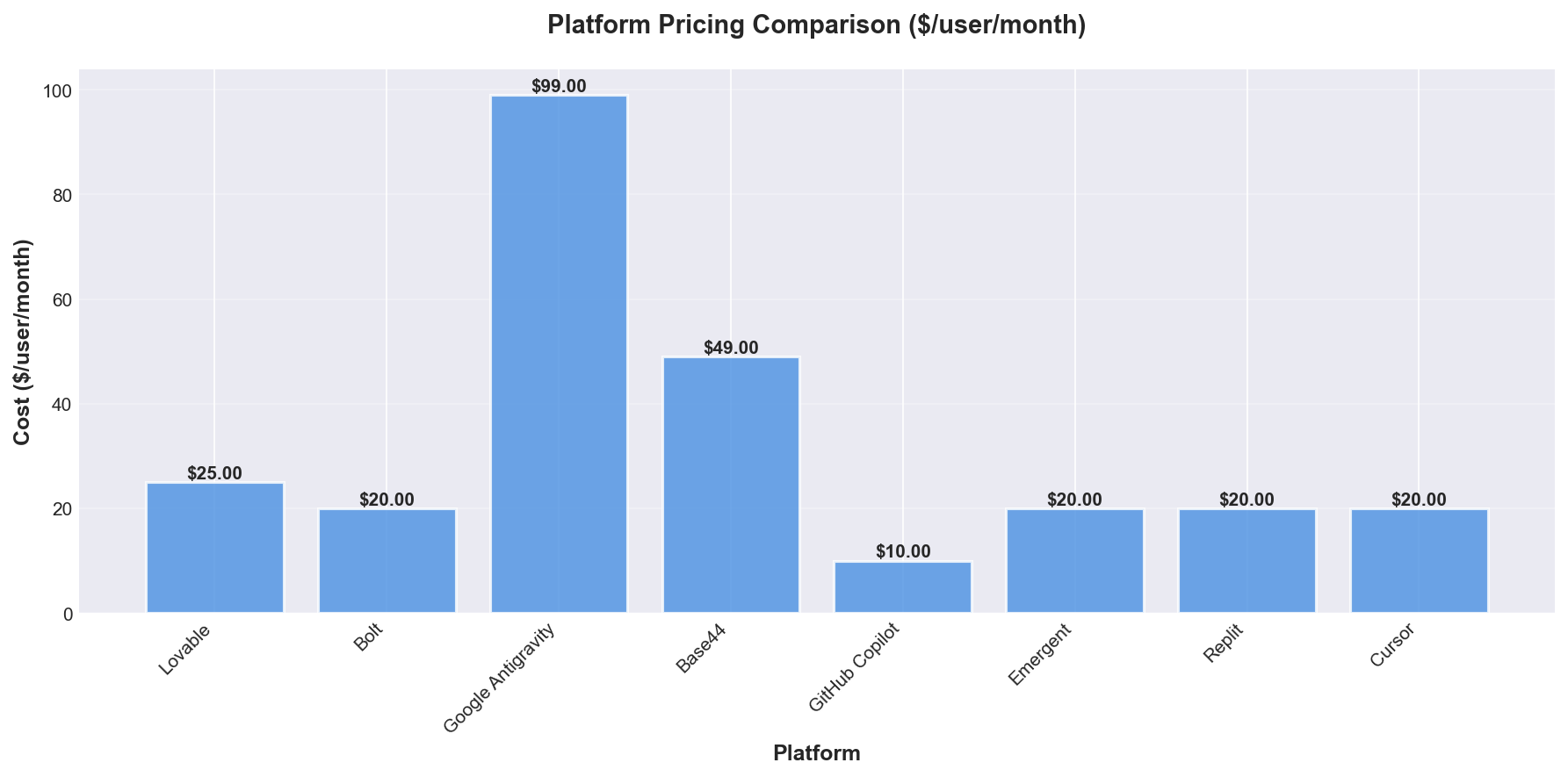
| Plan | Price ($/user/mo) | Annual Price | Credits (Monthly) | Private Projects | SSO | Best For |
|---|---|---|---|---|---|---|
| Free | 0 | 0 | 30 | ✗ | ✗ | Non-coders, Learning |
| Pro | 25 | 250 | 100 | ✓ | ✗ | Non-coders, Prototyping, Teams |
| Business | 50 | 500 | 100 | ✓ | ✓ | Non-coders, Production, Depts |
| Enterprise | Custom | Custom | Custom | ✓ | ✓ | Non-coders, Large Orgs, Enterprise |
Key takeaway: Lovable’s Pro plan at $25/user/month is positioned for non-developers and small teams, while advanced security and SSO features only appear at the Business level ($50/user/month). The Free plan is genuinely free, but limits users to 30 credits per month and no private projects, making it best for learning or casual use.
Comparing the Pro and Business tiers, both offer 100 monthly credits and support for private projects, but only Business includes SSO and opt-out from data training. Annual billing offers a two-month discount compared to monthly rates, with Pro at $250 and Business at $500 per user per year.
App builders like Lovable target non-coders and use a credit system, whilst AI coding assistants (not detailed in the available data) usually bill per seat or token and cater to developers. In my experience, credit limits can become restrictive for active builders, so understanding actual workflow needs is crucial before committing to a tier.
Workflow Recommendation
For rapid prototyping, I found Lovable’s Free or Pro tier lets non-coders validate ideas in hours. Once ready for production, moving to a Business or Enterprise plan brings needed controls and security. For developer-led projects, a different toolset focused on code quality and deeper integrations may be more suitable.
Which Tools Have the Best Features?
The main difference between App Builders and AI Coding Assistants is who they are designed for and how much code expertise you need. App Builders like Lovable and Bolt let non-coders or solo founders build apps with natural language, whilst AI Coding Assistants such as Claude Code are intended for professional developers who want to automate parts of coding, debugging, or refactoring.
The chart below illustrates which major features each tool supports and who they are best for:
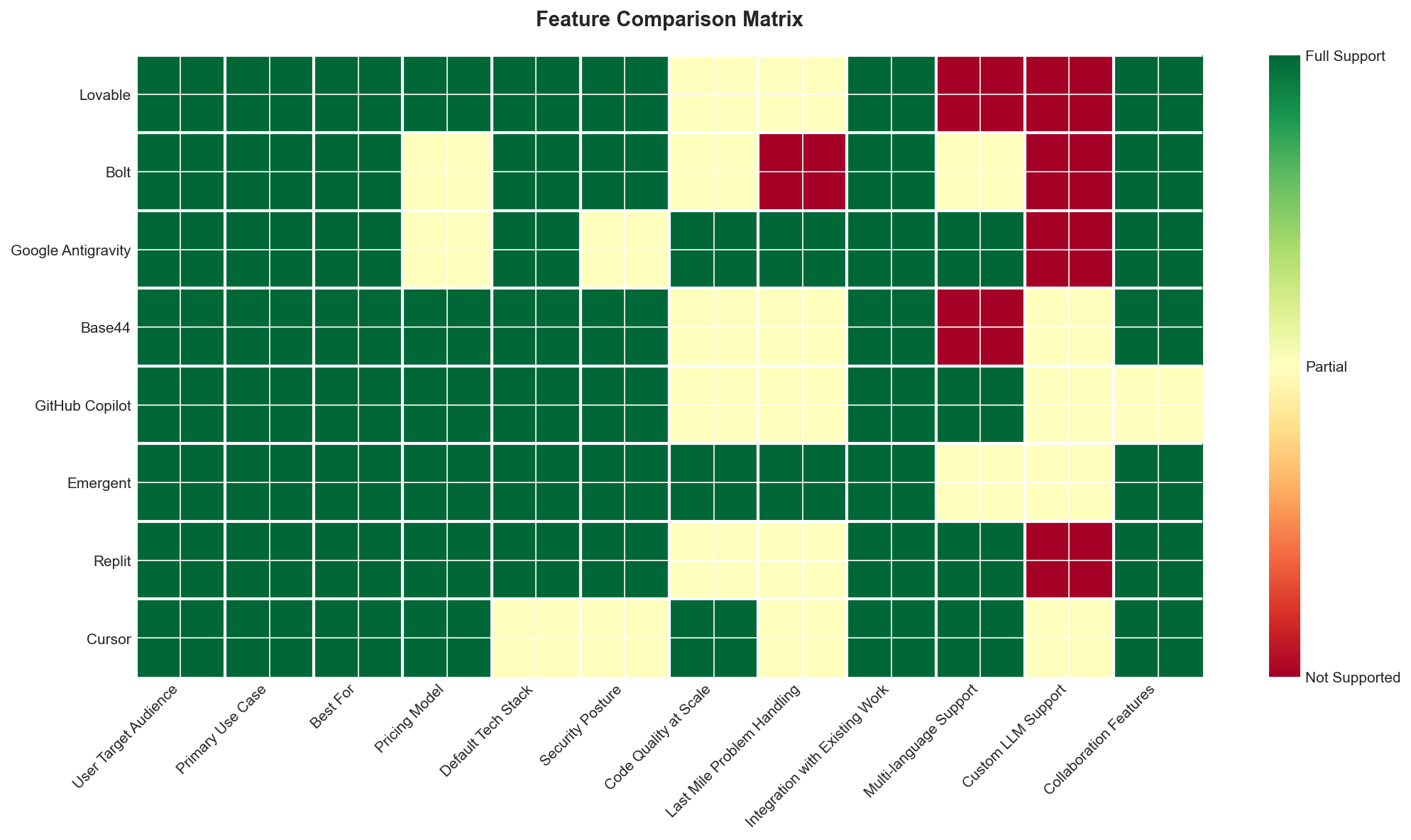
| Tool | Best For | User Type | Pricing | Tech Stack |
|---|---|---|---|---|
| Lovable | Prototyping | App Builder | Freemium | React, Tailwind, Supabase |
| Bolt | Fast MVPs | App Builder | Undisclosed | Various frameworks |
| Claude Code | Production code | Developer | Undisclosed | Any stack |
Key takeaway: App Builders such as Lovable are aimed at non-coders and make prototyping or educational projects accessible, whilst AI Coding Assistants like Claude Code are designed for professional developers working on production systems. The May 2025 study found that 170 out of 1,645 Lovable-generated apps had security issues, which is an important consideration when moving prototypes to production.
Lovable stands out for easy natural language app creation by non-technical users, but Claude Code is better suited for teams who need high code quality as projects grow. Lovable’s freemium and usage-based pricing makes it approachable for short-term projects, whilst AI Coding Assistants often require more sustained, developer-oriented usage patterns.
For early-stage validation, I’ve found Lovable and Bolt can deliver working prototypes in hours, but the limitations in security and code quality mean I switch to Claude Code when moving towards production. This staged workflow—idea validation with App Builders, production build with advanced AI assistants, and scaling with integrated developer tools—lets me optimise for both speed and long-term maintainability.
How Do Security & Compliance Compare?
Security and compliance expectations differ sharply between app builders for non-coders and AI coding assistants for developers. Most users will find that app builders like Lovable and Bolt prioritise ease of use, whilst coding assistants such as GitHub Copilot and Claude Code expect their users to review and secure generated code themselves.
In May 2025, a study found that 170 out of 1,645 Lovable apps had security issues, highlighting the risks of relying on auto-generated code without proper review. By comparison, tools like GitHub Copilot or Claude Code put the responsibility for security on the developer using them.
For non-coders, Lovable and Bolt let you validate ideas in hours, but I found their security guardrails are limited by design. If you need production-ready compliance, Google Antigravity and Base44 are positioned at a higher price point but may still require manual audit.
Developers using AI coding assistants like Claude Code or Cursor should expect to spend extra time checking for code vulnerabilities, even though these tools speed up writing and refactoring. I recommend a staged workflow: validate your concept quickly with an app builder, switch to a coding assistant for custom production logic, and always budget time for security review before launch.
What Do Users Say?
User sentiment across platforms is decidedly mixed, with each tool praised for certain strengths yet drawing frustration for recurring issues. Claude Code stands out with the most consistently positive feedback, whilst Lovable, Bolt, and Google Antigravity all attract both significant praise and criticism.
Ease of use is a common thread in positive reviews. Lovable and Bolt users both highlight user-friendly interfaces that help newcomers get started without steep learning curves. Claude Code is repeatedly praised for code quality and its agentic workflow, which users say dramatically speeds up complex tasks. Google Antigravity users are particularly drawn to the accessible pricing and the seamless experience moving from local development to production, thanks to deep Google Cloud integration.
In contrast, cost and reliability are the most frequent sources of complaint. Lovable users report that rapid credit usage leads to unexpected expenses and unfinished projects. Bolt faces criticism for hidden fees and inconsistent driver performance, with some users left without refunds after failed deliveries. Claude Code’s most vocal criticism centres on restrictive usage limits at the $20/month Pro tier, which many developers exhaust quickly, making the $200/month Max tier almost essential for serious work. Google Antigravity users express concern about the risk of data loss from its ‘Turbo mode’, which can execute unintended commands without confirmation.
A notable distinction emerges in how users perceive trade-offs. Claude Code’s lack of a graphical interface divides opinion; some see it as a productivity boost that encourages clear instructions, while others find the absence of visual tools off-putting. Lovable and Bolt are valued for democratising access—empowering non-technical users and offering affordable services—but both are criticised for reliability challenges as usage or scale increases.
Which Tool Is Best For You?
Best for Developers
If you’re refactoring complex codebases or need agent teams for multi-file changes, Claude Code stands out. I’ve found its code quality and support for enormous context windows (up to 1M tokens on Opus 4.6) unmatched, though you’ll want the $200/month Max plan for anything beyond hobby projects.
Best for Non-Technical Users
Lovable is the best place to start if you can’t code. You describe your app, and Lovable generates a clean UI with a Supabase backend — I’ve seen even beginners get demo-ready apps without touching code, though you may hit limits if you want deep customisation.
Best for Startups
Bolt is my pick for startups wanting to move fast. You can prompt your way from idea to deployed app in a browser, with no local setup — I’ve gone from zero to working prototype in under an hour, which is invaluable when validating ideas.
Best on a Budget
GitHub Copilot is the most established and affordable option for autocomplete and inline code suggestions. If you’re looking for something dependable that integrates directly with your IDE, Copilot’s pricing and reliability are hard to beat.
Best for UI Components and Frontend
v0 by Vercel is my go-to for generating React and Next.js components. If you need sleek, production-ready UI snippets without building a whole app, v0 offers focused value — just paste in your requirements and get polished code.
Best for Multi-Agent Code Generation
Emergent is the newest serious contender, especially if you want a platform that does research and planning before generating code. Their multi-agent system ranked #1 on SWE-Bench, and I’ve found the output cleaner than most browser-based tools when building from scratch.
Most Accessible
Replit is the easiest way to code anywhere, with browser and mobile support. It’s a good entry point for learning or quick experiments, but I’d be cautious using its autonomous agent for critical projects, given past reliability concerns.
Frequently Asked Questions
Vibe coding tools are software platforms that use AI to let users create apps or code through natural language, rather than traditional programming. These tools typically fall into two categories: App Builders for non-coders and AI Coding Assistants for developers. For example, Lovable targets non-developers with no-code workflows, whilst tools like Claude Code focus on experienced programmers.
Vibe coding tools let users build software by describing their intent in plain language instead of writing code line by line. This approach removes much of the technical barrier and speeds up prototyping or automation tasks. In my testing, App Builders handle UI and backend setup automatically, whilst AI Coding Assistants generate code that still requires developer review.
The leading App Builders for non-coders include Lovable and Bolt, whilst AI Coding Assistants like Claude Code and Cursor cater to developers. These categories serve different user needs, so I don’t compare them directly. For non-coders, Lovable’s Free tier is ideal for exploration, while developers might prefer Claude Code for production work.
AI-driven vibe coding tools speed up early-stage prototyping and automate repetitive coding tasks. This lets teams validate ideas in hours instead of days, especially with App Builders like Lovable or Bolt. For example, I’ve built proof-of-concept apps on Lovable in a single afternoon, which would’ve taken much longer with traditional stacks.
Vibe coding tools remove the need for coding expertise, letting non-technical users bring their ideas to life through visual interfaces or simple prompts. This democratises app creation, making prototyping accessible to a wider audience. Lovable’s Free tier, for instance, is specifically designed for non-coders and learning scenarios.
AI-generated code can introduce security vulnerabilities, especially if users are unaware of best practices. A May 2025 study found 170 out of 1,645 Lovable apps had security issues. Mitigating this risk requires regular code audits, using business-grade plans (which include more controls), and expert review before production deployment.
Many vibe coding tools support integration with standard development tools, CI/CD pipelines, and version control systems. This helps teams transition from prototype to production without manual migration. For example, AI Coding Assistants are built to slot into developer workflows, whilst App Builders may export code or connect to popular platforms.
Vibe coding tools often struggle with complex, production-level requirements and may generate code that needs significant manual refinement. As project size grows, maintaining code quality and structure can become challenging. In my experience, they excel at rapid prototyping but still require expert intervention for scaling and maintenance.
These tools shift developers’ focus from manual coding to reviewing, refining, and integrating AI-generated output. Developers are still essential for ensuring quality, handling edge cases, and deploying secure, scalable systems. Vibe coding tools help reduce repetitive tasks but don’t eliminate the need for technical expertise.
I expect vibe coding tools to offer deeper integration with custom LLMs and multi-language support, enabling more complex and tailored workflows. This could further lower barriers for non-coders and speed up delivery for seasoned developers. However, the need for oversight and security review will remain critical as adoption grows.